Overview of Public Safety and Security
Oracle Public Safety and Security is an Oracle Cloud Infrastructure (OCI) service for managing isolated environments and providing authorized users with Oracle Radio communications.
High-Level Architecture
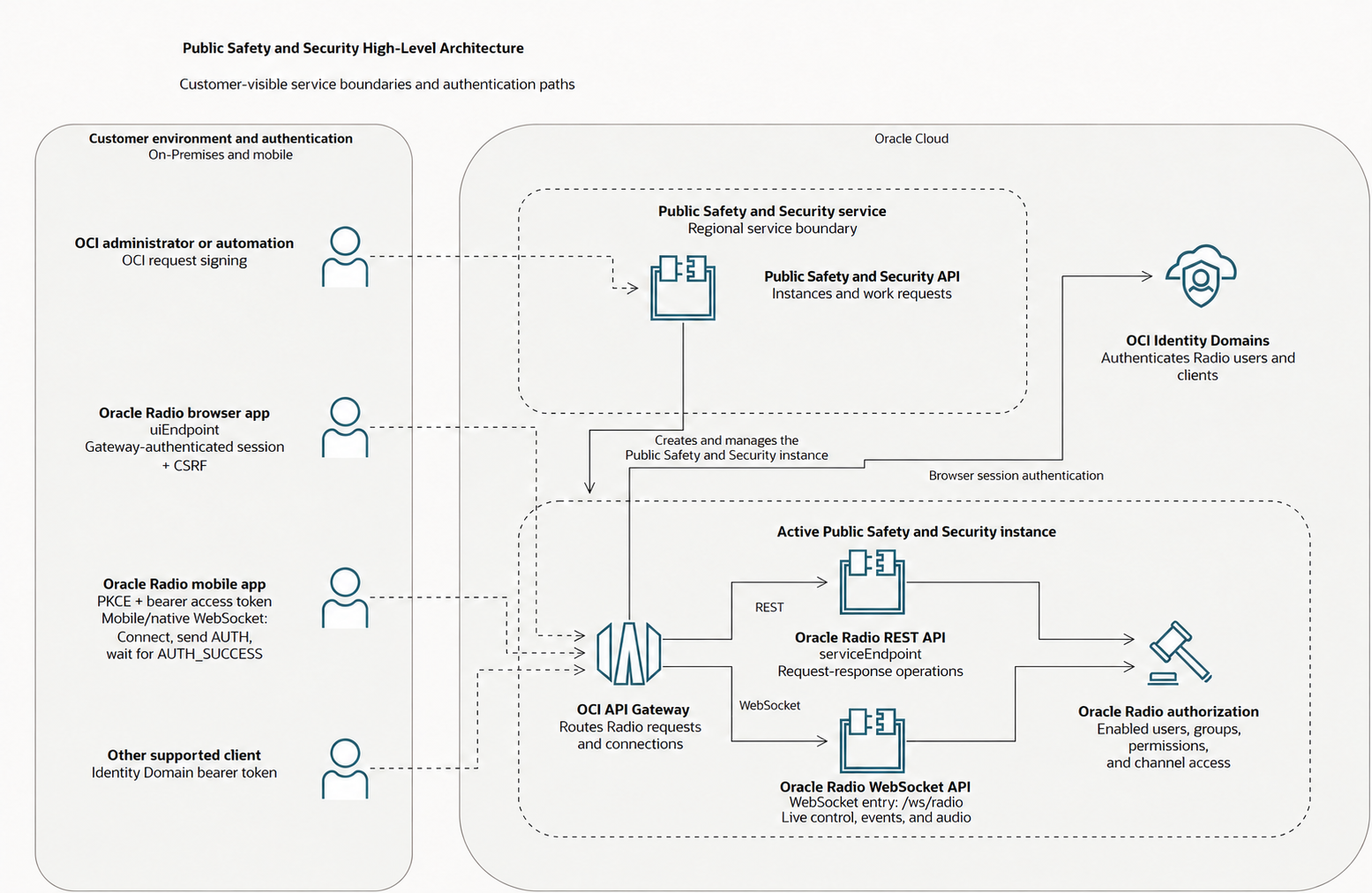
- OCI administrators: Create, list, get, update, move, and delete Public Safety and Security instances. Use work requests to monitor asynchronous operations, and use OCI IAM policies and Public Safety and Security metrics to govern and observe the OCI resources.
- Radio administrators: Administer Oracle Radio by enabling Radio access for authenticated Identity Domain users and managing Radio groups, permissions, channels, supported devices, and settings.
- Radio operators: Use Oracle Radio to join authorized channels, request the floor, transmit voice, send text messages, and review permitted communications history.
- Application developers: Develop with Oracle Radio by integrating supported clients with the approved REST and WebSocket contracts.
OCI Identity Domains provides authentication for users and clients. Oracle Radio separately authorizes application access by using enabled Radio users, Radio group permissions, and applicable channel access rules.
How Public Safety and Security Works
- An OCI administrator prepares a compartment, IAM authorization, an OCI Identity Domain, and an initial administrator Identity Domain user.
- The administrator creates a regional Public Safety and Security instance. Public Safety and Security provisions and maintains the authentication applications required for the instance, including the supported Radio mobile application's callback, grants, resource scope, and offline access, and returns a work request for the asynchronous create operation.
- When the instance reaches
ACTIVE, its details includeserviceEndpointfor API requests anduiEndpointfor Oracle Radio. - An authorized Radio administrator signs in and enables Radio access for Identity Domain users. Radio groups and permissions determine which application operations each enabled user can perform.
- Authorized users access Oracle Radio through supported clients. Channel access rules can further limit channel visibility and communication behavior.
Create, update, move, and delete operations are asynchronous. Continue to monitor the returned work request until the operation reaches a terminal state.
Oracle Radio Mobile Application
Oracle Radio provides a ready-to-use mobile application for supported Radio workflows. The mobile instructions in this guide describe the Oracle-provided application. The features available to you depend on your permissions and your organization's configuration.
The supported authentication paths are the Oracle-provided browser application and Radio mobile clients. Bearer-token authentication is supported for mobile clients; command-line, custom-browser, and server authentication contracts are not currently supported. See client authentication. API examples describe requests used by supported clients, not a procedure for creating a separately authenticated custom application.
See Using Oracle Radio for mobile setup guidance and device registration. For your first iPhone voice and text exchange, follow the Oracle Radio iPhone quick start.


Explore Public Safety and Security and Oracle Radio
Use the following topics to administer Public Safety and Security resources, operate Oracle Radio, or develop supported clients.
| Goal | Tasks |
|---|---|
| Set up and manage OCI resources |
Public Safety and Security Instances |
| Use Oracle Radio | |
| Administer Oracle Radio | |
| Develop with Oracle Radio | |
| Find answers |
Concepts
The following key concepts describe Public Safety and Security and Oracle Radio.
Public Safety and Security instance
A regional OCI resource representing one isolated managed Public Safety and Security environment.
Work request
A customer-visible progress record that reports the outcome of an asynchronous Public Safety and Security instance operation.
Service endpoint
The HTTPS entry point returned for an active instance. Use this value instead of constructing an instance URL.
Identity Domain user
A person or agent authenticated by the Identity Domain configured for the instance.
Radio user
An enabled Oracle Radio authorization record linked to an Identity Domain principal.
Radio group
A Radio-owned group that grants Radio permissions to its members.
Channel
A named boundary for authorized live voice, text, presence, and communications history. Administrators can manage channels and their access rules.
Channel access rule
A Radio rule that further limits actions for a specific channel.
Channel subscription
A saved user preference for a channel.
Joined channel
A channel joined by the current live client connection.
Talk token
A short-lived floor-control grant that permits one user to transmit on one channel.
Access token
An OCI Identity Domain bearer credential used to authenticate a native or API client.
Radio device
A record representing one registered installation of the Radio mobile application. The Radio device ID is application state, not an authentication credential.
Registration grant
A value with an expiration that lets an intended enabled Radio user register an application installation. One-time use is the default; reusable registration allows that user to enroll multiple installations until expiry or revocation. The application supplies an opaque advertising ID when it completes registration.
Develop with Oracle Radio APIs
Choose the API by the task your client needs to perform. REST uses individual requests and responses; WebSocket keeps a connection open for two-way messages and live events. A Radio integration can use both.
REST API
Your client sends an HTTP request and receives a response. Use the documented REST operations to retrieve information or change saved application state, such as registering a device, reading channel details, or managing saved channel subscriptions. To check for later changes, make another request.
WebSocket API
Your client establishes an authenticated connection over which both the client and server can send messages. Use the WebSocket operations for live channel communication, push-to-talk control, audio, text messages, and presence updates. Server events can arrive without a separate request for each update.
For example, use REST to retrieve channel information and manage a saved subscription, then use WebSocket to join the current connection to a channel and exchange live messages. Saving a subscription doesn't join a live connection or grant a talk token.
WebSocket clients must handle authentication, interrupted connections, and restoring live subscriptions after reconnecting. Follow the connection lifecycle guidance. Choose it when the task requires live interaction, not as a substitute for every REST operation.
The APIs aren't interchangeable. Each workflow's tabs describe the available methods; a REST operation doesn't imply a matching WebSocket operation. Protected operations on both interfaces require the applicable authentication, Radio permissions, and channel access.
Data Flow
An OCI administrator or automation client sends an authorized request to the regional Public Safety and Security control plane. The control plane validates the request, creates or updates the instance record, and returns a work request for an asynchronous change. Get both resources to observe customer-visible state and progress.
After provisioning, a Radio client connects through the appropriate managed instance API, user-interface, or WebSocket entry point. OCI Identity Domains authenticates the principal. Oracle Radio resolves the principal to an enabled Radio user and applies Radio permissions and channel access before processing REST or WebSocket actions.
What's Not Supported
- Identity Domain group membership doesn't grant Oracle Radio permissions. Configure Radio users, groups, permissions, and channel access separately.
- The Public Safety and Security instance update operation doesn't change the configured Identity Domain URL or initial administrator Identity Domain user.
- You can't use an instance create or update request to supply, replace, or change the callback, grants, scopes, or offline-access settings of authentication applications managed by Public Safety and Security.
- Don't construct an API or Oracle Radio URL from an instance OCID, display name, or raw API Gateway hostname. Use the returned
serviceEndpointoruiEndpointfor the applicable interface.
Regions and Availability Domains
Public Safety and Security instances and work requests are regional OCI resources. Select the region where you want to manage the instance before using the Console or a regional API endpoint. The Public Safety and Security create request doesn't require a customer-selected availability domain.
For region identifiers and information about regions and availability domains, see About Regions and Availability Domains.
Resource Identifiers
Public Safety and Security instances and work requests have Oracle Cloud IDs (OCIDs). Public Safety and Security instance configuration also references the compartment OCID and initial administrator Identity Domain user OCID. For more information, see Resource Identifiers.
Oracle Radio users, groups, channels, communications, access tokens, and talk tokens are application or identity concepts and aren't Public Safety and Security instance OCIDs.
Ways to Access Oracle Cloud Infrastructure
Use the OCI Console or OCI REST API to manage Public Safety and Security instances and work requests. OCI also provides SDKs, the CLI, and Cloud Shell for supported service interfaces. For general REST API guidance, see Using REST APIs.
Using the Console
- Use a supported browser to sign in to the Console at
https://cloud.oracle.com. - Enter your cloud account name, user name, and password.
- Open the navigation menu, and then select Oracle Public Safety and Security.
- Select the region and compartment that contain the Public Safety and Security resources.
Using the API Endpoints for OCI Resources
Use the regional Public Safety and Security control-plane API to manage Public Safety and Security instances and work requests. Authenticate and sign requests according to OCI API requirements. Use the endpoint and API version published for your region and realm.
For operations, parameters, and responses, see the Public Safety and Security API Reference.
For request signing details, see Request Signatures.
Using the CLI and Cloud Shell
OCI CLI and Cloud Shell provide command-line access to supported OCI services. Configure an OCI CLI profile or start Cloud Shell, and confirm that the installed CLI version includes the Public Safety and Security commands required for your release. See the Public Safety and Security CLI Command Reference for commands and parameters. For setup guidance, see Command Line Interface.
Using SDKs
OCI SDKs provide language-specific clients for published OCI service APIs. Use an SDK version that contains the Public Safety and Security service client and operation models for your release. See Software Development Kits and Command Line Interface.
Using the Public Safety and Security Instance Endpoints
After you create a Public Safety and Security instance, get the instance details and wait for the lifecycle state to become ACTIVE. Use serviceEndpoint for approved application API requests and uiEndpoint to open Oracle Radio.
The two endpoints use the same Public Safety and Security instance origin.
Copy the complete endpoint values from the Public Safety and Security instance details. Assign serviceEndpoint, including its trailing /api/, directly to PSS_SERVICE_ENDPOINT, the environment variable used in the API quick start.
The following URL patterns show the relationship between the endpoints.
uiEndpoint:https://<unique-id>.pss.<region>.oci.oraclecloud.com/ui/serviceEndpoint, stored in PSS_SERVICE_ENDPOINThttps://<unique-id>.pss.<region>.oci.oraclecloud.com/api/wss://<unique-id>.pss.<region>.oci.oraclecloud.com/ws/radioUse the returned endpoint values as supplied; don't add :443 or another port number. When deriving the WebSocket URL, change https to wss, replace /api/ with /ws/radio, and preserve a port only if the returned value explicitly includes one. The WebSocket URL is derived from serviceEndpoint; it isn't a separate field in the instance details. See WebSocket URL construction.
Authentication and Authorization
Use OCI authentication to manage Public Safety and Security instances and work requests. To operate Radio in its web application, sign in with the gateway-managed browser session. The supported mobile application uses OAuth with PKCE to obtain user access tokens for its own REST requests and WebSocket connection. The client and task determine the method; REST versus WebSocket doesn't select a different user identity. Follow Identity setup for instance prerequisites and the ordered authentication steps for Radio.
Authentication for Your API and Client
Use the following table to choose the authentication method and authorization requirements for your API surface and client.
| API surface | Client | Authentication | Additional authorization |
|---|---|---|---|
| Public Safety and Security control-plane API | CLI, SDK, or direct API client | OCI request signing | OCI IAM policy for the Public Safety and Security instance or work-request operation |
| Oracle Radio REST API | Browser | OCI API Gateway-managed session and the gateway-provided CSRF value on protected state-changing requests | Enabled Radio user, required Radio permissions, and applicable channel access |
| Oracle Radio WebSocket API | Browser | OCI API Gateway-managed session and the lowercase x-csrf-token query value during the HTTP upgrade | Enabled Radio user, required Radio permissions, and applicable channel access |
| Oracle Radio REST API | Radio mobile application | OCI Identity Domain bearer access token obtained by the provisioned public OAuth client using Authorization Code with S256 PKCE; the application requests openid, offline_access, and the supplied Radio resource scope and uses its refresh token to renew access | Enabled intended Radio user for registration; required Radio permissions and applicable channel access for subsequent operations |
| Oracle Radio WebSocket API | Radio mobile application | X-Oracle-Radio-Device-Id during the HTTP upgrade, then OCI Identity Domain bearer access token in AUTH after the connection opens | Enabled Radio user, radio.channel.list, required Radio permissions, and applicable channel access |
Bearer-token clients don't use browser CSRF state. A Radio talk token is a short-lived floor-control grant, not an authentication credential. See client authentication.
Public REST health and ping checks require no authentication or Radio permission; they do not validate access to protected operations.
Public Safety and Security Resource Authentication and Authorization
OCI authenticates Console users and signed API callers. OCI IAM policies authorize operations on Public Safety and Security instances and work requests. Grant only the verbs and resource types required for each administrator or automation workflow. See the policy reference.
Oracle Radio Authentication and Authorization
OCI Identity Domains authenticates supported Oracle Radio clients. Authentication alone doesn't grant Radio access. The principal must map to an enabled Radio user with the required Radio permission and, when applicable, channel access.
Public Safety and Security provisions and maintains the supported mobile OAuth configuration. The installed application owns its callback URI, and the registration QR value supplies the mobile client ID and authorization scope without exposing the callback URI, secrets, or OAuth tokens.
Identity Domain groups and Radio groups are different. Identity Domain groups don't grant Radio permissions.
If a request is rejected, review authentication failures. If sign-in succeeds but an operation is blocked, check Radio access and any subscription restriction.
Prerequisites
Before creating a Public Safety and Security instance, prepare:
- A customer compartment and the IAM policies required to create and manage Public Safety and Security resources.
- The OCI Identity Domain URL used to authenticate Public Safety and Security users. See Getting an Identity Domain's Details.
- The Identity Domain user OCID of the initial Public Safety and Security administrator. See Viewing User Details.
- Public Safety and Security manages the authentication applications required for the instance.
See Getting Started with Public Safety and Security for the complete first use sequence.
IAM User Groups and Oracle Radio Authorization
Use OCI IAM groups for users and dynamic groups for eligible resource principals. Grant only the IAM policies needed for Public Safety and Security resource administration and observability. The Identity Domain service policy separately authorizes the Public Safety and Security service, not these user groups.
For Oracle Radio, an authenticated Identity Domain principal must also have an enabled Radio user record. Radio administrators use Radio groups and permissions to authorize application behavior. Channel access rules can further restrict activity for a particular channel.
Policies
Configure OCI IAM policies for three distinct purposes:
- Identity Domain service access (IDCS): Authorize Public Safety and Security to provision its authentication applications and look up users in the selected Identity Domain. This required service policy belongs in the tenancy's root compartment. Follow the setup steps before creating an instance.
- Public Safety and Security instances and work requests: Authorize OCI IAM user groups to inspect, read, or manage regional Public Safety and Security resources. Choose the appropriate resource policies for each group's role.
- Metrics and events: Separately authorize users to query Public Safety and Security metrics, view OCI Events rules, or read OCI Audit records. These are different resource types with separate read policies; Public Safety and Security instance-management access doesn't include them automatically.
These policies don't replace Radio authorization. Radio administrators assign application permissions through Radio groups, with additional channel access rules where applicable. See the policy reference for statements and Getting Started for the setup sequence.
User Policies
Use the aggregate resource type pss-instance-family or the individual resource types pss-instance and pss-work-request. For the complete permission mapping, see Details for Public Safety and Security Policies.
Lets a group manage Public Safety and Security instances and work requests in a specific compartment.
allow group <group-name> to manage pss-instance-family in compartment <compartment-name>Lets a group manage Public Safety and Security instances in a specific compartment.
allow group <group-name> to manage pss-instance in compartment <compartment-name>Lets a group manage Public Safety and Security work requests in a specific compartment.
allow group <group-name> to manage pss-work-request in compartment <compartment-name>For separate metrics, Events-rule, and Audit-record access, use the read policies.
Limits on Public Safety and Security Resources
The following Public Safety and Security resource limits are regional and per tenancy.
| Resource | Limit Name | Oracle Universal Credits |
|---|---|---|
| Maximum number of Public Safety and Security instances. | max-instance-count | 2 |
For a list of applicable limits and instructions for requesting a limit increase, see Service Limits.
Security
Oracle provides security of cloud infrastructure and operations, such as cloud operator access controls and infrastructure security patching. You are responsible for securely configuring your cloud resources. Security in the cloud is a shared responsibility between you and Oracle. See Security for Public Safety and Security.
Oracle's security responsibilities include:
- Physical security: Protect the global infrastructure that runs OCI services, including its hardware, software, networking, and facilities.
Your security responsibilities include:
- Access control: Give users only the access necessary to perform their work. Configure OCI IAM policies and Oracle Radio permissions for their roles.
- Physical security: Limit physical access to devices used with Oracle Public Safety and Security, including mobile devices running Oracle Radio.
Protect network access and bearer tokens, and apply organizational privacy and retention policies to communications data. See the security responsibilities for more information.