Setting Up Travel Authorizations for PeopleSoft Fluid
This topic discusses the pages used to setup travel authorizations for the PeopleSoft Fluid user interface.
Pages Used to Set Up Travel Authorizations Using PeopleSoft Fluid
Use these pages to Set Up Travel Authorizations for the PeopleSoft Fluid user interface.
| Page Name | Definition Name | Usage |
|---|---|---|
|
EX_TA_FLUID_SETUP |
Select the expense types that users can use when creating travel authorizations using PeopleSoft Fluid. |
|
|
EX_EE_PRIV_TMPL |
Determine User Defaults, Billing Action, Accounting Defaults, and Accounting Details for the user. |
|
|
CF_DSP_TEMPLATE |
Define ChartField display options for ChartField templates. |
|
|
EX_EE_USER_PREF |
Define general default preferences for travel authorizations. |
|
|
EX_NONPREFMRCH |
Create justifications for users who use non-preferred merchants. |
|
|
EX_PRIV_TMPL |
Set up Privilege Templates for approvers. |
Travel Authorization Fluid Expense Type Page
Use the Travel Authorization Fluid Expense Type page (EX_TA_FLUID_SETUP) to select and define expense types when creating travel authorizations using PeopleSoft Fluid.
Navigation:
This example illustrates the fields and controls on the Travel Authorization Fluid Expense Type Page

| Field or Control | Description |
|---|---|
|
Sequence Number |
Enter a number that indicates the sequence in which the transaction label appears on the PeopleSoft Fluid page when creating travel authorizations. Always begin with the number “1”. Do not use 0 (zero). |
|
Transaction Label |
Enter a description of the expense type. This is a required field, so even if the transaction label is the same as the expense type, you must enter the text in this field. |
|
Expense Type |
Select an expense type. Expense types associated with Automobile Mileage, Per Diems, and Per Diem Lodging expense type edits are not displayed in the options list. |
|
Active |
Select to indicate that the expense type should appear on the PeopleSoft Fluid page when creating travel authorizations. This check box is associated with the row. |
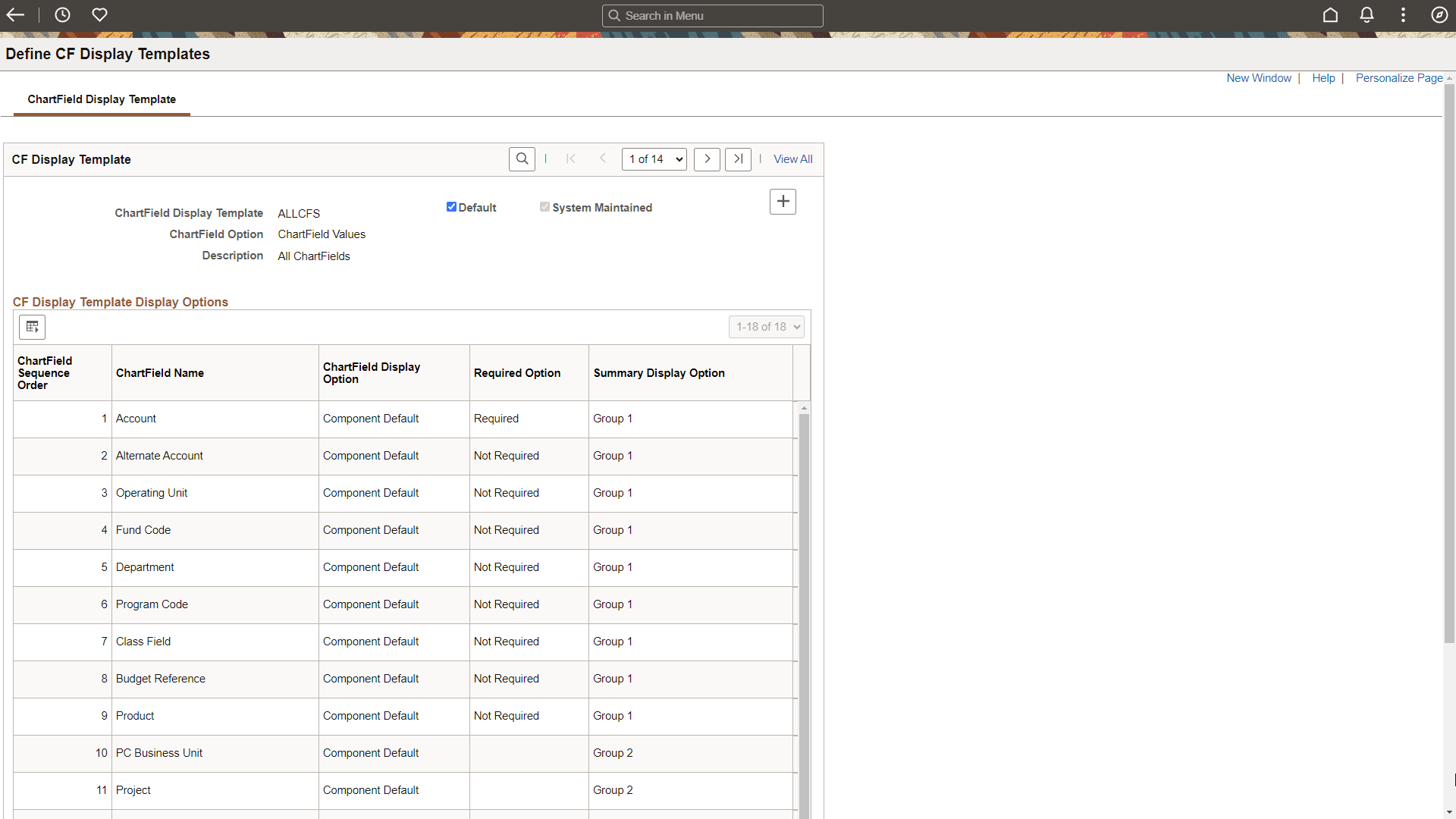
ChartField Display Template Page
Use the ChartField Display Template (CF_DSP_TEMPLATE) page to define ChartField display options for ChartField templates.
Navigation:
This example illustrates the fields and controls on the ChartField Display Template page.
| Field or Control | Description |
|---|---|
|
ChartField Option |
Select one of these options to determine whether you want to display ChartField values, ChartField descriptions, or both in the Accounting Defaults page and the Travel Authorization Distribution page.
|
|
ChartField Display Option |
Select one of these options to determine whether you want to display the ChartField:
|
|
Required Option |
Select one of these options to determine if a ChartField is required:
|
|
Summary Display Option |
Select one of these options that apply to tablets and smart phones
|
For more information on ChartField Display Templates, see Application Fundamentals: Setting Up ChartField Display Templates