Understanding Credit Card Data Loads
PeopleSoft Expenses delivers out-of-the-box functionality to support interfaces with five credit card suppliers that populates expense accounting lines with credit card data. You must work with your credit card supplier to determine how often data is available to download and the file format in which it comes.
After you establish a relationship with a credit card supplier, you must set up that company as a supplier in Oracle's PeopleSoft system to establish a supplier ID number, address, and bank information. PeopleSoft Expenses enables you to pay suppliers directly if the supplier is appropriately set up in the accounts payable system. If you purchase PeopleSoft Expenses as a standalone product, it is delivered with common accounts payable objects that allow the set up to occur as well as a pay cycle component, which enables you to pay suppliers and employees. Use the same functionality to set up new credit card suppliers.
After you establish the credit card supplier in your system, you must link the supplier to a payment type in PeopleSoft Expenses. The payment type identifies who is reimbursed for the expense transaction. For example, for the payment type AMX, set up the system to reimburse the supplier American Express.
Each credit card supplier has unique codes to represent each type of transaction. These codes represent the type of expense incurred, the currency in which the expense was incurred in and to which it was translated, and the location where or country in which the transaction occurred. PeopleSoft Expenses also has codes, or fields, that represent the same data elements. The data elements in the credit card supplier file must be mapped to the corresponding data elements in PeopleSoft Expenses. You must:
-
Map credit card supplier codes to corresponding payment types in PeopleSoft Expenses.
-
Map credit card supplier merchant category codes to corresponding merchant category codes in PeopleSoft Expenses.
-
Map credit card supplier expense types to corresponding expense types in PeopleSoft Expenses.
-
Map credit card supplier cash advance codes to corresponding cash advance codes in PeopleSoft Expenses.
-
Map credit card supplier currency codes to corresponding currency codes in PeopleSoft Expenses.
-
Map credit card supplier country names to corresponding country codes in PeopleSoft Expenses.
-
Map credit card supplier data source locations to corresponding expense location codes in PeopleSoft Expenses.
-
Map credit card supplier enhanced data to corresponding expense types in PeopleSoft Expenses.
After you set up the credit card supplier and map the data elements, set up employees with valid credit card numbers using the employee profile component on the Corporate Card Information page. You can enter the credit card data for employees manually, or the system can populate the data fields directly from the PeopleSoft Human Resources database.
Note:
PeopleSoft Expenses uses PeopleSoft PeopleTools credit card encryption technology to protect credit card data. PeopleSoft Expenses also masks credit card data entered for employees, so that only the last 4 digits are displayed. All credit card numbers received as data into PeopleSoft Expenses are encrypted using the PeopleSoft PeopleTools credit card encryption technology. Credit card data received as part of a file transfer from suppliers may not be encrypted. These files should be protected using other methods such as file system security provided by the host computer's operating system.
When you complete the supplier and employee setup and map the data elements, you can begin accepting data from the credit card supplier. The credit card data-load routes the transactions from the company interface to the business traveler based on employee ID, employee record number, corporate card type, and corporate card number. If errors result from incorrect mapping, fix the mapping and then reload the file. The credit card data-load functionality in PeopleSoft Expenses:
-
Stages and loads credit card data.
-
Notifies employees of existing charges and overdue charges in My Wallet.
-
Provides employee access to transactions in My Wallet within an expense report and a cash advance to populate data at the transaction level.
-
Manipulates corporate changes through My Wallet entry.
-
Processes credits and refunds.
Note:
To load data into the PeopleSoft system the currency of the credit card must be the same as the base currency of the employee. However, the currency of the transaction can be any currency. The base currency of the employee is determined by the currency of the business unit that is defined on the Employee Profile page.
Enhanced Data
This diagram illustrates the process of loading enhanced data, which creates expense lines. PeopleSoft Expenses supports importing enhanced detail data for hotel expense transactions that are charged on a Visa, American Express, and MasterCard credit card. This data is transferred into Expense Report or My Wallet tables. To support this process, you need to indicate whether enhanced data can be loaded into your Expenses application using the Corporate Card Supplier setup component. You also need to map the enhanced data to expense types.
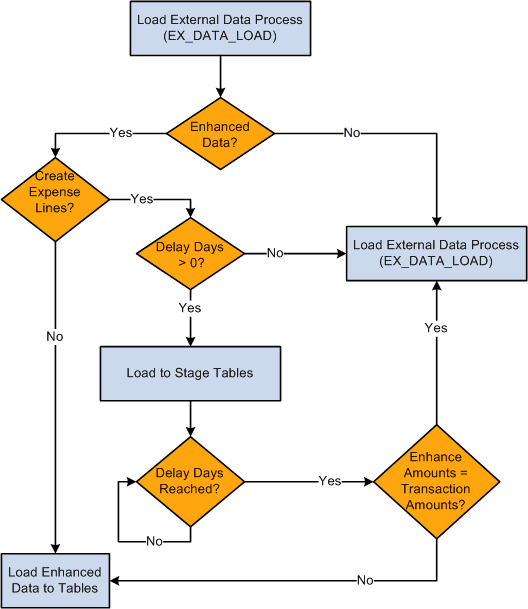
The diagram illustrates these decision points for the Load External Data process:
-
Is the Data Source Amex (either GL or KR), Visa or MC3.0?
-
If yes, process enhanced data checks and go to step 2.
-
If no, run the Load External Data Process.
-
-
Is the Load Enhanced data check box selected on the Corporate Card Supplier or the Card Issuer page for the supplier?
-
If yes, go to step 3.
-
If no, run the Load External Data Process.
-
-
Is the Create Expense Lines check box selected on the Corporate Card Supplier or the Card Issuer page?
-
If yes, go to step 4.
-
If no, run the Load External Data Process.
-
-
Are delay days greater than zero?
-
If yes, load data into staging tables and go to step 5.
-
If no, run the Load External Data Process.
-
-
Have the delay days been reached?
-
If yes, got to step 6.
-
If no, stop.
-
-
Are the amounts on the enhanced data lines equal to the transaction amounts?
-
If yes, process the lines through the Load External Data process.
-
If no, do not create expense line. Load the data into the Enhanced Data Detail and Summary tables.
-
The Expenses Load External Data process loads the credit card supplier file that may contain the main transaction and the enhanced data in the same file. However, the main transaction may come in a file prior to the enhanced data. For example, the main transaction might be sent in a file that a credit card supplier sends on Monday, and the enhanced data is sent in a file that the same credit card supplier sends on Thursday. In this case, the system incorporates the delay days to connect the main transaction with the enhanced data. The delay days is defined on the Credit Card Supplier page.
If the value in the Delay Days field is greater than zero, all hotel transactions are loaded to staging tables This includes the main transaction data, the lodging summary data, and the lodging detail data.
The system retrieves the data from the staging table when the delay days are met. If the detail or summary data equals the total amount of the main transaction record, the data is moved into My Wallet and appears on the My Wallet Detail page. If the detail or summary amounts do not match, only the main transaction data is moved into My Wallet.
When the system loads transactions into My Wallet, the transactions are divided into new expense lines. The Load External Data process takes the summary or detail lines and breaks them into individual expense lines. The enhanced mapping table is used to determine what expense type to assign to the new expense lines. The amounts that are in the appropriate fields are mapped into transaction amount and transaction currency.
If any of the enhanced detail data is marked as non-reimbursable, then all enhanced detail lines are marked as l non-reimbursable. Also, if any of the enhanced detail data is deleted from the expense sheet, then all enhanced detail lines are deleted and sent back to My Wallet. If the lines are deleted from My Wallet, then they can be restored back to My Wallet using the current restore process.
Hotel Folio Files from American Express
It is important to understand how the Load External Data process handles the financial transaction data and the hotel folio data from American Express.
If importing a folio file from American Express and the delay days is zero, you need to load the financial transaction file (GL1025 or KR1025) and the hotel folio file in the same run control. If delay days = 0, and the GL1025, or KR1025 file is processed, and then the hotel folio file is processed, then only the hotel folio data is written to the enhanced data tables and individual expense lines are not created. This is because the financial transactions were written to the EX_TRANS table when the GL1025, or KR1025, file was processed and the system does not add enhanced data from American Express after the main transaction file is added to EX_TRANS.
If delay days is > 0 and both processes are run at the same time, then the financial data from GL1015, or KR1015, is written to the staging table and stays there until the delay days is reached or until the data is in the hotel folio file. If the hotel folio data exists and existing data is in the staging tables, then the rows are processed and the system attempts to create individual expense lines. If existing data is not in the staging tables, then the system looks for the data in EX_TRANS. If the transaction data exists in EX_TRANS, then the enhanced data is loaded to the enhanced detail table. If the transaction data cannot be found, then the hotel folio data is ignored.
If delay days > 0 and only the hotel folio file is processed, if the financial transaction is already in the staging tables, then the entire transaction is processed. If the financial transaction is not in the staging tables, then the process looks for the transaction in EX_TRANS. If the financial transaction is in EX_TRANS, then the process loads the data into the detail table. If the financial transaction is not in EX_TRANS, then the data is ignored. When the delay days has been reached, any financial data that is in the staging tables is processed, Any data in the enhanced data holding table is loaded to the enhanced detail table.
Error processing and Reprocess Errors do not apply to hotel folio files because rows from these files are not written to error tables. If a match cannot be made between the transaction data and the folio data, then the hotel data is not processed. However, if the Create Expense Lines check box is selected on the Corporate Card Supplier or the Card Issuer page, then the expense lines are processed through the error checks.
Important:
To load data from credit card suppliers, please see the supplier for file layouts.