Period Close Visualization Page (Level 1 - Compact View)
Use the Period Close Visualization page (GL_BU_CHART_FL) to view and take action on General Ledger entities (node) and general ledger business units (leaf) based on the tree name and tree node selected on the My Preferences - Period Close Visualization page.
Navigation:
Select the Finance & Accounting search menu, Period Close Visualization tile, enter the Search Name (defined on the My Preferences - Period Close Visualization page), select the View Visualization button.
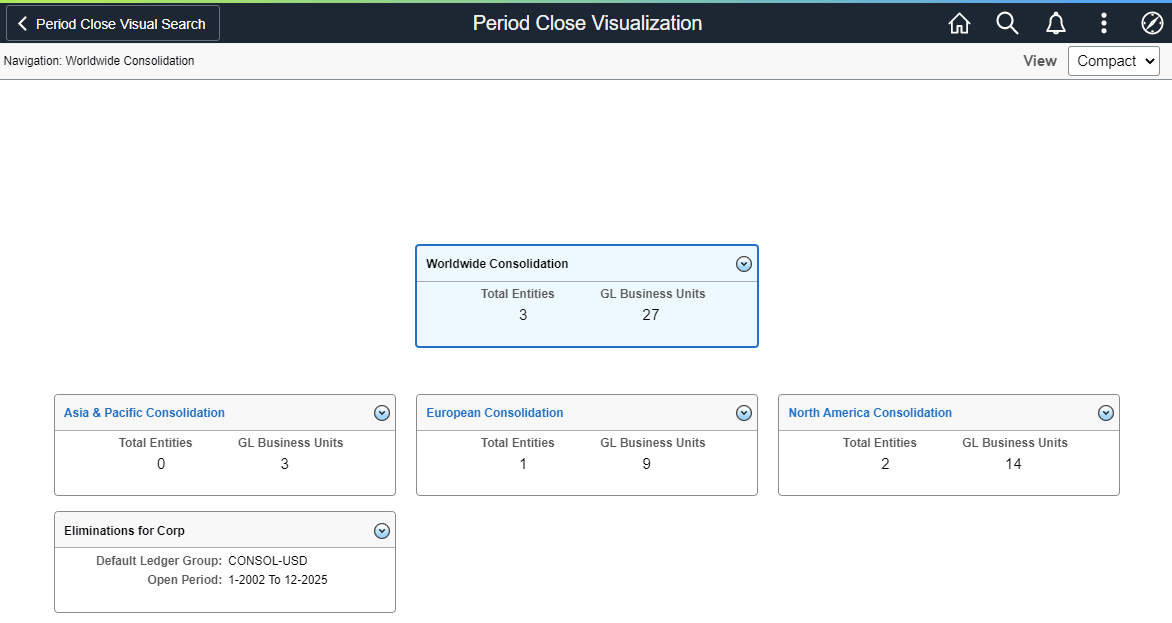
This example illustrates the fields and controls on the Period Close Visualization page at level 1, using the Compact View option.
This tile and page requires you to have full access to the Open Period Update (OPEN_PERIOD_UPDATE) component.
Based on the tree and tree node selected, the system displays the tree in a hierarchical manner. The highlighted card (or box) is the focus (or parent) card and the cards below are the child card(s). The child cards are tree nodes or a GL business unit. Each card displays the number of child nodes. A zero indicates there is no child for that card.
The example above displays the Compact view:
-
If the card is a tree node (all cards displayed above), then the total entities and GL business units under that tree node are displayed.
-
If the card is a GL business unit (no cards displayed above), it displays the Default Ledger Group and current open period of that GL business unit.
| Field or Control | Description |
|---|---|
|
Card Header |
Select a node link (such as North America Consolidation in the example displayed) to drill into that node, or level 2 of the tree. The header displays the tree node or GL business unit. If the card header is not a link, then you cannot drill up or down and there is no child node or GL business unit for the card. |
|
Total Entities |
Displays the number entities of that tree node. Entities are displayed as nodes on the Tree Manager page. |
|
GL Business Units |
Displays the number of business units for that tree node. Business units are displayed as leafs on the Tree Manager page. |
|
Default Ledger Group |
Displays the default ledger group where the Journal Generator Default check box is selected on the Application Fundamentals: Ledgers For A Unit - Definition Page. |
Related Actions
Select the Related Actions button to display a list of actions that you can take for the node. Actions include:
-
Express Period Roll - Select to access the Express Period Roll Page.
-
Mass Update Open Period - Select to access the Application Fundamentals: Open Period Mass Update Page.
-
Update Open Period - Select to access the Application Fundamentals: Open Period Update Page.
-
GL WorkCenter - Select to access the General Ledger WorkCenter Page (Fluid).
Use this link to view all unposted journals for the business unit, which allows you to review information before the Period End Process / Year end Process is run.
-
Update Run Control Date - Select to access the Enterprise Components: Run Control Date Update Page.
-
Email Notification - Select to access the Application Fundamentals: Email Notification Page.