PeopleSoft Landing Page - Suggestions Section
Use the Suggestions section (EOHP_SUGGESTEDACTIONS_SCTN_LP template) to view and access tasks and processes you have not started but need to complete.
Note:
Tiles that appear in this section can be either dynamic content sources from notifications or CREF tiles, such as the Approvals Awaiting Action tile.
Navigation:
The Suggestions section is part of the PeopleSoft (My Home) Landing Page.
This example illustrates the fields and controls on the Suggestions section.
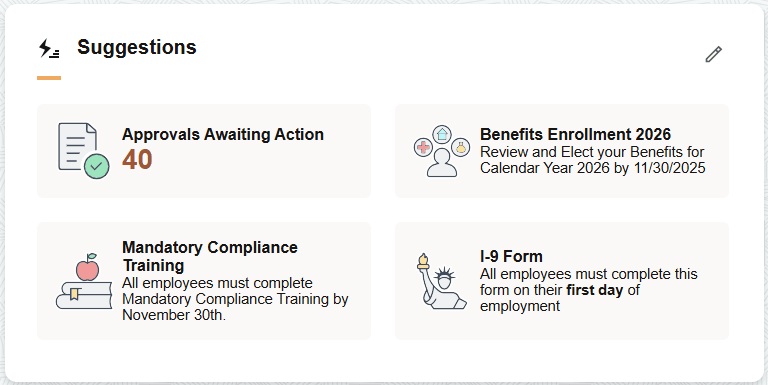
Use this section to view and access reminders of tasks you need to complete or address. When the number of tiles exceed those that fit in the section tile, the section displays the View All link. The number of tiles that appear in the section is controlled by CSS styles for the section template and the device's form factor.
When you have no outstanding tasks to perform and are not an approver, the section displays the text "All caught up!". Ongoing tasks that you did not complete move to the PeopleSoft Landing Page - Continue With Section.
For a list of delivered notifications that call the tiles that appear in this section, see Delivered HCM Notifications and Tiles for Suggestions Section.
| Suggestions Tile | See Also |
|---|---|
|
Approvals Awaiting Action tile |
This tile is derived from Approvals and displays the number of pending approvals requiring your attention. The image, text, description, and target URL are defined in the Notification Composer. For more information, see the Enterprise Components: Creating and Managing Notifications with Notification Composer. |
Note:
Other notifications shown in this section do not require separate security for the tiles like CREF security for Approvals. As long as there is a notification within the section, it will appear.
The following lists the common controls in this section:
| Field or Control | Description |
|---|---|
|
|
Select this icon to access the View All Suggestions page (see View All <Suggestions, Continue With, or Announcements> Page) to view a list of all items in the Suggestions section and dismiss tiles, where applicable. |
|
View All link |
This option appears when the number of tiles exceed those that fit in the section. Select this link to access the View All Suggestions page and review the full list of suggested items. |
 (Edit Suggestions) icon
Viewing Aggregate Results
When aggregate results is enabled for a notification, the system consolidates multiple transactions of the same notification types onto one tile with a count of the number of transactions. Select the tile to view a list of all transactions for this notification type. For more information on configuring notifications with aggregate results, see Enterprise Components: Creating and Managing Notifications with Notification Composer.