Processing Reported Recognitions
This topic provides an overview of reporting posts and comments, and discusses how to process reported recognitions as administrators.
Pages Used to Process Reported Recognitions
| Page Name | Definition Name | Usage |
|---|---|---|
| Reported Posts and Comments Tile |
- |
Access the Reported Posts and Comments page. |
|
HRRC_ADM_LIST_FL |
Review a list of posts or comments reported by users. |
|
|
HRRC_ADM_POST_FL |
Review and take action on reported posts or comments. |
Reporting Posts and Comments
Users can report inappropriate or abusive recognition posts and post comments from the More Actions menu.
When a post or a comment is reported, the content is sent to the administrator for review. During the review, the content is temporarily hidden from the public. The administrator reviews the reported content and decides if it should be displayed or remain hidden.
The system sends notifications to alert users when posts or comments are reported.
Related Topics
Reported Posts and Comments Page
(Administrator) Use the Reported Posts and Comments page (HRRC_ADM_LIST_FL) to review a list of posts or comments reported by users.
Navigation:
-
Select the Reported Posts and Comments tile on the Recognition and Digital Badges Dashboard of the PeopleSoft landing page.
- Select the Recognition and Digital Badges tile on the Talent Administrator Homepage. On the dashboard that appears, select the Reported Posts and Comments tile.
-
Select the notification entry of a reported post or comment.
This example illustrates the Reported Posts and Comments page.
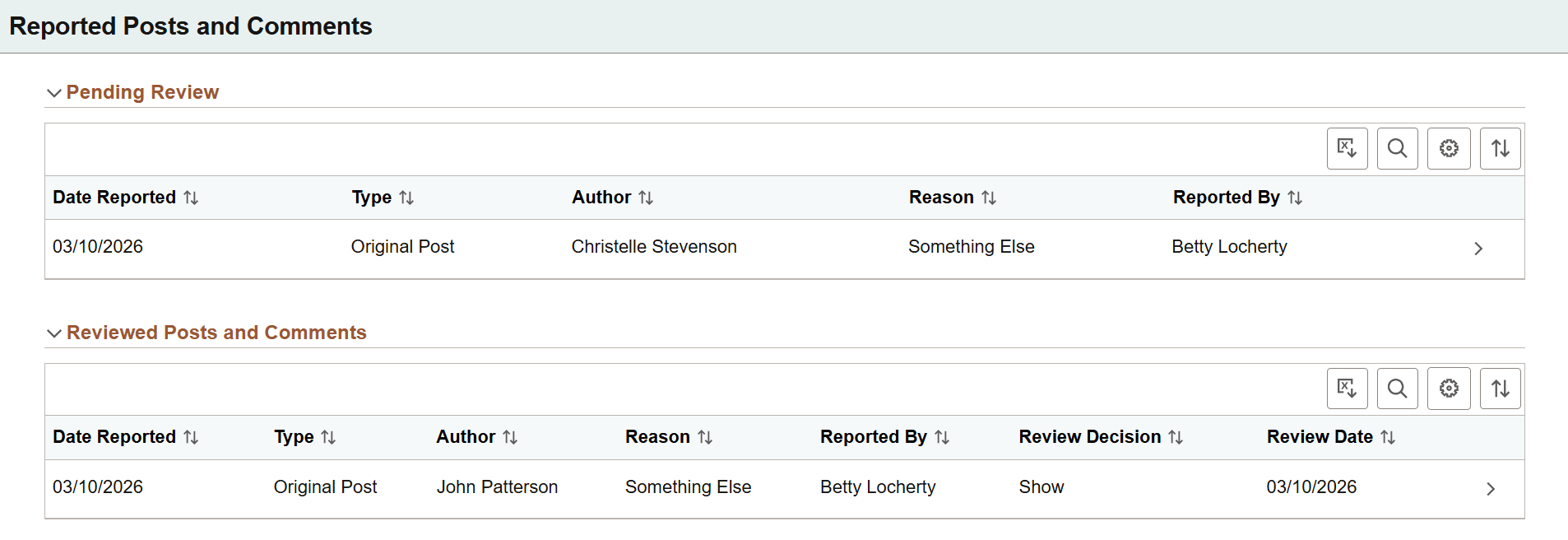
When you access this page from the notification entry of a reported post or comment, the system highlights and sets the corresponding recognition entry in focus for easy identification.
Note:
The Type column and rows for reported comments are not shown, if the Enable Comments option is cleared on the HCM Options Page.
Pending Review
This section lists the information of reported posts and comments that are pending administrator's review.
Select a row to review the content of the corresponding entry on the Reported <Original Post or Comment> Page.
Reviewed Posts and Comments
This section lists the information of reported posts and comments that have been reviewed and acted upon by the administrator, including the decision and date of each review.
Select a reviewed row to view or update as needed.
Reported <Original Post or Comment> Page
(Administrator) Use the Reported <Original Post or Comment> page (HRRC_ADM_POST_FL) to review and take action on reported posts or comments.
Select a row on the Reported Posts and Comments Page.
This example illustrates the fields and controls on the Reported <Original Post or Comment> page.
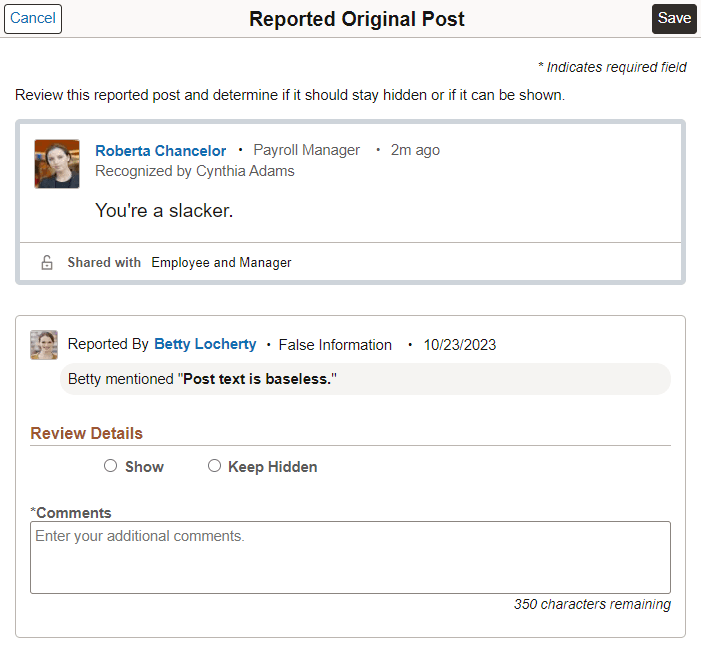
The layout of the Reported Original Post page and Reported Comment page is identical. The administrator can review the content of the complaint (original post or post comment), reason and comment provided by the reporter, and take the appropriate action.
| Field or Control | Description |
|---|---|
|
Show or Keep Hidden |
Select to either display or hide the reported content after the review. This is required. |
|
Comments |
Enter any comment (350 characters maximum) for the review of the reported content. This is required. |