SetDataHints method: Chart class
Syntax
SetDataHints(Record_Name.Field_Name1, ...)Description
Use the SetDataHints method to override the default text that appears as a caption when you mouse over data in a chart (that is, a bar, a pie slice, or a data point).
Important:
The ToolTipLabel class provides an alternative method for creating custom tooltips for data items on charts. See Using the ToolTipLabel Class for more information.
The default data hint text that appears is constructed from information about the composition of the chart that you have defined and the row of data being charted. Specifically, its structure depends on whether the chart has a data series or not.
If you do not specify SetDataHints and do not specify SetDataSeries, then the value of the x-axis (Group) and the value of the y-axis appear in the data hint:

If you do not specify SetDataHints but do specify SetDataSeries, then the value of the x-axis (Group), the y-axis, and the series appear in the data hint:
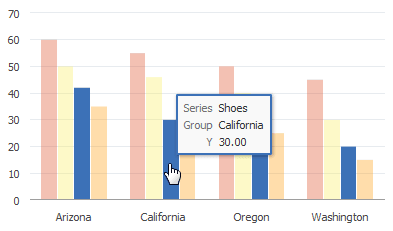
If you use SetDataHints, the text that appears as a caption when you mouse over data will be precisely that which is in the RECORD.FIELD for that row of data. This is true whether a data series is present or not.
For example, SetDataHints is set as follows:
&cChart12.SetDataHints(DOC_CHRT_SLS_2.DOC_CHRT_MASCOT);Mousing over the bar representing California reveals Golden Bears as the value of the DOC_CHRT_MASCOT field for that row in the DOC_CHRT_SLS_2 rowset:

In the following example, SetDataSeries is already set, and SetDataHints is set as follows:
&cChart13.SetDataHints(DOC_CHRT_SLSREC.DOC_CHRT_RGN);Mousing over any bar in the bar chart will display the region represented by the bar.

Parameters
| Parameter | Description |
|---|---|
|
Record_Name.Field_Name1, ... |
Specify the name of the record and one or more fields on that record that contain the tooltips for the data items for the chart. Note: The number and order of fields specified must correspond to the order specified by the SetDataYAxis method. |
Returns
None.
Example
&cChart13.SetDataHints(DOC_CHRT_SLSREC.DOC_CHRT_RGN);