Using the Definition Group Save As Page
Use the Definition Group Save As page (PTDEFSEC_SAVEAS) to copy a definition group and define the copied group with a new name.
To access the page click the Save As button at the bottom of any of the pages listed in the following table:
| Page | Object ID | Source for Additional Information |
|---|---|---|
|
Group Content Summary page |
PTDEFSECCNT |
|
|
Group Content Detail page |
PTDEFSECGRP |
|
|
Inclusion Rules page |
PTDEFSECINRL |
|
|
Group Permission page |
PTDEFSECPERM |
|
|
Group Users page |
PTDEFSECGRPUSERS |
This example illustrates the fields and controls on the Definition Group Save As page. You can find definitions for the fields and controls later on this page.
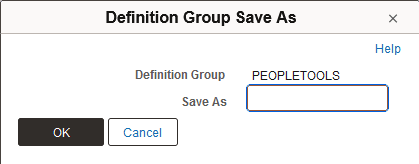
| Field or Control | Description |
|---|---|
|
Save As |
Enter a name for the new definition group. |
|
OK |
Click the button to copy the group. |
|
Cancel |
Click the button to exit the page without saving any changes or copying the definition group. |