About Autonomous Data Guard with Cross Region Standby
Provides information on features and operation of Autonomous Data Guard with a cross region or a cross tenancy standby database.
When you add a standby database in a different region, if the primary instance goes down, Autonomous Data Guard provides a standby database that is physically separated in a remote region. The standby database is available to assume the role of the unavailable primary instance. When you add a standby database in a different tenancy, Autonomous Data Guard provides a standby database that is in a different tenancy. The standby database is available to assume the role of the unavailable primary instance.
A cross region standby database is a replica of the primary database and may be used for recovery in case of failure or when the primary is not available. Enabling Autonomous Data Guard with a cross region standby provides a low RTO solution for disaster recovery in the event an entire region is not available or when the primary database is down for any reason.
Autonomous Data Guard cross region standby databases incur the additional cost of the base CPUs and twice the storage of the Primary database, including any auto scaled storage usage, billed on the remote peer database. auto scaled CPUs of the Primary are not billed for additionally on the remote peer database. The number of base CPUs is specified by the number of ECPUs (OCPUs if your database uses OCPUs) as shown in the ECPU count (OCPU count) field on the Oracle Cloud Infrastructure Console.
Autonomous AI Database allows you to create one or more remote disaster recovery peer databases, depending on your compute model:
-
OCPU Compute Model: You can add one remote standby database in a paired region. Paired regions are remote regions where you can create a cross region peer.
-
ECPU Compute Model: You can add multiple remote disaster recovery peers, with up to one peer in each remote paired region. For example if your primary database is in the IAD region, you can add a standby database in PHX and a standby database in SJC, but you cannot add two remote disaster recovery peers in PHX.
Paired regions are remote regions where you can create a cross region standby database. See Autonomous AI Database Cross Region Paired Regions for more information on paired regions.
You perform almost all operations, such as scaling up the ECPU count (OCPU count if your database uses OCPUs) and enabling compute auto scaling on the primary database. Autonomous Data Guard then performs the same actions on the cross region standby database.
After you add a remote standby database, Autonomous AI Database provides access to the remote standby database from the Oracle Cloud Infrastructure Console. Autonomous AI Database provides access to the remote standby database so that you can perform some operations independently on the remote standby, such as configuring networks and VCNs for private endpoints and adding tagging to define keys and values that are not replicated between the primary database and the remote standby.
Note: Autonomous Data Guard does not perform automatic failover for a cross region standby. If the primary database is unavailable and a local standby is unavailable, you can perform a manual failover to make a cross region standby database assume the primary role.
You cannot connect to a cross region standby while it operates as a standby database, and it is not available for read-only operations. You can connect to the database in the following cases:
-
When the database assumes the primary role after a failover or switchover operation. See Perform a Switchover andPerform a Manual Failover for more information.
-
After you convert a standby database to a snapshot standby database. See Convert Cross Region Disaster Recovery Peer to a Snapshot Standby for more information.
The following areas have differences for failover or switchover from the primary database to a remote standby database, when compared to failover or switchover to a local standby:
-
Display Name: The display name has a “_region” extension. Where region is the region name, such as
IADorBOM.If you created the cross region peer before the introduction of support for multiple cross region peers, the cross region peer's display name has a “
_Remote” extension. -
OML Notebooks: After a cross region switchover or failover, OML notebooks from primary that was switched over or failed over are not present in the primary database (the current primary database after the role change). New OML notebooks can be created.
-
Private Endpoint: You can independently configure and update private endpoints on a standby database before failover or before you perform a switchover. This allows you to have a private endpoint that is configured differently, after failover or after you perform a switchover. Autonomous AI Database does not keep the networking configuration synchronized from the primary to a remote standby.
VCN Peering and domain forwarding are required for wallets to work across regions, with Autonomous AI Databases with a private endpoint with an Autonomous Data Guard standby, where the primary and the standby database are in different VCNs. See Remote VCN Peering using an RPC and DNS in Your Virtual Cloud Network for information on VCN peering and domain forwarding.
-
Network Access Control List: By default a disaster recovery primary database and remote peer databases use the same network Access Control Lists (ACLs). Optionally, you can independently edit network ACLs on a remote peer database. This allows you to use different ACLs on a remote peer database.
See Manage Remote Peer Network ACLs for more information.
-
Tags: Tags are handled independently on a disaster recovery primary and on remote peer database. This means:
-
When you add, remove, or update a tag on a remote peer, the change applies only on the remote peer database.
-
When you add, update, or remove a tag on the primary, the tag is not added, updated, or removed on remote peer databases.
-
-
APIs or Scripts: Any APIs or scripts you use to manage the Autonomous AI Database may need to be updated to call the APIs on the primary database.
You can also use predefined substitution variables in your Oracle Cloud Infrastructure (OCI) URLs for cross region failover for Autonomous AI Database when using OCI REST APIs. See Substitution Variables in Oracle Cloud Infrastructure (OCI) URLs for more information.
For mTLS connections, you must download a wallet from the primary database, the current primary database, after a failover or after you perform a switchover. See Cross Region Disaster Recovery Connection Strings and Wallets for more information.
-
Client Applications: Client applications need to connect using the connection strings and wallet you download from the primary database, the current primary database, after a failover or after you perform a switchover. See Cross Region Disaster Recovery Connection Strings and Wallets for more information.
-
Wallet Based Connections: You must download a wallet and connect using the connection strings from the primary database, the current primary database, to connect to the database after a failover or after you perform a switchover. See Cross Region Disaster Recovery Connection Strings and Wallets for more information.
-
Autonomous AI Database Tools: The tools have different URLs in the primary database, the current primary database, after a failover or after you perform a switchover (the tools URLs do not change for a switchover or failover to a local standby):
-
Database Actions
-
Oracle APEX
-
Oracle REST Data Services (ORDS)
-
Spatial Studio
-
Graph Studio
-
Oracle Machine Learning (OML) Notebooks
-
Data Transforms
-
MongoDB API
-
-
Oracle Cloud Infrastructure Object Storage Usage: After you failover or switchover from the primary database to a standby database, on the primary database (the current primary database) the credentials and the URLs that provide access to Object Storage continue to work as they did before the failover or the switchover, providing access to the following:
-
External tables
-
External partitioned tables
-
External hybrid partitioned tables
Note: This applies when the Object Storage is available. For rare scenarios when the Object Storage is not available, Oracle recommends having Object Storage backups or replication to a different region. If the Object Storage is not available (that is the Object Storage resource you used with the Primary before a switchover or failover), you may update your user credentials and parameters that set URLs for Object Storage so that the parameters specify values to access an available region’s Object Storage. See Using Replication for more information.
-
Cross Tenancy Autonomous Data Guard with Cross Region Standby
You can enable cross tenancy Autonomous Data Guard with a cross region standby. When you add a cross tenancy Autonomous Data Guard standby database in a different region, Autonomous AI Database provisions a cross region standby database in the destination tenancy. With a cross tenancy Autonomous Data Guard standby, you can failover, switchover, or create a snapshot standby with a cross region standby in a different tenancy. This feature allows you to use Autonomous Data Guard to migrate a database to a different tenancy.
See Use a Cross Tenancy Autonomous Data Guard Standby Database for more information.
OCI Full Stack Disaster Recovery with an Autonomous Data Guard Cross Region Standby
When Full Stack Disaster Recovery is enabled, the Autonomous AI Database details page, under Disaster recovery, shows the Full Stack DR field as Enabled.
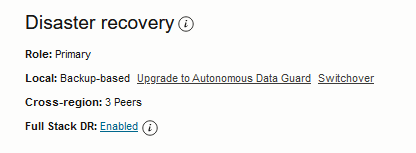
Description of the illustration adb_full_stack_dr_enabled.png
See Use OCI Full Stack Disaster Recovery with Autonomous AI Database for more information.
Autonomous Data Guard Database Role
After you add a cross region standby database, each database has a designated role: primary, standby, or snapshot standby.
The role specifies the current state of a database, primary, standby, or snapshot standby, and this value changes after you perform a switchover or a failover or after you convert a standby database to a snapshot standby. You can view the Autonomous AI Database role in the icon that shows next to the display name on the Autonomous AI Database Information page. For example:

Description of the illustration adb_adg_primary.png

Description of the illustration adb_adg_standby.png
After you add a cross region standby database, you can view the role in the Disaster recovery area on the details page. The role is one of:
-
The Role shows Primary on the primary database.
-
After a switchover or failover, on the same database the Role shows Standby.
-
After you convert a cross region peer to a snapshot standby, the Role shows as Snapshot Standby.
To view details for a peer, on the Autonomous AI Database details page, select the Disaster recovery tab. The list shows the peer database information and the Peer role column shows the peer role:
-
Standby (local): the Peer role column shows Standby and the database has the same display name in the Peer Autonomous AI Database column. The Region column shows the name of the current region.
-
Standby (cross region) the Peer role column shows Standby for a remote standby database and the database has the same name with an “
_region” extension in the Peer Autonomous AI Database column. You can click the link to access the remote database. The Region column shows the name of the remote region.If you created the cross region peer before the introduction of support for multiple cross region peers, the cross region peer's display name has a “
_Remote” extension. -
Snapshot standby: the Peer role column shows Snapshot standby. The Region column shows the name of the remote region.
Autonomous Data Guard Cross Region Failover and Switchover
You can have one local disaster recovery peer and optionally you can add one or more cross region peers (multiple cross region peers are allowed with the ECPU compute model). In both the local and cross region cases, either peer can be a Backup-Based Disaster Recovery copy or an Autonomous Data Guard standby.
With both a current region and one or more cross region Autonomous Data Guard peer databases, depending on the state of the primary database, you have the following options:
-
If your primary database goes down and the local standby database is available, Autonomous Data Guard automatically performs failover to convert the local standby database to the primary database, with minimal interruption. After failover completes, Autonomous Data Guard creates a new local standby database for you. If automatic failover is not possible, you have the option to perform a manual failover.
Autonomous Data Guard continues to use the same cross region peer databases.
-
If your primary database goes down and the local standby database is not available, you can perform a manual failover to a cross region peer database and the cross region peer database you failover to becomes the primary database.
In this case, after the failover completes, Autonomous Data Guard does not create a new local standby database (by default you have a backup copy peer).
-
You can perform a switchover operation, where the primary database becomes the local standby database, and the local standby database becomes the primary database.
Autonomous Data Guard continues to use the same cross region peer databases.
-
You can perform a switchover operation, where a cross region peer database becomes the primary database (and the database that was the primary is recreated as a new standby database so that it becomes a peer database).
A switchover changes the roles of the primary and a peer database. If you perform a switchover two times between the same two remote regions, the primary database returns to again be the primary database.
Autonomous Data Guard Database Cross Region Backup and Restore
After you add an Autonomous Data Guard cross region standby database, backup and restore from backup is handled as follows:
-
If the primary database is restored from a backup, a new remote standby is created from the restored primary database.
-
Automatic Backups are only taken on the primary database (the database showing Role: Primary). For example, after a switchover or failover, the database with the Primary role starts to perform automatic backups. A database with the Standby role no longer takes backups. If you switchover again, the database that becomes the Primary role database starts taking backups again.
-
You cannot restore or clone from a backup when a peer database is in the Standby role. Backups are only taken on the database in the Primary role, and the restore operation is not available from the Oracle Cloud Infrastructure Console on a Standby database.
Cross Region Disaster Recovery Connection Strings and Wallets
When you add an Autonomous Data Guard cross region (remote) standby database, or when you use a cross region Backup-Based Disaster Recovery peer, the wallet and connection string from the primary database contains only the hostname of the primary database.
In addition, the wallet and connection string from a remote peer database contains only the hostname of the remote database. This applies for both instance and regional wallets.
Oracle recommends that you configure your applications running on the Primary Role database to use the wallet or connection string downloaded from the Primary database. For applications that run on a remote database, use the wallet or connection string downloaded from the remote database (where the remote database is the current primary database after a failover or after you perform a switchover). You can obtain these connection strings or the wallet by clicking Database connection on the Oracle Cloud Infrastructure Console.
For example, if your cross region Autonomous Data Guard is setup with the primary in Ashburn (IAD) and a cross region standby in Phoenix (PHX), Oracle recommends that your mid-tier applications running in IAD use the connection string or wallet from the primary database in IAD, and your corresponding applications that run in PHX after a failover or after you perform a switchover, use the connection string or wallet from the standby database in PHX. During regional failover or switchover, Oracle recommends failing over both your database and your mid-tier applications to the new Primary role database for optimum performance and to minimize any cross regional latency.
See Download Client Credentials (Wallets) for more information.
If required by your application, you may manually construct connection strings containing both primary and remote database hostnames, to support connecting to either instance that is available and open for connections automatically, the primary or the remote database.
For details on the steps to manually create these connection strings see:
Cross Region Autonomous Data Guard with Customer-Managed Encryption Keys
When you add an Autonomous Data Guard cross region standby, there are special considerations when the primary database is using customer-managed encryption keys, or if you want to switch to using customer-managed encryption keys on the primary database.
Note: Autonomous AI Database supports multiple customer-managed keys providers. Only Oracle Cloud Infrastructure Vault is supported for use with Autonomous Data Guard. Other vaults are not supported for customer-managed keys.
In order for a remote standby to be able to use the same master encryption key as the primary database, the master encryption key must be replicated to the remote region. Customer-Managed Encryption Keys are only supported with a single cross region Autonomous Data Guard standby. Multiple cross region standbys are not supported because Oracle Cloud Infrastructure Vault only supports replication to one remote region.
Consider the following cases:
-
Adding an Autonomous Data Guard remote standby is allowed if the Autonomous AI Database is using customer-managed keys. When the database is using a customer-managed key and you add an Autonomous Data Guard cross region standby, the Region list in the Add peer database dialog only shows the regions that contain the replicated vault and keys. If you don't see a remote region listed, you need to replicate your vault and keys to the region where you want your standby database (this must be a paired region).
-
Switching to customer-managed keys is allowed on the primary when you have an Autonomous Data Guard cross region standby. In the case when the database is using Oracle-managed keys and you switch to customer-managed keys on the primary, you only see the keys that are replicated in both the primary and the standby regions. The Manage Encryption Key Vault and Master encryption key lists only show vaults and keys that are replicated across both the primary and the standby regions. If you don't see a key listed, replicate your vault and keys to a paired region.
See the following for more information:
Cross Tenancy Autonomous Data Guard with Customer-Managed Encryption Keys
When you add an Autonomous Data Guard cross tenancy standby, there are special considerations when the Primary database is using customer-managed encryption keys or if you want to switch to using encryption keys on the Primary database.
When you add an Autonomous Data Guard cross tenancy standby for additional security, for example to protect against ransomware, if the Primary is using a customer-managed key, you can replicate the encryption key and use it in the standby. You must use the same encryption key, whether an Oracle-managed key or a customer-managed key, in both the Primary tenancy and the standby. Since each tenancy has an independent copy of the key, disabling or deleting the key in one tenancy does not affect the other.
Note: Autonomous AI Database supports multiple customer-managed keys providers. Only Oracle Cloud Infrastructure Vault is supported for use with Autonomous Data Guard. Other vaults are not supported for customer-managed keys on either the Primary or a Standby with Autonomous Data Guard.
See Notes for Customer-Managed Encryption Keys with a Cross Tenancy Autonomous Data Guard Standby for more information.
Replicating Backups to a Cross Region Autonomous Data Guard Standby
When you add a cross region Autonomous Data Guard standby you can enable cross region backup replication so that automatic backups from the primary are also available on a remote region.
By default the backups taken on the primary are not replicated to a cross region standby database. When you enable cross region backup replication, up to 7 days of automatic backups for the primary are replicated to a cross region standby database. When this feature is enabled, automatic backups are available in the remote region as follows:
-
After a switchover or failover you can restore or clone to any timestamp in the past seven (7) days, or to any timestamp in the specified retention period when the retention period is set to less than seven days.
-
All backups for the primary that are replicated to the remote region are deleted on the remote region peer after seven days, or after the retention period number of days when the retention period is set to less than seven days.
-
You cannot modify the backup retention period for replicated backups, except if you modify the backup retention period on the primary to specify a value less than seven days. In this case, the retention period for replicated backups on the remote region matches the automatic backup retention period set on the primary.
Cross region backup replication incurs an additional cost. See Oracle Autonomous AI Database Serverless Features Billing for more information.
See Add a Cross Region Standby Database and Enable or Disable Backup Replication for an Existing Cross Region Standby for more information.
Note the following for cross region automatic backup replication:
-
After a switchover or a failover, while the cross region database is in the primary role, backups are taken on the current primary and are replicated to the current (remote) standby.
-
In a remote region you can create a clone from a replicated backup while the database is in the Standby role.
Autonomous Data Guard cross region BYOL Licensing
The BYOL ECPU limit you set on an Autonomous Data Guard Primary database does not apply to a cross region or cross tenancy Autonomous Data Guard Standby database.
On a cross region or cross tenancy Standby you can independently set the BYOL ECPU limit, as required. Setting a value for BYOL License limit limits how many ECPUs will be covered by BYOL licenses.
For example, consider an 8 ECPU Autonomous Data Guard Primary database using BYOL licensing. When you add a cross region or cross tenancy Standby, the Standby takes its licensing from the Primary (using BYOL licensing).
In this example, if you set the BYOL License limit to 4 (ECPUs) on the Primary, then 4 of the 8 ECPUs use BYOL licensing. However, the BYOL License limit you set on the Primary does not apply on a cross region or cross tenancy Standby. The Standby uses Bring your own license (BYOL) licensing (without a BYOL License limit). If you separately set a BYOL License limit on the Standby, for example if you set the BYOL License limit value to 2 (ECPUs), 2 ECPUs on the Standby are billed using BYOL licensing and 6 ECPUs. Similarly, the BYOL ECPU limit you set on the Standby does not affect the Primary’s BYOL ECPU limit.
See Choose Bring Your Own License Option While Provisioning or Cloning and Choose Bring Your Own License on Autonomous AI Database (ECPU Compute Model) for more information.