

Oracle AI Vector Search: architecture and access paths
Oracle AI Vector Search is a capability of Oracle AI Database. It stores vectors with application data and supports similarity search with relational, JSON, text, spatial, and graph data.
The oracle-vecdb Python package is the Python SDK for Oracle Simple Vector SDK. It provides methods for managing vector tables, records, embeddings, indexes, and searches.
For a runnable Python path, start with the Quickstart: Build Vector Search with Python. Use this page to understand how the pieces fit together and choose the access path that matches your application.
Key terms
- Oracle AI Database — Stores your records, vectors, and metadata, and runs vector search.
- ORDS — Oracle REST Data Services. It exposes the database operations that the Python SDK calls over HTTPS.
- Vector user — The database account used by your application. This user owns the vector tables used by the application.
- Vector table — A database table that stores searchable records, including their vectors and metadata.
- Embedding model — A model that converts source text or a search query into a vector.
- Metadata — JSON attributes stored with a record, such as a title, tenant ID, or document source. Metadata can be returned or used to filter results.
How Oracle AI Vector Search works
An Oracle VecDB workflow typically moves through these stages:
The first four stages prepare and query vector data. The fifth stage uses the results in an AI application.

- Choose an embedding workflow. Choose an integrated embedding or bring-your-own-vectors workflow. For integrated embeddings, use a loaded model.
- Prepare data. Turn source content into searchable records. For example, split documents into chunks and decide relevant metadata. Create a vector table to store the records, metadata, and vectors that your application needs to search.
- Load records into the table. Oracle AI Database creates and maintains vector and metadata indexes automatically by default. IVF is the default vector index; HNSW is the alternative. For controlled bulk loading, configure manual indexing and create the index explicitly after loading. See Indexes for the high-level choices.
- Search by meaning. Submit text, a vector, or a record ID to run a similarity search. Include metadata filters in the same query to evaluate semantic similarity and structured conditions together. The database can use the relevant vector and metadata indexes to reduce search work.
- Use the search results in an AI application. Use retrieved records as context or inputs for recommendations, RAG, knowledge assistants, and agent memory. See Example applications and notebooks.
This page focuses on the core Oracle VecDB workflow: loading models, storing records, indexing vectors, and searching by meaning.
Access Oracle AI Vector Search
Oracle Simple Vector SDK provides several ways to work with Oracle AI Vector Search:
The graphic shows the available SDK resources and access paths. The table below explains when to use each database interface.
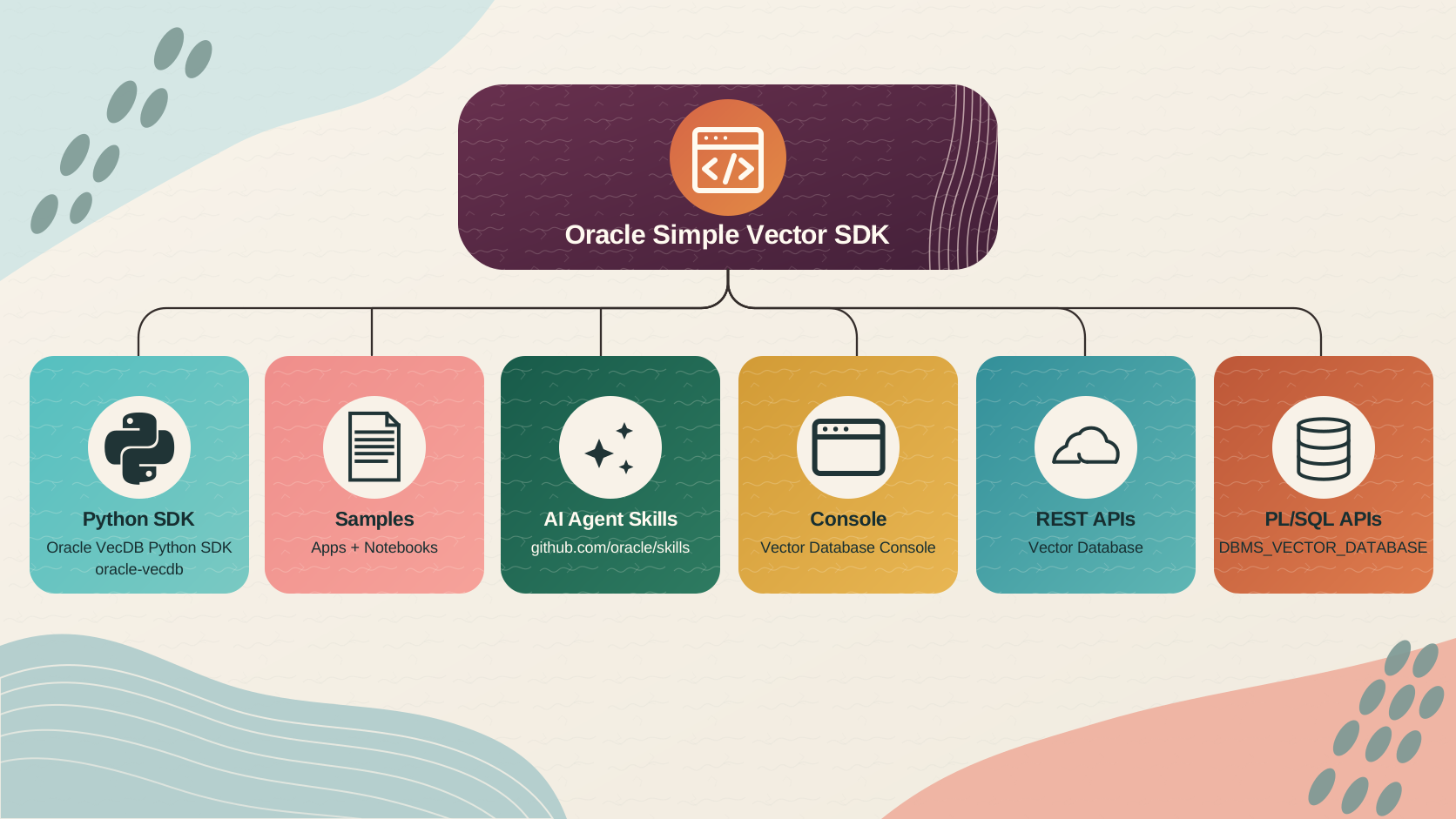
| Access path | What it provides | Use it when |
|---|---|---|
| Oracle VecDB Python SDK | A Python client for the Vector Database through Oracle REST Data Services (ORDS). | You are building a Python application. |
| Vector Database | Direct HTTP access to vector database resources through ORDS. | You are building an application in another language or want direct HTTP calls. |
| Vector Database Console | A browser-based interface for managing vector database resources and trying searches interactively. | You want to explore vector search or manage resources in a browser. |
| DBMS_VECTOR_DATABASE | Direct access to the DBMS_VECTOR_DATABASE package in Oracle AI Database. |
You are working in database procedures, scripts, or SQL-based applications. |
For Python and direct REST calls, ORDS exposes the Vector Database REST API. The REST API invokes DBMS_VECTOR_DATABASE, which creates, manages, and queries vector database objects, including vector tables, indexes, models, and vector data.
The next graphic shows this detailed request path. Use it to understand what happens after a Python SDK or REST client sends a request.
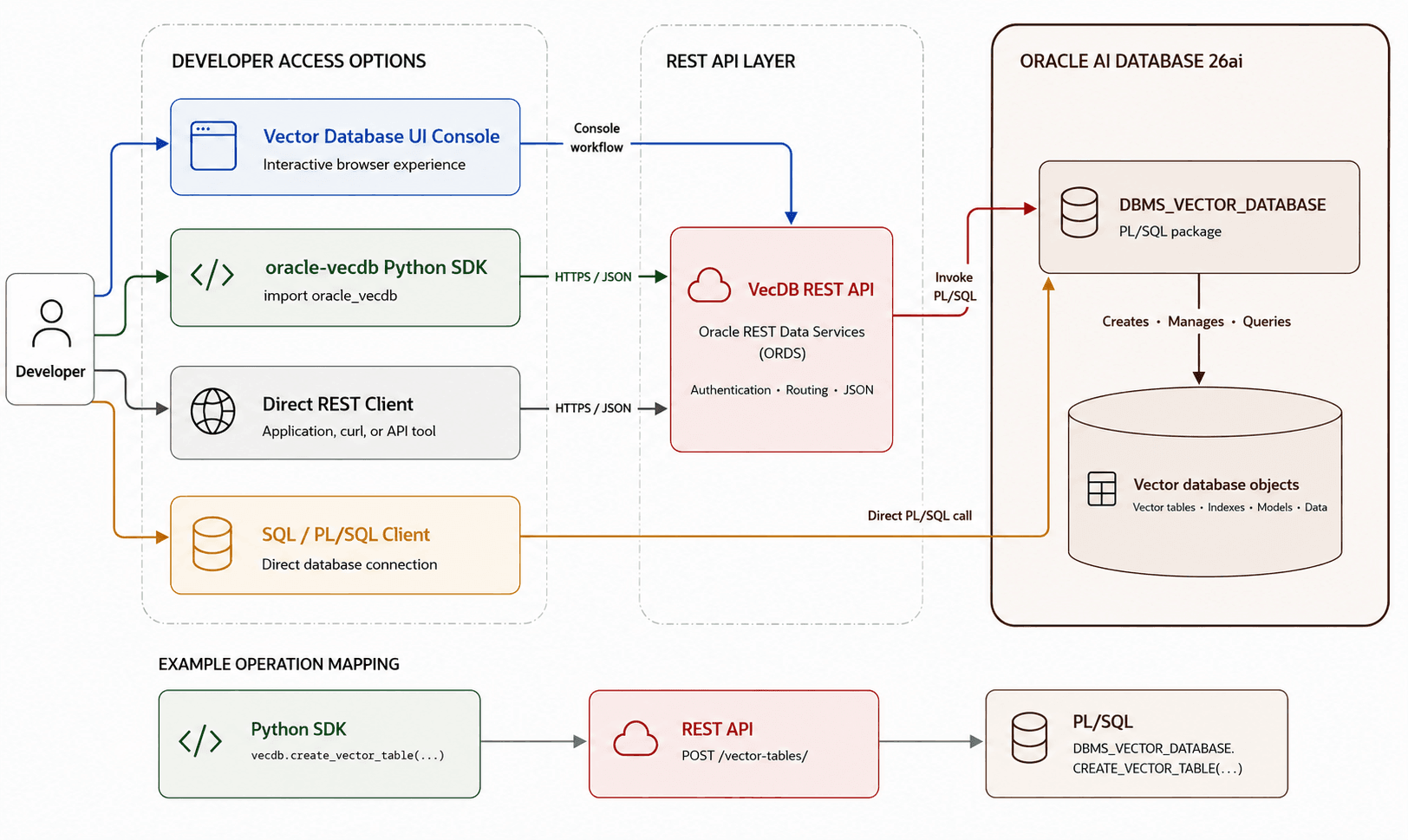
Description of the illustration vecdb-overview-workflow.png
The Oracle VecDB Python SDK and direct REST clients use the SDK REST endpoint. The Vector Database Console uses a separate browser URL. See Choose a Database Deployment to identify both URLs.
AI Agent Skills
If you use an AI coding agent, Oracle VecDB AI Skills provide source-backed instructions for choosing a workflow and verifying current parameters before writing or explaining VecDB code. They cover architecture and access paths, deployment setup, vector tables and data, models, indexes and jobs, search and reranking, and API-reference routing.
These skills support development with Oracle VecDB; they are not an application dependency and do not replace the Python SDK, REST API, Vector Database Console, or DBMS_VECTOR_DATABASE.
Common application patterns
AI Vector Search finds related content by semantic meaning rather than only matching exact words. Because it runs in Oracle AI Database, vector similarity can be combined with application data and metadata filters in the same query.
Common patterns include:
- Semantic search over documents, tickets, policies, product catalogs, and other unstructured content.
- Retrieval-augmented generation (RAG) that supplies relevant private or current data as context for large language model responses.
- Recommendations and similar-item experiences based on the meaning of products, documents, images, or other content.
- Knowledge assistants and agent memory that retrieve durable context across sessions and tasks.
See the Example applications and notebooks page for complete runnable examples of these patterns.
Next steps
- Run the Quickstart: Build Vector Search with Python to create a table, load records, and run a semantic search.
- Follow the Python SDK connection guide for authentication and the Python API Reference for vector tables, data ingestion, search, and indexes.
- For a complete RAG application, follow the Doc Chatbot sample.