Managing Exceptions Generated When Loading Balances into Account Reconciliation
Use the Mapping Exceptions tab to view and then take actions on exceptions generated for unmapped accounts and missing profiles (previously called invalid mappings) during balance loads.
This tab displays loaded balances that have unmapped accounts or missing profiles in the selected period. You can use predefined or custom filters to display exceptions that meet the set filter conditions. The chart on right shows the mapping exceptions by status. As you take actions on the displayed exceptions, the information on this chart is dynamically updated. If you have the same unmapped account or missing profile across multiple balance loads, this account ID is listed only once per currency and per bucket. However, the Amount field shows the total of all balances for that unmapped account.
It is recommended that you resolve all the exceptions that are displayed in this tab.
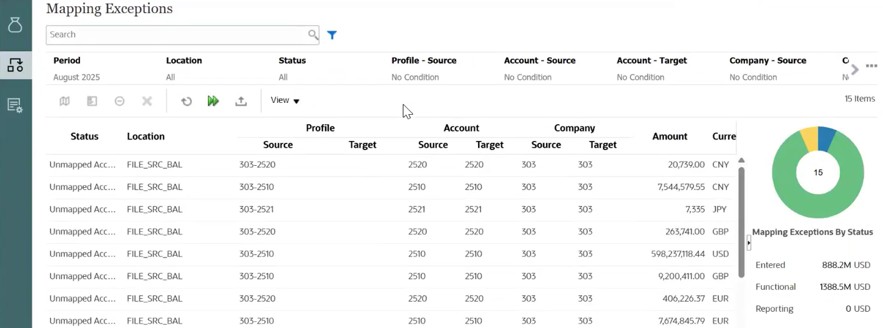
Steps to Manage Exceptions Generated During Balance Loads
- Load balances using Data Integration or from a pre-mapped file.
- Review the balance load results in the Balance Loads tab. The Results column lists the errors or exceptions that occurred during a balance load.
- Select the Mapping Exceptions tab.
- Balances with Status set to Unmapped Account do not have a matching
account ID into which the balance can be loaded. For unmapped accounts:
- Create mappings to map the unmapped accounts, as described in Creating Mappings for Unmapped Accounts When Loading Balances.
- Recalculate balances by clicking Rerun.
- If you did not configure automatic creation of profiles for balances with
missing profiles, you may see balances with Status set to Missing
Profile. These balances are mapped to an existing account ID but do not have a
matching profile.
For missing profiles:
- If the missing profiles are because of a bad mapping (one that maps to an incorrect account), update mapping rules.
- If the account ID for the balance is correct, create a new profile for this balance. See Creating Profiles for Balances with Missing Profiles When Loading Balances.
- Recalculate balances by clicking Rerun.
- After resolving the unmapped accounts and missing profiles exceptions, click
Rerun to rerun the balance loads and recalculate
balances to reflect the exceptions are recalculated.
For example, if the exceptions that you resolved correspond to two balance load jobs, AR reruns both these jobs. Click the job name to view its details. Notice that the mode used for this job is Recalculate.
Errors caused by missing currencies or missing source types need to be acted on in Data Integration.