Generic Integration Protocol
The Intelligent Advisor generic integration protocol is a web service based integration protocol that allows different endpoints to be configured for each load, query, save or checkpoint operation needed by a deployed Intelligent Advisor interview. The generic integration protocol:
- Supports external tools that map the data model of an Intelligent Advisor deployment onto other application data models, for example, for loading and saving application data from an Intelligent Advisor interview. This is the mapping style required by Oracle Integration.
- Ensures that business users can publish changes to deployments without changing existing externally managed mappings.
- Allows the providers of the different operation endpoints to reuse those endpoints across multiple policy models.
- Enables partners to build an Intelligent Advisor adapter for a legacy on-premises application or for some third party middleware solution.
While the Intelligent Advisor adapter for interviews implements the generic integration protocol, the purpose of the protocol is to be generic. Other endpoint providers can register themselves with Intelligent Advisor Hub, and in turn can then register endpoints for operation versions that are required for particular deployment versions. The system registering the handler has complete control over how it manages what will happen when the load, query, save or checkpoint request is made. It could provide a mapping UI to the user, or it could do automatic mapping based on name matching, for example.
The high-level process of using the generic integration protocol is shown in the diagram below.
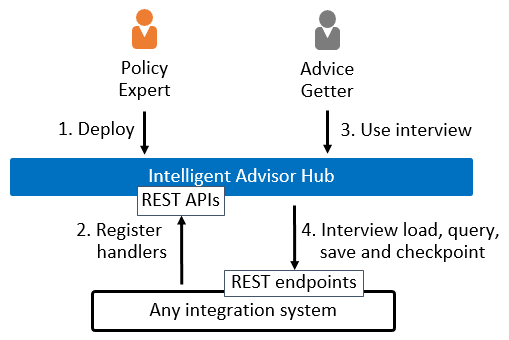
To use the generic integration protocol, follow these steps:
- In Intelligent Advisor Hub:
- The Permissions administrator creates an API Client with the Manager role for the workspace that the deployment will be added to. For more information, see Add a new API client.
- The Connections administrator establishes a web service connection to the generic integration provider. For more information, see Load and Save Data to a Generic Integration Provider.
- In Policy Modeling, the interview designer:
- Puts the Policy Modeling project into generic mapping mode.
- Defines the mapping names that will appear in interview load, query and save operations. Note that the interview designer doesn't need to decide how to map onto enterprise data.
- (Optional) Specifies any entities that are to be dynamically loaded.
- (Optional) Select any screens that will create checkpoints.
- Deploys the Policy Modeling project to Intelligent Advisor Hub to allow integration. Intelligent Advisor Hub will examine the mapping information and automatically create placeholders for the load, query and save operations needed by the interview.
- In Intelligent Advisor Hub, the Manager associates the generic provider web service connection with the deployment in Intelligent Advisor Hub. For more information, see Choose a Generic Provider Connection for a Deployment. (Note that this step can be performed during or after step 4 but must be done before step 5.)
- The system integrator uses the PUT method of the Operations REST API to register the endpoints for each operation. For more information, see Using the Operations REST API.
Note: To pass parameters via the URL into an integration, the format specified in Use URL Parameters to Specify Context needs to be used and the URL parameters also need to be registered using the Operations REST API. - In Intelligent Advisor Hub, the Manager activates the deployment on the Interview channel to make the interview active for end users. When the Intelligent Advisor interview is used, it calls each load, query, save or checkpoint handler as needed. When each handler is called, it is passed any data specified, and must return the requested data in response. For information on the response format, see Format of Response Data.
Note: The generic integration protocol does not support the following features: translations and value lists.