Use the Intelligent Advisor Adapter for Interviews
The Intelligent Advisor adapter can be used to develop integrations in Oracle Integration that load, query, save and checkpoint the data needed by deployed interviews. The interview operations will be exposed by the adapter as inbound operations, allowing Oracle Integration integrations to be triggered by requests received from Intelligent Advisor. When such an integration is activated in Oracle Integration, the endpoint will be recorded in Intelligent Advisor so that the appropriate integration can be invoked by the interview data operations.
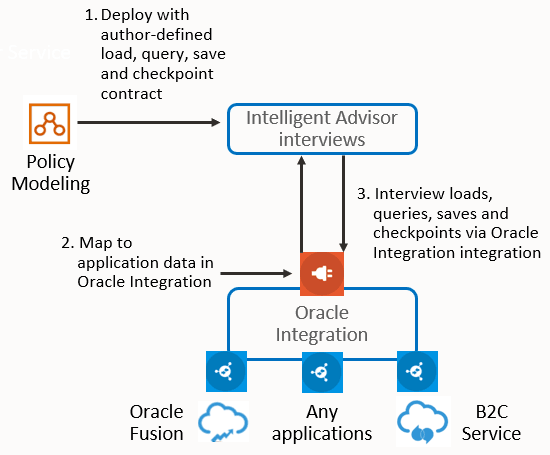
For example, an Intelligent Advisor interview that triages incidents that are associated with high value opportunities could, via an Oracle Integration integration:
- Load data about an opportunity from Oracle Fusion, ask a few questions of the user, and then load related Incidents from B2C Service, then
- Save the results to B2C Service and update information in Oracle Fusion.
To use the Intelligent Advisor adapter for interviews, follow these steps:
-
If using Oracle Integration 3 (which requires OAuth token based authentication for invoking integrations), perform the prerequisite steps for using an OAuth 2.0 grant with the Intelligent Advisor adapter in Oracle Integration. These steps will also need to be followed if using Oracle Integration Generation 2 with OAuth token based authentication.
If using Oracle Integration Generation 2 with Basic authentication, you can skip to step 2.
- In Intelligent Advisor Hub:
- The Permissions administrator creates an API Client with the Manager role for the workspace that the deployment will be added to. For more information, see Add a new API client.
- The Connections administrator establishes a connection to Oracle Integration. For more information, see Create a Connection to Oracle Integration From Intelligent Advisor Hub.
- In Oracle Integration, the system integrator establishes a connection to Intelligent Advisor. For more information, see Create a Connection to Intelligent Advisor In Oracle Integration.
- In Policy Modeling, the interview designer:
- Puts the Policy Modeling project into Oracle Integration mapping mode.
- Defines the mapping names that will appear in interview load, query and save operations in Oracle Integration. Note that the interview designer doesn't need to decide how to map onto enterprise data.
- (Optional) Specifies any entities that are to be dynamically loaded.
- (Optional) Select any screens that will create checkpoints.
- Deploys the project to Intelligent Advisor Hub to allow integration via Oracle Integration. Intelligent Advisor Hub will examine the mapping information and publish new operations as required via the Operations REST API. For more information, see Deploy a Policy Model.
- In Intelligent Advisor Hub, the Manager establishes the Oracle Integration connection for the deployment. For more information, see Choose an Oracle Integration Connection for a Deployment. (Note that this step can be performed during or after step 5 but must be done before step 6.)
- In Oracle Integration, the system integrator:
- Creates an integration for each of the deployment operations (that is, for the load, query, save and checkpoint operations). This triggers the Operations REST API for the deployed policy model published by the Intelligent Advisor connection.
- Maps each integration.
- Activates each integration.
- In Intelligent Advisor Hub, the Manager activates the deployment on the Interview channel.
- The system integrator tests that the integration is working. For more information, see Launch an Interview From a URL.
Note: The Intelligent Advisor adapter for interviews does not support the following features: translations and value lists. The data sent by Oracle Integration in response to a Load or Save request must be formatted to adhere to the JSON standard.