Customer Metadata in Profitability and Cost Management Sync
When you import the Customer metadata to your Profitability and Cost Management, the Parent Company value is used as the parent of the customer. If the Parent Company value is empty, the value from the NSPC Customer Planning Category field is used as the parent.
To set the NSPC Customer Planning Category to represent the parent company:
-
In NetSuite, go to Lists > Relationships > Customers.
-
Click Edit next to a customer of your choice.
-
Click the Custom subtab.
-
From the NSPC Customer Planning Category list, select a value to represent the parent company.
Customers in NetSuite can use NSPC Customer Planning Category values to group customers into different categories and create their own custom hierarchy. When you import Customer metadata to your Profitability and Cost Management, the NSPC Customer Planning Category values are used to build the Customer metadata hierarchy.
You can define the NSPC Customer Planning Category on a customer record under the Custom subtab.
The Customer metadata hierarchy is built with the following logic:
-
If a customer from NetSuite has a parent, the parent of the customer is used in your Profitability and Cost Management as the parent.
-
If the customer from NetSuite doesn't have a parent, but has an NSPC Customer Planning Category, the NSPC Customer Planning Category is used in your Profitability and Cost Management as the parent.
-
If a customer from NetSuite has neither a parent nor an NSPC Customer Planning Category, the top-level customer is used in your Profitability and Cost Management as the parent.
On Customer metadata saved search records, the Stage filter under the Criteria subtab is set to is Customer. This ensures that Customer metadata saved searches executed from Data Exchange return only customers.
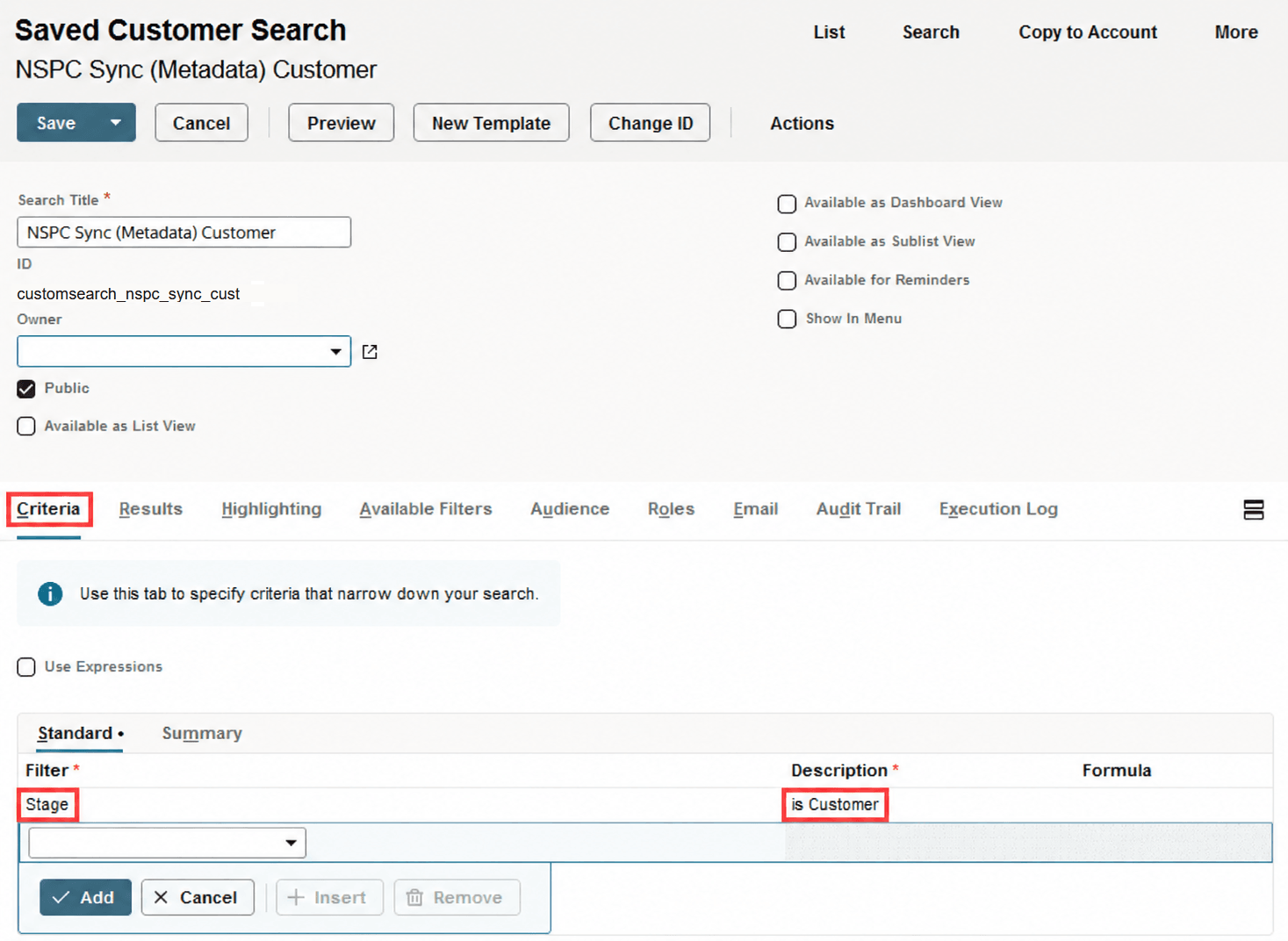
If you disable the CRM feature, the Stage filter is no longer available to ensure that only customers are returned. For information about how to enable the CRM feature, see Required Features for Installing the Profitability and Cost Management Sync SuiteApp. For general instructions on how to customize a saved search, see Customizing a Profitability and Cost Management Sync Saved Search.
Related Topics
- Metadata Export to Profitability and Cost Management
- Supported Metadata Saved Searches in Profitability and Cost Management Sync
- Accounts Metadata in Profitability and Cost Management Sync
- Class Metadata in Profitability and Cost Management Sync
- Customer Project Metadata in Profitability and Cost Management Sync
- Department Metadata in Profitability and Cost Management Sync
- Employee Metadata in Profitability and Cost Management Sync
- Item Metadata in Profitability and Cost Management Sync
- Location Metadata in Profitability and Cost Management Sync
- Project Metadata in Profitability and Cost Management Sync
- Subsidiary Metadata in Profitability and Cost Management Sync
- Vendor Metadata in Profitability and Cost Management Sync
- Creating the Hierarchy of Metadata in Profitability and Cost Management Sync
- Optimal Number of Metadata Records to Import to Profitability and Cost Management
- Returning Metadata Hierarchy Based Only on Cloned Saved Search in Profitability and Cost Management Sync
- Account Type Mapping in Profitability and Cost Management Sync
- Item Type Mapping in Profitability and Cost Management Sync