Audit Summarization using Generative AI
The Generative AI (GenAI) audit summarization feature automates audit findings in the Compliance 360 SuiteApp. This feature uses the SuiteScript GenAI API to access Large Language Models (LLMs). This summarizes your audit using information from the audit control ID, title, description, memo, and status fields. The Audit Insights field displays a comprehensive summary of your audit and suggested steps. A pre-built prompt ensures every summary remains consistent.
This feature helps you produce high-quality, standardized outputs. It also reduces manual, repetitive tasks for compliance officers and administrators.
Before you use the audit summary feature, you must first create an audit in the Audit page.
To create an Audit Summary with GenAI:
-
On the Create Audit page, enter the required audit information.
-
Click the Text Enhance button next to the Audit Insights field.
 Warning:
Do not edit the existing Compliance 360 prompts in Prompt Studio. Editing these prompts may cause the generated audit summary to become inconsistent with the Audit Controls.
Also, if you edit the original Compliance 360 prompts, future Compliance 360 SuiteApp upgrades for your account may fail.
-
The Audit Insights field provides a text enhance functionality that can help you further customize the audit summary. Select one of the following options:
-
Summarize Audit - GenAI summarizes your audit using data from the Audit Controls and the default, pre-built prompt in Prompt Studio.
-
Clean Up - Refines the existing text and corrects grammar and spelling errors. It may also rephrase some of the existing text to use effective style and tone.
-
Make Longer - Expands the AI generated summary into well-written business content.
-
Make Shorter - Shortens the AI generated summary into a more concise format.
Note:If you click on Summarize Audit or Clean Up after manually editing the summary, a warning message will inform you that your manual changes will be deleted.
-
Undo - Reverts the most recent Audit Insights action and changes the field back to its previous content. To return to an even earlier state, continue selecting Undo until you reach the desired result. Audit Insights maintains the previous results as you work on the page.
-
Redo - Restores the Audit Insights action and updates the field to its state before you selected Undo.

-
-
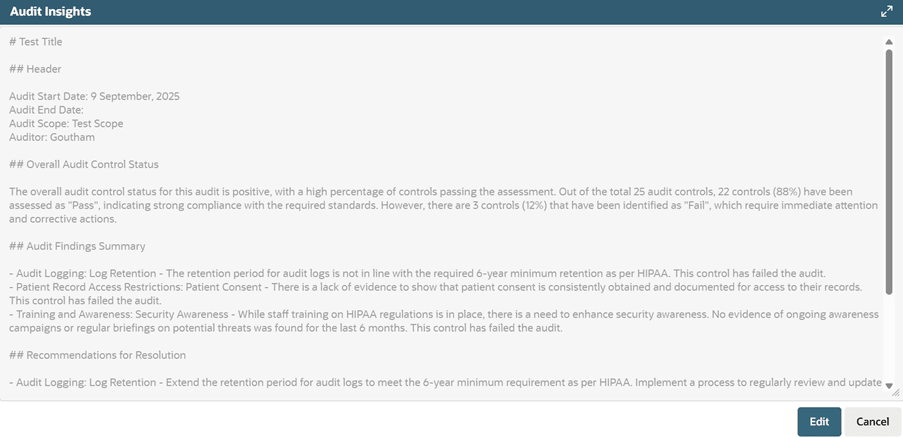
You can view the AI generated audit summary using the View button located next to the Text Enhance button.
-
Click Edit to make changes to the summary.
-
Click Save.
You should carefully review the audit summary generated by GenAI before saving your changes to the page. Generative AI services such as audit summarization provide creative responses. Always validate the generated content for accuracy and quality.
To learn more about the generative AI models, see the SuiteAnswers article LLM Mapping for Generative AI Features. Be aware that you must be logged in to NetSuite to access articles in SuiteAnswers.