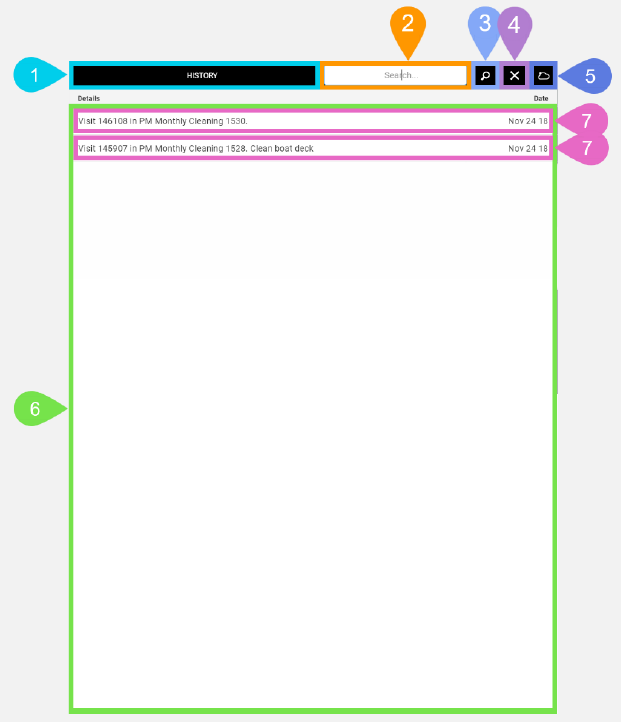
History Task List Screen in Detail
This screen lets you view all historical tasks that have been performed on the selected task's asset.
|
Section |
Task |
Effect |
Availability |
Errors/Alerts Shown |
Highlighted in Screenshot |
|---|---|---|---|---|---|
|
Toggle Selected Task Details Screen Visibility button |
Lets you access functions on the Selected Task Details screen. |
Shows the Selected Task Details screen. |
Always |
None |
1 |
|
Search text field |
Lets you type a search query in the History Task list to only display a subset of the historical tasks for the current asset. |
When you enter the search query and then tap Enter on your mobile device Field Service Mobile will download from the cloud a subset of the historical tasks for the current asset and show the results in History Task list. |
When you've tapped the Search button without tapping the Hide Search Text Field button. |
None |
2 |
|
Search button |
Lets you display the search text field. |
Displays the Search text field. |
When the Search text field is not visible. |
None |
3 |
|
Hide Search text field button |
Hides the Search Text Field button and displays the total number of historical tasks for the current asset. |
Hides the Search text field then Field Service Mobile will download from the cloud the total number of historical tasks for the current asset and show the results in the History Task list. |
When the Search text field is visible. |
None |
4 |
|
History Data Download indicator |
Informs you that Field Service Mobile is downloading data from the cloud for the history. |
None |
From when you first see the History Task List screen until the history data finishes downloading from the cloud. Or, when you enter a search query into the Search text field and tap Enter on your mobile device the History Data Download indicator shows until the search results finish downloading. |
None |
5 |
|
History Task list |
Shows you all the historical tasks for the current asset. |
None |
Always |
None |
6 |
|
History Task list item |
Shows you the Details and Date of a historical task in the History Task list. This also functions as a button that displays the History Task Details screen when you tap it. |
Shows the History Task Details screen with the fields filled with values for the current historical task. |
Always |
None |
7 |