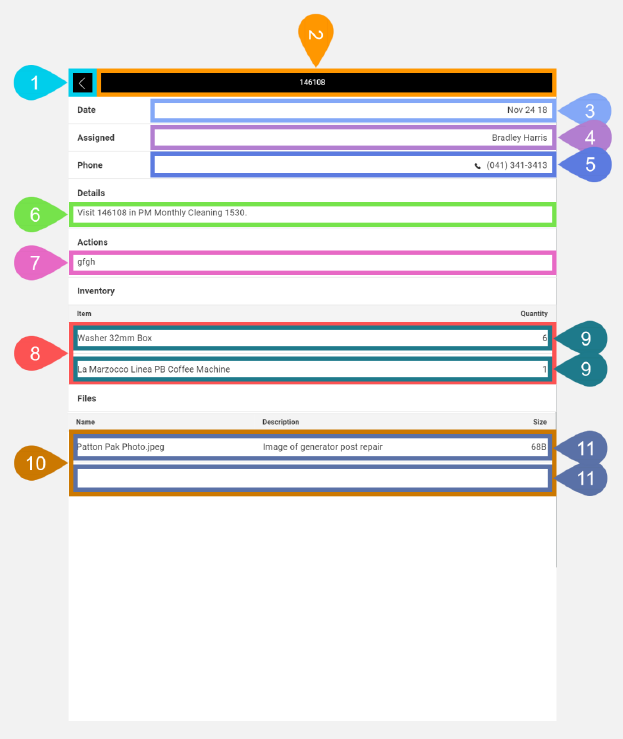
History Task Details Screen in Detail
This screen lets you view details for the selected historical task.
|
Section |
Task |
Effect |
Availability |
Errors/Alerts Shown |
Highlighted in Screenshot |
|---|---|---|---|---|---|
|
Back button |
Lets you go to the History Task List screen. |
Shows the History Task List screen. |
Always |
None |
1 |
|
Toggle Selected Task Screen Visibility button |
Lets you access functions on the Selected Task Details screen. Lets you access functions on the Selected Task Details screen. The task number of the selected task is displayed inside this button. |
Shows the Selected Task Details screen. |
Always |
None |
2 |
|
Date text display field |
Shows you the start date for the selected historical task. |
None |
Always |
None |
3 |
|
Assigned text display field |
Shows you the primary assigned technician field for the selected historical task. |
None |
Always |
None |
4 |
|
Phone text display field |
Shows you the phone number field for the selected historical task. This also functions as a button when you tap it, the phone number will be sent to your mobile device's default phone dialing app. |
Launches your mobile device's default phone dialing app. |
Always |
None |
5 |
|
Details text display field |
Shows you a job summary for the selected historical task. |
None |
Always |
None |
6 |
|
Actions text display field |
Shows you the actions for the selected historical task. |
None |
Always |
None |
7 |
|
Inventory Items list |
Shows you all inventory items used for the selected historical task. |
None |
Always |
None |
8 |
|
Inventory Items list entry |
Shows you the Item and Quantity fields of a particular inventory item for the selected historical task. This also functions as a button that displays the History Inventory Items screen when you tap it. |
Shows you the History Inventory Items screen with the values for the selected inventory item in the selected historical task. |
If there's one or more inventory items saved for the selected historical task. |
None |
9 |
|
Files list |
Displays all the saved files for the selected historical task. |
None |
Always |
None |
10 |
|
Files List entry |
Displays the name, description and file size of a saved file for the current historical task in the current asset. This also functions as a button that displays the History File Item Details screen when you tap it. |
Shows the History File Item Details screen with the current file item values in the historical task of the current asset. |
If there's one or more files saved for the current historical task. |
None |
11 |