Note List Screen in Detail
This screen lets you view all the notes added for the current task.
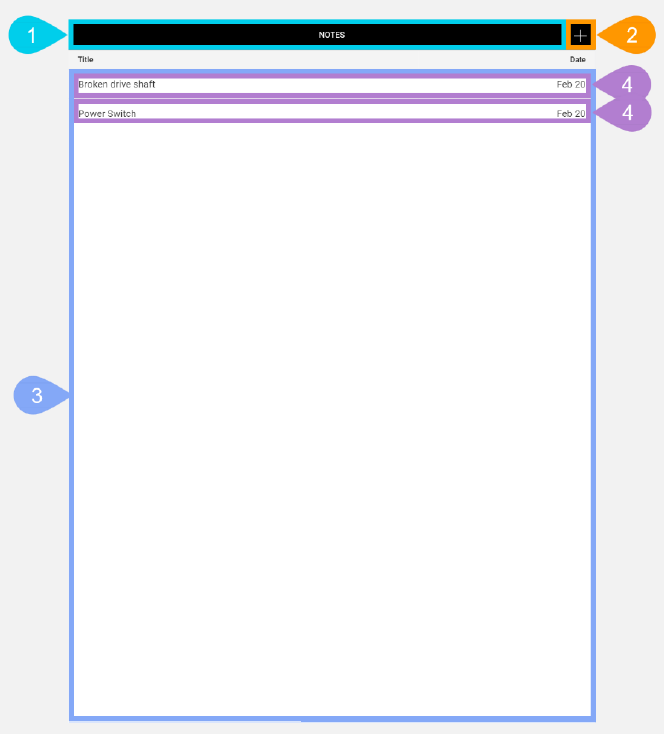
|
Section |
Task |
Effect |
Availability |
Errors/Alerts Shown |
Highlighted in Screenshot |
|---|---|---|---|---|---|
|
Toggle Selected Task Details Screen Visibility button |
Lets you access functions on the Selected Task Details screen. |
Shows the Selected Task Details screen. |
Always |
None |
1 |
|
Add New Note button |
Lets you display the Add/Edit/Delete Note screen to add a new note. |
Shows the Add/Edit/Delete Note screen with all data entry fields set to default values. |
Always |
None |
2 |
|
Note list |
Displays all of the saved notes for the selected task. |
None |
Always |
None |
3 |
|
Note List entry |
Displays the note's title and creation date in the Note list. This also functions as a button that displays Add/Edit/Delete Note screen when you tap it. |
Shows the Add/Edit/Delete Note screen with the data entry fields pre-filled with the saved values for the current note. |
Always |
None |
4 |