IPM Insights: Period Movement Variance Insights Now Available in Forms and Dashboards
Period Movement Variance insights are now available to view in forms and dashboards, along with the other insight types.
Applies To: Enterprise Profitability and Cost Management, FreeForm, Planning
Note: An administrator must have already run the Insights job in order to see the insights in forms and dashboards.
To view insights from a form or dashboard:
-
From a form or dashboard, click the Insights icon in the upper right corner.
 Pre-generated insights are retrieved based on the form or dashboard POV. A panel opens on the left side of the form or dashboard.
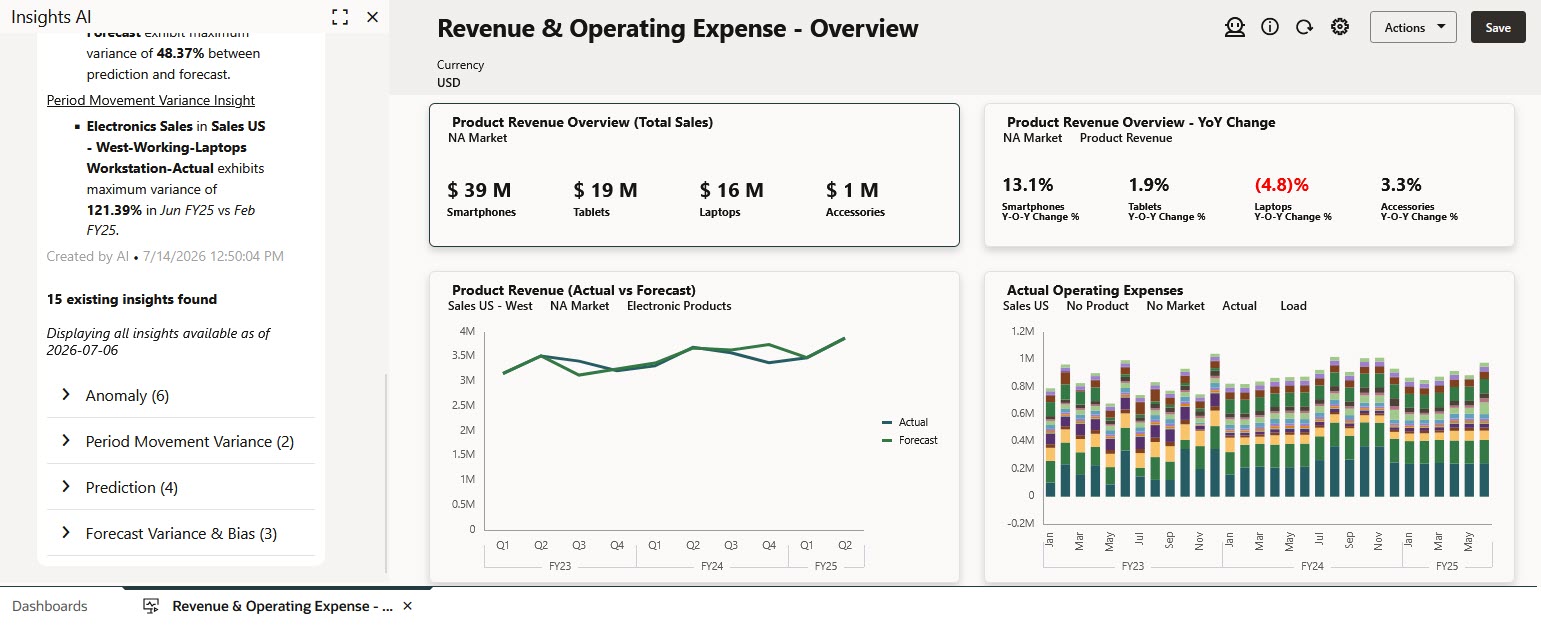
Period Movement Variance Insights in a dashboard
- In the Insights panel, you see a summary of the pre-generated insights for the current POV. If GenAI is enabled, you see a GenAI-enhanced summary of the insights. If GenAI is not enabled, you see the number of insights identified and their categorization by insight type.
You also see Displaying all insights available as of <date>, which indicates when the currently displayed insights were last generated. This helps you understand the freshness of the insights and whether the Insights job might need to be run again to reflect more recent data changes. - Insights are grouped by type. Click the > to expand and show the insights for each insight type.
- You can maximize the Insights panel, which makes it easy to see Insights details, including Priority, Details, POV, Impact, and Created. You can also perform these actions:
- Click a column header to sort the insights list.
- Click the Details cell for an insight to open the Insights details page.
Business Benefit: You can review Period Movement Variance insights directly in your workflow, along with the other insight types, based on the POV of your current data view, rather than having to navigate to the Insights list, making insights easier to access.
Tips and considerations
- IPM Insights require an EPM Enterprise Subscription with Hybrid mode enabled.
- The Insights job must have already been run to see the insights in forms and dashboards.
- If GenAI is enabled, you see a GenAI-enhanced summary of the insights. If GenAI is not enabled, you see the number of insights identified and their categorization by insight type. To enable GenAI, from the Home page, click Application, then click Settings, and then in the Enable AI section, select Generative AI.
- You can see insights from within forms and dashboards, not from within ad hoc forms.
Key resources
- Administering and Working with Enterprise Profitability and Cost Management
- Administering FreeForm
- Working with FreeForm
- Administering Planning
- Working with Planning