Redwood specialization management
Enjoy a modern Redwood learning path experience that makes creating, managing, and exploring learning paths simpler than ever. Now you can organize content more efficiently and learners get a clearer view of their progress and next steps along their learning journey.
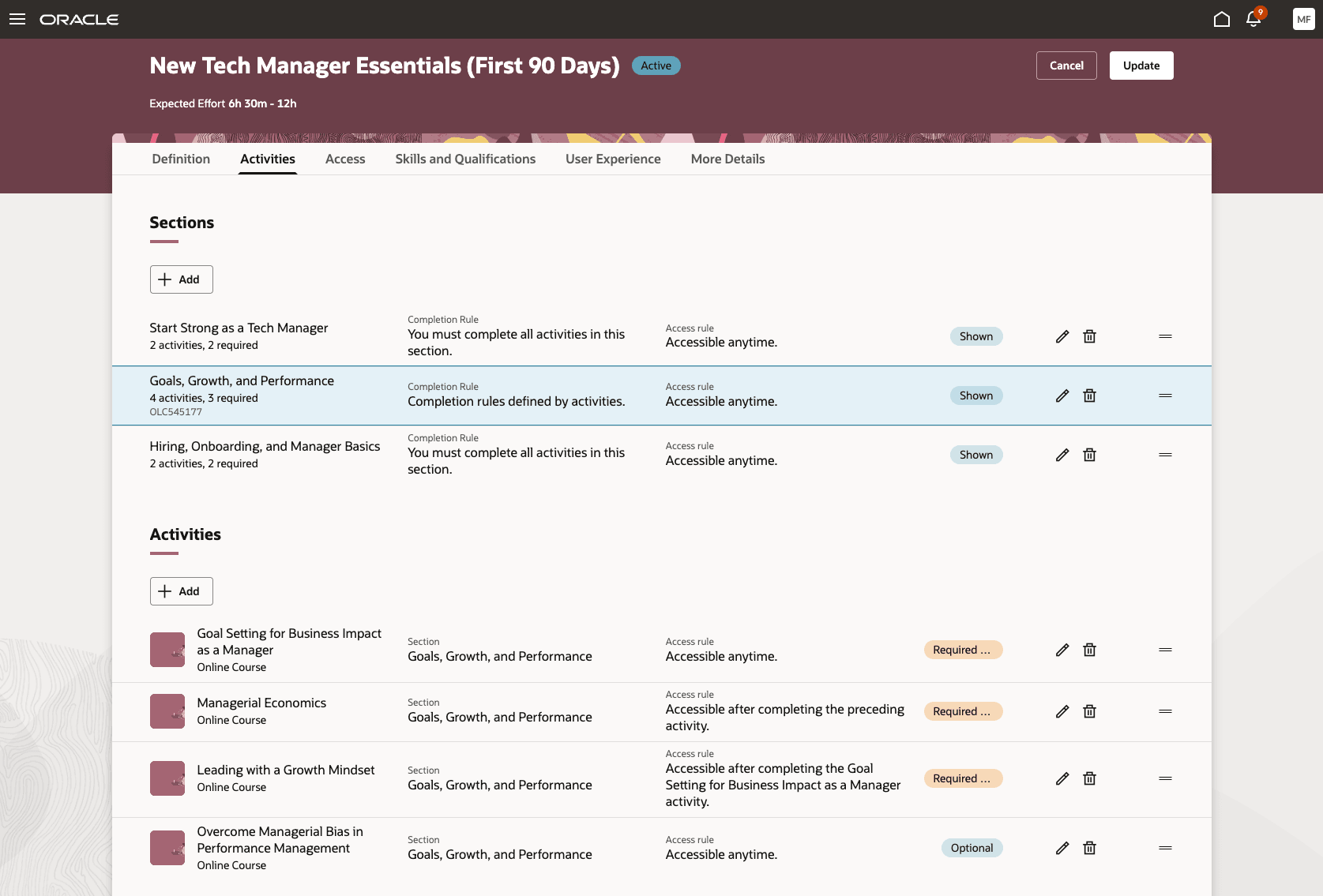
Unified Activities Tab: Visual Overview of Learning Path Content
The new Activities tab when creating or editing a learning path consolidates all included Sections and Activities into a single, interactive listing. You can quickly see the flow, dependencies, and requirements for the learning path. Visual indicators highlight completion and access rules, making path requirements and optional elements easy to grasp. Supported activity types now include events, courses, and self-paced learning.
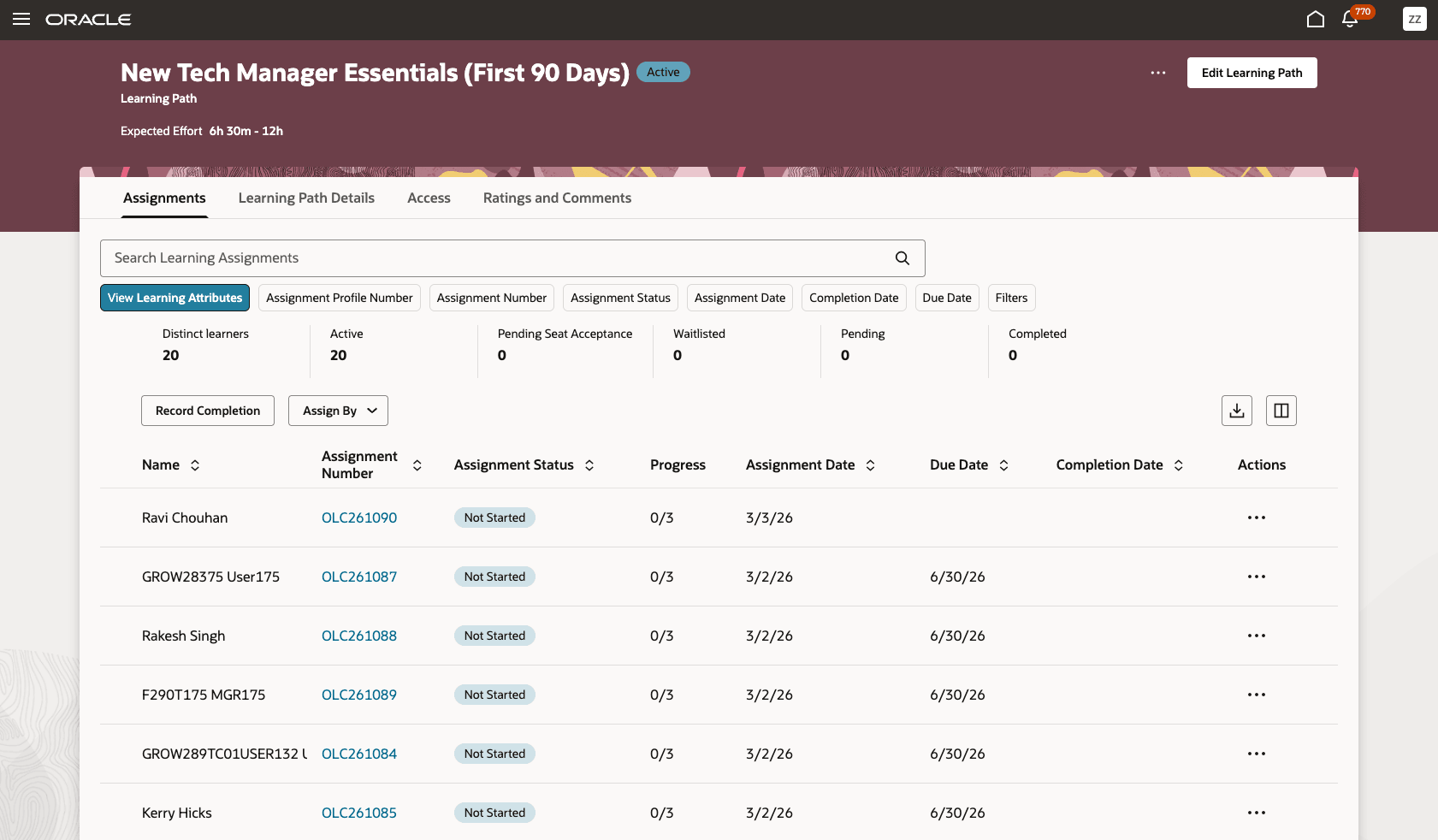
Assignments Tab: Manage and Track Learner Progress Instantly
The Assignments tab gives you a real-time overview of all learner assignments related to a learning path. In this streamlined view, you can review which workers are enrolled, track completion statuses, view key dates, and monitor outstanding actions. Filters and search let you focus on specific learners or assignment states, supporting timely interventions and effective oversight of your training initiatives. For organizations, this ensures no learner falls behind and that compliance and professional development goals are always within reach.
Redwood learning paths introduce significant improvements and new features compared to the legacy specializations experience:
-
Modern Redwood user interface: Experience a consistent and intuitive interface for both administrators and learners. Use a step-by-step guided flow for creating and editing learning paths with tabs for definition, details, skills and qualifications, activities, access, and more.
-
Comprehensive activities management: Visually organize sections and activities, set dependencies, and define completion and access rules. Get inline warnings for conflicting or circular dependencies to help you design effective learning journeys.
-
Advanced skills and qualifications assignment: Assign outcome skills and add prerequisites and credentials with a dedicated tab. Enjoy visual skills river mapping for clearer progress tracking.
-
Flexible and rich attribute support: Specify the author, instructor, coordinator, and publisher directly. Enhance learning paths with cover art, trailers, and descriptive flexfield support for more flexibility.
-
Configurable catalog access and audience: Set catalog visibility dates, specify private or open scope, and select the intended audience. Manage enrollment and withdrawal rules precisely.
-
Renewals and completion validity: Enable renewals for completed learning paths and set requirements for renewals and validity periods so learners stay current.
-
Celebratory and certification experiences: Celebrate achievements with built-in features, including Share your success options. Configure completion certificates for easy download.
-
Enhanced ratings, comments, and conversations: Foster collaboration with integrated ratings and feedback. Use conversation tabs for learners and catalog specialists to connect and share ideas.
-
GenAI content assistance: Use Oracle Generative AI to generate learning path descriptions and summaries that help make content creation quick and straightforward.
-
Reconciliation workflow: Get visual guidance while editing active learning paths. Updates run smoothly so there’s no disruption to ongoing learner assignments or data loss.
-
Improved security and role-based privileges: Maintain strict control across administration, creation, editing, deactivation, and learner assignment.
Redwood learning paths help catalog managers create high-impact, clear, and visually engaging learning journeys faster and with greater confidence. Learners get more structured and actionable information, supporting improved skill development, progression, and satisfaction. Overall, organizations benefit from increased training efficiency, engagement, and reporting accuracy.
Steps to enable and configure
- If you haven't already, enable these features to use this feature:
- Set the site-level value to Yes for the ORA_WLF_ENABLE_REDWOOD_LEARNING_PATHS profile option.
- Go to Setup and Maintenance > Tasks panel > Search > Manage Administrator Profile Values.
Tips and considerations
- All of these advancements are either new or significantly enhanced in the Redwood experience compared to previous specialization and learning path features.
- For optimal display in the learning catalog, fill out the new fields for existing specializations, such as learning format, expected effort, and collaborators.
- When updating audience settings, review your visibility controls as you switch to user groups.
- Events and self-paced learning items cannot be part of a learning path and a course simultaneously.
Key resources
For more details about the unified learning catalog and catalog administration, see these documents:
- Unified Learning Catalog Administration and Access Control feature in the release 25D What's New
- Redwood Catalog Administration Series post on customer connect.