Configurable Weekend Duration in Schedule Generation Profiles
Administrators can define the weekend on a schedule generation profile as a single day, 2 consecutive days, or 3 consecutive days.
When a single-day weekend is configured, weekend rules use only that day. Weekend-worked counts and weekend-hours calculations also count only the configured weekend day.
Schedule validation uses the configured weekend definition for weekend-related rules, including minimum and maximum weekend duration and occurrence rules.
In the schedule manager view, the configured single-day weekend is highlighted in day, week, and 2-week views. When schedule managers add open shifts for weekends or work weeks, the schedule generation profile weekend definition determines where shifts are created.
Example Scenario
A manufacturing site treats Sunday as the only weekend day. The schedule generation profile can define Sunday as the weekend.
Support organizations, such as manufacturing teams, that define weekend as just 1 day. Schedule administrators can configure schedule generation profiles to match actual operating practices and keep weekend-based scheduling behavior consistent.
Steps to enable and configure
This feature is ready to use.
To use a single-day weekend:
- Create or edit a schedule generation profile.
- Open the Schedule Plan tab.
- Define the weekend as a single day.
- Save the profile.
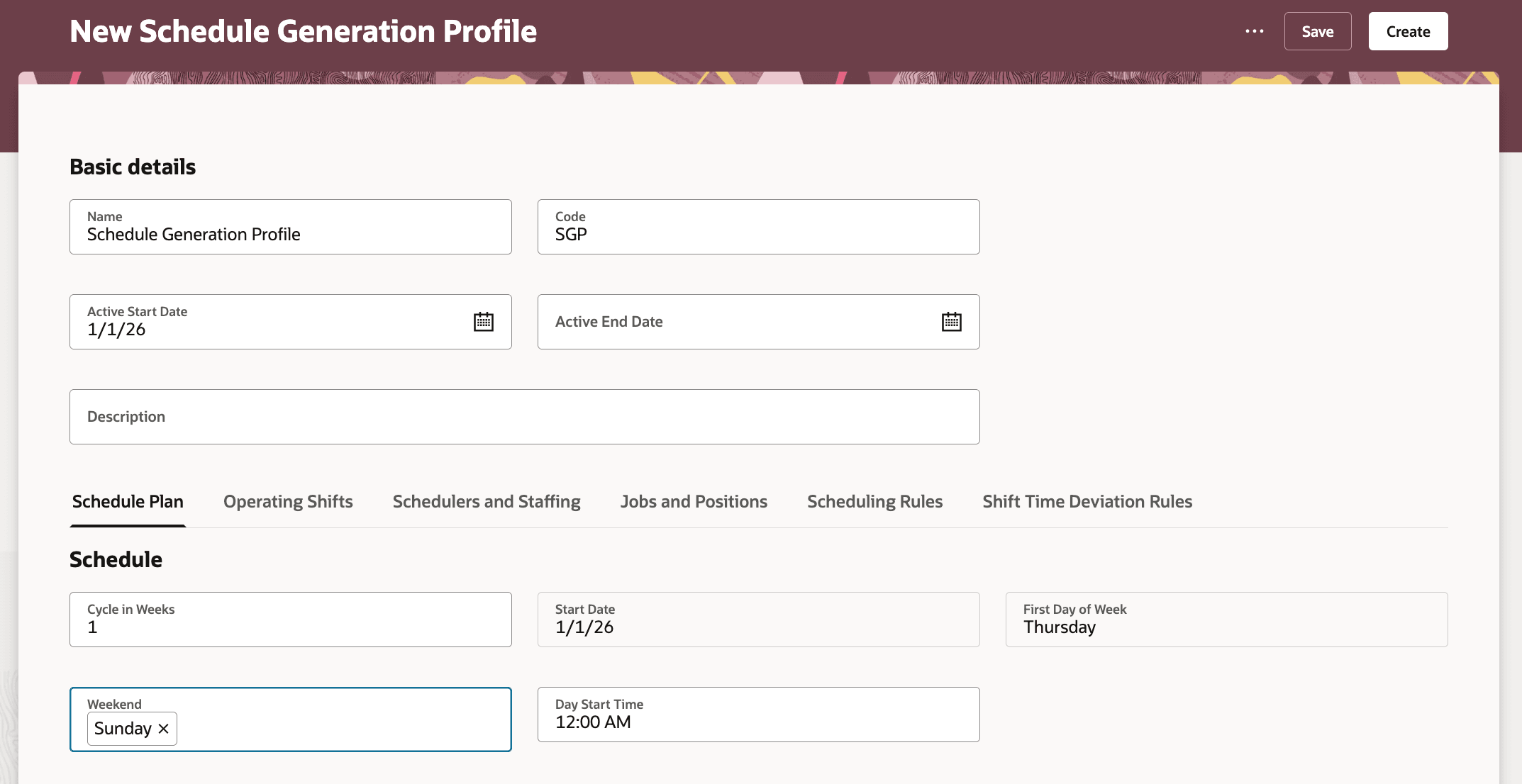
Schedule Generation Profile with Single-day Weekend
Tips and considerations
- Weekend days must be consecutive.
- You can configure up to 3 weekend days.
- Nonconsecutive weekend days raise a validation error.
- More than 3 weekend days raise a validation error.
- Weekend rules use the schedule generation profile weekend definition.
- A single-day weekend changes weekend-worked counts and weekend-hours calculations.
- When open shifts are added for Work Week, shifts are created on all days except the configured weekend day.
Key resources
- 24B: Schedule Generation Profile Introduction
- 26A: Schedule Generation Profiles Enhancements
- 26B: Schedule Generation Profiles Enhancements
- Schedule Generation Profiles for Workforce Scheduling
Access requirements
Schedule administrators and schedule managers need these aggregate privileges to work with schedule generation profiles.
| Privilege | Code | Description |
|---|---|---|
|
Manage Schedule Generation Profiles by Schedule Administrator |
ORA_HTS_MANAGE_SCHEDULE_GENERATION_PROFILE_BY_ADMINISTRATOR |
Allows schedule administrators to manage schedule generation profiles. |
|
View Schedule Generation Profiles by Schedule Administrator |
ORA_HTS_VIEW_SCHEDULE_GENERATION_PROFILE_BY_ADMINISTRATOR |
Allows schedule administrators to view schedule generation profiles. |
|
View Schedule Generation Profiles by Schedule Manager |
ORA_HTS_VIEW_SCHEDULE_GENERATION_PROFILE_BY_MANAGER |
Allows schedule managers to view schedule generation profiles. |