Fairness Rules and Coverage Priority for Schedule Generation
Administrators can define fairness rules in scheduling rule sets to help distribute selected shift occurrences more equitably across eligible workers. A fairness rule can be based on shift type family, shift type, or shift category, and can apply over a week or schedule period.
Schedule generation applies fairness during auto assignment and open shifts assignment. Fairness is a soft rule, so hard scheduling rules and workload coverage remain higher priorities.
Schedule managers can also select a coverage priority when they create or regenerate a workforce schedule. The selected priority determines how schedule generation handles situations where demand can’t be perfectly matched.
Coverage priority options let managers:
- Minimize overstaffing while risking undercoverage.
- Balance overstaffing and understaffing.
- Minimize understaffing while risking overcoverage.
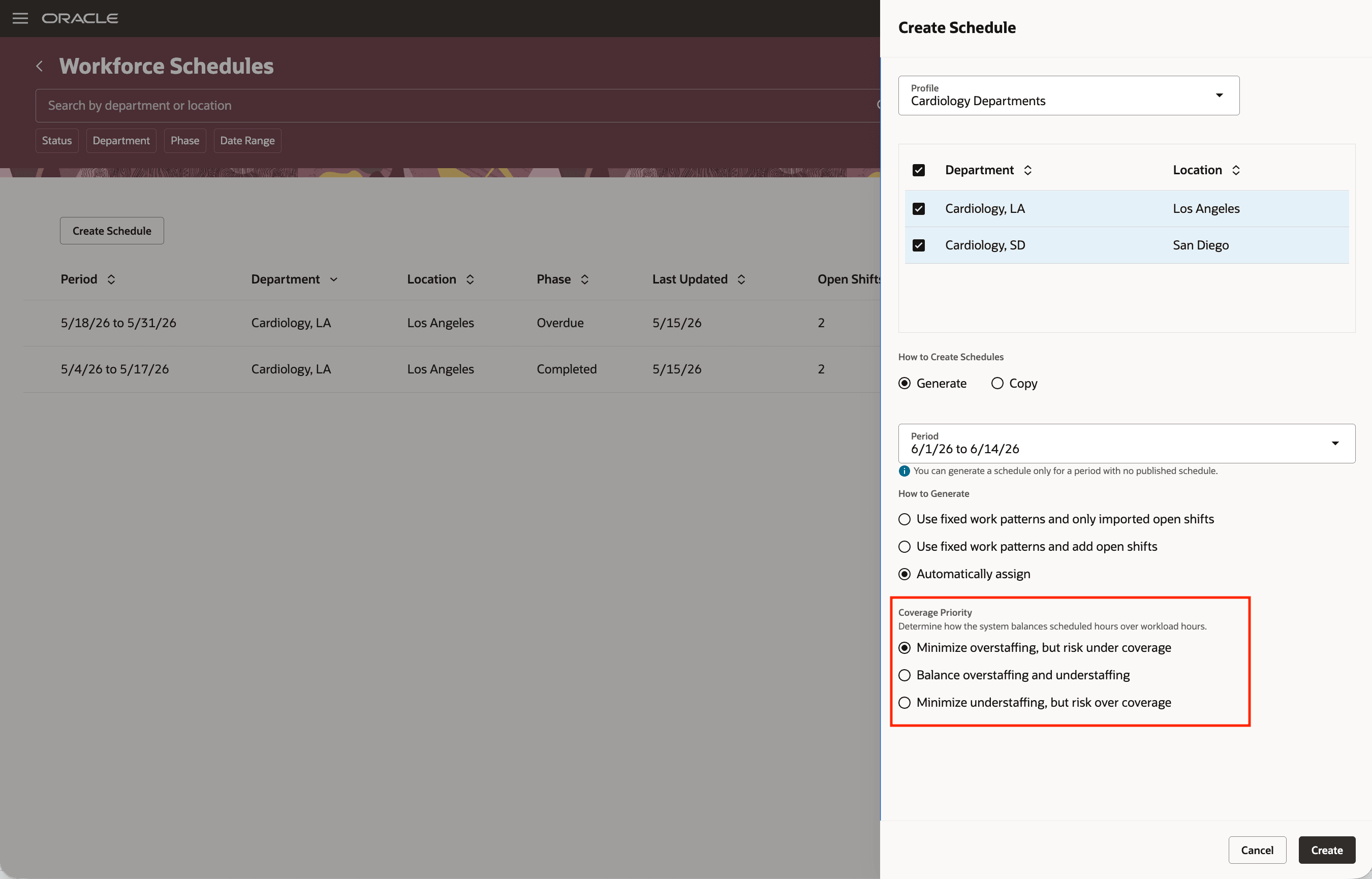
Select Coverage Priority When Generating Schedule
Example Scenarios
- Night-shift equity: A manager wants night shifts shared more evenly across eligible employees. A shift category-based fairness rule helps avoid concentrating night assignments on the same workers.
- On-call equity: A manager wants on-call shifts shared more evenly across eligible employees. A shift type-based fairness rule helps distribute on-call assignments more consistently over the schedule period.
- Coverage during peak demand: A manager selects the minimize understaffing option when covering demand during busy periods is more important, even if the schedule includes extra hours.
- Control of extra scheduled hours: A manager selects the minimize overstaffing option when controlling extra scheduled hours is more important than fully covering every time slot.
Help schedule managers balance equitable shift distribution, coverage needs, and extra scheduled hours. Administrators can model fairness policies in scheduling rule sets, while managers can choose the coverage priority that best matches business needs when demand can’t be perfectly matched.
Steps to enable and configure
To configure fairness rules:
- Create or update a Workforce Management rule set for scheduling.
- Add one or more fairness rules.
- For each fairness rule, select the shift classification and period that determine which shift occurrences should be distributed equitably.
- Save the rule set.
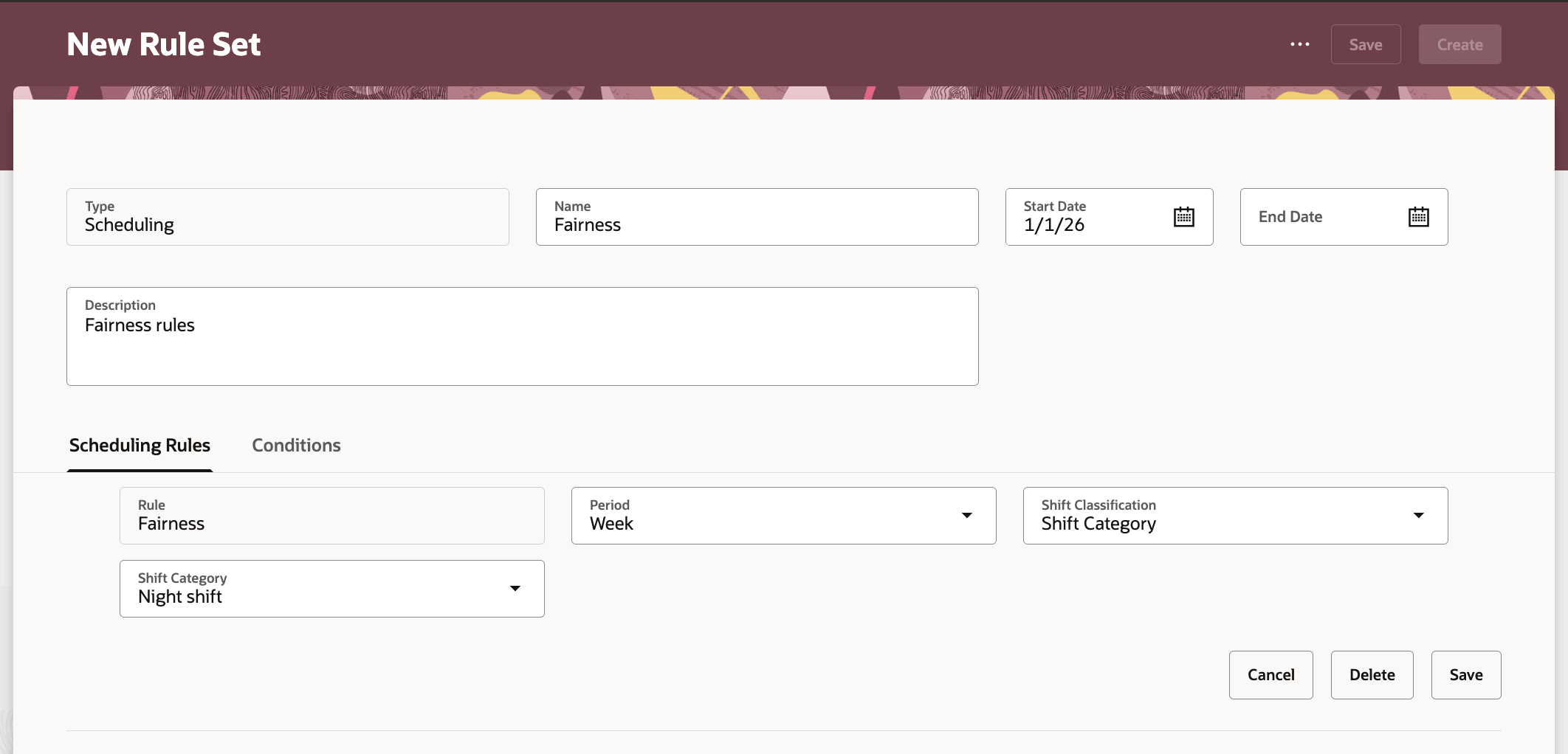
Fairness Rule on Night Shifts over the Week
Tips and considerations
- Fairness is a soft rule. Hard scheduling rules and workload coverage take priority over fairness.
- Manual fixations are counted as occurrences when schedule generation evaluates fairness.
- Fairness in this release is based on shift occurrences.
Key resources
For more information about generating and validating workforce schedules, see these What's New features:
- Release 24B: Generate Workforce Schedule Introduction and Validate Workforce Schedule Introduction
- Release 24C: Generate and Validate Workforce Schedule Enhancement
- Release 24D: Generate Workforce Schedule Enhancement
- Release 25A: Generate and Validate Workforce Schedule Enhancements
- Release 25B: Generate Workforce Schedule Enhancements
- Release 25C: Generate and Validate Workforce Schedule Enhancements
- Release 25D: Generate and Validate Workforce Schedule Enhancements and Automated Workforce Schedule Generation and Publication
- Release 26A: Open Shifts Automatic Assignment Introduction
- Release 26B: Open Shifts Automatic Assignment Enhancements
For more information about scheduling rules and workforce management rule sets, see these What's New features:
- Release 25A: Scheduling Rule Sets Introduction
- Release 25B: Scheduling Rule Sets Enhancements
- Release 25C: Scheduling Rule Sets Enhancements
- Release 25D: Scheduling Rules Enhancements
- Release 26A: Scheduling Rules Enhancements
- Release 26B: Workforce Management Rule Sets Enhancements
Access requirements
Users need these privileges to use workforce labor optimization features and manage scheduling rule sets.
|
Privilege name |
Code |
Description |
|
Use Workforce Labor Optimization |
HTS_USE_WORKFORCE_LABOR_OPTIMIZATION |
Allows use of workforce labor optimization features. |
|
Manage Scheduling Rule Sets |
HTS_MANAGE_SCHEDULING_RULE_SETS |
Allows users to manage scheduling-type rule sets for workforce scheduling. |
Administrators also need access to the setup task for managing Workforce Management rule sets to configure fairness rules.