Open Shifts Automatic Assignment Introduction
You can now assign existing open shifts to qualified, available workers directly from the Workforce Schedule page when a schedule is in progress. This automatic assignment follows established work patterns, job roles, team member qualifications, scheduling guidelines, approved absences, holidays, and worker unavailability. Already assigned shifts are not affected, and no other shifts are created—only the open, existing shifts are filled in. This assignment supports both library-based and custom open shifts. After open shifts are assigned, managers see an onscreen confirmation and get notified that their scheduling update is complete.
Here are some of the top practical scenarios where this new assignment feature is especially useful:
- After self-scheduling: Fill any open shifts that remain after employees have claimed their own through self-service.
- Call-out sweeps: Rapidly assign open shifts when last-minute absences or call-outs occur.
- Coverage adjustments: Smoothly finalize scheduling when changes in staffing levels leave shorthanded periods in the roster.
- Mixed shift assignments: Automatically assign both work and on-call open shifts to the right workers, always checking skills and other business rules.
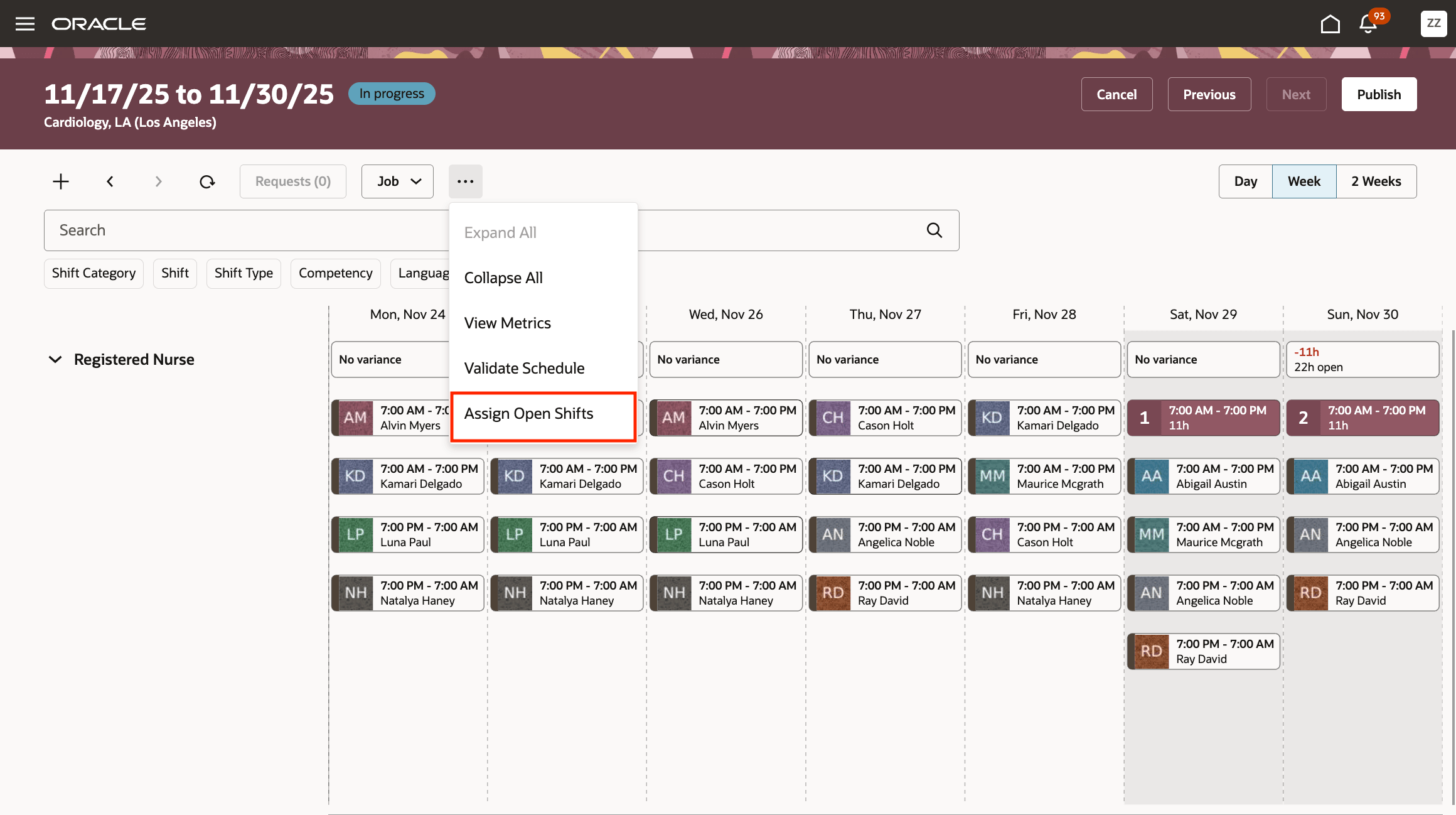
Assign Open Shifts from Workforce Schedule

Assign Open Shifts In-Progress Banner on the Workforce Schedule

Assign Open Shifts Success Banner on the Workforce Schedule
This automated approach reduces the time and manual effort required to fill open shifts, keeps existing assignments intact, and maintains workforce coverage—all while helping ensure labor cost control and rule compliance.
Steps to enable and configure
You need to configure security. See the Access Requirements section.
Tips and considerations
-
Assignment scope and behavior
- Assignments only fill existing open shifts; no new shifts are created and previously assigned shifts remain unchanged.
- Both standard (library) shifts and custom open shifts are included in the assignment process when all requirements are met.
- Assignments may occur even when demand is fully met (potentially overstaffed); deviation allowances do not apply.
-
Rules and eligibility
- All relevant rules are honored: staffing patterns, full-time equivalent permissions, job role, duration, minimum rest, number and length of shifts, qualifications, and absences.
- Public holidays and approved absences prevent assignments during those periods, while pending absences get checked according to rules.
- On rest or partial rest days, the tool avoids assignment if possible, but may fill if there’s no reasonable alternative, still aligning with business rules.
- The Assign Open Shifts option appears only for in-progress schedules.
Key resources
For more information about workforce schedules generations, see these What's New features:
- Release 24B: Generate Workforce Schedule Introduction and Validate Workforce Schedule Introduction
- Release 24C: Generate and Validate Workforce Schedule Enhancement
- Release 24D: Generate Workforce Schedule Enhancement
- Release 25A: Generate and Validate Workforce Schedule Enhancements
- Release 25B: Generate Workforce Schedule Enhancements
- Release 25C: Generate and Validate Workforce Schedule Enhancements
- Release 25D: Generate and Validate Workforce Schedule Enhancements
For more information about alert notifications, see Alert Notifications for Workforce Scheduling
Access requirements
This privilege gives access to automatically assign open shifts:
| Privilege Name | Code | Description |
|---|---|---|
|
Use Workforce Labor Optimization |
HTS_USE_WORKFORCE_LABOR_OPTIMIZATION |
Allows use of workforce labor optimization features. |