Manage Journeys with AI Assistance
In continuation of the Manage Journeys with AI Assistance feature introduced in Release 26A, we have further enhanced the Journeys Assistant to manage journeys more effectively. The enhanced experience converts the existing Journeys Assistant supervisor agent to a workflow. This new workflow agent includes all the capabilities of the existing supervisor agent. It leverages advanced large language models (LLMs) to understand your natural-language requests and responds with clear, actionable answers tailored to your organization's policies.
Note: The existing Supervisor Agent template will no longer be supported. Instead, you can use the Journeys Assistant workflow agent template.
Here are a few points to consider:
- If you are currently using a copy of the Release 26A agent, you can continue using it without disruption. However, it will continue to support self-service functionality only.
- Journeys Assistant is a new, separate workflow agent that extends journey management capabilities, enabling broader and more efficient handling across the organization.
- This enhancement gives greater flexibility by allowing you to either continue with the existing self-service model or adopt the enhanced workflow agent.
With the Journeys Assistant, you can make use of these capabilities:
-
Search for journey related information from the Team Journeys or Organization Journeys tabs. For example, you can search for the following information:
-
Open, completed, or overdue journeys.
-
The number of employee tasks or your tasks.
-
All journeys for a person.
-
Tasks in a specific journey.
-
Onboarding journeys for your team.
-
Tasks for an employee in an onboarding journey.
-
Specific journey for a person.
-
Tasks pending in a specific journey.
-
Employee tasks due today for onboarding journey.
-
Employee tasks due in 3 days for onboarding journey.
-
Overdue onboarding journeys for my direct reports.
-
-
Navigate using a deep link to the pages where they can view and update their journey information.
Here's some benefits of using the Journeys Assistant instead of the UI:
- Provides access to relevant resources through a Retrieval-Augmented Generation (RAG) tool.
- Uses LLMs for natural-language understanding which includes summarizing journey or task status, identifying overdue or upcoming tasks, and quickly aggregating information across teams or individuals.
- Returns concise summaries with deep links to the exact UI pages, removes the learning curve for new or infrequent users, minimizes training, and manual filtering.
- Helps managers and HR teams tracking journey progress to quickly find information tailored to their roles, reporting structure, teams, and organizational context.
In this example, we created an AI Agent named Journeys Assistant from the preconfigured template. The employee has asked these questions:
- What are the overdue onboarding journeys for my direct reports?
- Show open enterprise onboarding journeys in the organization
- List the open journeys for person number 8153757
- List tasks in the onboarding journey assigned to Ravi Chouhan
In response to each question, the agent responds with relevant details and includes a link to the page where the employee can view and edit the information.
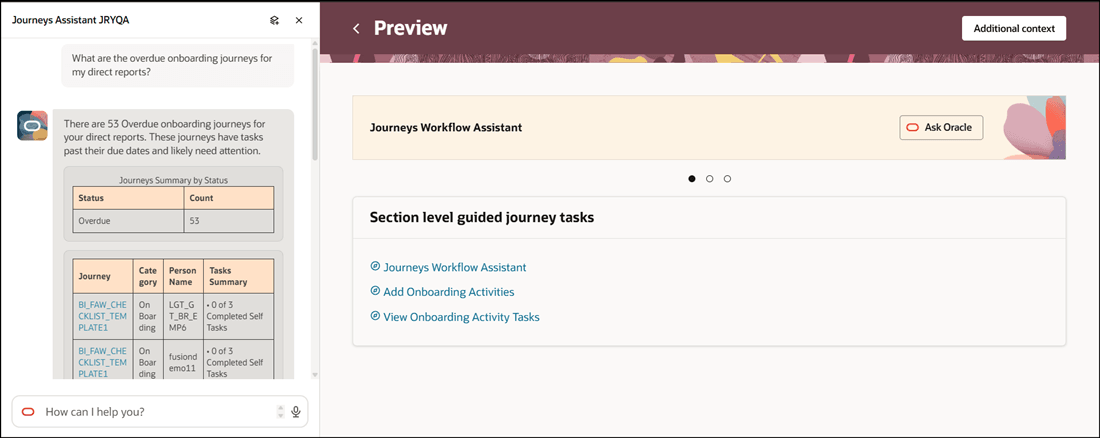
Prompt to Display Overdue Onboarding Journeys for Direct Reports
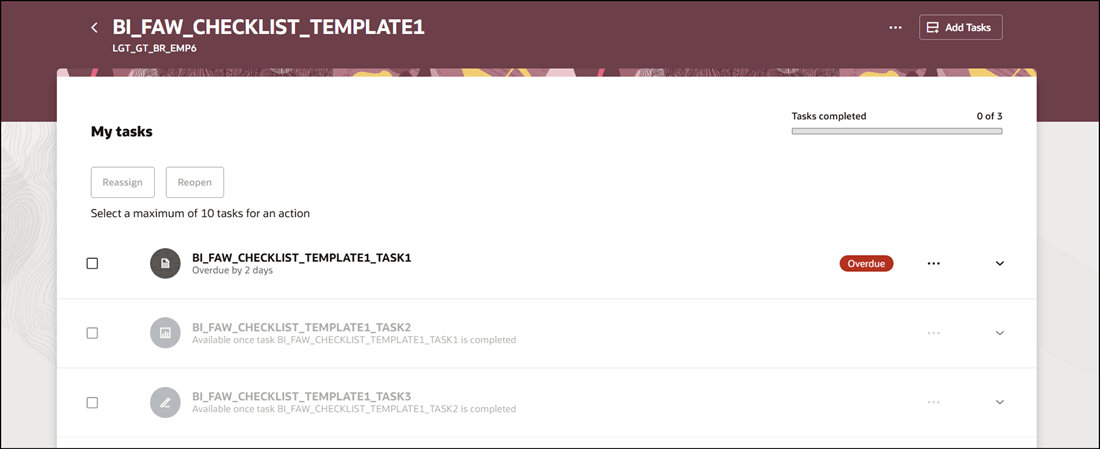
Click on Deep Link in Response to go to Specific Journey Task Page
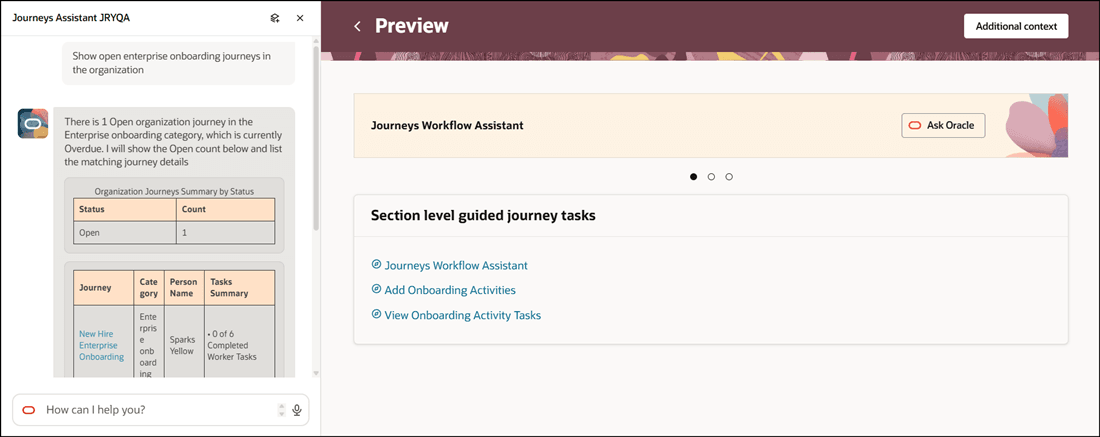
Prompt to Display Open Enterprise Onboarding Journeys in Organization
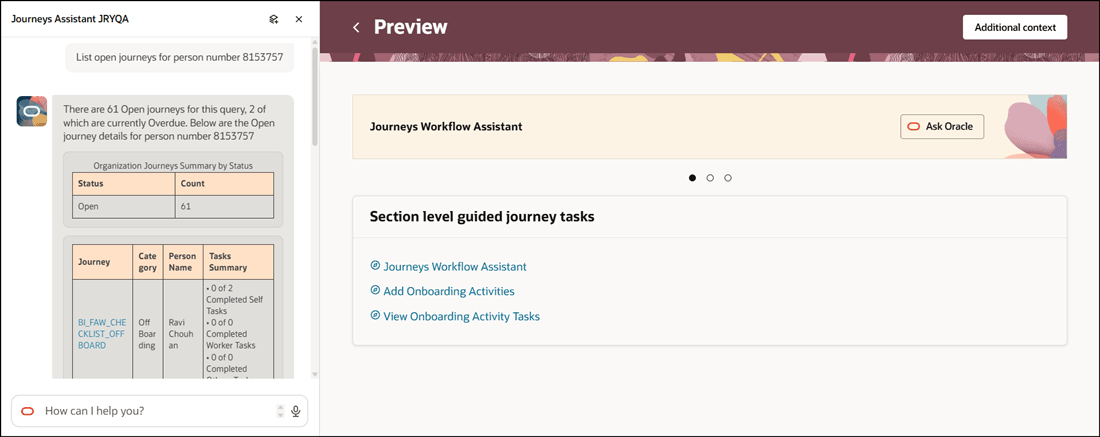
Prompt to Display Open Journeys for Person Number
- Helps managers and HR teams tracking journey progress to quickly find information tailored to their roles, reporting structure, teams, and organizational context.
Enhance the existing Journeys framework by providing proactive support, personalized guidance, and efficient access to information.
Steps to enable and configure
- Your environment must have certain necessary configurations. Ask your help desk to contact Oracle Support, who can verify what your environment has and address any gaps. For more information, see FAQ2521 on My Oracle Cloud Support.
-
Set the Enable Security Console External Application Integration (ORA_ASE_SAS_INTEGRATION_ENABLED) profile option to Yes and enable permission groups for the appropriate roles. See Access Requirements for AI Agent Studio.
-
Add To Insight is a preconfigured template. You need to create your own agent using the preconfigured template.
-
To learn how to set up AI agents, see Create AI Agents Using Preconfigured Agent Team Templates.
-
Tips and considerations
-
This feature only works when Oracle Search for Journeys is enabled.
-
You can search journeys or tasks for my team, direct reports, or organization. This table shows for whom the data will be fetched for based on the criteria.
Criteria Audience My team All reports Direct reports Only direct reports No criteria specified Entire organization Controlling what information the agent can return
-
What is honored: Role-based data security (RBAC). Users only see the data that their role permits.
-
What’s not honored: Localization rules and your own business rules in Visual Builder Studio are not enforced by the Agent.
-
What's not included
-
This version of the template provides capability to retrieve, but not edit, the journey information. However, the agent provides deep links to the pages where the employee can update the information, if they have the security to do so.
Key resources
For more information, refer to these resources:
Access requirements
- The agents you can view depend on the roles and privileges assigned to you. To access this agent, your role must be explicitly granted access to it by an AI Studio Administrator. See How can I give users access to AI agents, and Access Requirements for AI Agent Studio.