Redwood: Synchronize and Notify When Formula Changes Impact Process Manufacturing Work Definitions
In this update, the Process Item Structure Changes to Work Definitions scheduled process is enhanced to support formula changes impacting process manufacturing work definitions. Changes are either automatically synchronized or in some scenarios, you may receive a notification to review the formula changes. You can use the embedded link in the notification to navigate to the impacted work definitions using the Redwood user experience to edit or create a work definition version.
Here are the scenarios where formula changes are automated and where a notification is sent:
- Automated
- Changes to referenced attributes from formula:
- Product: Basis, UOM Name, Product Yield and Quantity
- Ingredient: Basis, UOM Name, Yield, Quantity, Inverse Quantity and Contribute to Yield
- Adding an ingredient or a product and specifying a suggested operation sequence
- Changes to referenced attributes from formula:
- Notification is Sent
- Changes to the supply type of an ingredient or completion type of a product
- Adding an ingredient or a product and not specifying a suggested operation sequence
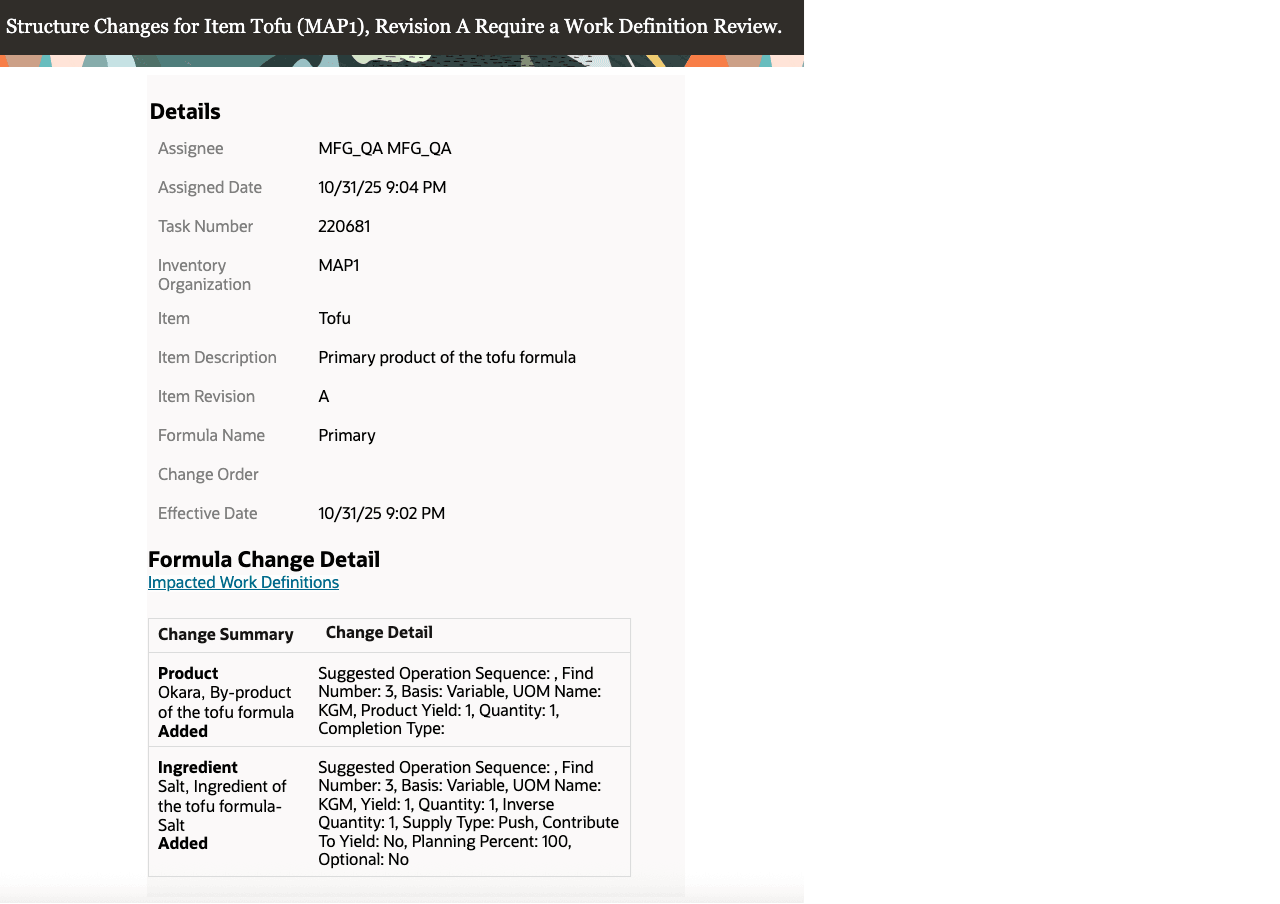
Redwood-Style Structure Changes Notification
Synchronizing changes in formula ingredients and products with process manufacturing work definitions ensures that both the formula and the related work definitions stay consistent. This alignment leads to accurate process manufacturing work orders for execution.
Steps to Enable and Configure
If you want to use the Create a Process Manufacturing Work Definition Based on a Formula feature, then you must opt in to its parent feature: Redwood: Create and Edit Formulas. If you’ve already opted in to this parent feature, then you don’t have to opt in again.
After you opt in, changes to the formulas referenced in the process manufacturing work definitions work as described above. There are no additional steps required to receive the structure changes notifications.
Tips And Considerations
- Creating a process work definition based on formula is available only with the Redwood experience, which can be enabled using the profile option, Redwood Work Definitions Enabled.
- Only the Redwood-style structure changes notification supports formula changes.
- Refer to the 25D feature Create a Process Manufacturing Work Definition Based on a Formula.
- The same Process Item Structure Changes to Work Definitions scheduled process is used for item structure changes and formula changes. Refer to the 25A feature Redwood: Navigate to Impacted Work Definitions in the Redwood User Experience Using the Item Structure Change Notification.
Key Resources
- Oracle Fusion Cloud SCM: Refer to the Using Manufacturing guide, available on the Oracle Help Center.
- Oracle Fusion Cloud SCM: Refer to the Implementing Manufacturing and Supply Chain Materials Management guide, available on the Oracle Help Center.
- Refer to the 25D feature Create a Process Manufacturing Work Definition Based on a Formula.
Access Requirements
Users who are assigned a configured job role that contains this privilege can access this feature:
- Receive Item Structure Change Notification for Work Definitions (WIS_RECEIVE_ITEM_STRUCTURE_CHANGE_NOTIFICATIONS_PRIV)
This privilege was available prior to this update.