Report Flow Schedule Completion Efficiently Using Industrial Handheld Devices
Production operators working on flow manufacturing production lines without dedicated computer access still need a way to report their completed work in real time. Using alternate, offline methods for production reporting may lead to delays in discovering or reporting production anomalies and exceptions that result in poor quality and waste.
Using industrial handheld devices, operators can now do the following:
- Report flow schedule completions:
- At the end of a production line.
- At an intermediate operation.
- Enter additional information, such as license plate number (LPN), lot, and serial number details for the product and its materials.
- Trigger label printing using third-party label printing solutions with Oracle Integration Cloud.
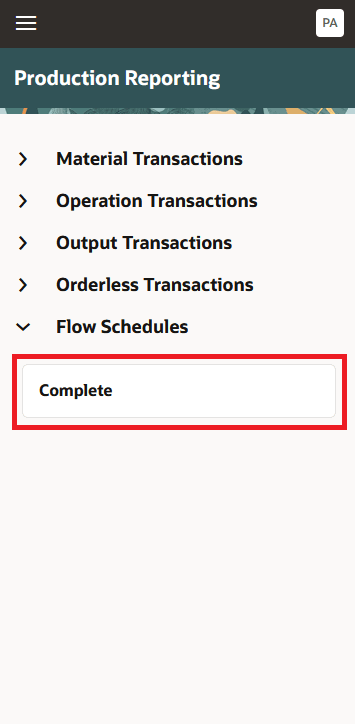
Action to Complete a Flow Schedule
Select a Production Line to report completion at the end of the line. The first flow schedule sequenced in the order of priority is selected by default, requiring the user to enter additional details such as serial or lot number.
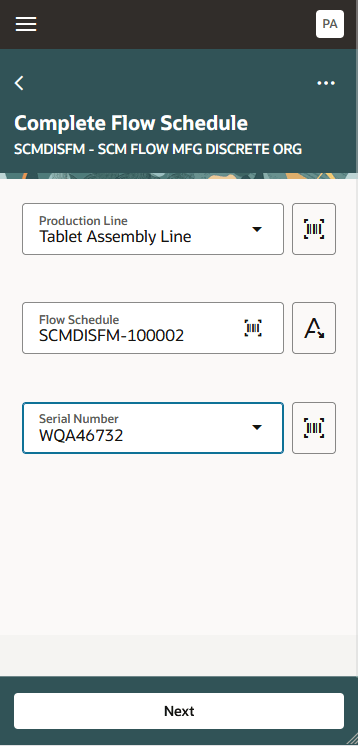
Select a Production Line to Report Completion at the End of the Line
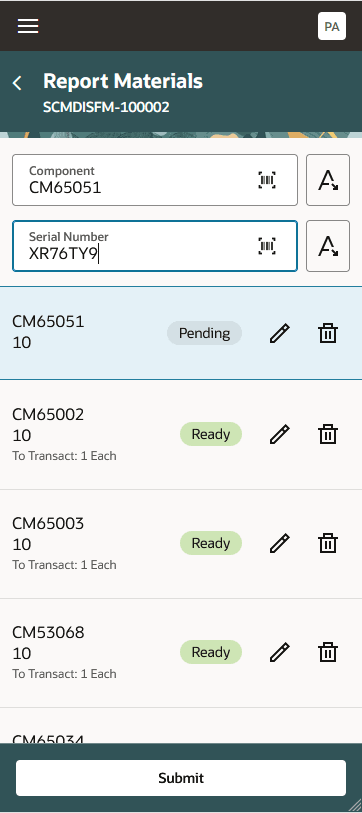
Enter Backflush Material Details
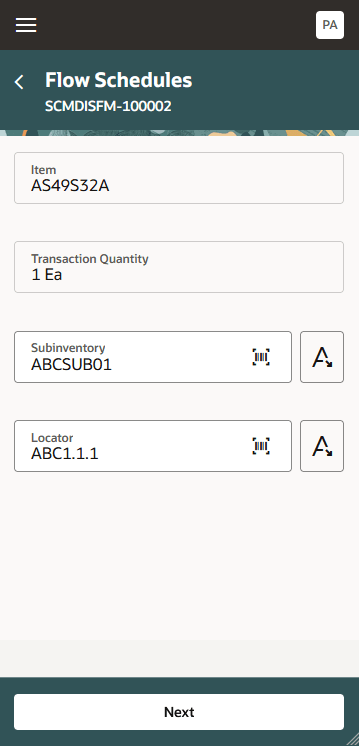
Enter or Edit Additional Details as Required
Note: Additional lot related attributes, LPN, and Print Label attributes are conditionally displayed.
Select a Production Line to report completion at an intermediate operation. The first flow schedule sequenced in the order of priority is selected by default.
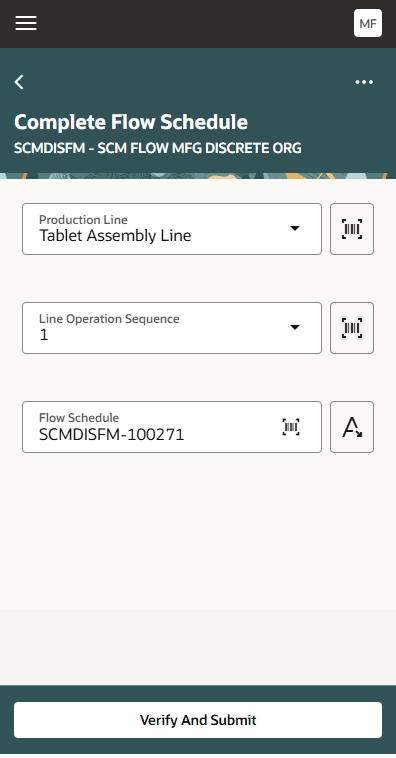
Select a Production Line and a Line Operation Sequence to Report Completion at an Intermediate Operation
Industrial handheld devices provide increased mobility, speed, and convenience for operators reporting flow schedule completions at production lines.
Here's the demo of these capabilities:
Steps to Enable and Configure
You don't need to do anything to enable this feature.
Tips And Considerations
- Reporting quality inspection results when completing flow schedules using industrial handheld devices is not supported at this time. Instead, you can use the 25B feature Inspect Flow Schedules at End of the Production Line that uses a Redwood page.
- Entering Descriptive Flexfield values for items, lots, and serials is not supported currently.
- As an alternative to the mobile transactions, you can also execute flow schedules using the Redwood UI. Refer to the 25A feature Execute Flow Schedules on a Production Line and the 25C feature Complete an Intermediate Operation for a Flow Schedule on a Production Line for more information. You can also the report flow schedule completions using the Work Order Material Transactions REST.
Key Resources
- Watch the Report Flow Schedule Completion Efficiently Using Industrial Handheld Devices demo.
- Oracle Fusion Cloud SCM: Refer to the Using Manufacturing guide, available on the Oracle Help Center.
- Oracle Fusion Cloud SCM: Refer to the Implementing Manufacturing and Supply Chain Materials Management guide, available on the Oracle Help Center.
Access Requirements
Users who are assigned a configured job role that contains these privileges and codes can access this feature:
- Manage Production Reporting Work Area (WIP_MANAGE_PRODUCTION_REPORTING_ WORK_AREA)
This privilege allows access to the Production Reporting work area to report production transactions using handheld devices and is a new privilege in this update.
Roles mapped to this privilege - Production Operator. - Execute Flow Schedules (WIP_EXECUTE_FLOW_SCHEDULES_PRIV)
These privileges were available prior to this update.