Redwood: Suggest Alternate Suppliers in Staged Documents Using AI
Use AI to suggest alternate suppliers from historical transactions when processing requisition lines into a purchase order using the Redwood experience. These suggestions are derived from past transactions such as purchase orders, purchase agreements, negotiation awards, responses, and invitations.
When you create a staged document, you can initiate the Suggest Alternate Supplier Using AI action to view supplier suggestions. The AI model identifies relevant suppliers for each staged document line by matching attributes such as item, line description, or category. Suggested suppliers are consolidated and presented for inclusion in the staged document.
Suppliers are ranked based on the number of staged document lines they can fulfill. Lines without supplier suggestions are grouped under Lines Not Covered for targeted review.
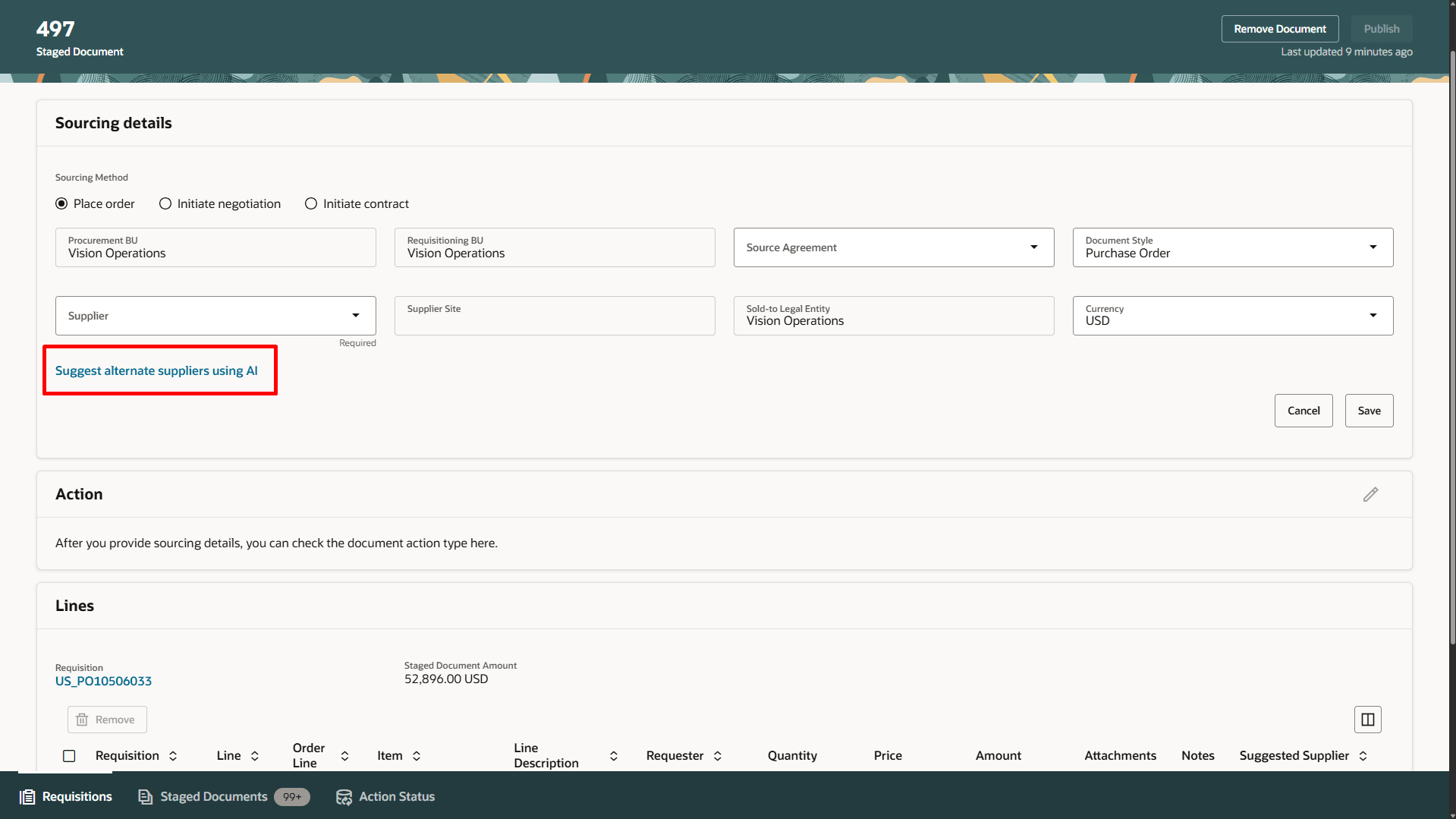
Add Suggest Alternate Supplier Using AI
Buyers can review a confidence rating for each suggested supplier. This rating is based on a similarity score that measures how closely staged document line attributes, such as item, description, and category, match a supplier’s historical transactions. The overall supplier confidence rating is derived from the highest line-level rating across the staged document lines.
By default, similarity score thresholds are set to the following numeric values:
- High: 80
- Medium: 60
- Low: 40
A similarity score of 80 or higher is High, a score from 60 through 79 is Medium, and a score from 40 through 59 is Low.
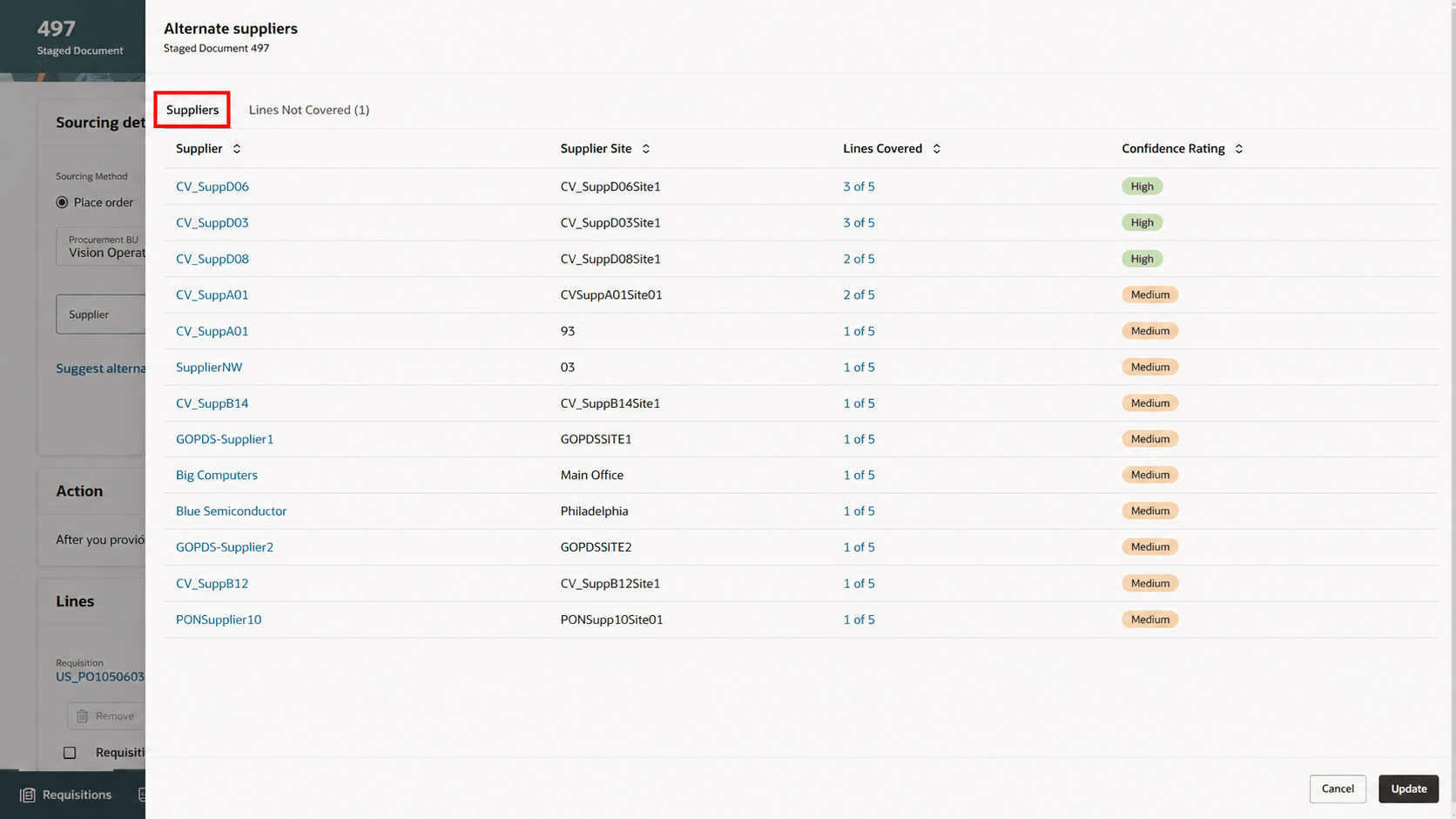
Supplier Suggestions Based on AI Model with Confidence Rating
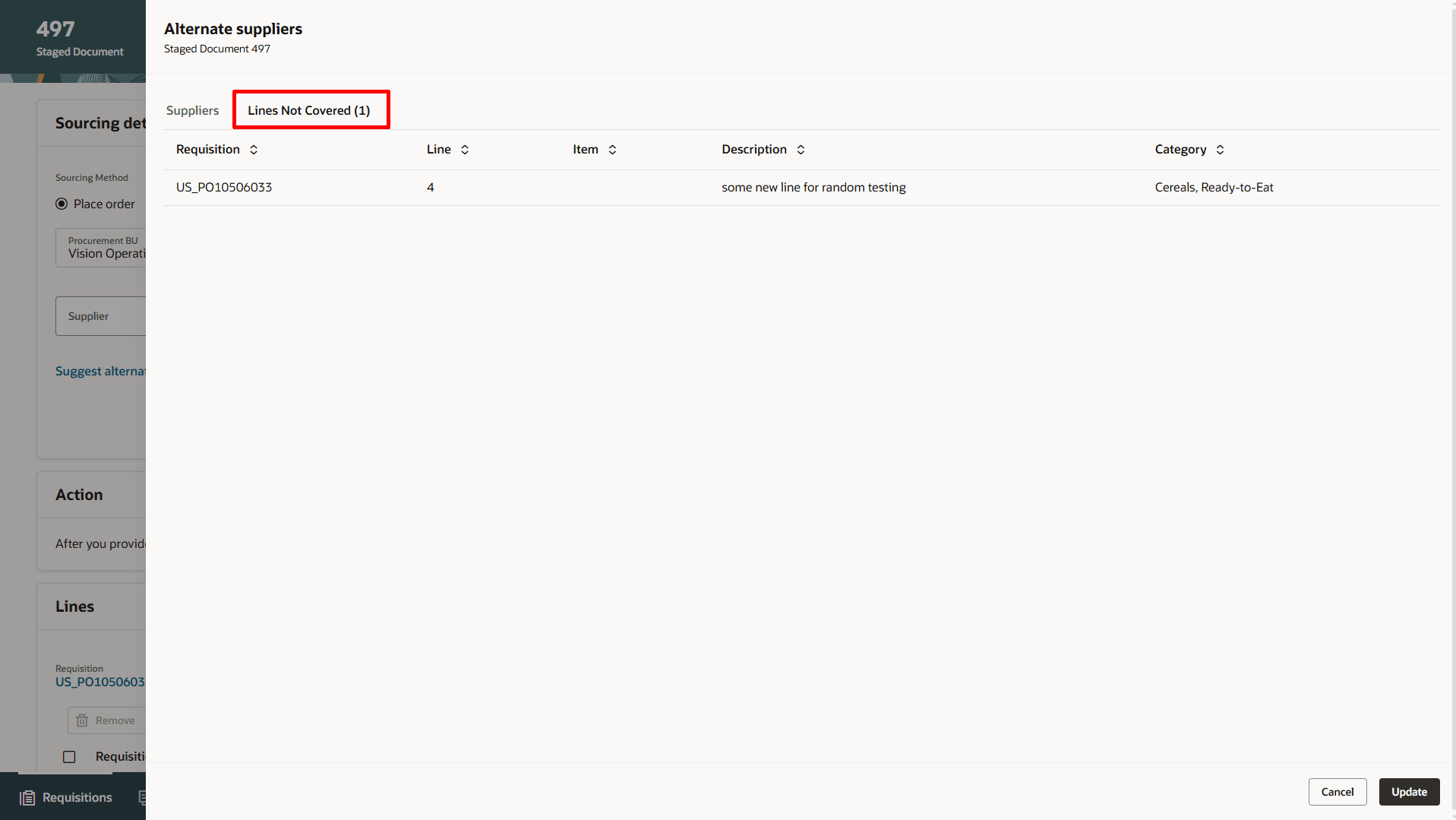
Staged Document Lines Not Covered by Any of the Suggested Suppliers
You can evaluate a suggested supplier by clicking the supplier name. Any staged document lines that a suggested supplier can't fulfill are shown under Lines Not Covered for quick review.
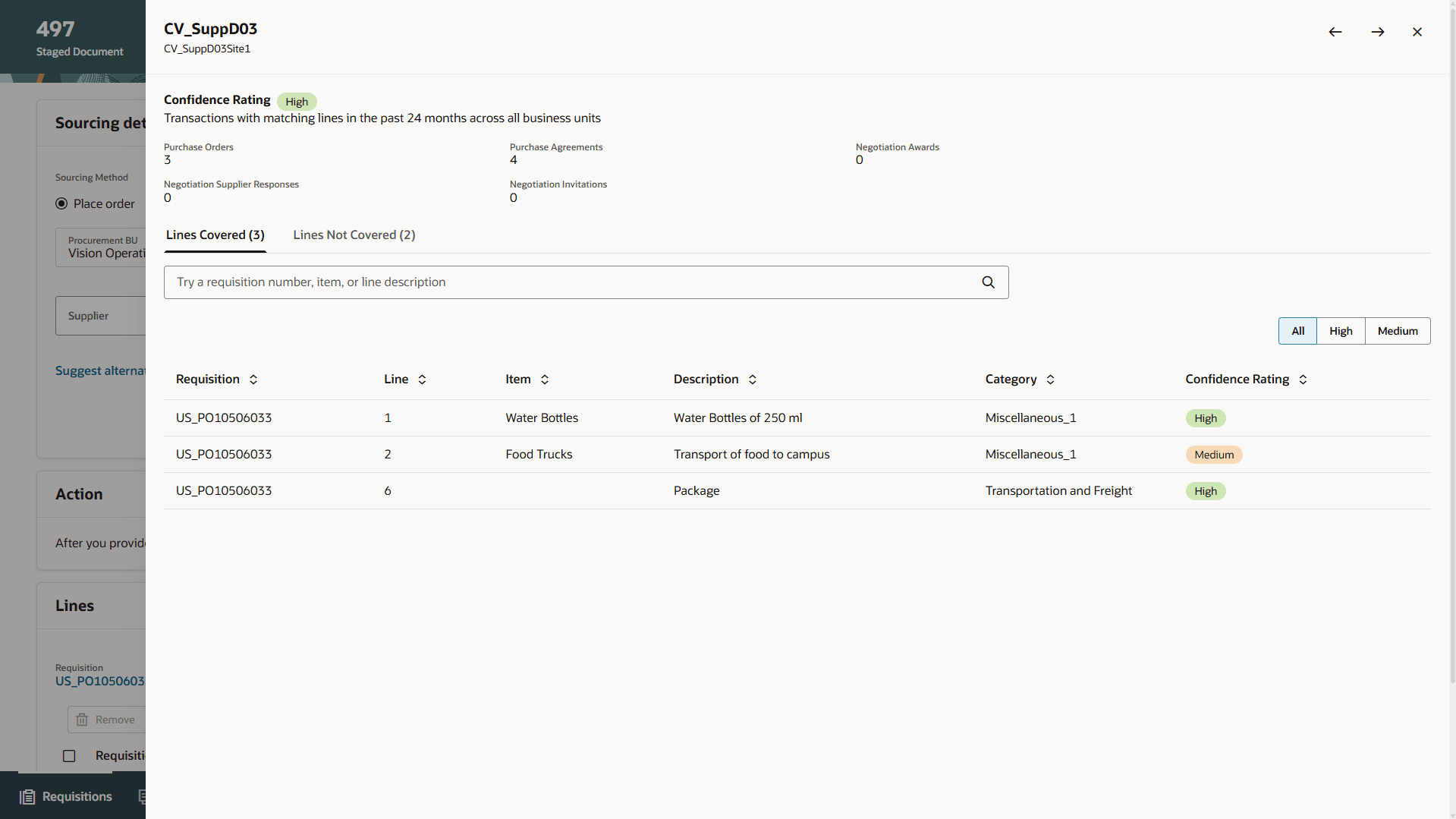
Review Details of the Suggested Supplier
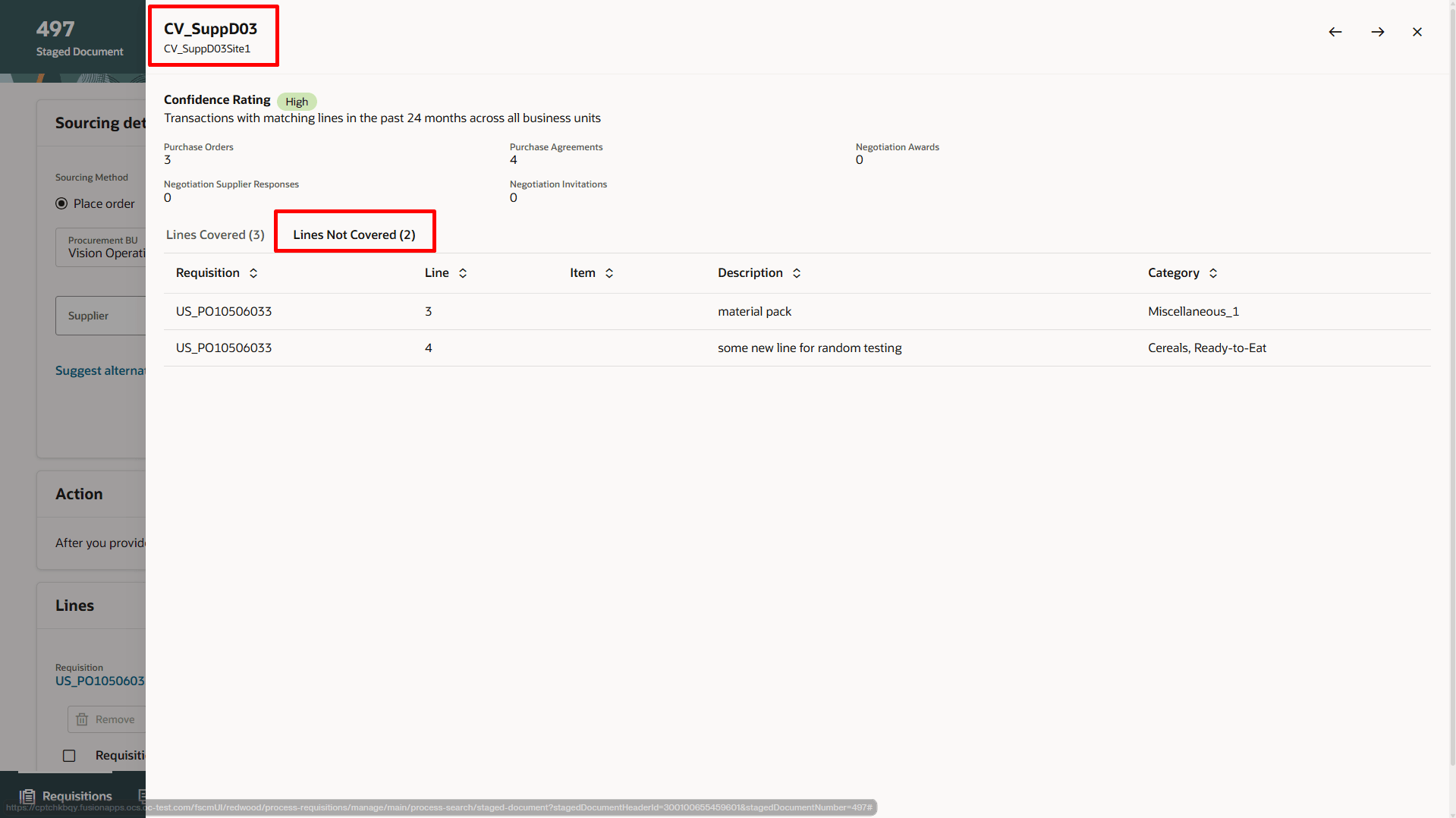
Staged Document Lines Not Covered by the Suggested Supplier
Steps to enable and configure
Use the Opt In UI to enable this feature. For instructions, refer to the Optional Uptake of New Features section of this document.
Offering: Procurement
- If you haven't enabled Redwood for Purchasing, see the Getting Started with Redwood in Purchasing topic on the SCM Resource Center in Customer Connect.
- Run the Prepare Smart Supplier Suggestions scheduled job to extract historical transactions and train the AI model to provide supplier suggestions. Consider scheduling this process to run periodically so the model can be refreshed as new approved purchasing document history becomes available.
- To adjust the default similarity thresholds, follow these steps:
- In the Setup and Maintenance work area, search and select the Manage Administrator Profile Values task.
- On the Manage Administrator Profile Values page, search for and select these profile option name or code:
- High AI Confidence Supplier Suggestions Threshold (ORA_PON_SUPPLIER_AI_HIGH_THRESHOLD)
- Medium AI Confidence Supplier Suggestions Threshold (ORA_PON_SUPPLIER_AI_MEDIUM_THRESHOLD)
- Low AI Confidence Supplier Suggestions Threshold (ORA_PON_SUPPLIER_AI_LOW_THRESHOLD)
- Set the profile options values between 1 and 100.
- Select Save and Close. Changes to the profile values take effect the next time users sign in.
Tips and considerations
- By default, the scheduled job extracts 24 months of historical transactions. You can modify this duration by updating the ORA_PON_SUPPLIER_AI_NUM_OF_MONTH profile option according to your business requirements. To update the duration, follow these steps:
- In the Setup and Maintenance work area, go to the Manage Administrator Profile Values setup task.
- Enter the ORA_PON_SUPPLIER_AI_NUM_OF_MONTH profile option code and search.
- Update the profile option value and save.
- If a supplier has at least one high-confidence match, the overall rating is High.
- If no high-confidence matches exist but at least one medium-confidence match is found, the overall rating is Medium.
- When configuring the similarity score threshold, enter a single numeric value from 1 to 100. For example, enter 80 to set the High confidence threshold. Do not enter text or a range, such as “80 and above” or "80–100".
Key resources
- For details on additional buyer capabilities available while processing requisition lines, see the Redwood: Use Additional Capabilities When Processing Requisition Lines as a Buyer, available in Oracle Fusion Cloud Procurement What's New, update 25C.
- For details on processing requisition lines using the Redwood user experience, refer to the Redwood: Search and Process Requisition Lines Using a Redwood Page, available in Oracle Fusion Cloud Procurement What's New, update 25B.
Access requirements
Users who are assigned a configured job role that contains this new privilege can run the ESS job:
-
Configure Smart Supplier Recommendations (PON_CONFIGURE_RECOMMEND_SUPPLIERS_AI_PRIV)