Redwood: View Competing Supplier Responses in Supplier Portal
Suppliers can now view all competing supplier responses in open and unsealed negotiations on a single page. Supplier users can access the All Responses page from negotiation details, response monitoring, or response details pages to review competing supplier responses.
They can view all response history for the negotiation, which includes; primary, alternate, revised, archived, disqualified, and surrogate responses. When suppliers view competing responses, the identity of other suppliers is hidden, which includes; supplier name, supplier site, and supplier contact.
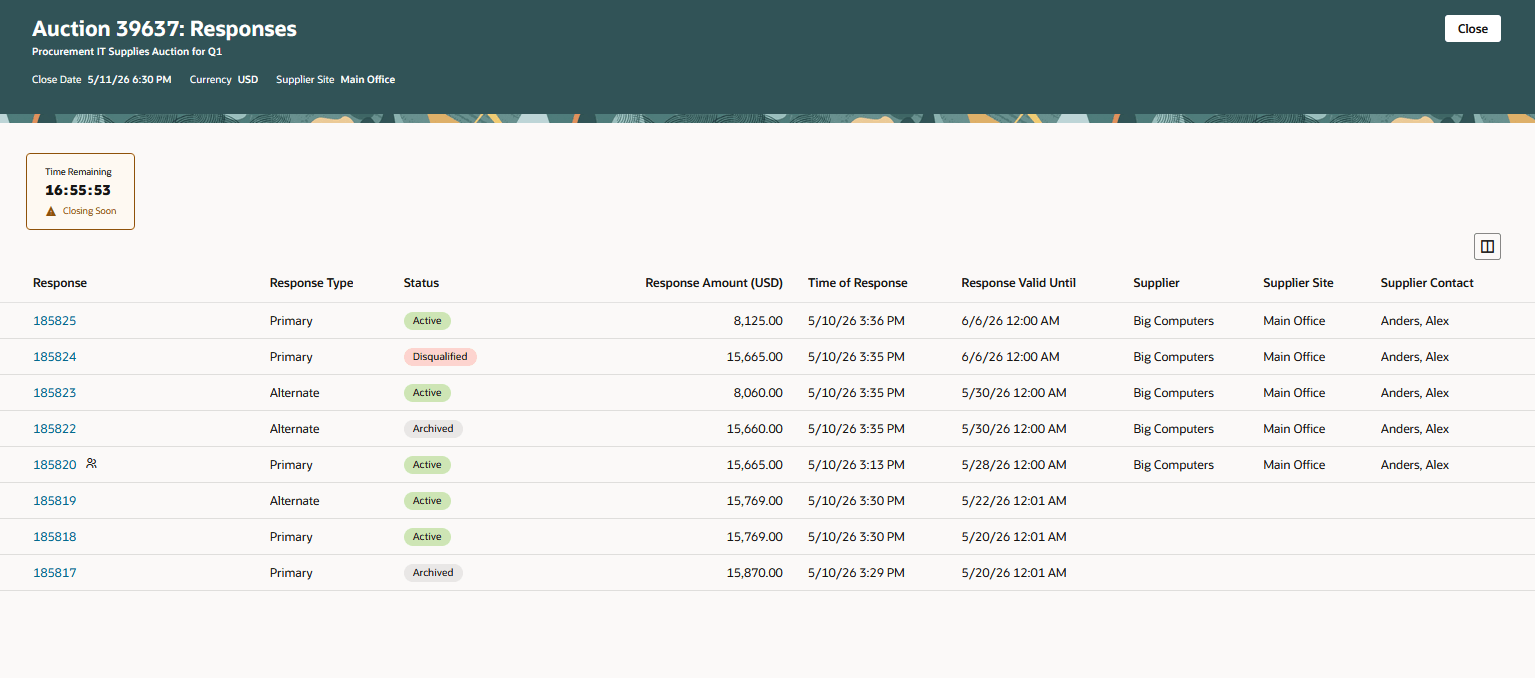
View All Responses
This feature helps suppliers evaluate the competitive position of their responses in the Redwood user experience. Suppliers can review response amounts, response status, and response history all in one place, improving transparency and reducing the need to navigate across multiple pages.
Steps to enable and configure
Use the Opt In UI to enable this feature. For instructions, refer to the Optional Uptake of New Features section of this document.
Offering: Procurement
To use this feature, you must opt in to the Update 25A feature, Redwood: Enable the New Supplier Portal Home Page Experience in Supplier Portal functional area. If you previously opted in, then this feature is automatically enabled.
Refer to the What's New for the detailed instructions on Steps to Enable.
Tips and considerations
The All Responses action is available to supplier users only when both these conditions are met:
- The supplier user has the privilege to view supplier negotiation response history.
- The negotiation isn't in Preview or Preview (Locked) status.
For negotiations with multiple currencies, response amounts are displayed using the currency of the latest response for the supplier and supplier site.
If a supplier is invited to the same negotiation using multiple supplier sites, the supplier site context is retained when the supplier opens the All Responses page.
Key resources
- Refer to the What's New for the Redwood: Use New Supplier Experience for Sourcing feature.
- Refer to the What's New for the Redwood: Enable the New Supplier Portal Home Page Experience in Supplier Portal functional area.
- For information about using Oracle Visual Builder Studio to extend your Redwood application pages, see Oracle Fusion Cloud HCM and SCM: Extending Redwood Applications for HCM and SCM Using Visual Builder Studio.
- Refer to Overview of Guided Journeys in the Oracle Fusion Cloud Human Resources: Implementing and Using Journeys guide, available on the Oracle Help Center.
Access requirements
Users who are assigned a configured job role that contains these existing privileges can access this feature:
- View Supplier Negotiation Response History as Supplier (PON_VIEW_SUPPLIER_NEGOTIATION_RESPONSE_HISTORY_(SUPPLIER-FACING))
- View Supplier Negotiation Response as Supplier (PON_VIEW_SUPPLIER_NEGOTIATION_RESPONSE_(SUPPLIER-FACING))