Use the production line calendar to calculate performance metrics in Production Supervision
Before this update, Production Line Monitoring metrics and line capacity versus completed quantities were displayed based on the shifts defined by the plant calendar. However, organizations that use a separate calendar for their production lines require these metrics to reflect the production line's shift schedule instead.
Production supervisors can now monitor and view current shift performance metrics in Production Supervision based on the calendar assigned to the Production Line, ensuring that the metrics are calculated and displayed for the correct shift.
With this update, the Production Line Monitoring tab in Production Supervision:
- Displays the current shift for a production line based on its assigned calendar.
- Calculates line capacity, completed quantity, overall equipment effectiveness, availability, performance, quality, and downtime for the current shift.
- Shows production line calendar shift times in the Line Capacity vs Completed table.
- Derives the current shift and operational time information in View Workstations details.
If an override calendar is not specified in the production line, then it continues to use the plant calendar.
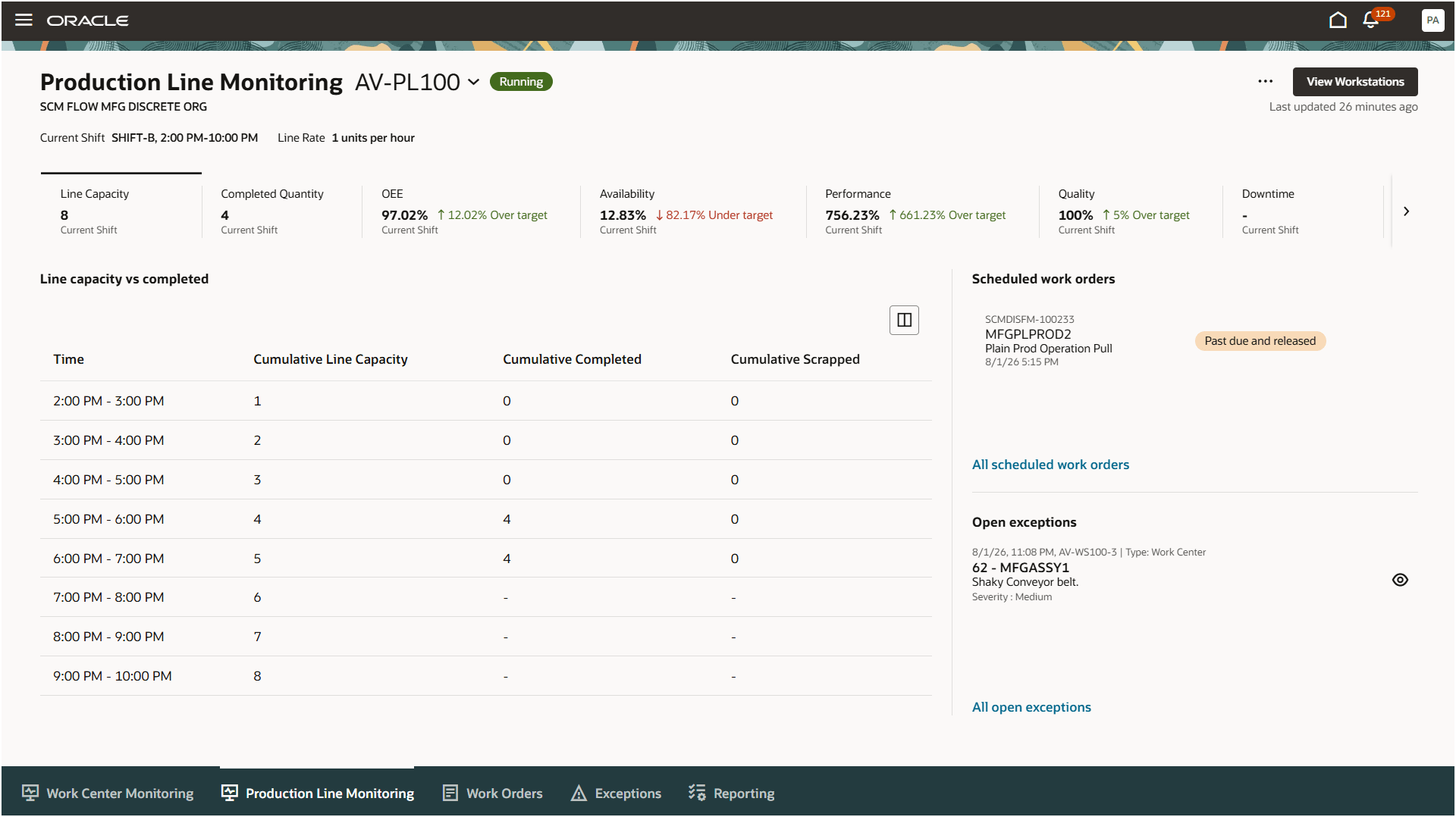
Production Line Monitoring in Production Supervision - Shift and metrics are displayed based on the production line calendar
Aligning performance metrics to each production line’s calendar gives production supervisors an accurate view of capacity and operational performance. This helps teams monitor line activity against the correct shift schedule and make timely production decisions.
Here's the demo of these capabilities:
Steps to enable and configure
There are no additional setups to use this feature.
Tips and considerations
- This feature applies to production lines that execute both flow schedules and work orders.
- Operator assignments for production line workstations continue to use the shifts defined in the associated work center calendar. To ensure that these assignments align with the shift boundaries of the production line, it is recommended to configure the same override calendar for both the production line and the work center associated with the workstation.
Key resources
- Oracle Fusion Cloud SCM: Using Manufacturing guide, available on the Oracle Help Center.
- Oracle Fusion Cloud SCM: Implementing Manufacturing and Supply Chain Materials Management guide, available on the Oracle Help Center.
- Refer to the 26A feature Define a Production Line Calendar for Flow Schedule Execution for more information on defining production line calendars.
- Refer to the 25C feature Monitor Flow Schedules for a Production Line Using the Production Supervisor Workbench for more information on production line metrics that can be monitored in Production Supervision.
Access requirements
If you are using custom job roles, then you need to validate that you have the previously delivered privileges listed.
|
Privilege status |
Privilege name and code |
| Previously delivered |
Supervise Production WIP_SUPERVISE_PRODUCTION_PRIV |
| Previously delivered |
View Production Shift Details WIP_GET_PROD_SHIFT_DETAILS_PRIV |
| Previously delivered |
Manage Flow Schedules by Service WIP_MANAGE_FLOW_SCHEDULES_SERVICE_PRIV |
| Previously delivered |
Manage Flow Schedules WIP_MANAGE_FLOW_SCHEDULES_PRIV |
| Previously delivered |
View Flow Schedules WIP_VIEW_FLOW_SCHEDULES_PRIV |
| Previously delivered |
Get Flow Schedules by Service WIP_GET_FLOW_SCHEDULES_SERVICE_PRIV |