Procurement Request Concierge
Use Procurement Request Concierge as a single conversational entry point for supported requester-facing procurement tasks in the new user experience for Oracle Self Service Procurement. From the Ask AI action on the Self Service Procurement home page, requesters can describe what they want to do in their own words instead of determining which specialized procurement assistant to use.
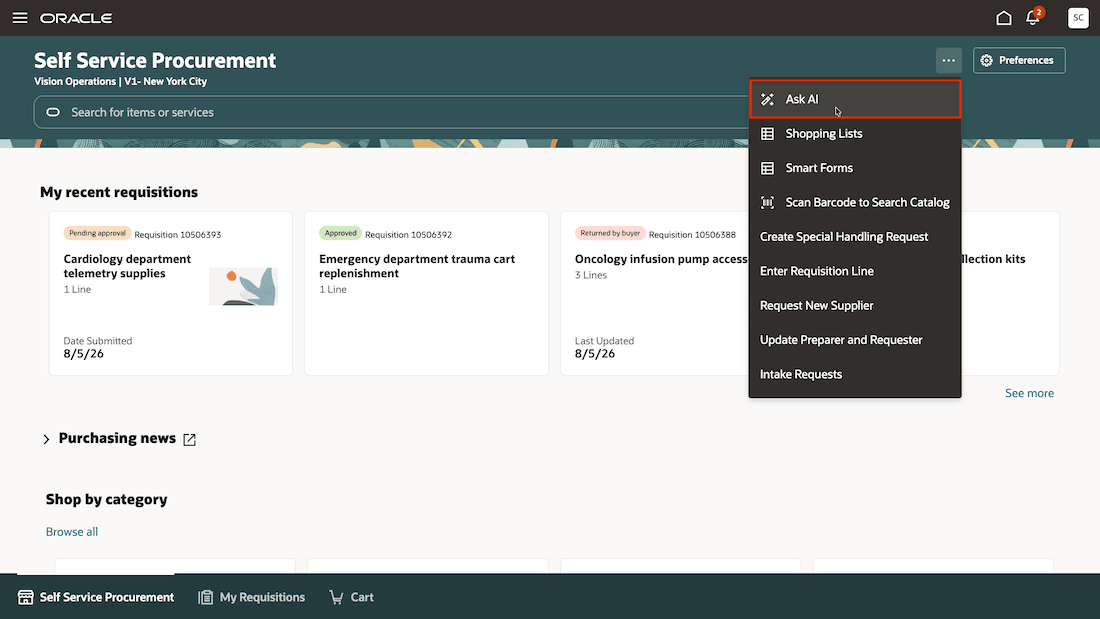
Initiate chat with Procurement Request Concierge using Ask AI
It recognizes the intent of a request and directs the conversation to an eligible specialized assistant. Depending on the request and the assistants configured for the user, it can help requesters create catalog or noncatalog requisitions, start a procurement intake request, create a requisition from a supplier quote, check requisition status, or ask procurement policy questions. The specialized assistant completes the task, while Procurement Request Concierge provides a consistent starting point and preserves the conversational context during the handoff.
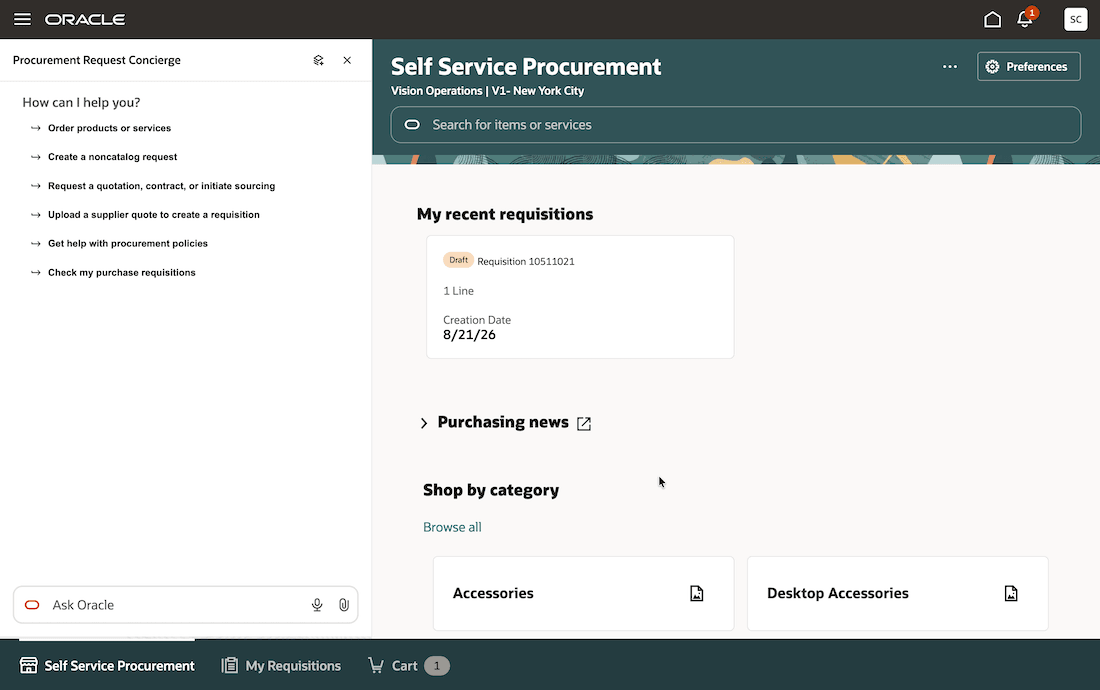
Starter prompts for Procurement Request Concierge
For requests that could be either a straightforward purchase or a more complex procurement engagement, Procurement Request Concierge uses a catalog-first experience. It first helps the requester look for a suitable catalog item. When a suitable item isn't available, it can direct the requester to a noncatalog request. When an appropriate and available intake path applies, it help the requester start a procurement intake request.
This approach helps requesters start with a straightforward purchasing path while directing more complex needs, such as sourcing, contract, privacy, security, or supplier-review requests, to the appropriate procurement process.
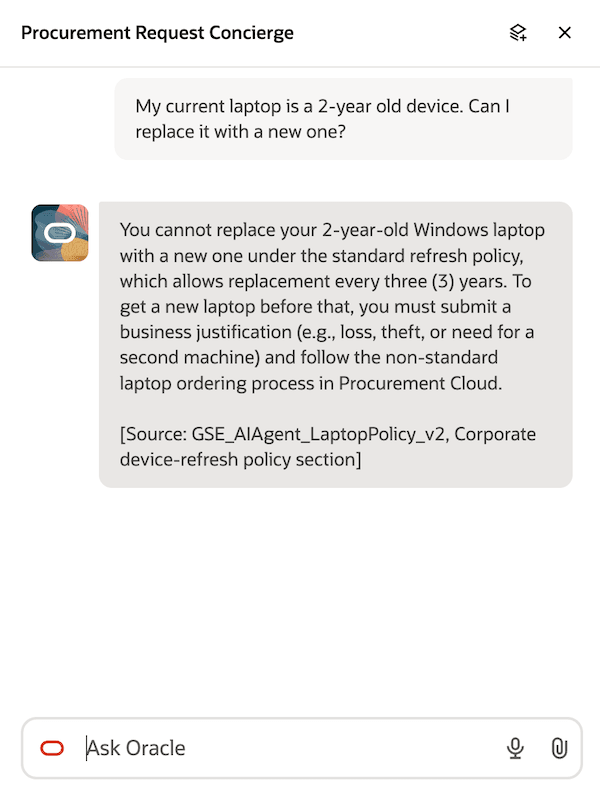
Check procurement policies using Procurement Request Concierge
It also evaluates whether the relevant specialized assistant is configured, published, available from the current launch point, and accessible to the signed-in user. If an assistant isn't available, it doesn't present it as an option and provides a response appropriate to the request.
This feature provides a clear starting point for requester-facing procurement work. Requesters can describe what they need in natural language instead of determining which specialized assistant, page, or guided journey to open first.
- Helps requesters identify the appropriate procurement path for needs such as purchasing an item, creating a noncatalog request, asking a procurement policy question, creating a requisition from a supplier quote, checking requisition status, or starting a procurement intake request.
- Helps requesters look for a suitable catalog item before moving to a noncatalog or procurement intake path, supporting a straightforward approach for routine purchases.
- Makes specialized procurement assistants easier to discover while preserving their task-specific capabilities. It provides a consistent starting point and maintains conversational context when it hands the request to a specialized assistant.
- Supports controlled adoption by allowing administrators to make available only the routes that are configured and accessible for the relevant requester population.
- Helps protect access by presenting only assistants that are available to and accessible by the signed-in requester. When a route isn't available, it provides a user-focused response instead of exposing technical setup or access details.
Steps to enable and configure
To enable the Procurement Request Concierge AI agent, follow these steps:
- In Oracle Visual Builder Studio, navigate to Self Service Procurement - Home > Page Properties > Self Service Procurement AI Agent Code and specify the agent code as ORA_PROCUREMENT_REQUEST_CONCIERGE.
To enable permission groups for roles, take these steps:
- In the Setup and Maintenance work area, search for the Manage Administrator Profile Values task using the search link in the Tasks panel tab.
- Search for the Enable Security Console External Application Integration (ORA_ASE_SAS_INTEGRATION_ENABLED) profile option and set the Site profile level to Yes.
Tips and considerations
- Procurement Request Concierge provides a conversational entry point and routes requests to specialized assistants. The specialized assistants perform tasks such as catalog shopping, supplier quote processing, procurement policy assistance, requisition status retrieval, and procurement intake processing.
- You can create procurement intake requests through Procurement Request Concierge only when you've opted into the Initiate Procurement Activities with Intake Requests feature.
- The available starter prompts and routes depend on the assistants configured for the requester and the current launch point on the Self Service Procurement home page. A route isn't available if the corresponding specialized assistant isn't published, isn't enabled for the launch point, or isn't available to the requester.
- Clear purchase and noncatalog requests are routed to Purchase Requisition Creation Guide. Policy questions, quote-based requisition requests, requisition status questions, and intake requests are routed to their corresponding specialized assistants when those assistants are available.
- For an ambiguous request that could involve either a purchase or a procurement intake need, Procurement Request Concierge starts with catalog discovery when appropriate. If a suitable catalog option isn't found, the concierge can offer an available noncatalog or intake path based on the request.
- Requests to approve, reject, cancel, or withdraw a requisition aren't routed to an assistant that only retrieves requisition status or to a requisition creation assistant. These requests require a separately configured, supported destination for the requested action.
- Creating a requisition from a supplier quote requires a text-readable supplier quote. Procurement Request Concierge uses the attachment to determine the appropriate handoff.
- To disable access to specific features, in Oracle Visual Builder Studio, go to Self Service Procurement - Home > Page Properties > Self Service Procurement AI Agent Input Context and specify a value in this format:
{
     "disablePurchaseRequisitionCreationGuide": true,
     "disableNoncatalogPurchaseReqCreationGuide": false,
     "disableIntakeRequestCreationAssistant": true,
     "disableQuotetoPurchaseRequisitionAssistant": true,
     "diablePurchaseRequisitionStatusAdvisor": false,
     "disbaleProcurementPolicyAdvisorprovides": true
}
- Use valid JSON when you supply Homepage input context. If the optional input context is missing, empty, or malformed, the Homepage Ask AI experience continues to load and uses the standard availability behavior.
Key resources
- For more details about the Quote to Purchase Requisition Assistant agent, refer to the AI Agent: Quote to Purchase Requisition Assistant feature, available in the Oracle Fusion Cloud Self Service Procurement What's New, update 25D.
- For more details about the Quote to Purchase Requisition Chat Assistant agent, refer to the AI Agent: Quote to Purchase Requisition Chat Assistant feature, available in the Oracle Fusion Cloud Self Service Procurement What's New, update 26B.
- For more details about the Purchase Requisition Creation Guide agent, refer to the AI Agent: Purchase Requisition Creation Guide and the AI Agent: Purchase Requisition Creation Guide – Additional Capabilities and Policy Compliance features, available in the Oracle Fusion Cloud Self Service Procurement What's New, update 26B and update 26C respectively.
- For more details about the Procurement Policy Advisor agent, refer to the AI Agent: Procurement Policy Advisor feature, available in the Oracle Fusion Cloud Self Service Procurement What's New, update 25C.
- For more details about the AI-assisted intake request creation, refer to the Initiate Procurement Activities with Intake Requests feature, available in the Oracle Fusion Cloud Procurement Common What's New, update 26C.
- For more details about the Purchase Requisition Status Advisor agent, refer to the AI Agent: Purchase Requisition Status Advisor and the AI Agent: Purchase Requisition Status Advisor - Get Current Approver features, available in the Oracle Fusion Cloud Self Service Procurement What's New, update 25C and update 26B respectively.
- Access Requirements for AI Agent Studio.
- How can I give users access to AI agents?
- Create AI Agents.
- For information about using Oracle Visual Builder Studio to extend your Redwood application pages, see Oracle Fusion Cloud HCM and SCM: Extending Redwood Applications for HCM and SCM Using Visual Builder Studio.
- To know how to provide the required privileges to your requesters to use your own configured role instead of the Requisition Self Service User role, refer to the Privileges Required for a Predefined Role for a Requisition Self Service User topic.
Access requirements
To access the Oracle AI Agent Studio for Fusion Applications and manage PRC AI agents, users must be assigned a custom job role that contains these duty roles:
| Duty role status | Duty role name and code |
|---|---|
| Existing | PRC Intelligent Agent Management Duty ORA_PO_PRC_AI_AGENT_MANAGEMENT_DUTY |
| Existing | PRC Intelligent Agent Management Duty ORA_PO_PRC_AI_AGENT_MANAGEMENT_DUTY_HCM |
| Existing | Fai Genai Agent PRC Administrator Duty ORA_DR_FAI_GENERATIVE_AI_AGENT_PRC_ADMINISTRATOR_DUTY |
To interact with AI agents in product pages, users must be assigned a custom job role that contains this duty role:
| Duty role status | Duty role name and code |
|---|---|
| Existing | Fai Genai Agent Runtime Duty ORA_DR_FAI_GENERATIVE_AI_AGENT_RUNTIME_DUTY |
In the Security Console, filter by Roles and Permission Groups to find this duty role.
To allow users to interact with agents, you must also enable permission groups in the Security Console on those users’ custom job roles that contain the Fai Genai Agent Runtime Duty role. You can enable permission groups when you manage the basic information of your custom job roles.
Users’ custom job roles must also contain privileges that allow access to the pages where AI agents are enabled.
See Access Requirements for AI Agent Studio (for administrators) and How can I give users access to AI agents (for end-users) for more information.