Purchase Requisition Creation Guide - Support multilingual interactions and display on-hand quantity for internal material transfers
Use the Purchase Requisition Creation Guide AI agent to create purchase requisitions in supported languages. Start the conversation in your preferred language and the guide asks for required information and responds in the same language as it guides you through creating the requisition. This makes guided requisition creation easier for a broader range of users without requiring them to switch languages.
The Purchase Requisition Creation Guide also gives eligible users more information when they add items that are fulfilled through internal material transfers. After you select an internal material transfer item and provide the required quantity, the guide checks the available quantity at the preferred source. When the preferred source doesn't have enough quantity to fulfill the request, the guide provides available supply information so you can decide how to proceed.
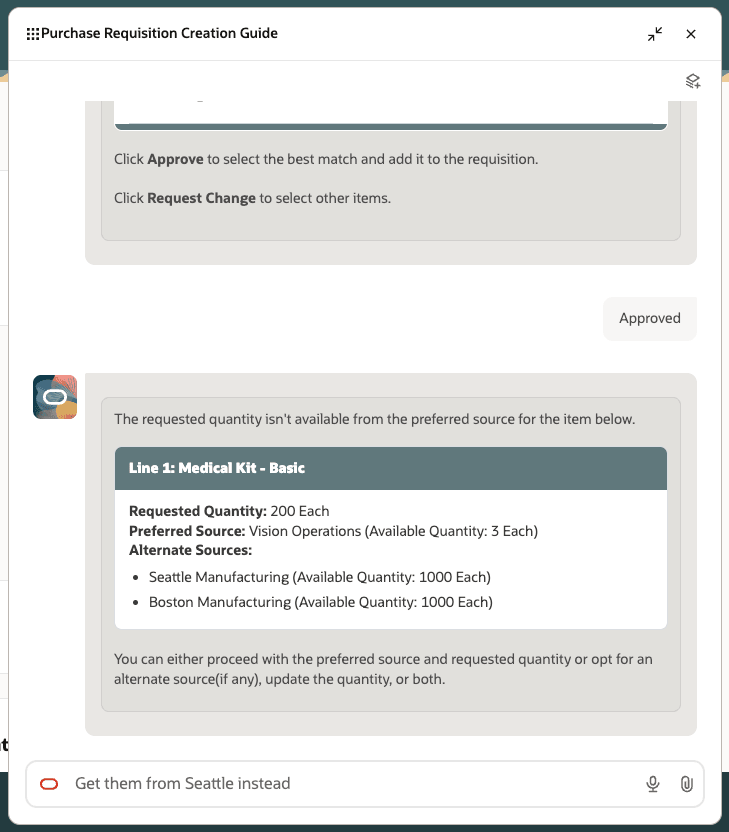
Review available quantity at the preferred and alternate sources for internal material transfer items
For each affected requisition line, the guide shows the requested quantity, the preferred source with its available quantity, and up to 5 alternate sources with their available quantities. You can continue with the preferred source, change the requested quantity, select an alternate source, or change both the source and quantity.
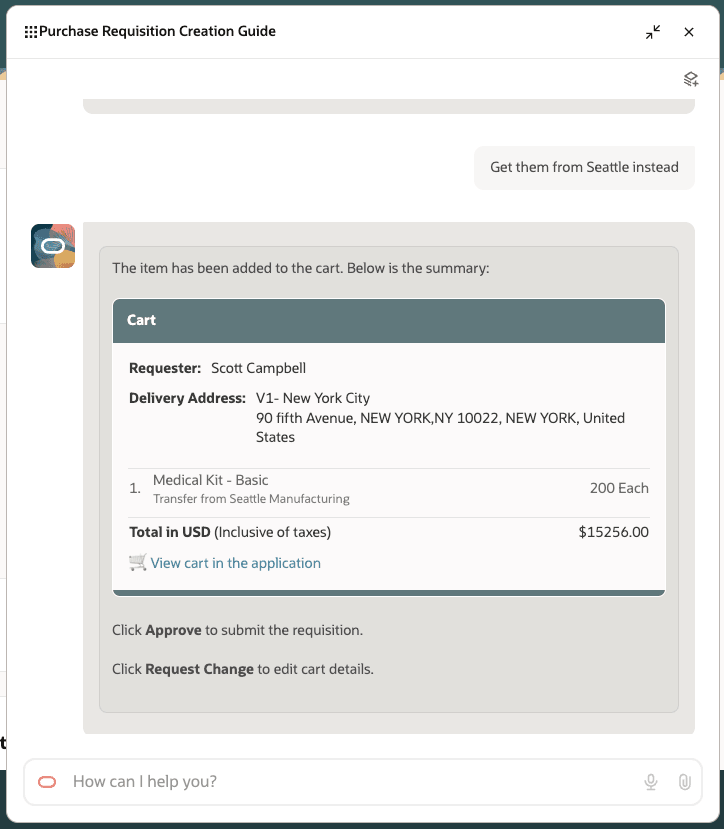
Review cart summary with requested changes
If you don't provide the required quantity when searching for an internal material transfer item, the guide adds 1 quantity by default to the cart. You can review the cart and change the quantity, supply source, or both for the applicable lines.
This feature makes guided requisition creation more flexible and helps requesters make better-informed sourcing decisions.
- Helps requesters complete guided requisition conversations in a supported language, improving clarity and reducing the effort required to create a requisition.
- Makes internal supply availability visible when the preferred source can't fulfill the requested quantity, helping requesters avoid selecting a source that can't fulfill the requested quantity.
- Supports faster, better-informed source selection by presenting alternate sources in order of preference, which can reduce additional changes and delays in fulfilling internal material transfers.
Steps to enable and configure
To enable the Purchase Requisition Creation Guide AI agent, follow these steps:
- In Oracle Visual Builder Studio, navigate to Self Service Procurement - Home > Page Properties > Self Service Procurement AI Agent Code and specify the agent code as ORA_REQUISITION_CREATION_GUIDE.
To enable permission groups for roles, take these steps:
- In the Setup and Maintenance work area, search for the Manage Administrator Profile Values task using the search link in the Tasks panel tab.
- Search for the Enable Security Console External Application Integration (ORA_ASE_SAS_INTEGRATION_ENABLED) profile option and set the Site profile level to Yes.
Tips and considerations
- For the best experience, this feature uses the GPT-5 Mini (Oracle Premium) model.
- The guide displays supply availability and alternate-source details only when the requested quantity exceeds the quantity available at the preferred source.
- If the preferred source has sufficient quantity, the guide adds the item without displaying supply availability information.
- The guide displays a maximum of 5 alternate sources for each internal material transfer item.
- Alternate supply sources are sorted by ranking, from highest to lowest.
Key resources
- For more details about Purchase Requisition Creation Guide agent, refer to the AI Agent: Purchase Requisition Creation Guide and the AI Agent: Purchase Requisition Creation Guide – Additional Capabilities and Policy Compliance features, available in the Oracle Fusion Cloud Self Service Procurement What's New, update 26B and update 26C respectively.
- To learn more about selecting preferred and alternate supply sources during catalog shopping, refer to the Procure Goods from Preferred Sources During Catalog Shopping feature, available in the Oracle Fusion Cloud Self Service Procurement What's New, update 24B.
- Access Requirements for AI Agent Studio.
- How can I give users access to AI agents?
- Create AI Agents.
- For information about using Oracle Visual Builder Studio to extend your Redwood application pages, see Oracle Fusion Cloud HCM and SCM: Extending Redwood Applications for HCM and SCM Using Visual Builder Studio.
- For more details about how to get the best-fit purchasing category recommendation for a noncatalog request, refer to the Get the Best-Fit Purchasing Category Recommendation for a Noncatalog feature, available in the Oracle Fusion Cloud Self Service Procurement What's New, update 26A.
- To know how to provide the required privileges to your requesters to use your own configured role instead of the Requisition Self Service User role, refer to the Privileges Required for a Predefined Role for a Requisition Self Service User topic.
Access requirements
If you're using custom job roles, then you need to validate that you have the previously delivered privileges listed.
| Privilege status | Privilege name and code |
|---|---|
| Previously delivered | View Total On Hand Quantity in Supply Source DOS_VIEW_AVAILABLE_ONHAND_QTY_PRIV |
| Previously delivered | Allow Users to Shop from All Supply Sources during Catalog Shopping POR_ALLOW_SHOPPING_FROM_ALL_SOURCES_PRIV |
To access the Oracle AI Agent Studio for Fusion Applications and manage PRC AI agents, users must be assigned a custom job role that contains these duty roles:
| Duty role status | Duty role name and code |
|---|---|
| Existing | PRC Intelligent Agent Management Duty ORA_PO_PRC_AI_AGENT_MANAGEMENT_DUTY |
| Existing | PRC Intelligent Agent Management Duty ORA_PO_PRC_AI_AGENT_MANAGEMENT_DUTY_HCM |
| Existing | Fai Genai Agent PRC Administrator Duty ORA_DR_FAI_GENERATIVE_AI_AGENT_PRC_ADMINISTRATOR_DUTY |
To interact with AI agents in product pages, users must be assigned a custom job role that contains these duty roles:
| Duty role status | Duty role name and code |
|---|---|
| New | Purchase Requisition Agent Runtime Duty ORA_POR_REQUISITION_AGENT_RUNTIME_DUTY |
| Existing | Fai Genai Agent Runtime Duty ORA_DR_FAI_GENERATIVE_AI_AGENT_RUNTIME_DUTY |
In the Security Console, filter by Roles and Permission Groups to find this duty role.
To allow users to interact with agents, you must also enable permission groups in the Security Console on those users’ custom job roles that contain the Fai Genai Agent Runtime Duty role. You can enable permission groups when you manage the basic information of your custom job roles.
Users’ custom job roles must also contain privileges that allow access to the pages where AI agents are enabled.
See Access Requirements for AI Agent Studio (for administrators) and How can I give users access to AI agents (for end-users) for more information.