Integrate with the Database Tools MCP Server
The Database Tools Model Context Protocol (MCP) Server lets MCP clients run SQL queries against Oracle AI Database. The MCP Server authenticates each end user to the database with an OCI IAM auth token.
An OCI IAM auth token is a scoped proof-of-possession token that is issued by OCI IAM for database authentication and bound to a public key. Before sending the token to the database, the database client signs it with the private key associated with the token’s public key, proving that the sender is the rightful holder of the token. Unlike a bearer token, this token cannot be replayed by a party that does not hold the private key. See Authenticating and Authorizing IAM Users for Oracle AI Database in Oracle AI Database Security Guide.
Learn how you can integrate the Database Tools MCP Server with Oracle Deep Data Security (Deep Sec) so that each query returns only the specific rows, columns, or cells that the requesting end user is authorized to see.
Topics:
The Authentication Flow
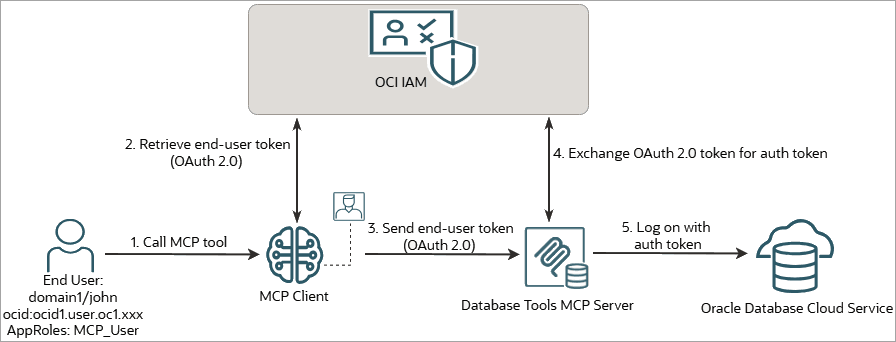
This integration pattern uses the following authentication and enforcement flow.
-
The MCP client obtains an OAuth 2.0 token for the end user from OCI IAM, and sends the end-user token to the Database Tools MCP Server.
-
Through OCI IAM, the Database Tools MCP Server exchanges the OAuth 2.0 token for an OCI IAM auth token issued to the same end user.
-
The Database Tools MCP Server connects to the database using the end user’s OCI IAM auth token.
-
The database validates this token through OCI IAM. If no mapped global database user or application identity of the same name as the connecting user exists, and the end user holds the
CREATE SESSIONprivilege through a data role, the database permits the session creation as a direct logon of the end user. -
Subsequently, the database establishes an end-user security context on the session: it enables the data roles mapped to the end user’s OCI IAM groups, and enforces the data grants defined for those roles on every SQL statement that the MCP server runs in the session.
Scope and Related Documentation
Learn about the integration scope, architectural boundaries, and related OCI IAM or Database Tools documentation for this integration.
-
This integration pattern is supported only on Oracle Cloud database platforms that support OCI IAM database authentication, such as Oracle Base Database Service, Oracle Autonomous AI Database Serverless, Oracle Autonomous AI Database Dedicated, Oracle Exadata Database Service, Oracle Exadata Cloud@Customer, and Oracle Exadata Database Service on Exascale Infrastructure.
-
This section covers only the database-side configuration related to Deep Sec. Creating and securing the Database Tools connection, the MCP server, the MCP toolsets, the MCP clients, the MCP application roles, and the OCI IAM policies is external to this guide. Use the following OCI IAM or Database Tools documentation for those tasks.
Configuration Area OCI IAM or Database Tools Documentation MCP server overview and tutorial Working With the Database Tools Model Context Protocol (MCP) Server
Tutorial: Set Up a Database Tools MCP Server and Integrate with an MCP Client
Prerequisites, Database Tools connection, and IAM authentication Prerequisites (Database Tools MCP Server)
Create a Database Tools Connection Using Token-Based Authentication
Integrating IAM Authentication with Database Tools Connections
MCP server, toolsets, and client registration Creating a Database Tools MCP Server
Connecting to an MCP ServerSecurity, roles, and identity propagation Security (Database Tools MCP Server)
Authorization and Authentication
Role-Based Access Control for MCP Server Tools and Reports
Database Session Identity and Role PropagationOCI IAM policies and troubleshooting Configuring OCI IAM for Oracle DBaaS
Policies for Database Tools MCP Server
Troubleshooting MCP Servers
Prerequisites: OCI IAM and MCP Server Setup
The OCI IAM and MCP Server setup controls which end users can invoke the Database Tools MCP Server and use its Database Tools connection, and which OCI IAM group memberships are propagated to the database for authorization. The database then validates the OCI IAM auth token and uses the configured data role mappings and privileges to determine whether the end user can create a session and access protected data.
Before you configure the database, verify the following:
-
The target database is an Oracle Cloud database that supports OCI IAM database authentication.
-
The end users or groups that query the database through the MCP client are assigned the appropriate MCP application roles, such as
MCP_User, on the Database Tools MCP Server. -
You have recorded the exact names of the OCI IAM groups that your Deep Sec data roles will map to. For a group in the default identity domain, the domain prefix is optional. For a group in a non-default identity domain, record it as
<domain>/<group_name>and reuse the same string in theIAM_GROUP_NAMEdata role mapping. -
The OCI IAM policies are configured for the MCP Server runtime identity model in use. The policies must allow the end users to invoke the MCP Server and use its Database Tools connection, and allow the MCP Server to obtain OCI IAM auth tokens for the end users. The required permissions are listed here.
Granted to the MCP users or their groups:
-
database-tools-mcp-servers-invocation -
database-tools-connections, optionally scoped to the Database Tools connection that the MCP Server uses. -
database-connections
Granted to the MCP Server principal:
database-tools-db-connect-obo—for example, granted as anany-userpolicy constrained byrequest.principal.idto the MCP Server OCID.
Additionally,
secret-bundlesread access is required when secrets or keystores are used. The grantee depends on the runtime identity model; for example, it can be the MCP users’ group or the connection principal.For the exact policy statements, including resource-scope or compartment-scope options and the supported runtime identity models, see Policies for MCP Server.
-
-
The Database Tools connection that the MCP Server uses is configured for OCI IAM token-based authentication, with the connection’s
iam.db.token.scopeset to the same scope as, or a more restrictive scope than, the scope your OCI IAM policy grants for database connections. At runtime, the MCP Server exchanges the end user’s OAuth 2.0 token for an OCI IAM auth token and connects to the database as that end user. See Create a Database Tools Connection Using Token-Based Authentication.
Note:
-
Do not use
IAM_OAUTH_GROUPin the data role mappings for this integration.IAM_OAUTH_GROUPapplies only to OCI IAM group claims carried in an OAuth 2.0 access token, which are resolved within the identity domain set byIDENTITY_PROVIDER_OAUTH_CONFIG.domain_url. OCI IAM auth token group mappings useIAM_GROUP_NAME. -
For the OCI IAM auth token flow, cross-domain mappings within a tenancy are supported, but cross-tenancy mappings are not.
Configure the Database for OCI IAM Auth Tokens
On Oracle AI Database, run the statements in this section as a named user with the DBA role. On Oracle Autonomous AI Database, run them as the ADMIN user. Complete the steps in order.
Oracle AI Database here refers to the four non-autonomous platforms: Oracle Base Database Service, Oracle Exadata Database Service, Oracle Exadata Cloud@Customer, and Oracle Exadata Database Service on Exascale Infrastructure. Oracle Autonomous AI Database refers to Oracle Autonomous AI Database Serverless and Oracle Autonomous AI Database Dedicated.
-
Enable Transport Layer Security (TLS).
OCI IAM auth token authentication requires a TLS-secured connection between the MCP server and the database. If TLS is not already configured, see Configuring Transport Layer Security Encryption in Oracle AI Database Security Guide.
-
Configure the database to validate OCI IAM auth tokens.
Set the database initialization parameters to enable OCI IAM as the external identity provider.
Note:
On Oracle AI Database, connect to your target pluggable database (PDB) before applying configuration changes. (On Oracle Autonomous AI Database, this step is not required; you connect directly to the PDB as the
ADMINuser.)ALTER SESSION SET CONTAINER = <your-target-PDB>;-
On Oracle AI Database:
ALTER SYSTEM SET IDENTITY_PROVIDER_TYPE = OCI_IAM SCOPE=BOTH; -
On Oracle Autonomous AI Database:
BEGIN
  DBMS_CLOUD_ADMIN.ENABLE_EXTERNAL_AUTHENTICATION(
      type => 'OCI_IAM'
  );
END;
/
The database validates the tokens through OCI IAM using the metadata in
IDENTITY_PROVIDER_CONFIG. Do not set this parameter manually for this integration. On Oracle Autonomous AI Database Serverless, theDBMS_CLOUD_ADMIN.ENABLE_EXTERNAL_AUTHENTICATIONprocedure sets theIDENTITY_PROVIDER_CONFIGparameter. On other Oracle DBaaS platforms, the database retrieves this information through the instance metadata service or an ephemeral key wallet.Confirm the identity provider settings using the following command:
SHOW PARAMETER identity -
-
Create data roles mapped to the OCI IAM groups.
Create one data role for each OCI IAM group that should confer data access, using the
IAM_GROUP_NAMEmapping format. Include the domain prefix for a group in a non-default identity domain. For the complete syntax, see Configure Data Roles.-- Group in the default identity domain (domain prefix optional) CREATE DATA ROLE employee_role MAPPED TO 'IAM_GROUP_NAME=employee'; -- Group in a non-default identity domain: qualify as <domain>/<group> CREATE DATA ROLE hr_admin_role MAPPED TO 'IAM_GROUP_NAME=hrdomain/hr_admin'; -
Grant the connection privilege through a database role.
The Database Tools MCP Server’s connection is a direct logon of the end user, so at least one data role mapped to the end user’s OCI IAM groups must hold the
CREATE SESSIONprivilege. GrantCREATE SESSIONto a standard database role, and grant that database role to each data role that is allowed to establish a database session. See Grant Database Role to Data Role.CREATE ROLE oci_connect_role; GRANT CREATE SESSION TO oci_connect_role; GRANT oci_connect_role TO employee_role; GRANT oci_connect_role TO hr_admin_role; -
Create data grants.
Create data grants for the data roles. Data grants define the rows, columns, and cells that the user can access after the end-user security context is established. See Create Data Grants.
Verify the Integration
When the Database Tools MCP Server connects with an OCI IAM auth token, the identity of the established security context is the end user.
Verify the active end-user identity and the enabled data roles in the database. Use the following commands.
-- Verify the active end-user identity
SELECT ORA_END_USER_CONTEXT.username FROM dual;

-- Verify the enabled data roles
SELECT role_name FROM V$END_USER_DATA_ROLE;
For the full set of diagnostic views, see Oracle Deep Data Security Data Dictionary Views.
To understand how the database server manages an end-user security context established by direct logon, see How the Database Server Manages an End-User Security Context.