Concepts
Learn how search spaces, search targets, target actions, target inputs, and target value sets work together, and how versions support changes to a search space. For a hands-on example, see Getting Started.
Search Space
A Search Space is a versioned collection of search targets for a specific application domain. Teams can isolate changes, collaborate, compare versions, and promote approved updates. LLM re-ranking is optional and can be enabled or turned off for each search space.
In the Wikimedia example, the Search Space Expert maintains the WIKIMEDIA search space that groups targets such as Total Page Views, Top Viewed Articles, Page Views by Country Map, and editor activity reports. Experts can stage updates, review diffs, and promote a tested configuration to production once approvals are complete.
Search Target
A Search Target is a curated entry that points to a report, page, or SQL-generated view. A Text Target has a description and sample queries; a Regex Target has rules for matching query patterns. Trusted Answer Search stores the target configuration, not the report content. It returns matching target metadata and resolved target inputs to the application, which decides how to use the result, such as opening the target URL.
Consider a Wikimedia Insights application that helps users find readership, editor participation, edit activity, and media usage reports. If a user searches for italian page views, Trusted Answer Search can return targets such as Page Views by Country Map, Top Viewed Articles, and Total Page Views, along with resolved target inputs such as language: it.
Target Action
A Target Action is metadata associated with a Search Target. It is usually one of the following:
- URL to open a report or page
- SQL statement to populate a report view
Trusted Answer Search returns action metadata to the client; execution is handled by the client application.
For example, the Total Page Views - All Projects target can publish a URL action that opens a Wikimedia Statistics page with target inputs substituted into the URL:
https://stats.wikimedia.org/#/all-projects/reading/total-page-views/normal|bar|:period|~total|:frequency
When the user asks for monthly page views, Trusted Answer Search can resolve :frequency to monthly, and the application can open the resulting report URL.
Additional examples illustrate how applications consume target actions:
-
Retail banking target “Daily Cash Position” returns
https://portal.examplebank.com/reports/cash-position?customer_id=:CUSTOMER_ID, letting the application or website open the authenticated dashboard after substituting the resolved customer ID. -
Workforce planning target “Upcoming Staffing Gaps” returns a SQL query that filters upcoming shifts by
:REGION_CODE, allowing the APEX report to bind the extracted region value and render schedule gaps.
SELECT shift_id,
       start_time,
       end_time,
       required_headcount,
       scheduled_headcount
  FROM workforce_shifts
 WHERE region_code = :REGION_CODE
   AND start_time BETWEEN SYSDATE AND SYSDATE + 7
   AND scheduled_headcount < required_headcount
 ORDER BY start_time;
Target Inputs
Target Inputs make URL and SQL actions dynamic. Placeholders in an action template are populated from values extracted from user queries.
Example URL template:
https://stats.wikimedia.org/#/:language.wikipedia.org/reading/page-views-by-country/normal|map|:period|~total|:frequency
In this example, if the user query includes a language such as italian, :language is replaced with the canonical value it. Configured defaults can also supply values such as :period and :frequency.
For example, Trusted Answer Search would return:
https://stats.wikimedia.org/#/it.wikipedia.org/reading/page-views-by-country/normal|map|2-year|~total|monthlywhen the user queries: “italian page views”https://stats.wikimedia.org/#/fr.wikipedia.org/reading/page-views-by-country/normal|map|2-year|~total|monthlywhen the user queries: “french page views”
The Target Input :language is linked to a Target Value Set that contains supported language codes and synonyms so that Trusted Answer Search only substitutes approved values or synonyms. Target value sets are described later in this section.
Target Value Sets
Target Value Sets define values used for extracting target inputs from a user query and substituting those extracted values into target actions. Four Target Value Set sources are supported:
- Manual value sets: explicitly curated lists of values, with optional synonyms
- Column-Based value sets: values sourced from a database table column and synced as needed, with optional synonyms
- LLM-Based value sets: values extracted by a configured LLM profile according to a value-set instruction and optional output format
- Regex-Based value sets: regular-expression rules matched against user queries
Synonyms can improve matching. By default, a matched synonym resolves to its corresponding value. Enable Use Matched Synonym when the target action requires the matched synonym instead.
In the Wikimedia example, a LANGUAGE Target Value Set might define canonical values such as it, fr, and de with synonyms such as italian, french, and german. A FREQUENCY Target Value Set might define values such as monthly with synonyms such as by month or month. Target Inputs reference these value sets so that user-friendly words can be resolved to the values required by the report URL.
Search Space Versions
Search space versions let you prepare and test changes before making them available to end-users. A version contains the search targets, target value sets, and administrator feedback used by that version.
- Draft: A working version in which you can prepare changes and test queries.
- Published: The version used for end-user searches. Access to the search space still depends on its visibility and the user’s permissions.
Compare versions, review regressions, and run evaluation sets before publishing a draft. For the procedures, see Manage Search Space Versions.
How It Works
Trusted Answer Search returns curated search targets rather than free-form generated answers. For Text Targets, a search space can use hybrid keyword and semantic retrieval or keyword-only retrieval. Regex Targets match configured query patterns. If LLM re-ranking is enabled, the configured profile can reorder retrieved candidates. LLM-backed Target Value Sets can also extract target input values according to their instructions. See Configure Admin Settings for the search-space controls.
1. Query Processing
The search service processes the user’s query before matching it to configured targets. The following retrieval stages describe Text Target search; Regex Targets use their configured rules.
2. Text Target Retrieval
Semantic Retrieval
When hybrid search is enabled, vector similarity retrieval uses Oracle AI Vector Search to compare the query with configured Text Target descriptions, sample queries, and queries associated through administrator feedback.
Semantic retrieval provides strong recall when wording differs.
Lexical Retrieval
Keyword-based matching uses configured Text Target content, including:
- Target descriptions
- Sample queries
- Queries that Search Space Experts have associated with relevant search targets through administrator feedback
- Target value sets and synonyms linked to a search target’s inputs
Lexical retrieval provides high precision when terminology aligns.
3. Re-ranking and Fusion
When hybrid search is enabled, keyword and semantic results contribute to an ordered list of candidates. With hybrid search disabled, the search space uses keyword-only matching.
If LLM re-ranking is enabled for the search space, Trusted Answer Search passes the configured number of retrieved candidates to the selected LLM profile for additional ranking. The response still contains curated target metadata, not a free-form generated answer.
4. Target Input Extraction
For targets with dynamic actions, the system resolves target input values using the mapped Target Value Sets. Manual and column-based sets can map query terms and synonyms to configured values; regex-based sets apply configured rules; LLM-based sets use the selected LLM profile and extraction instruction. Resolved values are used in the target action.
For example, an LLM-based PERIOD value set can extract a time window from Show total page views for the past six months. With the fixed reference date 2026-10-12, the expected value is 2026-04-12~2026-10-12. See the Wikimedia PERIOD example for the extraction instruction, default value, and expected outputs.
Example Walkthrough
This illustrative walkthrough assumes hybrid search is enabled for the Wikimedia search space. The rankings shown are examples; actual results depend on the configured targets, settings, and feedback.
User query:
italian page views
-
Normalize the query.
- Spelling correction: No typos detected.
- Morphology handling: Normalize “views” to “view” for matching. Normalized text: “italian page view”
- Stop-word filtering: No low-value words need to be removed. Normalized keywords: italian, page, view.
-
Run dual retrieval.
Lexical search:
- Matches detected: “page” and “views” across target descriptions and sample queries.
- Target Value Set matches:
italianresolves to language valueit. - Ranked lexical results:
- Rank 1: “Page Views by Country Map”
- Rank 2: “Total Page Views”
- Rank 3: “Top Viewed Articles”
Semantic search:
- Ranked semantic results:
- Rank 1: “Page Views by Country Map” (strong match for page-view analysis by country/language)
- Rank 2: “Top Viewed Articles”
- Rank 3: “Total Page Views”
-
Re-rank and fuse the lexical and semantic lists.
- Rank 1: “Page Views by Country Map” — combines strong lexical matches for page views with semantic relevance to the country/language-oriented query.
- Rank 2: “Top Viewed Articles” — remains relevant because it also answers page-view questions for the resolved language.
- Rank 3: “Total Page Views” — remains in the result set because it covers overall page-view volume.
If LLM re-ranking is enabled for the search space, the configured number of candidates from the fused list can be passed to the LLM profile for an additional relevance ordering step before the final ranked targets are returned.
-
Extract target inputs.
For the “Page Views by Country Map” target, Trusted Answer Search resolves and displays target input values for the returned target:
languageresolves toitfrom “italian”.perioduses the configured value2-year.projectuses the configured valuewikipedia.frequencyuses the configured valuemonthlywhere applicable.
The resulting URL opens the Wikimedia Statistics report with the resolved language and configured defaults, for example:
https://stats.wikimedia.org/#/it.wikipedia.org/reading/page-views-by-country/normal|map|2-year|~total|monthly
This hybrid approach ensures users get fast, consistent, and trustworthy results while keeping the returned actions tied to curated search targets.
Feedback-Aware Relevance
Search Space Experts can review query results in Query Tester or recorded searches on the Dashboard, then use Admin Feedback to confirm or correct the matches:
-
Upvote: Identify a Search Target that should match the query.
-
Downvote: Indicate that a returned Search Target is not of interest for that particular query.
If a Search Target that should match the query is missing from the results, use Choose Another Target to select and upvote it. Trusted Answer Search uses the saved administrator feedback to improve matches for similar queries. For the procedure, see Administrator Feedback.
Users can report an unsuccessful search through the final option in the search widget’s results list. In the following example, that option is labeled I didn’t find the report I was looking for.
The screenshot shows a widget search for What are the total editors on all Wikimedia pages?, with the unsuccessful-search option below the results.
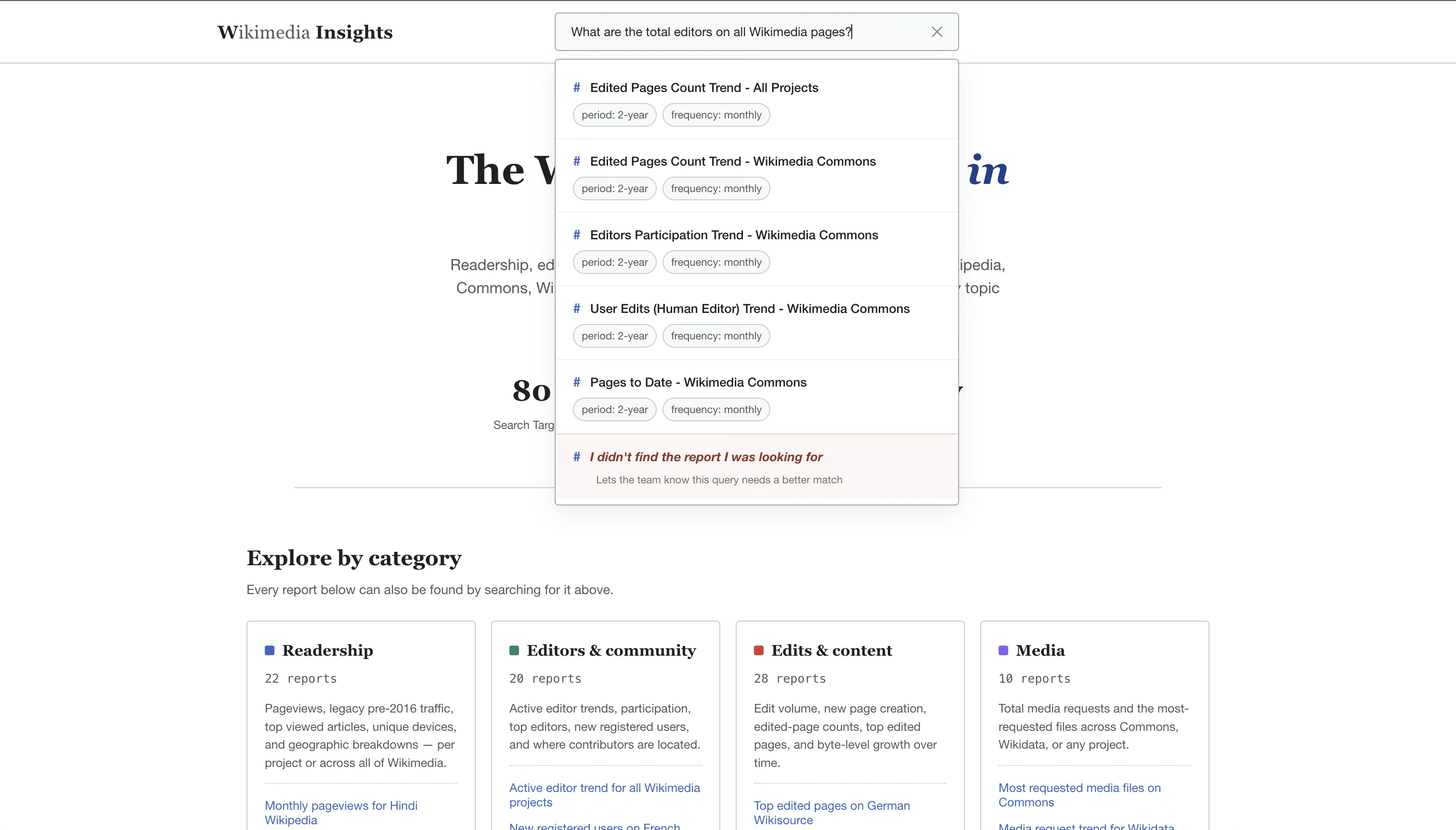
Description of the illustration search-bar-widget.png
Reliability Characteristics
- Results are limited to configured Search Targets and their approved actions.
- Search-space versions, regression checks, and evaluation sets support review before publication.
- Administrator feedback and telemetry help identify and correct poor matches.
- Optional LLM features can affect ranking or target input extraction; they do not generate free-form answer text.