Oracle® Intelligent Communications Orchestration Network cloud service Network Overview
The Oracle® Intelligent Communications Orchestration Network cloud service enables customers to connect Unified Communications (UC) and Contact Centers (CC) because the service supports connecting to both on-premises and SaaS based UC and CC solutions. The Oracle® Intelligent Communications Orchestration Network cloud service focuses on bringing voice communications services together in one place to relieve you from managing Carrier Service compatibility issues.
Oracle® Intelligent Communications Orchestration Network cloud service provides numerous features to enable bringing voice communications
services together with a single point of management rather than managing each of them
independently. The following diagram shows how the features and services interact to
provide voice services to the end customer.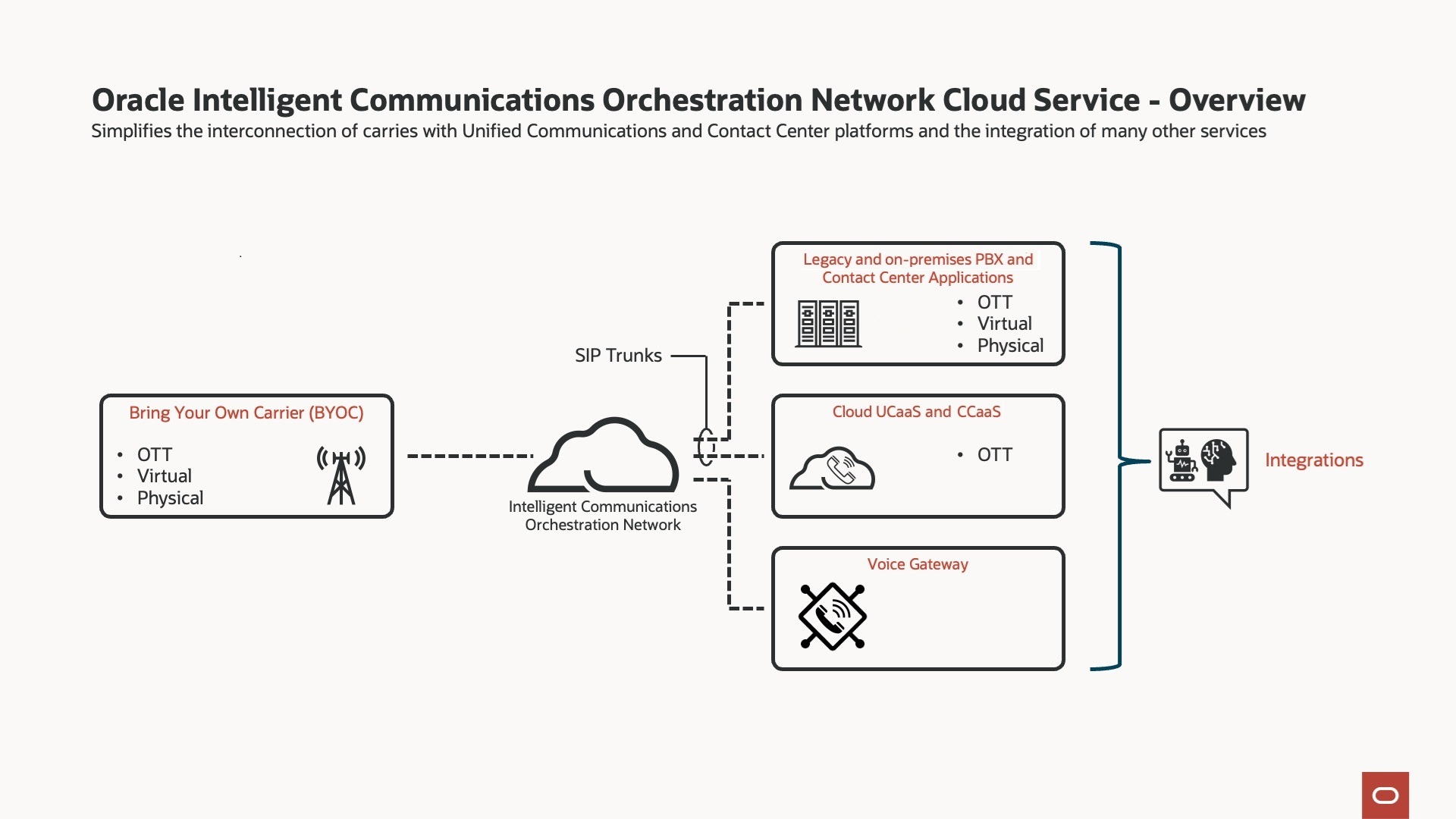
The preceding diagram begins with associating your carrier with Oracle® Intelligent Communications Orchestration Network cloud service Over the Top, Virtually, or Physically. To that association, you add SIP Trunks and Voice Gateways in Oracle® Intelligent Communications Orchestration Network cloud service to integrate with the voice services you want.
Number Management
The Oracle® Intelligent Communications Orchestration Network cloud service allows customers and Managed Service Providers to manage the numbers they use for their services. Number management integration provides you with the ability to add and remove numbers to services and accounts as needed.
Note:
The responsibility of managing BYOC connectivity lies solely with the Oracle® Intelligent Communications Orchestration Network cloud service subscriber, as does the purchasing and porting of numbers. While Oracle ensures the security and reliability of the platform, it does not form part of the contractual relationship for these services.Number Provisioning
Note:
There is no integration with the Bring Your Own Carrier (BYOC) provider. Customers cannot buy or port numbers from the Oracle® Intelligent Communications Orchestration Network cloud service into those services. Such actions fall under the agreement with the provider.Inventory Management
In addition to managing numbers across services and accounts, you can manage your inventory of numbers by way of the Inventory site that is embedded by default in each account.
The Inventory site is for storing unassigned numbers that you do not want to cancel and return to the carrier when you discontinue the services for which they were originally provisioned. You might want to keep the numbers for future use. You can also put new numbers in Inventory until you assign them to a service.
Numbers in inventory cannot be associated with an active service and cannot be used to make or receive calls until you assign them to a service.
Note:
You cannot delete the Inventory site.Number Actions
You can perform certain actions on the platform for a more granular level of functionality to help you use your number inventory in a more consistent manner. See Actions on the Number Blocks Page.
Self-Service Management Portal
The Oracle® Intelligent Communications Orchestration Network cloud service provides a portal for creating and using the following elements you need to manage voice services.
Sites—A site is an artifact that represents the physical location where voice services are delivered. Sites hold all relevant information related to the location, such as the address and contact details. For example, a corporate headquarters office can be considered a site. The portal provides tools to create, edit, and delete site information.
Numbers—A number is an artifact that represents a block of phone numbers where services are routed. You can access numbers after they have been imported into the platform through Bring Your Own Carrier (BYOC). The availability of numbers depends on the location of the service and the types of numbers allowed. You can move numbers from sites, store numbers in inventory, and split number blocks across different service types. Managing numbers is an important component of the platform access services, enabling Managed Service Providers (MSP) and Enterprises to effectively manage their telecommunications operations.
Services—A Service is a voice application connected to the platform through SIP trunks, enabling communication between other services and selected carrier networks When you create a SIP trunk, you select a service profile, such as Carrier, Genesys, Microsoft Teams, Generic, or Voice Gateway. You can add voice bots to the Voice Gateway. Oracle® Intelligent Communications Orchestration Network cloud service displays the configuration fields required for the selected profile when you add the service. The Services pages in the Portal allows Enterprises and MSPs to manage platform features such as trunks and their attributes, as well as other platform features enabled as part of their subscription. Services is the landing page when an Enterprise customer logs on. MSPs can navigate to the Services page from their landing page.
Accounts—An Account is a logical container used as the entry point for working with Oracle® Intelligent Communications Orchestration Network cloud service. Oracle creates an account for each Enterprise end-user customer (single-tenant only) and each Managed Service Provider (multi-tenant capable) customer. MSPs can create sub-accounts with in their account for their customers. The Accounts page is the landing page when an MSP logs on. Enterprises cannot access the Accounts page.
SIP Trunks
SIP trunks enable services to make and receive telephone calls. Customers will connect a SIP trunk (known as a service) within Oracle® Intelligent Communications Orchestration Network cloud service and connect it to their telephony equipment. By creating such connections, customers can make and receive telephone calls both locally and internationally.
Service Groups
Oracle® Intelligent Communications Orchestration Network cloud service offers a solution to customers facing service outages on specific trunks, enabling them to continue operating their businesses. This is achieved through the provision of trunk groups, which allow Managed Servie Providers and Enterprises to combine multiple trunks into a single group. Trunk group types include:
End-Point service groups—Groups services such as Microsoft Teams, Genesys, and Generic SIP.
Carriage service groups—Groups carriers.
With both types of groups, you can set the priority among the services to automatically switch to a backup trunk in the event that the currently active trunk becomes unavailable.