3 Understanding the LPO Process
This chapter explains the batch and What-If run flows from initial forecast and default-strategy setup through scheduled batch optimization, automatic finalization, recurring review, and downstream execution.
The workflow varies by optimization type, but the operating cadence remains consistent: configure the inputs, let the scheduled batch create the active recommendations, and complete recurring decisions in Manage Recommendation.
Forecast Configurations
Forecasts provide the demand estimates that LPO uses to predict how customers are likely to respond to price changes. By combining historical sales, inventory, seasonality, and customer behavior, forecasts help estimate future sales, revenue, gross margin, inventory movement, and other projected business outcomes under different pricing scenarios.
Forecast configurations are required for the following optimization types:
- Promotion Optimization
- Markdown Optimization
- Targeted Offer Optimization
- Forecast-Based Regular Pricing
Rules-Based Regular Pricing instead uses configured Non-Forecast business rules and current pricing, cost, competitor, merchandise, and location data.
Verifying a Forecast Configuration
Forecast configurations are created and managed outside LPO. Before creating a forecast-based optimization run, verify that the required forecast run type has completed aggregation, is active, and is mapped to the applicable LPO application.
- From the Oracle Retail AI Foundation Tasks menu, navigate to Forecast Engine -> Manage Forecast Configurations.
-
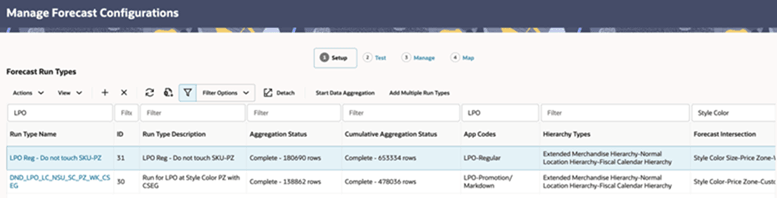
In the Setup stage, filter for the appropriate LPO forecast run type and verify that the Aggregation Status is Complete.
Figure 3-1 Manage Forecast Configurations
-
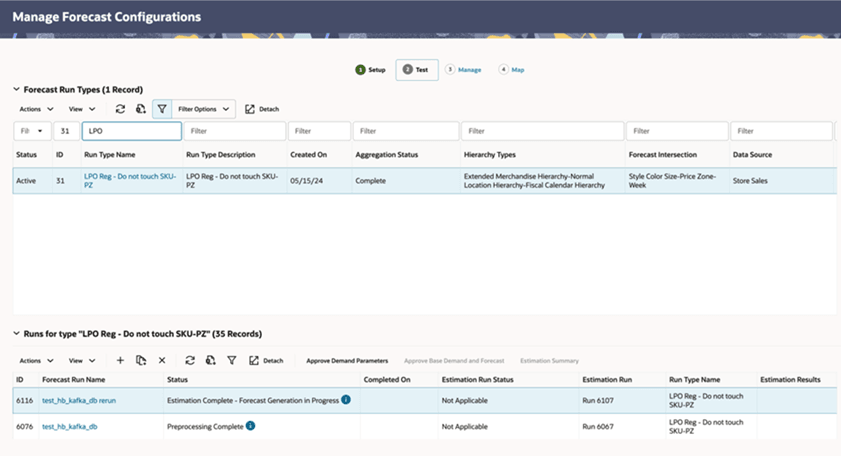
Open the Test stage and verify that the Run Status is Complete for the applicable Promotion/Markdown or Regular forecast run.
Figure 3-2 Forecast Configuration - Test
-
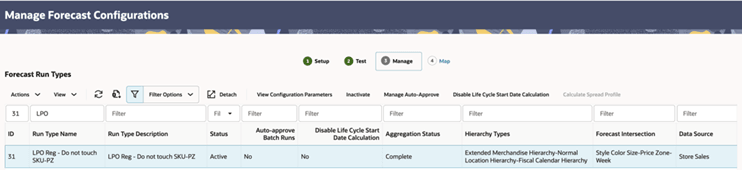
Open the Manage stage and verify that the forecast run type Status is Active.
Figure 3-3 Forecast Configuration - Manage
-
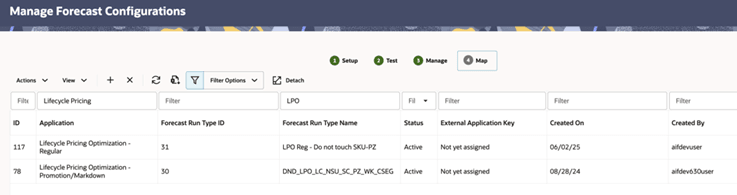
Open the Map stage and verify that the forecast run type has an active mapping to the applicable LPO application.
Figure 3-4 Forecast Configuration - Map
For additional details on forecast configurations, see the Forecast Engine chapter in the Oracle Retail AI Foundation Cloud Service Implementation Guide.
Business Rules and Strategy
Demand forecasts alone do not determine pricing recommendations. Retailers must also define the pricing objectives, constraints, and business policies that guide the optimization process.
In LPO, these policies are managed through strategies and business rules. A strategy represents the retailer’s pricing approach, while the business rules within that strategy define the conditions and constraints that the optimization engine must consider when generating recommendations.
Every optimization run requires a pricing strategy. The selected strategy determines which business rules are evaluated during optimization and therefore has a significant influence on the recommendations that LPO generates.
Although all optimization types require a pricing strategy, the rules evaluated depend on the selected optimization workflow:
- Promotion, Markdown, Targeted Offer, and Forecast-Based Regular Pricing evaluate forecast-based business rules together with other applicable pricing constraints.
- Rules-Based Regular Pricing evaluates only Non-Forecast business rules and ignores any forecast-based rules that may exist within the selected strategy.
Most organizations maintain a system-provided default strategy (DEFAULT_SET) that represents their standard pricing policy and is typically used for scheduled Batch Runs. Additional strategies can be created to support specific business scenarios, such as promotional events, competitor pricing initiatives, high-priority merchandise, or What-If analysis.
Before creating an optimization run, verify that an appropriate pricing strategy is available for the selected optimization type.
For additional information about creating and maintaining pricing strategies, see LPO Rules and Strategies. Configuration details are available in the Control and Tactical Center chapter of the Oracle Retail AI Foundation Cloud Service Implementation Guide.
LPO Runs
Every recommendation generated by LPO originates from an optimization run. A run defines the pricing problem that LPO is trying to solve by combining a business scope, pricing strategy, business rules, and optimization objective.
LPO supports two types of optimization runs that are available for all types of pricing and optimizations:
- Batch Runs, which generate recommendations on a scheduled basis.
- What-If Runs, which allow users to evaluate alternative pricing scenarios before replacing the active batch run recommendations.
Although the run types are consistent across optimization workflows, the optimization inputs and analysis stages vary depending on the selected optimization type.
Batch Run
A Batch Run is created by the configured nightly or weekly batch process. It uses the retailer's default strategy, generates the active recommendation set, and is automatically finalized so the recommendations become available in Manage Recommendation.
Strategy Coverage and Precedence: Ensure every merchandise-location-season combination in scope is covered by DEFAULT_SET. For a combination and rule category defined in a What-If strategy, the What-If rule takes precedence. Any rule category not defined for that combination continues to use the applicable rule from DEFAULT_SET.
For Promotion, Markdown, and Targeted Offer optimization, batch runs generate recommendations that become available in Manage Recommendation for business review, approval, and execution.
For Regular Pricing, batch runs generate recommendations using the configured pricing strategy. Depending on the implementation, recommendations that satisfy configured auto-approval criteria can be automatically approved and exported to downstream pricing systems.
Batch Run Notifications
LPO generates a pre-batch notification when an optimization batch begins. When the batch completes, LPO generates a notification summarizing the runs started automatically by that batch.
Separate post-batch summaries are provided for Promotion and Markdown runs and for Regular Pricing runs. Each summary shows the total number of runs and counts for Created, Queued for Creation, Ready for Review, Running, Submitted, Infeasible, and Failed. Users can view the post-batch notification in LPO or receive it by email according to their Retail Home notification settings.
What-If Run
A What-If Run is an optional, user-initiated analysis used to evaluate a custom strategy or rule change without affecting the active batch run recommendations.
Unlike Batch Runs, What-If Runs are isolated from the active batch run. They can use alternative strategies, business rules, or optimization parameters so users can compare scenarios before deciding whether to replace the active batch run recommendations.
Typical What-If scenarios include:
- Testing an alternative promotional strategy.
- Evaluating a different markdown cadence or sell-through target.
- Assessing the impact of competitor pricing rules.
- Comparing multiple pricing strategies before selecting the preferred approach.
Finalize a What-If run only when the alternative should replace the active Batch Run recommendations for the same business scope and effective period. If the alternative is not adopted, leave the Batch Run recommendations unchanged.
Table 3-1 Batch Versus What-If Run
| Action/Use | Batch Run | What-if Run |
|---|---|---|
| Initiated by | System, on a batch schedule | User, on demand |
| Strategy | Default strategy | Any custom strategy |
| Rules | Fixed at batch creation | Configurable per run |
| Auto-approval | Supported for Regular Pricing | Not applicable |
| Output | Live recommendations | Isolated until finalized |
| Typical use | Weekly pricing cycle | Scenario testing, strategy comparison |
Batch and What-If Flows
The batch run flow and the optional What-If flow serve different purposes. After setup, scheduled batch runs are created automatically; a What-If run is created only when a user needs to evaluate a change.
Figure 3-5 LPO Workflow
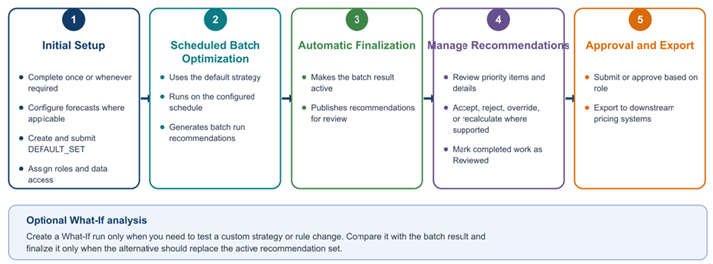
Initial Setup. Complete the required forecast, role, business-rule, and DEFAULT_SET configuration once during implementation and update it whenever business policy, scope, access, or forecast configuration changes.
Scheduled Batch Processing. On the configured schedule, LPO uses the default strategy to optimize the eligible scope. The batch run is automatically finalized, creating the active recommendation set in Manage Recommendation.
Recurring Recommendation Review. Pricing analysts and buyers use Manage Recommendation to focus the item set, review item-level evidence, complete supported actions, mark recommendations as Reviewed, and Submit or Approve them for export according to role and workflow.
Optional What-If Analysis. Create a What-If run only to test a custom strategy or rule change. Compare it with the active batch run. Finalize the What-If run only when its recommendations should replace the active batch run recommendations.
Workflow by Optimization Type
The following comparison shows which inputs and analysis stages apply to each optimization type.
Forecast Configuration is required for Promotion, Markdown, Targeted Offer, and Forecast-Based Regular Pricing, while Rules-Based Regular Pricing uses current operational data and N/F rules.
Table 3-2 Workflow Stages Available for Each Optimization Type
| Workflow Stage | Promotion | Markdown | Targeted Offer | Forecast-Based Regular Pricing | Rules-Based Regular Pricing |
|---|---|---|---|---|---|
| Forecast Configuration | ✓ | ✓ | ✓ | ✓ | X |
| Run Overview | ✓ | ✓ | ✓ | ✓ | ✓ |
| Scope | ✓ | ✓ | ✓ | ✓ | ✓ |
| Rules | ✓ | ✓ | ✓ | ✓ | ✓ |
| Optimize | ✓ | ✓ | ✓ | ✓ | ✓ |
| Results | ✓ | ✓ | ✓ | ✓ | ✓ |
| Sales Forecast | ✓ | ✓ | ✓ | X | X |
| Returns Forecast | ✓ | ✓ | ✓ | X | X |
| Exceptions | ✓ | ✓ | ✓ | X | X |
| Manage Recommendation | ✓ | ✓ | ✓ | ✓ | ✓ |
| Price Modeling | X | X | X | X | ✓ |
Promotion and Markdown Workflow
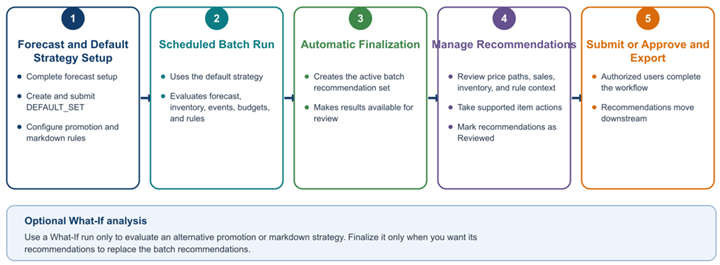
Promotion and Markdown use the same forecast-driven batch run flow. Initial forecast and DEFAULT_SET configuration support the scheduled batch, while recurring users review the active recommendations in Manage Recommendation.
Key characteristics:
- Requires an active Forecast Configuration and forecast-based business rules.
- Uses planned events and pricing inputs for promotions, and markdown timing, exit-date, sell-through, and budget controls for markdowns.
- Includes Sales Forecast, Returns Forecast, and Exceptions.
- Recommendations are reviewed in Manage Recommendation.
Figure 3-6 Promotion, Markdown, and Targeted Offer Forecast-Driven Workflow
Forecast-Based Regular Pricing Workflow
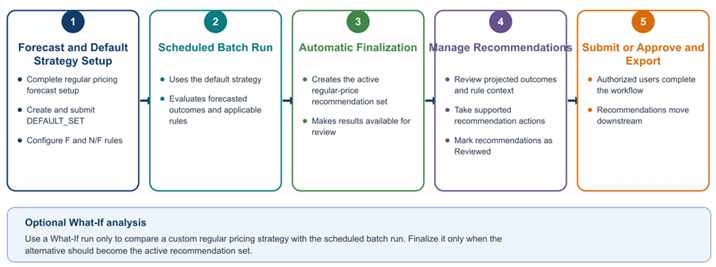
Forecast-Based Regular Pricing uses demand forecasts with configured F and N/F business rules. The scheduled batch creates the active regular-price recommendation set for review in Manage Recommendation.
Key characteristics:
- Requires a valid Forecast Configuration before optimization.
- Evaluates both Forecast and Non-Forecast business rules during optimization.
- Optimizes regular prices using projected demand, revenue, gross margin, and sales volume.
- Results focus on projected Revenue, Gross Margin, and Volume performance.
- Recommendations are reviewed and approved in Manage Recommendation before execution.
Figure 3-7 Forecast-Based Regular Pricing Workflow
Rules-Based Regular Pricing Workflow
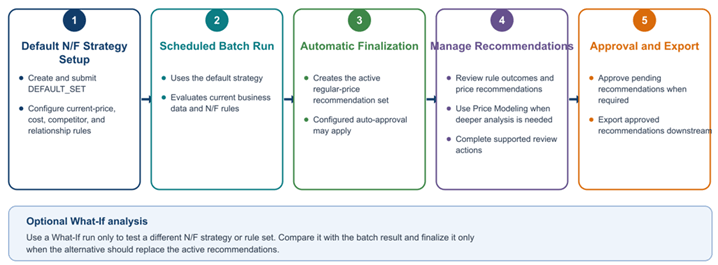
Rules-Based Regular Pricing uses current business data and configured N/F rules. The scheduled batch creates the active regular-price recommendation set, with auto-approval applied where configured.
The analysis emphasizes recommendation and rule outcomes before any pending recommendations continue through approval and export.
Figure 3-8 Rules-Based Regular Pricing Workflow
Targeted Offer Workflow
Targeted Offer Optimization combines demand forecasts with customer segments to generate personalized offers. As shown in Figure 3-6 , it follows the same forecast-driven lifecycle as Promotion and Markdown, but recommendation eligibility and offer values are evaluated for configured customer groups or individuals.
- Requires forecast and customer-segmentation inputs.
- Evaluates configured targeting criteria, deal type, channel, and discount information.
- Uses the Maximize Redemption Rate objective to identify offers expected to produce the best redemption rate.
- Recommendations are reviewed and approved through Manage Recommendation.