Solution Architecture
This chapter provides an overview of the application architecture used by the integration, including:
- Solution Overview
- Solution Diagram
- Integration Flows
Solution Overview
The technical aspects involved in the integration between Oracle Utilities Customer Cloud Service and Oracle Utilities Opower are:
- The integration layer consists of integration processes deployed on Oracle Integration Cloud.
- The integration processes interact with other applications using the following adapters:
- Oracle Utilities Adapter interacts with Customer Cloud Service REST services to send or request information.
- REST Adapter interacts with Opower GraphQL APIs to send and receive information. It also interacts with Oracle Cloud Infrastructure Object Storage APIs to transfer files from one application to another.
- FTP Adapter interacts with Customer Cloud Service On Premise Server when files are transferred to the Customer Cloud Service FTP location.
- Three types of email notifications can be configured in this integration:
-
Business email notifications:
These notifications are sent when the application encounters a business fault, such as a missing required field, an invalid value, or another data-related issue.
In the OUTL-BRT-CCS_OPWR_BusinessConfigProps lookup, configure the following properties to enable or disable notifications:
- Set the
notif.email.business.error.flagproperty name to ‘true’ to receive business error email notification. By default, this is set to ‘true’. - Define the business error email recipients in the
businessError.to.emailproperty name. These are usually sent to the application business users.
- Set the
-
Technical error email notifications:
These notifications are sent when a technical fault is encountered, such as authentication error, connection issues or server unavailable.
In the OUTL-BRT-CCS_OPWR_TechnicalConfigProps lookup, configure the following properties to enable or disable notifications:
- Set the
notif.email.technical.error.flagproperty name to ‘true’ to receive technical error email notification. By default, this is set to ‘true’. - Define the technical error email recipients in the
technicalError.to.emailproperty name. These are usually sent to the application administrators or devops team.
- Set the
-
Technical error info email notifications:
These notifications are sent to business users or business administrators to inform them that a technical error was encountered.
In the OUTL-BRT-CCS_OPWR_BusinessConfigProps lookup, configure the following properties to enable or disable notifications:
- Set the
notif.email.techerror.info.flagproperty name to ‘true’ for business users or administrators to receive technical error informational email notification. By default, this is set to ‘true’. - Define the email recipients in the
businessError.to.emailproperty name. These are usually sent to the application business users.
- Set the
-
Note: Email notifications are optional but are enabled by default. You can specify multiple email addresses in the “To Email” property by separating them with commas. For example: useremail1@company.com, useremail2@company.com.
- The OUTL-BRT-CCS_OPWR_BusinessConfigProps and OUTL-BRT-CCS_OPWR_TechnicalConfigProps lookups are used to define the default values needed by the integration flows. Make sure the properties in the lookups are configured.
- Integration related Domain Value Mapping (DVM) lookups are used for translation of values from one application to the other. Make sure these DVM lookups are configured.
- In Customer Cloud Service initiated processes, outbound messages are sent real-time. For inbound messages, it uses REST inbound web services (IWS) to receive messages and use a batch process to upload the file(s) from the content server for processing.
- In Oracle Utilities Opower, GraphQL APIs are used to retrieve communications information. Files are used to pass the affordability indicator information out to Customer Cloud Service.
- For Scheduled Integration processes, make sure Opower’s periodic pipelines and affordability file extract process are run first so the integration process will have data to process.
The integration uses One-way Asynchronous and Synchronous patterns.
Synchronous Pattern
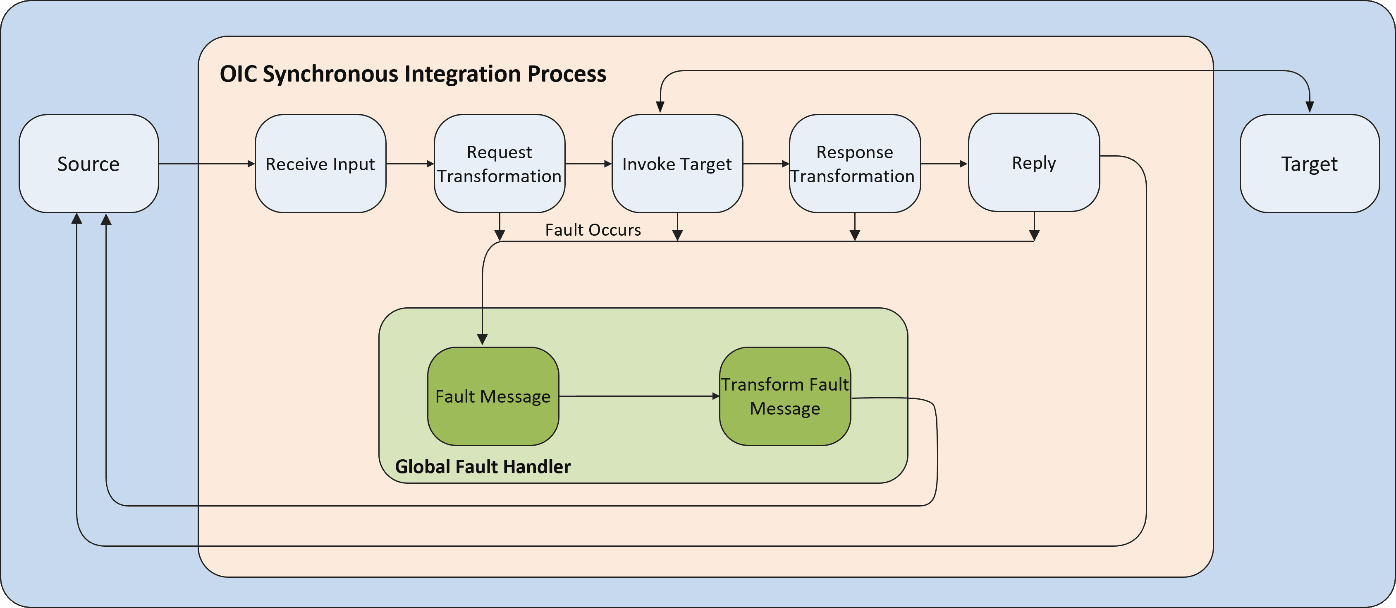
Synchronous integration pattern
The synchronous integration process:
- Receives a request message from the source application.
- Transforms the message from the source format to the target format. Lookups are used for data translations, if applicable.
- Invokes the target application with the request and waits for the response to come back.
- Transforms the response message from the target application to the source format. It sends a synchronous response/acknowledgment back to the source application.
- In case of any error, the global fault handler catches them and sends the transformed error message to the source application.
One-way Asynchronous Pattern
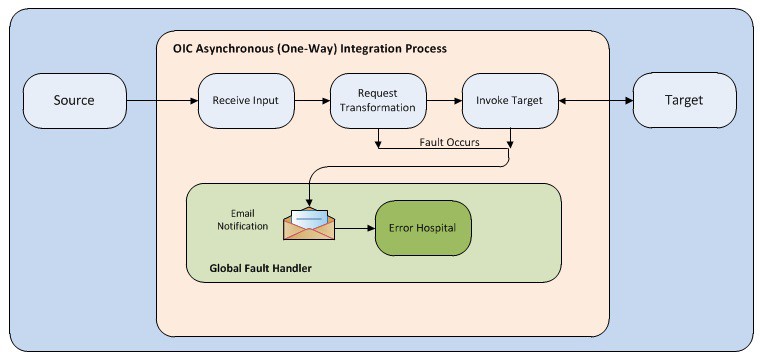
One-way asynchronous integration pattern
The one-way asynchronous integration process:
- Receives a request message from the source application.
- Transforms the message from the source format to the target format. Lookups are used for data translations, if applicable.
- Invokes the target application to send the request message.
- In case of any error, the global fault handler catches the error.
- An optional email notification is sent to the respective users as configured.
- The error instance can be re-submitted from Oracle Integration Cloud. Refer to the Error Handling section in Configuring Lookups, Error Handling, and Email Notifications for more details.
Solution Diagram
The following solution diagrams show the integration between Oracle Utilities Customer Cloud Service and Oracle Utilities Opower.
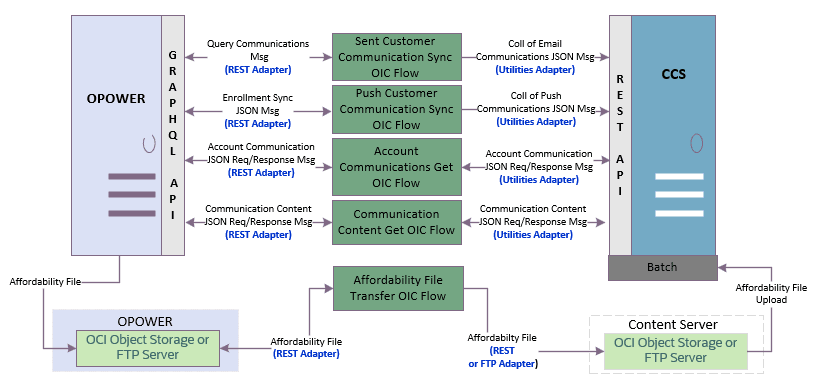
Solution Architecture Diagram
Integration Flows
The integration supports the following processes. Select a process to view its processing details and technical artifacts.
- Transfer Affordability Indicator File Process (Oracle Integration Cloud Initiated)
- Synchronize SENT Customer Communications Process (Oracle Integration Cloud Initiated)
- Synchronize PUSH Customer Communications Process (Oracle Integration Cloud Initiated)
- Get Account Communications Process (Oracle Utilities Customer Cloud Service Initiated)
- Get Communication Content Process (Oracle Utilities Customer Cloud Service Initiated)
- Common Integration Flows