Designing Single-Page Applications Using Oracle JET
Oracle JET includes Knockout for separating the model layer from the view layer and managing the interaction between them. Using Knockout, the Oracle JET oj-module component, and the Oracle JET oj.Router framework class, you can create single-page applications that look and feel like a standalone desktop application.
Topics:
Understanding Oracle JET Support for Single-Page Applications
Single-page applications (SPAs) are typically used to simulate the look and feel of a standalone desktop application. Rather than using multiple web pages with links between them for navigation, the application uses a single web page that is loaded only once. If the page changes because of the user's interaction, only the portion of the page that changed is redrawn.
Oracle JET includes support for single page applications using the oj.Router class for virtual navigation in the page, the oj-module component for managing view templates and viewModel scripts, and Knockout for separating the model layer from the view layer and managing the binding between them.
In the Oracle JET SPA-ojModule-ojRouter application shown in the image below, the index.html page displays the application shell with a toolbar for choosing the Home, Customers, and Admin content.
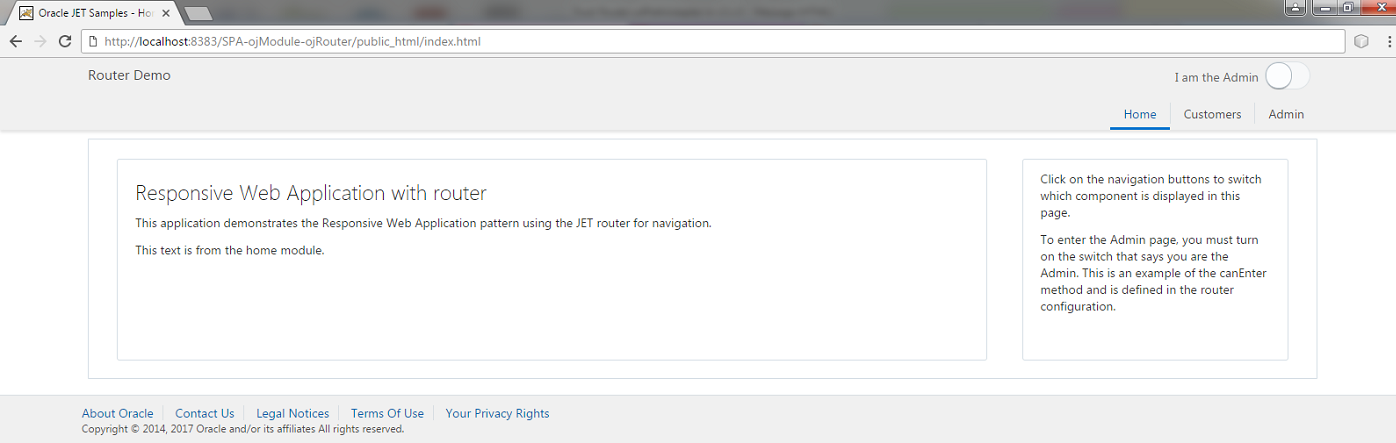
When the user selects a toolbar item such as the Customers button, the new content displays, and the URL changes to reflect the user's current location on the page.
If the user chooses several chapters to display, the browser remembers the previous selections. When the user selects the browser's back function, the URL and page content change to reflect the user's previous selection.
-
urlPathAdapterformats the URL in path segments. Each segment is the possessive router’s current state id separated by a '/' , like/customers. -
urlParamAdapterformats the URL using query parameters. Each parameter is the router name and its current state id like?root=customers.
In this example, routing is handled using query parameters (web_site/public_html/index.html?root=customers).
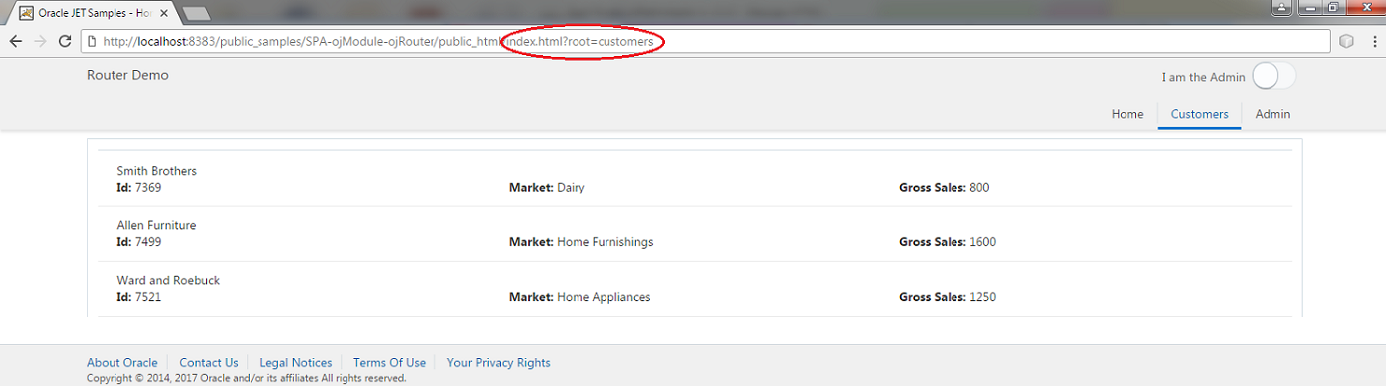
web_site/public_html/customers). To configure routing to use path segments, you must have
-
Access to a server
-
URL rewrite rules configured properly on the server
-
Commented out the line in the
main.jsfile://oj.Router.defaults['urlAdapter'] = new oj.Router.urlParamAdapter();
The default adapter for the router is the urlPathAdapter adapter. However, the Oracle JET SPA-ojModule-ojRouter application uses the urlParamAdapter to ensure that it can run in any server environment without modification to the server.
When routing a single-page application, the page doesn't reload from scratch but the content of the page changes dynamically. In order to be part of the browser history and provide bookmarkable content, the Oracle JET router emulates the act of navigating using the HTML5 history push state feature. The router also controls the URL to look like traditional page URLs. However, there are no resources at those URLs, and you must set up the HTML server. This is done using a simple rule for a rewrite engine, like mod rewrite module for Apache HTTP server or a rewrite filter like UrlRewriteFilter for servlets.
In general, use query parameters when your application contains only a few views that the user will bookmark and that are not associated with a complex state. Use path segments to display simpler URLs, especially for nested paths such as customers/cust/orders.
The Oracle JET Cookbook and Oracle JET sample applications use the Oracle JET oj-module feature to manage the Knockout binding. With oj-module, you can store your HTML content for a page section in an HTML fragment or template file and the JavaScript functions that contain your viewModel in a viewModel file.
When oj-module and oj.Router are used in conjunction, you can configure an oj-module object where the module name is the router state. When the router changes state, oj-module will automatically load and render the content of the module name specified in the value of the current RouterState object.
Creating a Single-Page Application in Oracle JET
The Oracle JET Cookbook includes complete examples and recipes for creating a single-page application using path segments and query parameters for routing and examples that use routing with the oj-module component. Regardless of the routing method you use, the process to create the application is similar.
To create a single-page application in Oracle JET:
If needed, create the application that will house your main HTML5 page and supporting JavaScript. For additional information, see Getting Started with Oracle JET Web Application Development or Getting Started with Oracle JET Hybrid Mobile Application Development.
-
Design the application's structure.
Identify the templates and ViewModels that your application will require. For example, the SPA-ojModule-ojRouter single-page sample application defines the HTML template for header and footer navigation items and uses
oj-modulein conjunction withoj.Routerto navigate through the content. The code sample below shows theindex.htmlfile, with the router definition highlighted.<!DOCTYPE html> <!-- Copyright (c) 2014, 2018, Oracle and/or its affiliates. The Universal Permissive License (UPL), Version 1.0 --> <html lang="en-us"> <head> <title>Oracle JET Samples - Home</title> <meta http-equiv="x-ua-compatible" content="IE=edge"/> <meta charset="UTF-8"> <meta name="viewport" content="width=device-width, initial-scale=1"> <!-- base href="/" /--> <!-- This is the main css file for the default Alta theme --> <link rel="stylesheet" href="../../jet/css/libs/oj/v6.0.0/alta/oj-alta-min.css" type="text/css"/> <!-- These style classes are for demonstration purposes only. --> <link rel="stylesheet" href="css/demo-alta-patterns-min.css"/> <!-- This is where you would add any app specific styling --> <link rel="stylesheet" href="css/override.css" type="text/css"/> <!-- RequireJS bootstrap file --> <script data-main="js/main" src="../../jet/js/libs/require/require.js"></script> </head> <body class="oj-web-applayout-body"> <!-- Template for rendering navigation items shared between nav bar and nav list --> <script type="text/html" id="navTemplate"> <li><a href="#"> <span :class="[[$data.iconClass]]"></span> <span><oj-bind-text value="[[$data.name]]"></oj-bind-text></span> </a></li> </script> <div id="globalBody" class="oj-offcanvas-outer-wrapper oj-offcanvas-page"> <!-- ** Oracle JET V6.0.0 web application navigation drawer pattern. ** Please see the demos under Cookbook/Patterns/App Shell: Web ** and the CSS documentation under Support/API Docs/Non-Component Styling ** on the JET website for more information on how to use this pattern. ** The off-canvas section is used when the browser is resized to a smaller media ** query size for a phone format and hidden until a user clicks on ** the header hamburger icon. --> <div id="navDrawer" role="navigation" class="oj-contrast-marker oj-web-applayout-offcanvas oj-offcanvas-start"> <oj-navigation-list data="[[navDataSource]]" edge="start" item.renderer="[[oj.KnockoutTemplateUtils.getRenderer('navTemplate', true)]]" on-click="[[toggleDrawer]]" selection="{{router.stateId}}"> </oj-navigation-list> </div> <div id="pageContent" class="oj-web-applayout-page"> <!-- ** Oracle JET V6.0.0 web application header pattern. ** Please see the demos under Cookbook/Patterns/App Shell: Web ** and the CSS documentation under Support/API Docs/Non-Component Styling ** on the JET website for more information on how to use this pattern. --> <header role="banner" class="oj-web-applayout-header"> <div class="oj-web-applayout-max-width oj-flex-bar oj-sm-align-items-center"> <!-- Offcanvas toggle button --> <div class="oj-flex-bar-start oj-md-hide"> <oj-button id="drawerToggleButton" class="oj-button-lg" on-oj-action="[[toggleDrawer]]" chroming="half" display="icons"> <span slot="startIcon" class="oj-web-applayout-offcanvas-icon"></span> <span>Application Navigation</span> </oj-button> </div> <div class="oj-flex-bar-middle oj-sm-align-items-baseline"> <span role="img" class="oj-icon demo-oracle-icon" title="Oracle Logo" alt="Oracle Logo"></span> <h1 class="oj-sm-only-hide oj-web-applayout-header-title" title="Application Name"> <oj-bind-text value="[[appName]]"></oj-bind-text> </h1> </div> <div class="oj-flex-bar-end"> <oj-label id="switchLabel" class="oj-label oj-label-inline" for="switch">I am the Admin </oj-label> <oj-switch id="switch" value="{{isAdmin}}"></oj-switch> </div> </div> <div role="navigation" class="oj-web-applayout-max-width oj-web-applayout-navbar"> <oj-navigation-list class="oj-sm-only-hide oj-md-condense oj-md-justify-content-flex-end" data="[[navDataSource]]" edge="top" item.renderer="[[oj.KnockoutTemplateUtils.getRenderer('navTemplate', true)]]" on-oj-before-select="[[selectHandler]]" selection="{{router.stateId}}"> </oj-navigation-list> </div> </header> <div class="oj-web-applayout-content oj-web-applayout-max-width"> <div class="oj-flex oj-flex-items-pad"> <div class="oj-flex-item"> <oj-module role="main" class="oj-panel" style="padding-bottom:30px" config="[[moduleConfig]]"></oj-module> </div> </div> </div> <footer class="oj-web-applayout-footer" role="contentinfo"> <div class="oj-web-applayout-footer-item oj-web-applayout-max-width"> <ul> <oj-bind-for-each data="[[footerLinks]]"> <template> <li> <a :id="[[$current.data.linkId]]" :href="[[$current.data.linkTarget]]"> <oj-bind-text value="[[$current.data.name]]"></oj-bind-text> </a> </li> </template> </oj-bind-for-each> </ul> </div> <div class="oj-web-applayout-footer-item oj-web-applayout-max-width oj-text-secondary-color oj-text-sm"> Copyright © 2014, 2018 Oracle and/or its affiliates All rights reserved. </div> </footer> </div> </div> </body> </html>In this example,
oj-modulemanages content replacement for the header, main content, and footer sections of the body, andoj.Routerprovides routing support. For additional information aboutojModule, see Using ojModule Binding.The application also contains content that displays when the user clicks Customers and Admin in the application header. To manage the content for those sections, the application includes the
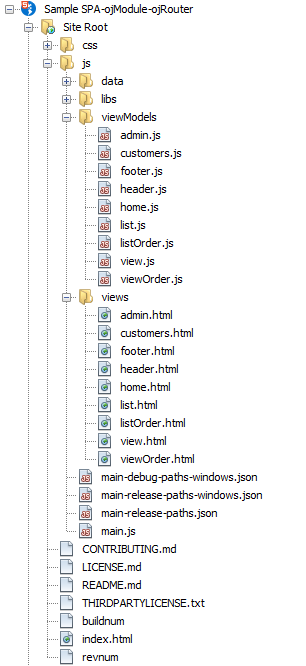
customers.htmlandadmin.htmlview templates with correspondingcustomers.jsandadmin.jsViewModels.The image below shows a portion of the directory structure for the SPA-ojModule-ojRouter single-page sample application. The ViewModel definitions are contained in JavaScript files in the
js/viewModelsfolder, and the view templates are contained in HTML files in thejs/viewsfolder. -
Add code to your application's main script that defines the states that the router can take, and add the
ojs/ojroutermodule to yourrequire()list.For example, in the SPA-ojModule-ojRouter sample application, the router can be in the
home,customers, oradminstates. The code sample below shows the code that configures the router.require(['ojs/ojcore', 'knockout', 'jquery', 'ojs/ojmodule-element-utils', 'ojs/ojmodule-element', 'ojs/ojknockout', 'ojs/ojbutton', 'ojs/ojmenu', 'ojs/ojtoolbar', 'ojs/ojnavigationlist', 'ojs/ojoffcanvas', 'ojs/ojarraytabledatasource', 'ojs/ojmodule', 'ojs/ojrouter', 'text', 'ojs/ojcheckboxset', 'ojs/ojswitch'], function (oj, ko, $, moduleUtils) { 'use strict'; // Set debug mode and log level // oj.Assert.forceDebug(); // oj.Logger.option('level', oj.Logger.LEVEL_INFO); // Router setup oj.Router.defaults['urlAdapter'] = new oj.Router.urlParamAdapter(); var router = oj.Router.rootInstance; router.configure({ 'home': {label: 'Home', isDefault: true, enter: function(){ console.log('entered Home'); }}, 'customers': {label: 'Customers', exit: function(){ console.log('exited customers'); }}, 'admin': {label: 'Admin', canEnter: function(){ return ko.dataFor(document.getElementById('switch')).isAdmin(); }} }); function ViewModel() { var self = this; // Media queries for responsive layouts var smQuery = oj.ResponsiveUtils.getFrameworkQuery(oj.ResponsiveUtils.FRAMEWORK_QUERY_KEY.SM_ONLY); self.smScreen = oj.ResponsiveKnockoutUtils.createMediaQueryObservable(smQuery); var mdQuery = oj.ResponsiveUtils.getFrameworkQuery(oj.ResponsiveUtils.FRAMEWORK_QUERY_KEY.MD_UP); self.mdScreen = oj.ResponsiveKnockoutUtils.createMediaQueryObservable(mdQuery); self.router = router; //initialize oj-module config self.moduleConfig = ko.observable({'view':[], 'viewModel':null}); //update module config every time as router.moduleConfig mutates ko.computed(function() { var name = self.router.moduleConfig.name(); var viewPath = 'views/' + name + '.html'; var modelPath = 'viewModels/' + name; var masterPromise = Promise.all([ moduleUtils.createView({'viewPath':viewPath}), moduleUtils.createViewModel({'viewModelPath':modelPath}) ]); masterPromise.then( function(values){ var viewModel = typeof values[1] === 'function' ? new values[1](self.router) : values[1]; self.moduleConfig({'view':values[0],'viewModel':viewModel}); } ); }); // Navigation setup var navData = [ {name: 'Home', id: 'home', iconClass: 'oj-navigationlist-item-icon demo-icon-font-24 demo-chart-icon-24'}, {name: 'Customers', id: 'customers', iconClass: 'oj-navigationlist-item-icon demo-icon-font-24 demo-people-icon-24'}, {name: 'Admin', id: 'admin', iconClass: 'oj-navigationlist-item-icon demo-icon-font-24 demo-info-icon-24'} ]; self.navDataSource = new oj.ArrayTableDataSource(navData, {idAttribute: 'id'}); // Drawer // Close offcanvas on medium and larger screens self.mdScreen.subscribe(function() {oj.OffcanvasUtils.close(self.drawerParams);}); self.drawerParams = { displayMode: 'push', selector: '#navDrawer', content: '#pageContent' }; // Called by navigation drawer toggle button and after selection of nav drawer item self.toggleDrawer = function() { return oj.OffcanvasUtils.toggle(self.drawerParams); } // Add a close listener so we can move focus back to the toggle button when the drawer closes $("#navDrawer").on("ojclose", function() { $('#drawerToggleButton').focus(); }); // Header // Application Name used in Branding Area self.appName = ko.observable("Router Demo"); // User Info used in Global Navigation area self.userLogin = ko.observable("john.hancock@oracle.com"); self.selectHandler = function (event, ui) { if ( ('ojBeforeSelect' === event.type ) && event.detail.originalEvent) { // router takes care of changing the selection event.preventDefault(); // Invoke go() with the selected item. self.router.go(event.detail.key); } }; self.isAdmin = ko.observable(false); // Footer function footerLink(name, id, linkTarget) { this.name = name; this.linkId = id; this.linkTarget = linkTarget; } self.footerLinks = ko.observableArray([ new footerLink('About Oracle', 'aboutOracle', 'http://www.oracle.com/us/corporate/index.html#menu-about'), new footerLink('Contact Us', 'contactUs', 'http://www.oracle.com/us/corporate/contact/index.html'), new footerLink('Legal Notices', 'legalNotices', 'http://www.oracle.com/us/legal/index.html'), new footerLink('Terms Of Use', 'termsOfUse', 'http://www.oracle.com/us/legal/terms/index.html'), new footerLink('Your Privacy Rights', 'yourPrivacyRights', 'http://www.oracle.com/us/legal/privacy/index.html') ]); } oj.Router.sync().then( function () { ko.applyBindings(new ViewModel(), document.getElementById('globalBody')); }, function (error) { oj.Logger.error('Error when starting router: ' + error.message); } ); } );In this example, the router is configured for query parameters. To configure the router for path segments, comment out the following line as shown below:
//oj.Router.defaults['urlAdapter'] = new oj.Router.urlParamAdapter();To configure the router for path segments, you must also set thebaseUrlproperty of therequirejs.config. This provides the router with a base to calculate which part belongs to the router state and which part is the existing URL.requirejs.config({ // Need to set baseUrl or nested view won't work because module location relative to current url. // Change to the correct baseUrl when deployed to site like: http://host/myApp baseUrl: window.location.href.split('#')[0].substring(0, window.location.href.split('#')[0].lastIndexOf('/')) + '/js', // Path mappings for the logical module names paths: { ... contents omitted });Note:
Routing with path segments also requires that the web server recognizes the paths as existing resources and routes the requests to the root page. If you're using the Apache web server, you can use the mod_rewrite module to rewrite requested URLs on demand. For other web servers, you can create a servlet filter or use one of the publicly available URL rewrite filters. In addition to rewriting the URL, the base URL needs to be set so that the router can retrieve the part of the URL representing the state. If your application start at the context root and is using
index.html, nothing needs to be done because the default value ofbaseUrlis'/'. If your application is nested in a directory namedmyApp, then the base URL should be changed:oj.Router.defaults['baseUrl'] = '/myApp/';If the
<base href>tag is set in your starting page, it is usually the same value used for the router base URL. -
Add code to the markup that triggers the state transition and displays the content of the current state.
When the user clicks one of the buttons in the header, the content is loaded according to the router's current state.
For additional information about creating templates and ViewModels, see Using ojModule Binding.
-
To manage routing within a module, add a child router using
oj.Router.createChildRouter().For example, when the user clicks Customers , the page displays a list of customer names with IDs that the user can select. The user can move back and forth between the customer details, and the child router maintains the state. The HTML markup is stored in the
Customers.htmltemplate and is shown below.<oj-module id="customers" config="[[moduleConfig]]"></oj-module>
The template defines the Oracle JET
oj-navigation-listcomponent and uses the router's state IDs as an argument to theoj-navigation-list’sselectionattribute. To display the customer list, the template iterates through eachRouterStateobject in therouter.statesproperty.The code sample below shows the
customer.jsfile that defines the child router in this code sample to display customers (either a list or details of a single customer) and to display orders of a specific customer.custRouteris a child of the parent router (params). The state of the child router, the parameters passed with it, along with the parent router determines the content of the page region.define(['ojs/ojcore', 'knockout', 'jquery', 'ojs/ojmodule-element-utils', 'ojs/ojmodule-element','ojs/ojknockout', 'ojs/ojrouter'], function(oj, ko, $, moduleUtils) { 'use strict'; var custArray = [ {id:7369, name: 'Smith Brothers', market: 'Dairy', sales: 800, deptno: 20, orders: [ {id:100, name:'A'}, {id:110, name:'B'}, {id:120, name:'C'}] }, {id:7499, name: 'Allen Furniture', market: 'Home Furnishings', sales: 1600, deptno: 30, orders: [ {id:101, name:'A'}, {id:102, name:'C'}] }, {id:7521, name: 'Ward and Roebuck', market: 'Home Appliances', sales: 1250, deptno: 30, orders: [ {id:120, name:'A'}, {id:121, name:'F'}, {id:122, name:'G'}] }, {id:7566, name: 'Jones Brothers', market: 'Reality', sales: 2975, deptno: 20, orders: [ {id:130, name:'B'}, {id:131, name:'C'}, {id:132, name:'D'}] }, {id:7654, name: 'Martin Marina', market: 'Water Sports', sales: 1250, deptno: 30, orders: [ {id:140, name:'C'}, {id:141, name:'B'}] }, {id:7698, name: 'Blake and Sons', market: 'Accounting', sales: 2850, deptno: 30, orders: [ {id:150, name:'E'}, {id:151, name:'G'}] }, {id:7782, name: 'Clark Candies', market: 'Confectionaries', sales: 2450, deptno: 10, orders: [ {id:160, name:'B'}, {id:161, name:'E'}] }, {id:7788, name: 'Scott Lawn Service', market: 'Gardening Supplies', sales: 3000, deptno: 20, orders: [ {id:170, name:'C'}, {id:171, name:'D'}] }, {id:7839, name: 'King Power', market: 'Champion Builders', sales: 5000, deptno: 10, orders: [ {id:180, name:'A'}, {id:181, name:'F'}, {id:182, name:'C'}] }]; function viewModel(parentRouter) { var routerConfig = { 'list': { isDefault: true } }; // Populate the router config object with all the items from the table custArray.forEach(function(item) { var id = item.id.toString(); // Configure the router state with a state parameter, in the form of // "1234/{orderId}" // "orderId" is the name we'll use to retrieve the value passed to // custRouter further in our moduleConfig. routerConfig[id+'/{orderId}'] = { label: item.name, value: item }; }); // Create and configure the router this.custRouter = parentRouter.createChildRouter('cust').configure(routerConfig); var initial = true; var self = this; self.moduleConfig = ko.observable({'view':[], 'viewModel':null}); // This is the main logic to switch the module based on both router states. ko.computed(function() { // create subscription to changes in states for both routers var customerState = self.custRouter.currentState(); var orderId = customerState && customerState.parameters.orderId; if(initial) { // nothing to load on inital call initial = false; } else { // update module config for oj-module on customers page var moduleName, viewModelParams = {}; if (orderId) { viewModelParams['parentRouter'] = self.custRouter; viewModelParams['data'] = orderId === 'orders' ? self.custRouter.currentValue.peek().orders : orderId; moduleName = orderId === 'orders' ? "listOrder" : "viewOrder"; } else if (customerState && customerState.id === 'list') { moduleName = self.custRouter.moduleConfig.name(); viewModelParams['data'] = custArray; // Pass a reference of custArray to the child module to render the list viewModelParams['parentRouter'] = self.custRouter; } else { moduleName = "view"; viewModelParams['data'] = self.custRouter.currentValue.peek() || {}; viewModelParams['parentRouter'] = self.custRouter; } // load view and view model and update the moduleConfig for 'customers' var viewPath = 'views/' + moduleName + '.html'; var modelPath = 'viewModels/' + moduleName; var masterPromise = Promise.all([ moduleUtils.createView({'viewPath':viewPath}), moduleUtils.createViewModel({'viewModelPath':modelPath}) ]); masterPromise.then( function(values){ var viewModel = new values[1](viewModelParams); self.moduleConfig({'view':values[0],'viewModel':viewModel}); } ); } }); self.connected = function() { oj.Router.sync().then( null, function(error) { oj.Logger.error('Error during refresh: ' + error.message); } ); }; self.disconnected = function() { // Every router is destroyed on dispose. self.custRouter.dispose(); }; } // Return constructor function return viewModel; });Note:
In this example, the oj-moduleconnectedlifecycle callback plays an important role in making the page work.oj.Router.sync()synchronizes the new router state with the current URL. The synchronization gives thecustRouterchild router a chance to transition to its default state, which islistin this example. -
Add any remaining code needed to complete the content or display.
You can download the Oracle JET SPA-ojModule-ojRouter application at SPA-ojModule-ojRouter.zip. The sample application includes the simple index.html page displayed in the preceding example and the content for the Customers and Admin sections.
The Oracle JET Cookbook also includes additional Routing Demos that implement oj.Router and a link to the oj.Router API documentation.