About the Oracle JET User Interface
The Oracle JET framework includes many components, patterns, and utilities that are ready for you to use in your application. Each Oracle JET UI component, pattern, and utility includes an API specification (if applicable) and a code example in the Oracle JET Cookbook. The Oracle JET Cookbook includes HTML markup and JavaScript that you can copy and paste into your own application.
Topics:
Oracle JET and jQuery UI
Oracle JET components encapsulate jQuery UI widgets, which are stateful plugins with a full life cycle that you can add to your page. jQuery UI widgets include methods and events which are described in jQuery UI API documentation at http://api.jqueryui.com.
By encapsulating jQuery UI widgets, Oracle JET components can take advantage of Knockout.js two-way data binding. Knockout is not required, however, and you can also work with Oracle JET components using standard jQuery calls.
Note:
The jQuery UI libraries included with Oracle JET contain the UI Core module and only those modules needed by the Oracle JET framework. For information about what is included in jQuery UI Core, see http://jqueryui.com/download. For information about downloading jQuery UI components or effects not included in the Oracle JET distribution, see Adding jQuery UI Components or Effects to Your Oracle JET Application.
Identifying Oracle JET UI Components, Patterns, and Utilities
The table below shows the list of Oracle JET UI components with links to an overview, the API documentation, and the code sample in the Oracle JET Cookbook.
| Component | Overview | API Specification | Cookbook Example |
|---|---|---|---|
|
Accordion |
|||
|
Button |
|||
|
Button set |
|||
|
Chart |
|||
|
Checkbox Set |
|||
|
Collapsible |
|||
|
Combobox |
|||
|
Conveyor Belt |
|||
|
Data Grid |
|||
|
Date and Time Picker |
|||
|
Date Picker |
|||
|
Diagram |
|||
|
Dial Gauge |
|||
|
Dialog |
|||
|
Drawer Utilities |
|||
|
Film Strip |
|||
|
Input Number |
|||
|
Input Password |
|||
|
LED Gauge |
|||
|
Legend |
|||
|
List View |
|||
|
Masonry Layout |
|||
|
Menu |
|||
|
Nav List |
|||
|
NBox |
|||
|
Pagination |
|||
|
Popup |
|||
|
Progress Indicator |
|||
|
Radioset |
|||
|
Rating Gauge |
|||
|
Row Expander (Tree Table) |
|||
|
Select |
|||
|
Slider |
|||
|
Spark Chart |
|||
|
Status Meter Gauge |
|||
|
Sunburst |
|||
|
Switch |
|||
|
Table |
|||
|
Tabs |
|||
|
Tag Cloud |
|||
|
Text Area |
|||
|
Textbox |
|||
|
Thematic Map |
|||
|
Time Picker |
|||
|
Timeline |
|||
|
Toolbar |
|||
|
Train |
|||
|
Tree |
|||
|
Treemap |
Common Functionality in Oracle JET Components
All Oracle JET components extend HTML elements, and you add the components to the HTML tags on your page.
Some Oracle JET components extend a single HTML element. For example, the ojTable component extends the HTML table element, and the ojInputText component extends input.
Other Oracle JET components can extend multiple HTML elements. For example, the ojButton component can extend button, input, and div. In some cases, the behavior of the component changes depending on which HTML element you are extending. The inputDateTime component displays a calendar inline if you use it to extend the div element, but it will display an input field with a calendar popup if you use it to extend the input element.
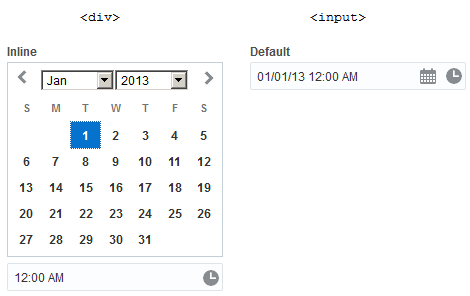
The Oracle JET Cookbook and JavaScript API Reference for Oracle® JavaScript Extension Toolkit (JET) provide examples that illustrate which HTML element to extend if you use the component. In addition, the Cookbook provides editing capability that allows you to modify the sample code directly and view the results without having to download the sample.
Oracle JET components also have the following functionality in common:
-
getNodebySubId()andgetSubIdByNode()methodsThe
getNodeBySubId()andgetSubIdByNode()methods provide safe access to an Oracle JET component's internal parts to check values and test components. Most Oracle JET components will consist of one or more internal parts. For example, an Oracle JET table component has table cells that you can access with thegetNodeBySubId()method. For additional information, see Testing Oracle JET Applications. -
getContextByNode()methodThe
getContextByNode()method is available on most DVT components and provides access to the component’s internal child DOM nodes. The method returns an object containing the context for the given node, including the child node’s subid and optional component-specific information. For additional information about the method and context objects, see the API documentation for the given component. -
rootAttributesoptionMost Oracle JET components provide the
rootAttributesoption which enables you to set attributes on the component's root DOM element at create time. Supported attributes includeid, which overwrites any existing value, and class and style, which are appended to the current class and style, if any. -
Keyboard navigation and other accessibility features
Oracle JET components that support keyboard navigation list the end user information in their API documentation. For additional information about Oracle JET components and accessibility, see Developing Accessible Applications.
-
Setting component state
In Oracle JET applications, when setting component state after create time, the correct approach depends on whether the component has a JavaScript (JS) API for that state.
State with a JS API, such as a button's disabled state, checked state, and label, should be set after creation through that API (
option(), for example) and not by directly manipulating the DOM after creation. This can be done by calling that JS API directly or by binding a component option such asdisabledto a Knockout observable using theojComponentbinding. In the latter case, the application should make any updates to the component option through the observable because any updates to the observable made by the application automatically update the component option. Likewise, options likevaluethat can change because of user interaction automatically update the observable.State with no JS API should be set by manipulating the DOM directly in an allowable way, and then calling
refresh()on the affected components. For example, callrefresh()if the reading direction is changed by setting thedirattribute on thehtmlnode.When using a built-in Knockout binding instead of the
ojComponentbinding, keep in mind that those bindings do not execute the necessaryrefresh()call after updating the DOM. Updates that flow from the component to the observable, because of user interaction, are not problematic. But updates in the other direction, that programmatically update the DOM because the observable changed, will not be picked up until the nextrefresh().