
Creating and Modifying Activities
This topic discusses how to:
Enter activity general information.
Define activities.
Define activity locations.
Track activity quality.
Track activity billing and project costing rates.
Pages Used to Create and Modify Activities
|
Page Name |
Definition Name |
Navigation |
Usage |
|---|---|---|---|
|
Activity Definitions - General Information |
PROJ_ACT_DESCR |
|
Create an activity and assign it to a project. This page operates in deferred processing mode. If you use PeopleSoft Program Management, you cannot access this page if no activities exist for the project, a change request is required to add activities to the project, and you are not the project manager. |
|
Activity Definitions - Definition |
PROJECT_ACTIVITY |
|
Define an activity and enter work details. |
|
Activity Definitions - Location |
PROJ_ACT_LOCATION |
|
Assign the physical location of an activity. |
|
Activity Definitions - Attachments |
PROJ_ACT_DOC |
|
|
|
Activity Definitions - Quality |
PROJECT_QUALITY |
|
Rate and record quality of work for specific activities. |
|
Activity Definitions - User Fields |
PC_ACT_USER |
|
Include additional, user-defined activity information. |
|
Activity Definitions - Rates |
ACTIVITY_SERVICES |
|
Enter and view billing and project costing rates that are associated with an activity. |
|
Activity Definitions - Budget Alerts |
PC_BUD_ACT_ALERTS |
|
Define budget alert thresholds at the activity level. |
|
Activity Definitions - Asset Integration Rules |
PC_AM_RULE_ACT |
Project Costing, Activity Definitions, General Information, Asset Integration Rules |
Define integration with PeopleSoft Asset Management at the activity level. |
Activity Definitions - General Information Page
Use the Activity Definitions - General Information page (PROJ_ACT_DESCR) to create an activity and assign it to a project.
This page operates in deferred processing mode.
Image: Activity Definitions - General Information page (1 of 2)
This example illustrates the fields and controls on the Activity Definitions - General Information page (1 of 2). You can find definitions for the fields and controls later on this page.
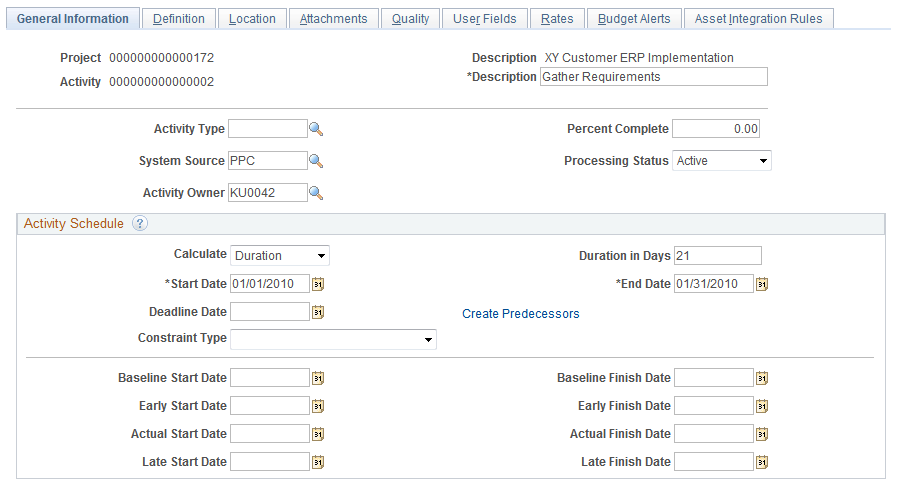
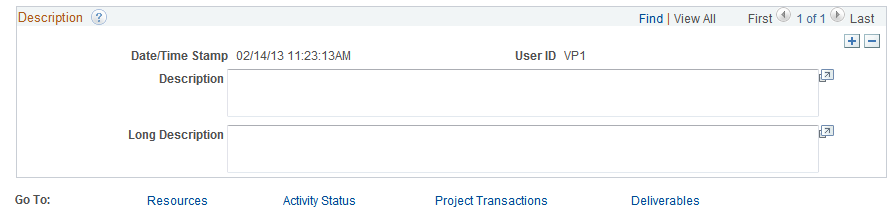
Image: Activity Definitions - General Information page (2 of 2)
This example illustrates the fields and controls on the Activity Definitions - General Information page (2 of 2). You can find definitions for the fields and controls later on this page.
| Activity Type |
Select an activity type. Use activity types to:
You set up activity types during implementation on the Activity Types page. See Activity Types Page. |
| Percent Complete |
Displays the percentage of the activity completed based on calculation method that you define on the Project Costing Definition page. If you select Manual in the Calculation Method field, you can enter a value in the Percent Complete field on this page. This field does not appear for activities with a processing status of Template. |
| System Source |
Select the origin of an activity, such as a third-party application or an online entry page in a PeopleSoft application. The default value is PPC (Project Costing online entry page). Available values are based on the translate values in the System Source field (SYSTEM_SOURCE) properties. |
| Processing Status |
Select an activity processing status. Select Active to make the activity available for selection from prompt lists within feeder systems to charge transactions. This field displays a processing status of Template if the activity belongs to a project template. |
| Activity Owner |
Select an activity owner from the list of project team members. The default value is based on the activity owner of the parent activity, if one exists. If there is no parent activity, the activity owner default value is based on the current project manager. The system uses the activity start date to determine the project manager. If you modify or remove an activity owner for a summary activity, a message appears when you save the page asking if you want to change the activity owner for all activities under this summary activity. |
| Activity Team |
Click to access the Activity Definitions - Team page to view and modify membership to the activity team. This link appears only if you use PeopleSoft Project Costing without PeopleSoft Program Management. |
| Resources |
Click to access the Resources by Activity page to view and modify the list of activity team resources. This link appears only if you use PeopleSoft Program Management. |
| Activity Status |
Click to access the Activity Definitions - Status page to view information regarding the history and current status of the activity. |
| Project Transactions |
Click to access the Transaction List page to view transactions for this activity. |
| Deliverables |
Click to access the Deliverables Summary Page to view and modify deliverables for this activity. This link appears only if you use PeopleSoft Program Management. |
Activity Schedule
| Start Date |
Enter the activity start date. If the activity start date is earlier than the project start date, the system adjusts the project start date accordingly. If you use PeopleSoft Program Management, you cannot enter a start date for a summary activity if the Activity Date Cascade Calculations for the project are set to Delay Calculations Until Save or Realtime Calculations. |
| Calculate |
Select the method of calculating the activity schedule. This field appears only when you use PeopleSoft Program Management and you select an Activity Date Cascade Calculations option of Delay Calculations Until Save or Realtime Calculations on the Program Management definition page for the project. For detail activities, select Duration, End Date, or Start Date to specify which one of these three fields is calculated by the system based on the values that you enter for the other two fields. For example, select End Date for the system to calculate the activity end date based on the values that you enter for activity start date and duration. The default value is based on the Activity Calculation Method field on the Program Management definition page for the project. For summary activities, the Calculate field value is Duration and is not editable. Note: You can override the default calculation method on a detail activity; however, you should limit this practice to exceptions only. We recommend that detail activities use the same activity calculation method as the project. |
| Duration in Days |
Enter the length of time needed to complete an activity. This field appears only if you use PeopleSoft Program Management. You cannot enter a duration for a summary activity if the Activity Date Cascade Calculations for the project are set to Delay Calculations Until Save or Realtime Calculations. |
| End Date |
Enter the activity completion date. If the activity end date is after the project end date, the system adjusts the project end date accordingly. If you use PeopleSoft Program Management, you cannot enter an end date for a summary activity if the Activity Date Cascade Calculations for the project are set to Delay Calculations Until Save or Realtime Calculations. |
| Deadline Date |
Enter the deadline date for the activity. You can enter any date, regardless of the project and activity schedules. If the activity end date falls after the deadline, an alert indicator appears on the Project Activities page. The date that you enter in this field also populates the Deadline field on the Project Activities page: More Dates tab. This field is for informational purposes only and appears only if you use PeopleSoft Program Management. |
| Constraint Type |
Select a constraint type to indicate when an activity can start or end. This field appears only if you use PeopleSoft Program Management. See Understanding Activity Constraints and Specifying Activity Constraints. |
| Constraint Date |
Select a constraint date if required based on the constraint type for this activity. The Constraint Date field appears only if you selected a constraint type that requires a constraint date and only if you use PeopleSoft Program Management. |
| Baseline Start Date and Baseline Finish Date |
Enter the projected start and finish dates for the activity. These fields do not appear for activities with a processing status of Template. |
| Early Start Date and Early Finish Date |
Enter the earliest possible activity start and completion dates. These fields do not appear for activities with a processing status of Template. |
| Actual Start Date and Actual Finish Date |
Enter the actual activity start and completion dates. These fields do not appear for activities with a processing status of Template. |
| Late Start Date and Late Finish Date |
Enter the latest possible activity start and completion dates. These fields do not appear for activities with a processing status of Template. |
Description
Enter a description and a long description for the activity. These fields are informational only, and you can use them to track notes over time. Each description is stamped with the date and time of entry and the user ID.
The Long Description field does not appear for activities with a processing status of Template.
Activity Definitions - Definition Page
Use the Activity Definitions - Definition page (PROJECT_ACTIVITY) to define an activity and enter work details.
Image: Activity Definitions - Definition page
This example illustrates the fields and controls on the Activity Definitions - Definition page. You can find definitions for the fields and controls later on this page.
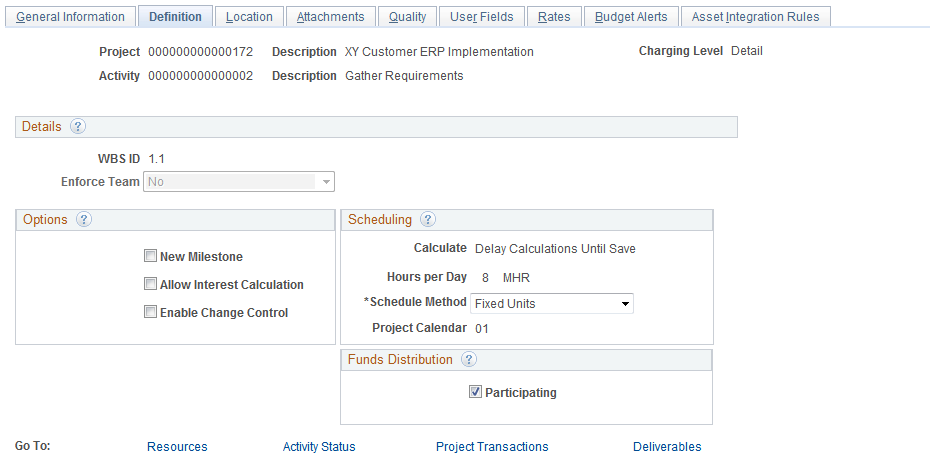
Use this page to select activity owner, activity team security, and options that control the functionality of the activity.
| Charging Level |
Displays the WBS level at which you want to track project budgets, forecasts, and costs. The system restricts charges to summary and detail activities that are in the specified level. This field appears if you use PeopleSoft Program Management. |
| WBS ID (work breakdown structure ID) |
Displays the hierarchical order of the activity within the WBS of the project. This value is system-generated based on the placement of the activity in the WBS. When you create a new activity from the Project Activity component, the system assigns a WBS ID that represents the last activity at level 1 of the WBS. You can move the activity in the WBS by using the Project Activities page. |
| Enforce Team |
Designates who can charge time and expenses to the activity. The Enforce Team drop-down list box is available for selection on this page if both of these conditions exist:
If the Enforce Team drop-down list box is available for selection, the possible values are: No: Select to enable all members of the project team to enter time and expenses against this activity for the period that they are on the project team. Expenses: Select to enforce activity team membership in PeopleSoft Expenses. Only activity team members can charge time and expenses in the PeopleSoft Expenses system against this activity for the period that they are on the project team. Exp and TL (Expenses and Time and Labor): Select to enforce activity team membership in PeopleSoft Expenses. Additionally, users can charge time in the PeopleSoft Time and Labor system to any activity on the project if they have security access to the project. Time&Labor: Select to enable all members of the project team to enter time and expenses against this activity for the period that they are on the project team. A read-only value of No in the Enforce Team field indicates that either Do Not Enforce or Project Team Only is selected as the enforce team option at the project level. A read-only blank value indicates that either Project Resource Pools Only or Project Activity Resource Pool is selected as the enforce team option at the project level. Note: The PeopleSoft Time and Labor system does not enforce project activity team. If you select the Exp and TL or Time&Labor product option, the system restricts PeopleSoft Time and Labor users for projects to which they can charge time. However, PeopleSoft Time and Labor users can charge time to any activity on a particular project if they have security access to the project. Security options are discussed in the Defining Project Security topic. See also, Project Definitions - Project Costing Definition Page. |
Options
Scheduling
This group box appears only if you use PeopleSoft Program Management.
See Understanding Programs, Projects, and the Enterprise Program Tree.
Funds Distribution
The Funds Distribution group box appears when the Enable Funds Distribution check box is selected on the Installation Integration Options page.
For more information about funds distribution, see Understanding Funds Distribution
Activity Definitions - Location Page
Use the Activity Definitions - Location page (PROJ_ACT_LOCATION) to assign the physical location of an activity.
| Location Code |
Select a location code that is already defined in the system. The address for this code appears in the bottom half of the page and cannot be edited. |
| Add Location |
Click to access the Location Definition page, where you can add or modify a location in the Location table (LOCATION_TBL). The location codes and addresses that you enter on the Activity Definitions - Location page are stored in the Project Activity Location table (PROJ_ACT_LOC). See Setting Up Locations. |
Activity Definitions - Quality Page
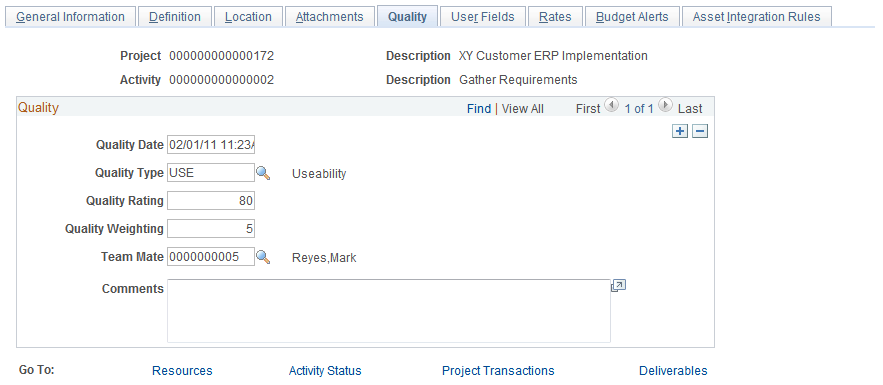
Use the Activity Definitions - Quality page (PROJECT_QUALITY) to rate and record quality of work for specific activities.
Image: Activity Definitions - Quality page
This example illustrates the fields and controls on the Activity Definitions - Quality page. You can find definitions for the fields and controls later on this page.
Activity Definitions - Rates Page
Use the Activity Definitions - Rates page (ACTIVITY_SERVICES) to enter and view billing and project costing rates that are associated with an activity.
Image: Activity Definitions - Rates page
This example illustrates the fields and controls on the Activity Definitions - Rates page. You can find definitions for the fields and controls later on this page.
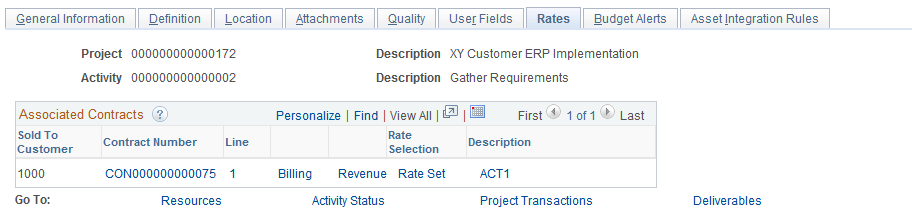
Associated Contracts
Displays the current contract information associated with the project and activity. The grid is blank if no contracts are associated with the project and activity, which is the case when you use this page to associate rate sets or rate plans with a project and activity for internal project costing that does not require billing, or when you have not yet linked the project and activity to a contract line.
Rates
Displays the rate set or rate plan that is associated with the project activity ID. This group box appears if no contracts are associated with the project and activity.
| Effective Date |
Enter the effective date of the association of the rate set or rate plan to the activity. This field can be based on one of these options:
|
| Status |
Select Active or Inactive as the status that corresponds to the effective date of the association of the rate set or rate plan to the activity. |
| Rate Selection |
Select a Rate Plan or Rate Set to attach to the activity. The default value is based on the project's rate selection. |
| Rate |
Enter a rate set or rate plan for project costing. This field can be based on these options:
You can link a rate set to an activity if no rate set or rate plan is attached at the contract line. You can link a rate plan to an activity for either of these conditions:
See Understanding the Relationship Between PeopleSoft Contracts and PeopleSoft Project Costing. Activities do not inherit the project level default rate set if any of these situations occur:
|
| View/Add Rates |
Click to access the Rate Sets component (PC_RATE) to view, add, or modify rate sets. |
Activity Definitions - Asset Integration Rules Page
Use the Activity Definitions - Asset Integration Rules page (PC_AM_RULE_ACT) to define integration with PeopleSoft Asset Management at the activity level.
Asset integration rules for the business unit, project, or activity are discussed in the Asset Integration Rules topic.
Activity Definitions - Budget Alerts Page
Use the Activity Definitions - Budget Alerts page (PC_BUD_ACT_ALERTS) to define budget alert thresholds at the activity level.
Budget alerts for the business unit, project, or activity are discussed in the Setting Up Budgets in PeopleSoft Project Costing topic.