Project Management Home Page
Use the Project Management home page to view project statistics and access additional pages.
Navigation:
This example illustrates the tiles on the Project Management home page.
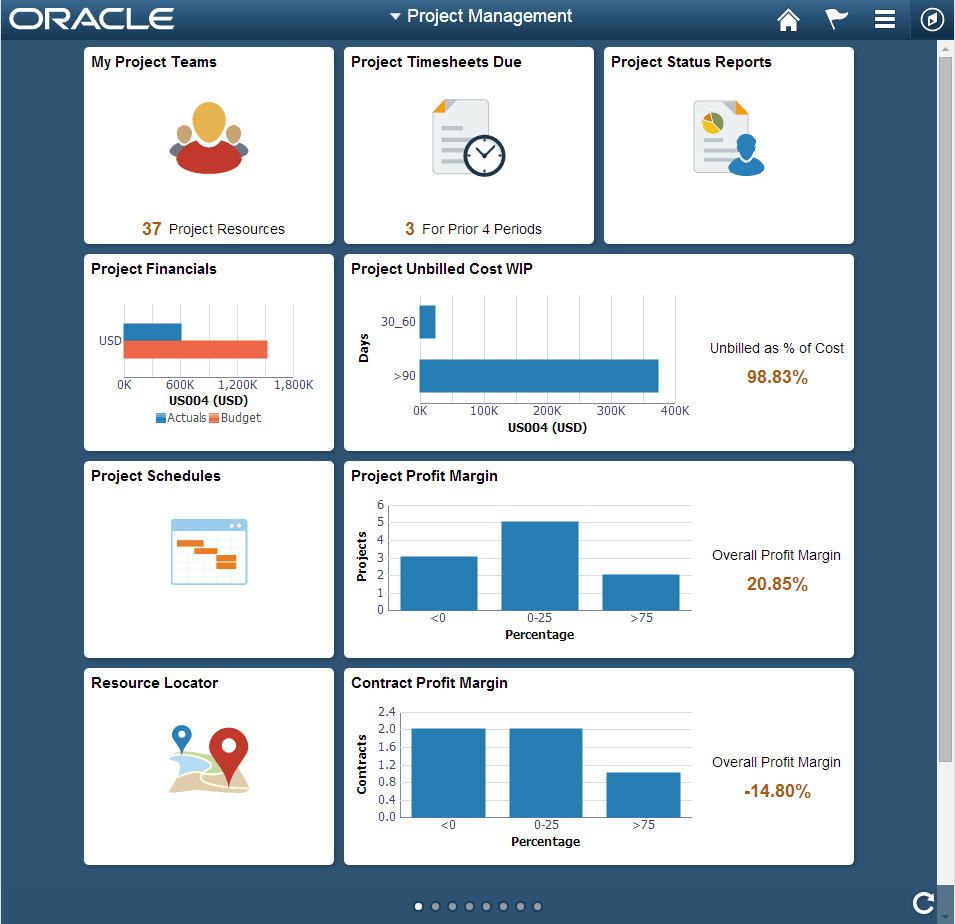
Use this page to view high-level information that is shown on each tile. You can also access PeopleSoft Fluid pages by clicking or tapping each tile.
Note:
The projects that are available on your Projects List Page determines which projects and values are displayed.
| Field or Control | Description |
|---|---|
|
My Project Teams |
Displays the number of unique resources that are assigned to the projects that appear on your Projects List page. Click this tile to access the My Project Teams (pivot) Page. |
|
Project Timesheets Due |
Displays the number of timesheets that are due from resources on your projects list, based on the number of periods specified on the My Preferences - Project Timesheets Due Page. Click this tile to access the Project Timesheets Due (pivot) Page. |
|
Project Status Reports |
Displays status reports for the resources on your projects list. Click this tile to access the Project Status Reports Page (pivot). |
|
Project Financials |
Displays a horizontal bar chart of the actual versus the budget amount for all projects that appear on your Projects List page and are limited to the business unit and currency specified on the My Preferences - Report Business Unit Page. Click this tile to access the Project Financials (pivot) Page. |
|
Project Unbilled Cost WIP (project unbilled cost work in progress) |
Displays the cost of projects that have not been billed based on the values specified on the Reporting Options - Reporting Groups Page. The system calculates this percentage based on actual costs that do not have a status of W (worksheet) or D (distributed) to Billing. Click this tile to access the Project Unbilled Cost WIP (pivot) Page. |
|
Project Schedules |
Click this tile to access the Project Schedules Page. |
|
Project Profit Margin |
Displays project profit margin groupings based on the values specified on the Reporting Options - Reporting Groups Page. Click this tile to access the Project Profit Margin (pivot) Page. |
|
Resource Locator |
Click this tile to access the Resource Locator Page. |
|
Contract Profit Margin |
Displays contract profit margin groupings based on the values specified on the Reporting Options - Reporting Groups Page. Click this tile to access the Contract Profit Margin (pivot) Page. |
|
Proj Data Compression |
Click this tile to access the Reviewing Project Data Compression Using PeopleSoft Fluid page. |