Organizational Instances
An organizational instance is a single occurrence of an organizational relationship. After you create a personal information record for a person, create an organizational instance to enter and maintain job records. An organizational instance has its own hire date and contains the accumulation of the person's job data records that are associated with that instance.
Use one of the following components to create an organizational instance:
| Classic Components | Fluid Components |
|---|---|
|
|
Note:
Hire applicants with data that is in the system by using the Hire component (ER_APP_HIRE_LAUNCH) in PeopleSoft Talent Acquisition Manager.
See PeopleSoft Talent Acquisition Manager: Hiring Applicants.
Update and maintain job data for the instances using the following components:
| Classic Pages | Fluid Pages |
|---|---|
|
Manage Job Tile (JOB_DATA_FL component) |
Organizational Instances for People of Interest
PeopleSoft delivers a number of different POI types that you can activate and use as needed. The following types require job records:
-
COBRA qualified beneficiaries.
-
Pension Payees.
-
Stock - board members.
-
Stock - non-HR employees.
-
Global Payroll payees.
-
Student refunds.
Some of the POIs you may want to track will not require a job record. If you are tracking POIs without jobs, you will need to use the Add a Person of Interest component (PERS_POI_ADD) in classic or (Fluid) Maintain Person of Interest Tile (PERS_POI_MAINT_FL) in fluid to indicate what kind of POI relationship the person has, as well as to enter any necessary security parameters to control access to the person's data.
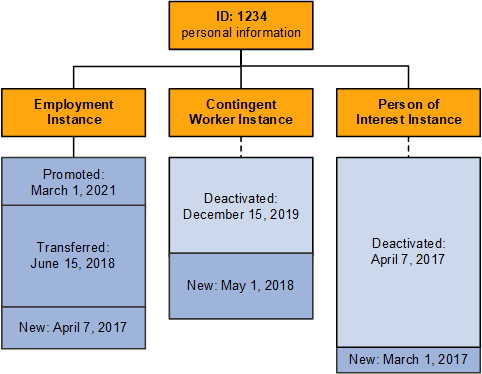
Example: A Person with Three Organizational Instances
Mario Estevez needs to successfully complete training with a third-party vendor before starting his new position. To reimburse Mario for the cost of the training, he needs a job record. The human resources administrator adds him in the system by using the Add a Person component and assigns him the ID 1234. The administrator then creates a POI job record for him by using the Add Person of Interest Job component.
After Mario completes his training, he joins the company as an employee. The human resources administrator terminates his POI instance (by using the Job Data component) and creates an employment instance by using the Add Employment Instance component.
A little more than a year after joining the company, Mario is given the opportunity to participate in a short-term project. The human resources administrator creates a contingent worker instance for him on the Add Contingent Worker Instance component.
Mario is later transferred and promoted in his employee job, and a new job data row is inserted for each of these changes. The historical job records accumulate under the organizational instance in which they are created. The human resources administrator updates the job records for the employment and contingent worker instances by using the Job Data component.
This table lists the changes to Mario's job records over a four-year period:
| Action Date | Employment Instance | Contingent Worker Instance | POI Instance |
|---|---|---|---|
|
March 1, 2017 |
POI instance created. |
||
|
April 7, 2017 |
Employment instance created with this date as the hire date. |
POI instance job record deactivated. |
|
|
May 1, 2018 |
No change to employment job record. |
Contingent worker instance created with this as the hire date. |
|
|
June 15, 2018 |
Transferred departments |
No change to the contingent worker job record. |
|
|
December 15, 2019 |
No change to employment job record. |
Contingent worker job ends and the job data record is deactivated. This date is the termination date for this instance. |
|
|
March 1, 2021 |
Promoted. |
This diagram illustrates how the system stores Mario's data: under the person record, there are separate employee, contingent worker, and POI organizational instances, each with its own event history: