Overview of AI Labeling Page
The AI Labeling page allows you to create AI labeling projects, label chips, load and store labels, and share your AI labeling project with other users.
Note: Spatial Studio needs to be attached to a compute environment for AI Labeling. See Create a Compute Environment for more information.
The page displays all the AI Labeling projects created in your Spatial Studio instance:
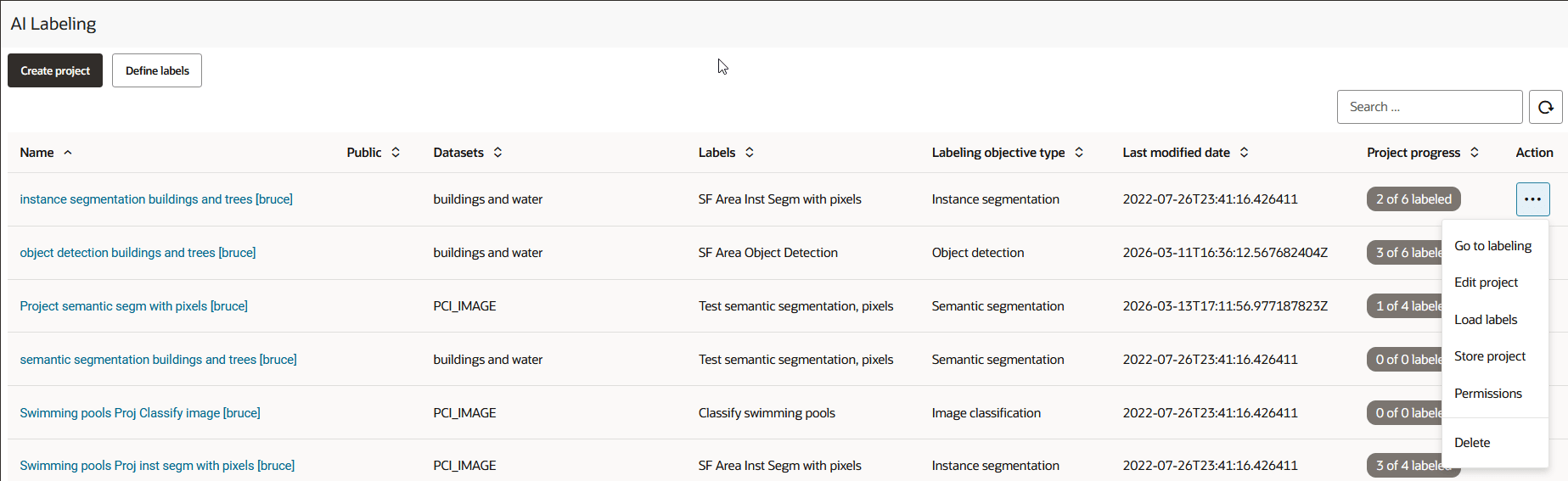
Description of the illustration ai_labeling_page.png
You can perform the following actions on the AI Labeling page:
-
You can create a new AI Labeling project, by clicking Create Project.
-
You can filter to view projects that are either created by you, or shared with you, or both.
-
You can perform the following actions by clicking
 against any displayed project :
-
Go to labeling: Label chips within a project (see Create Labels Manually and Create Labels with Auto-Label).
-
Edit project: Edit an existing AI Labeling project.
-
Load labels: Load labels into your project (see Load AI Labels).
-
Store project: Store the entire project (see Store AI Labels).
-
Permissions: Configure project sharing and permissions (see Sharing an AI Labeling Project).
-
Delete: Delete a project.
-