FSM Program
In Field Service Management (FSM), FSM Program creates service work from configured rules. Project rules plan cases for a service schedule. Case rules create the tasks needed to perform that work. Programs are commonly used for maintenance contracts and can also support a single planned service.
Program operates through project, case, and CRM task records. Its calculated schedule and background processing help distinguish planned work from records already created.
How It Works
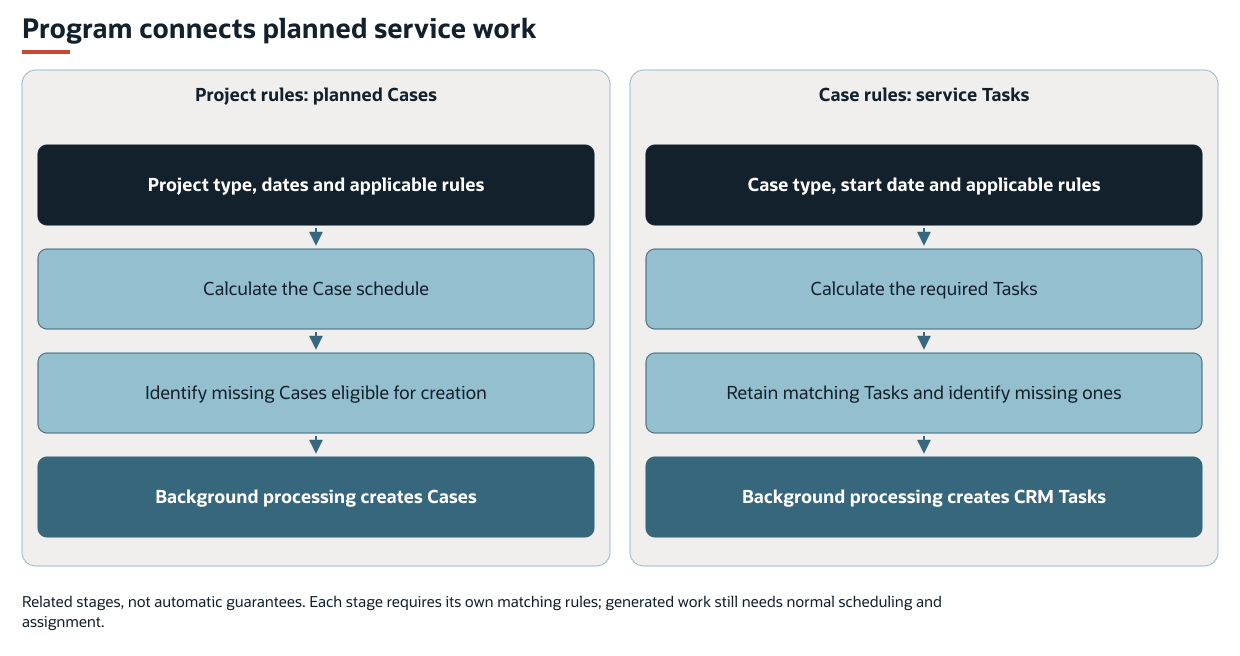
A project Program has two stages. FSM calculates the required cases from the project's type, dates, and applicable rules. When a case is created, applicable case rules can request one or more tasks linked to that case.
The stages are related, but automatic generation is not guaranteed. Each stage requires its own matching rules. Generated work still needs normal scheduling and assignment.
The following diagram shows the related project-to-case and case-to-task generation stages:
Case rules can also operate on cases outside a project Program. These cases include those generated by FSM Case and Task Recurrence. In that combination, Recurrence creates the case series and Program creates the child tasks.
The standard configuration contains no predefined Program schedule. Applicable rules must be configured before Program creates work. A project rule can create the next required case or missing cases within a rolling horizon. It can also create all planned cases through the project's end. Task creation requires applicable case rules. Creating a case does not by itself guarantee a task.
Generated tasks enter the normal Schedule Board and FSM Mobile flows, subject to their usual access and selection rules. The parent cases represent the service occurrences. Their child tasks are the work to schedule and perform. Program can carry configured assignment values into generated records. It does not automatically select an available technician or resolve scheduling conflicts.
In a maintenance contract, an administrator defines the rules and an operations manager supplies the project's service dates and context. Program processing generates the required service records. A scheduler assigns and schedules the tasks, and technicians perform the tasks in FSM Mobile. Completion and case closure can then request assessment of the next service occurrence.
Prerequisites
The two generation paths have different requirements:
-
Project to case: The project needs a Field Service Project Type (
custentity_nx_project_type), Start Date (startdate), and either End Date (enddate) or a usable Program Create Until (custentity_nx_program_create_until) value. Applicable project rules must define the cases to create. -
Case to task: For background task creation, the case needs a Case Type (
custevent_nx_case_type), Field Service Start Date (custevent_nx_start_date), and applicable case rules. Rules can select by Case Type, linked Project Type, or both. -
Record creation: Required values and relationships must satisfy the destination record's requirements. Rules that use asset, customer, or other related data depend on that data being available.
For supported settings and setup examples, see Configuring FSM Program.
Key Behaviors
This section describes how the feature responds to different conditions and actions.
Planned Rows and Existing Cases
The project's read-only Program subtab combines calculated schedule rows with matched existing cases. A row with a Program Date and no Case link is planned work for which no case has been matched.
The following table describes the columns on the Program subtab.
|
Column |
Meaning |
|---|---|
|
Type |
Case Type for the planned service occurrence. |
|
Program Date |
Calculated date for that row. |
|
Case |
Link to the matched case. Blank when no case has been matched. |
|
Start Date |
Actual start date of the matched case. It can differ from Program Date. |
|
End Date |
End date of the matched case, when populated. A blank value can also mean an existing case has no end date. |
|
Status |
Status of the matched case. |
|
Assigned To |
Matched case assignee or configured assignee for a planned row. It can appear before a case exists and does not establish availability. |
Start Date, End Date, and Status describe an actual case and appear only when a case has been matched.
FSM orders existing cases chronologically. It then matches those cases to planned rows by order and Case Type, rather than by an exact date match. It compares the next existing case with each planned row. If the types differ, that row stays unmatched and the same case is considered against the following row.
A manually added case of a participating Case Type can therefore occupy a planned row. Cases of other types do not participate in that matching. Existing cases are not excluded merely because their dates precede the project Start Date.
The following table shows how an alternating Minor and Major service schedule can match existing cases.
|
Program Date |
Planned Type |
Matched Case |
Actual Case Start Date |
|---|---|---|---|
|
August 6, 2023 |
Minor |
465 |
August 6, 2023 |
|
February 6, 2024 |
Major |
468 |
August 15, 2023 |
|
August 6, 2024 |
Minor |
None |
No entry |
|
February 6, 2025 |
Major |
466 |
February 6, 2024 |
|
August 6, 2025 |
Minor |
467 |
August 6, 2024 |
|
February 6, 2026 |
Major |
None |
No entry |
The existing case sequence is Minor, Major, Major, Minor. After case 468 takes the first Major row, case 466 remains next in the sequence. It skips the intervening Minor row and takes the following Major row. Case 467 then takes the next Minor row. The matches do not change the cases' actual dates or establish how those cases were originally created.
Changing project dates or rules can change the calculated rows and their matches. When you edit a project, the visible Program list recalculates when the Project Type, Start Date, End Date, Program Start Date, Program Create Until, or time zone changes. Refreshing the subtab recalculates the display. It does not create or reschedule records.
Date Boundaries and Creation Timing
Program Start Date (custentity_nx_start_date, also labeled Field Service Start Date) defines the starting date for the pattern. If it is empty, FSM uses the project Start Date. The project Start Date is also the lower boundary: earlier calculated occurrences are omitted.
The following table shows patterns that use a project Start Date of January 1, 2026.
|
Pattern |
Program Start Date |
First Included Occurrence |
|---|---|---|
|
Service every six months |
January 10, 2026 |
January 10, 2026 |
|
Service every six months |
December 10, 2025 |
June 10, 2026 |
|
Minor and Major each repeat annually, with Major six months after Minor |
Empty. Uses project Start Date |
Minor on January 1, 2026, then Major on July 1, 2026 |
|
The same alternating pattern |
December 10, 2025 |
Major on June 10, 2026, then Minor on December 10, 2026 |
The last example omits the Minor occurrence before the project Start Date and retains the pattern's phase. The relative timing of the rules determines which type comes first. Their order in the configuration alone does not establish the sequence.
When the project has an End Date, that date bounds the initial calculated occurrences. Otherwise, a rolling Program Create Until value supplies the calculation boundary. When both are present, the End Date bounds those occurrences, whereas the rolling horizon determines which missing cases qualify for advance creation. A configured occurrence count can end a rule sooner. Occurrences before the project Start Date still consume that count.
Consider a schedule every six months from September 18, 2024 through September 17, 2026. With no earlier reference date or shorter occurrence count, this schedule contains four dates. The dates are September 18, 2024, March 18, 2025, September 18, 2025, and March 18, 2026. The next occurrence falls after the project End Date. After creation, those cases also appear under Related Records. An unrelated repair case can appear there without appearing in this maintenance Program.
Creation timing determines how those planned rows become records:
-
Next required case: FSM selects the first row without an end date. It creates that case if the row has no matched case. An existing case without an end date prevents this next-case selection from advancing past it.
-
Advance creation: A rolling horizon allows additional missing cases within the horizon to be created. It advances relative to the time of assessment.
-
All planned cases: Applicable rules can request every missing case in the calculated schedule when no rolling horizon restricts advance creation.
In the next-case pattern, a case's status alone does not establish that the next case qualifies. When shifting is configured, later case dates can change before the cases are created. The change equals the difference between the preceding matched case's planned date and its end date. If no end date is available, the calculation uses that case's start date. For example, consider a pattern that repeats every six months, with planned dates of January 1 and July 1. Completing the first case on February 7 can shift the second planned date to August 7.
Existing matched cases retain their recorded dates. Shifting and configured output dates can place final dates outside the initial project date boundaries. Those boundaries are not a guarantee about every existing or generated case's actual dates.
Changes to Contracted Service
Recommended practice: Treat a change to the contracted service frequency, pattern, or terms as a separate Program. End the original Program at the agreed changeover and create a project for the revised terms. Keep completed service work linked to the original project and preserve its original service pattern. The project type and rules for the revised terms must support those terms without rewriting rules still used by the original project.
For example, consider a 10-year annual service contract that changes to monthly service after year three. Start the monthly Program for the revised terms from the agreed effective date. Changing the original project to monthly service and retaining its original start can recalculate monthly occurrences across the earlier years. Those earlier periods can appear to have missing cases even though the annual obligations were fulfilled, and existing cases can match different calculated rows.
At the changeover, review remaining cases, tasks, and processing requests. Confirm that service obligations are covered one time, with no unintended gap or overlap. A status labeled Closed does not necessarily make the old project inactive for Program. Shortening its End Date does not remove every existing future case. It also does not guarantee that missing historical work cannot be created. When ending the old Program, use the account's configured Program status classifications. Review the removal consequences in the Inactive Projects section in this topic. Retained cases can still request missing tasks independently of the project's inactive classification.
Existing Tasks
Case rules can create one task or a sequence of tasks at configured offsets and intervals from the case's Field Service Start Date.
Case rules match existing tasks by chronological order and Task Type, using the same next-record matching approach as project cases. The rules then create missing tasks and retain the matched tasks' existing values.
Changing case rules or dates does not update or delete existing tasks through this path. It can change the calculated matches and which additional tasks are considered missing.
Inactive Projects
Configured project status IDs determine when a project is inactive for Program processing. The inactive classification is separate from a status label such as Closed.
An inactive project stops Program case creation. Existing matched Program cases can be selected for removal when their case statuses are also classified as removable.
Removing a qualifying case first requests deletion of all tasks linked to that case, regardless of Task Type or status. Changing the inactive or removable status classifications can therefore affect existing service work.
Record Interactions
The following table describes each record's role in Program and its effects.
|
Record |
Role in Program |
Important Effect |
|---|---|---|
|
Project |
Supplies the type, dates, and context for a case schedule. |
Generated cases link to the project through their Company relationship. The Program subtab displays the calculated schedule and matched cases. |
|
Case |
Represents a planned service occurrence and supplies context for task generation. |
Applicable case rules create child tasks. FSM-managed case closure can request the next project Program work. |
|
CRM task |
Represents work to schedule and perform. |
Generated tasks link to their case and Company. Existing matching tasks are retained. Tasks linked to a case selected for Program deletion are included in its deletion request. |
|
Asset and customer |
Supply service context and values used by configured rules. |
Data is carried to generated records when the applicable rules and mappings specify it. |
|
Field Service Configuration |
Stores Program rules and mapping definitions. |
Applicable configuration supplies both generation paths. |
Rules can carry a project's asset and service description into a case. The rules can also use case values or related project data to populate a task's assignee, skill, or work details. These values are supplied when generating the record. Program does not continuously synchronize these values after a source value changes.
Program initially supplies the project's time zone to generated cases and the case's time zone to generated tasks. A project can obtain its time zone from an asset through normal FSM record processing. However, an existing project's time zone can differ from the asset's. Configured output values and normal record processing can affect the final saved values.
For field definitions, see FSM Project Record, FSM Case Record, and FSM CRM Task Record.
Processing Model and Lifecycle
This section explains when processing occurs and what can affect its progress and results.
Requesting Processing
Saving a project can request Program processing when FSM finds calculated changes. Saving an explicit Field Service Update Program request also schedules processing. The project field is custentity_nx_program_update. The case field is custevent_nx_program_update. Forms may shorten the label to Update Program.
The following table describes the work requested from projects and cases.
|
Request Saved On |
Requested Work |
|---|---|
|
Project |
Assess the project Program for eligible case additions and removals. |
|
Case |
Assess that case for missing child tasks. This does not directly set the parent project's Update Program request. |
Creating a case can request task generation when applicable case rules find missing tasks. Editing an existing case does not automatically recalculate its task Program. A saved update request is needed to process its missing tasks.
Both requests use the shared Program background processing. Scheduling it from a case does not make an unchecked project request eligible. A case request can create missing tasks even when that case is already Closed. Use it when child task generation is intended.
The rolling horizon is recalculated when Program is assessed. The passage of time alone does not guarantee another execution or the creation of more cases.
Manually Closed Cases
A case does not have to be completed through FSM Mobile to request the next project Program work. FSM reviews the project's Program when a typed case linked to that project changes to the Closed stage through FSM record processing. If that calculation finds eligible additions or removals, FSM sets the project's Update Program request and schedules processing.
With the standard mapping, next-case progression uses the case's Field Service End Date (custevent_nx_end_date). Field Service End Date differs from the native Date Closed (enddate) field in NetSuite. A manual status change can populate Date Closed and leave Field Service End Date empty.
Completion outside FSM Mobile: A manual save, workflow, or script can use the closure path. Save the actual Field Service End Date and applicable completion time with the change to Closed. The completion values must be saved and available when FSM reviews the closure, and the update must run FSM's case processing. For a workflow, set the completion values before the record is submitted. Do not rely on an after-submit action to supply the completion values after the closure review has already run. When eligible Program changes are found, this path requests project processing without a separate manual project checkbox action. Recording an end date does not guarantee another occurrence is due.
In a next-only Program, a matched case with no Field Service End Date can continue to block the next occurrence after it has been marked Closed. If no other addition or removal qualifies, the closure assessment finds no changes. The project request can remain unchecked, and that path requests no Program execution. Advance or all-case creation rules can find other eligible work, so manual closure does not have one universal result across all Programs.
Completion date added after closure: Adding the Field Service End Date to a case that is already Closed does not repeat the Closed-stage transition. Confirm and record the actual completion date and applicable time, then save Update Program on the project to request reassessment. Use this explicit project request if the closure review ran before the completion values were available. Also use it if the closing update did not run FSM's closure processing. A project request does not bypass missing completion data, other unfinished matched cases, rule boundaries, or processing errors. It can clear without creating the next case if no action qualifies. Checking Update Program on the case is not a substitute for that project request.
Status automation can populate Field Service End Date and time from qualifying completed tasks when it closes the case. It does not generally backfill those values after a case is already Closed. For the related behavior, see FSM Case and CRM Task Status Automation.
To find work needing review, identify Closed cases with missing Field Service End Dates and examine their parent projects' calculated rows, requests, and errors. A missing completion date is a review candidate. It does not prove that another service occurrence is due. Check the actual resulting case records after reassessment.
Background Processing and Results
Field Service Scheduled : Program (customdeploy_nx_program) processes saved requests. It handles eligible project requests before case requests. Project processing can remove qualifying tasks and cases or create missing cases. Case processing creates missing tasks.
A checked Update Program box indicates requested work. It does not prove that an execution is currently running.
FSM clears a record's request after assessment finds no remaining eligible changes. The request can also clear when required inputs are missing or no rules apply. A cleared box therefore does not prove that all expected records exist.
Verify record generation by checking the resulting case and task records, their relationships, and execution information. A completed execution does not establish that every individual action succeeded. The calculated Program subtab and an Add/Remove Program banner are also insufficient proof of completion.
For shared execution, monitoring, and deployment information, see FSM Script Reference.
Errors and Outstanding Work
Program processing can create Field Service Error Records when an action fails. An active, unrecovered Program error can exclude a project and its linked cases from further Program assessment. This exclusion applies to an error associated with the project or one of its cases or tasks.
Other eligible work can continue. Actions that succeeded before a failure remain separate from work still outstanding. Case and task generation is not a single all-or-nothing operation. The absence of a Program banner does not prove success, because error exclusion can prevent the affected work from appearing in that assessment.
For field and error-state definitions, see Field Service Error Record. For shared execution and retry behavior, see FSM Script Reference.
Configuration
Program configuration determines which project and case types participate and which records are generated. It also defines the date pattern, creation timing, and values carried between records. The configuration also controls the status classifications used for inactive-project removal.
For supported properties, defaults, units, mappings, and JSON examples, see Configuring FSM Program. Preserve the record relationships and required destination values when changing rules.
Case Types for Program and Recurrence
Recommended practice: Use distinct case types for cases created by a project Program and cases created by Recurrence. Program matches participating cases linked to a project by order and Case Type, without excluding cases created by Recurrence. A recurring case of a participating type can occupy a planned Program row and change which other cases appear to be missing. Avoid configuring both features to create cases for the same service obligation.
A dedicated Recurrence Case Type can still use Program case rules to create its child tasks. In that arrangement, Recurrence creates the case series and Program creates the tasks. Keep that Case Type separate from the types created by the project Program.
Projects Created from a Case
Recommended practice: If a project type used with Program is available through the case's New Project selection, require the linked project's Field Service Project Type. Apply this requirement before every matching case-to-task rule runs, including broader rules. Rules that also allow a missing Project Type can run before the project is linked.
The case is initially saved against its customer. A later callback creates the project and links the case to it. Rules that allow the initial state can request tasks before that link and the related project data are available. Tasks created at that point can retain interim values. Program retains existing matching tasks rather than updating those tasks when the case's project changes.
The New Project type selection alone does not satisfy the requirement. Program uses the resolved linked Project Type, rather than the selection on the case form. The standard New Project choices exclude types explicitly referenced by project-to-case rules. When this creation flow is used, save the case's Update Program request after the project link is established. Linking alone does not guarantee task generation.
Limitations and Constraints
Program and Recurrence provide different lifecycle behavior. Recurrence's series-editing, propagation, and instance-deletion controls do not automatically apply to a project Program.
Program matching is based on order and type. It does not provide an exact-date duplicate check or a complete reconciliation of every case or task related to a project. Case-rule processing does not automatically revise existing tasks after a rule change.
A calculated row, saved request, or completed script execution is insufficient on its own to establish successful record generation.
Related Processes and Procedures
These procedures explain how to view Program information and use Program with Recurrence:
-
Viewing the Program on a Project in NetSuite explains how to open and read the Program subtab.
-
Recurring Cases with Program explains how to use Recurrence to create cases and Program to create their child tasks.
Related Topics
See the following related topics:
-
FSM Case and Task Recurrence
-
FSM Project Record, FSM Case Record, and FSM CRM Task Record
-
Field Service Error Record