FSM Service Reports and Notifications
Field Service Management (FSM) generates service report PDFs for cases, CRM tasks, and project tasks. Staff can preview reports in NetSuite and choose to send the reports by email to configured recipients. FSM queues these emails and sends the queued emails through background processing. Configured automatic rules can also queue emails when relevant record values change.
How It Works
Each service record type has its own report and email definitions. The standard service-report notification contains an HTML email message and a generated PDF attachment. The PDF layout and email body use separate templates, so changing one does not change the other.
The following diagram compares preview-only actions with confirmed sending:
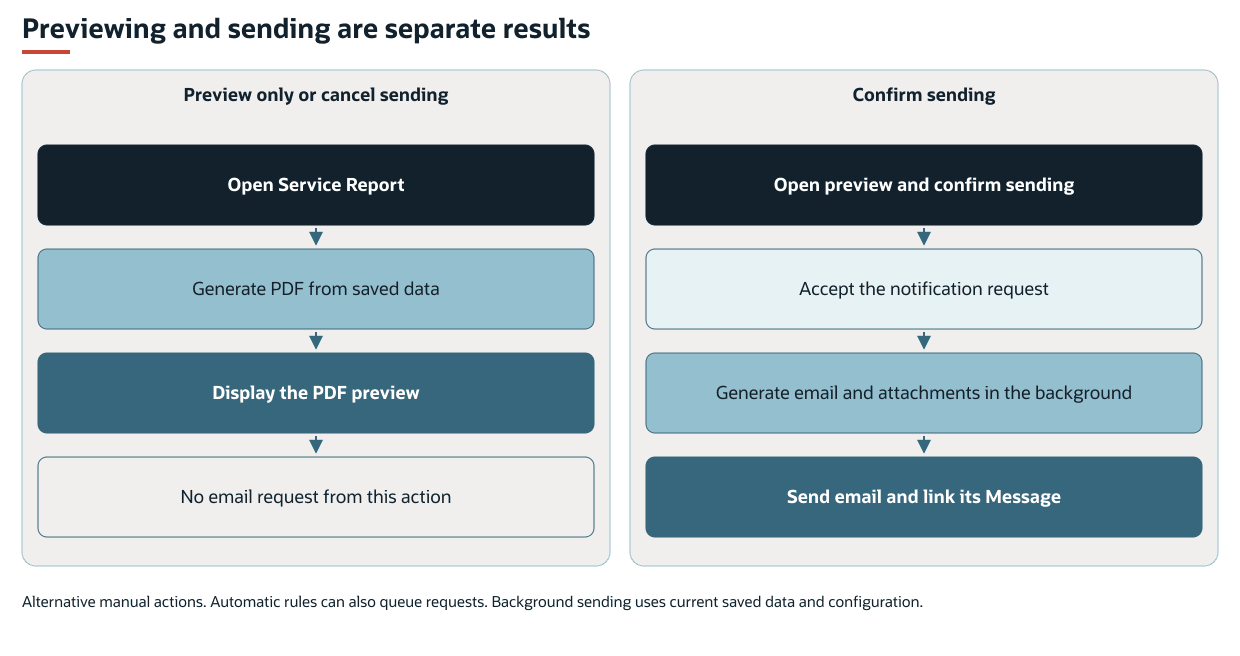
FSM generates a preview from saved NetSuite records and the current report configuration. The NetSuite Service Report button opens the PDF in a separate browser tab and then offers a send confirmation. Canceling the confirmation leaves the preview available without requesting an email message. A button configured for preview only does not offer that confirmation.
Confirming sends a request to the notification queue. Background processing later generates and sends the email and its attachments to the configured recipients. The button's success message confirms that the request was accepted. It does not establish that an email message was sent or delivered.
The Schedule Board also provides a report download for CRM tasks and project tasks when its event configuration supplies that action. The standard action generates a PDF from current saved data. It does not request an email message or retrieve a frozen copy of the last report sent by email. Its availability is separate from the eligibility checks on the native NetSuite Service Report button.
The preview and the queued email are generated separately. Changes to record data, templates, or notification configuration before background processing can make the report sent by email differ from the preview. Unsynchronized FSM Mobile data and unsaved Schedule Board changes are not part of the saved data used to generate the report.
Prerequisites
Service reports and notifications have the following prerequisites:
-
The relevant FSM record components must be active. The Service Report button also requires an eligible NetSuite record form in view mode. Automatic record-change requests run through record handling, including inline edits.
-
The selected report and email definitions, template files, and required record relationships must be available. PDF preview also uses the email definition and requires its email-body template, even when sending is disabled for that button.
-
Sending requires a valid sender, valid recipients, and the execution role's email permissions. Notification processing must be able to run.
-
Project task notification processing requires NetSuite Project Management.
Key Behaviors
This section describes how the feature responds to different conditions and actions.
NetSuite Report Button Availability
The standard Service Report button appears on an FSM-enabled record form in view mode under the following conditions.
|
Record |
Required Values |
|---|---|
|
Case |
Field Service Case Type ( |
|
CRM task |
Field Service Task Type ( |
|
Project task |
Field Service Task Type ( |
A customized form or hidden component can remove the button. These native button conditions do not define automatic-rule eligibility or restrict every other report-generation action. FSM Mobile completion and NetSuite task completion can occur at different times. See FSM Case and CRM Task Status Automation for CRM task completion behavior.
Notification Addressing and Attachments
The native report action uses configured addressing. It does not open a recipient-selection dialog. The standard service-report definitions use the following sources.
|
Report |
Sender |
Primary Recipient Source |
|---|---|---|
|
Case |
Employee assigned to the case. |
The case email address. |
|
CRM task |
Task assignee. |
The linked case email address. When there is no linked case, the customer's primary contact email, falling back to the customer email. |
|
Project task |
First resource returned from the project task assignments. |
The linked project's primary contact email address. |
For a CRM task with a linked case, a blank case email does not activate the customer fallback. The standard case and project task definitions have no equivalent customer-email fallback. The first project task assignment returned is not necessarily a designated lead resource.
If the configured sender resolves to no value, the send function uses the current execution user. This fallback does not select a designated business sender or supply a missing recipient.
Configuration can select different recipients and include carbon-copy or blind-copy recipients, generated reports, and existing File Cabinet attachments. Standard service-report notifications attach one PDF. Other notifications can have no attachments. Opening a PDF successfully does not establish that the full email, its addressing, and all attachments can be sent.
Automatic Notification Eligibility
The standard automatic notification rule lists are empty. Having a service-report definition or completing service work does not itself enable automatic sending.
FSM assesses configured rules during supported record creation, copying, editing, and inline editing when a monitored value changes.
The following table lists monitored changes and available rule context.
|
Record |
Monitored Changes |
Rule Context |
|---|---|---|
|
Case |
FSM Case Type, status, or stage. |
Case Type, status, stage, and related Project Type. |
|
CRM task |
FSM Task Type or status. |
Task Type, status, linked Case Type, and related Project Type. |
|
Project task |
FSM Task Type or status. |
Task Type, status, and related Project Type. |
Rules test the resulting values. FSM uses the first matching rule and requests the email definitions named by that rule. Later matching rules do not add their emails. A first matching rule that requests no emails also prevents later rules from supplying those emails.
Changing an unrelated field does not by itself cause reassessment. Changing a related case or project alone does not reassess every linked task. Automatic rules can target states other than completion. The native report-button conditions do not apply to automatic rules.
A rule that requires Completed status can request more than one completion notification. For example, a Task Type change on an already completed task can cause another assessment and another matching request. Manual report requests operate separately from these rules.
Language
With Multi-Language enabled, service notifications use the customer's language, then the subsidiary's language, then the account default. Employee notifications use the employee's language before the subsidiary and account fallbacks. With Multi-Language disabled, notifications use the account default.
FSM uses the selected language for the email and generated report attachments. Literal text in a custom template does not automatically acquire translations. See FSM Localization and Translation.
Record Interactions
The report template and its selected data determine what appears in the PDF. Supplying additional data does not display it unless the template uses it.
The following table describes the role of each record or data source in reports and notifications.
|
Record or Data |
Feature Role |
|---|---|
|
Case and linked CRM tasks |
The standard case report groups related work by task, including service details, time, used items, and expenses. |
|
CRM task |
The standard task report presents that task's service details and Actions Taken, related time, sales order lines, expenses, and eligible attached images. |
|
Project task and project |
The standard project task report presents the task's service details and Actions Taken, related time, sales order lines, expenses, and eligible images. The project supplies report context and the primary contact used for addressing. |
|
Time bills, sales orders, and expense reports |
Their record relationships determine which rows are selected. Expense data is conditional on NetSuite Expense Reports being enabled. These reports use linked sales order lines rather than automatically including every customer transaction. |
|
Files and subsidiary |
The standard CRM task and project task reports include image galleries. Subsidiary data can supply branding when subsidiaries are enabled. |
|
Employee |
The employee login email for FSM Mobile uses the same notification processing. The standard email goes to the employee email address and has no attachment. |
|
Field service notification |
Tracks an individual requested email, its source record, and its associated message. Its Email value identifies an email definition, not a recipient address. |
|
Message |
Records the sent email and the configured record associations. |
The standard case report's task search is not restricted to completed tasks. A closed case report can therefore contain work from tasks that remain incomplete.
The standard case report does not include image galleries. Image selection and layout do not change the original files.
The employee login email request comes from the employee action rather than service-record status rules.
Standard case and CRM task messages associate with the case and contact where supplied. Standard project task messages associate with the project. A task report does not imply a direct message association with that task.
Processing Model and Lifecycle
The Field Service Scheduled : Notification deployment (customdeploy_nx_notification) processes requested notifications. Record handlers request execution when pending requests are saved and when notification records are created. A request field indicates outstanding work, not that an execution is currently running.
The following table describes processing stages and their recorded evidence.
|
Stage |
Processing Action |
Evidence and Interpretation |
|---|---|---|
|
Request accepted |
A manual action or matching automatic rule adds a pending request to the source record. |
Event Pending Notifications ( |
|
Request represented |
Processing creates a field service notification record for each newly queued request. After the pending requests have corresponding records, processing clears the source field. |
An empty pending field can precede sending. It does not prove that notification processing succeeded. |
|
Email processing |
Processing selects notification records without a linked message, resolves the current definition and source data, and generates the email and attachments. |
An unlinked notification is outstanding processing. It is not a record-level running indicator. |
|
Sent message linked |
FSM sends the email, or finds a recent message for the same request, and links that message to the notification. |
A link to a sent message record is evidence of the send operation. It does not prove receipt or reading. |
Before sending, FSM checks recent messages for the same request identifier. This check can prevent a repeat send of that request. It is not a one-email-per-record rule: separate requests can send separate emails for the same case or task. See FSM Notification Configuration for the lookback setting and its limits.
Where a record displays Sending Notification, the indicator reports outstanding notification work. It can remain when an action is blocked and does not prove that an email message is currently being sent.
If the source case, task, project task, or employee no longer exists, processing does not send its notification. It records Message ID 0 to stop that request being selected as unlinked work. This value is not a sent message.
Errors and Outstanding Work
Preview generation, queue submission, and background sending can fail independently. Missing email definitions, inaccessible template or attachment files, incompatible template data, PDF rendering errors, and invalid addressing can prevent the affected operation from completing.
If the native button's queue request fails, it displays the configured error message. A request accepted earlier can still fail during later email processing.
Scheduled failures can create field service error records. A matching active, unrecovered error blocks the corresponding notification action in later executions. The standard notification actions do not specify a delayed automatic retry. Other eligible notifications can continue. For shared execution status and error handling, see FSM Script Reference. For error fields and state meanings, see Field Service Error Record.
Sending and linking are separate steps. An email message may already have been sent when the subsequent message lookup or link fails. A missing message link therefore does not establish that the email was never sent. The same-request duplicate check can find the earlier message if that request is processed again.
Configuration
For the supported settings, defaults and examples, see Configuring FSM Service Reports and Notifications.
This feature uses two configuration references:
-
FSM Service Report Configuration covers report selection, saved-data searches, template compatibility, PDF layout, images, and the native button for previewing and sending reports. Hiding that button or making it preview-only does not stop automatic rules or other send actions.
-
FSM Notification Configuration covers automatic rules, email definitions, senders, recipients, subjects, email content, attachments, message associations, and duplicate-check settings. Changing a PDF template does not create a sending rule or change the email's recipients.
Case, CRM task, and project task definitions are separate. A change to one does not automatically change the others. Report data and template references must remain compatible with the selected record type.
Limitations and Constraints
Service reports and notifications have the following limitations:
-
Standard report searches normally retrieve at most the first 1,000 matching rows per search. Large related datasets can produce an incomplete report even when generation succeeds. For supported retrieval changes and their processing consequences, see FSM Service Report Configuration.
-
Report images must match the configured selection and be accessible during PDF generation. Temporary file access can expire during generation. A file visible in FSM Mobile does not by itself establish that the PDF can retrieve or include it.
-
Preview uses the first attachment in the selected notification definition. If another attachment precedes the service-report PDF, the preview returns that attachment instead. It does not display the complete email or every attachment.
-
Email and attachment sizes remain subject to NetSuite email limits. Successful PDF generation does not remove those limits.
-
Removing automatic rules or making the native button preview-only does not cancel already-created requests. The queued email is generated when processing runs. It does not preserve the exact report previously previewed.
Related Processes and Procedures
Schedule Board Settings, Scheduling, and Shortcuts describes the report-download action and other Schedule Board activities.