About Mixed Non-VAT Sales Invoices
Here's a sample mixed NON-VAT sales invoice:
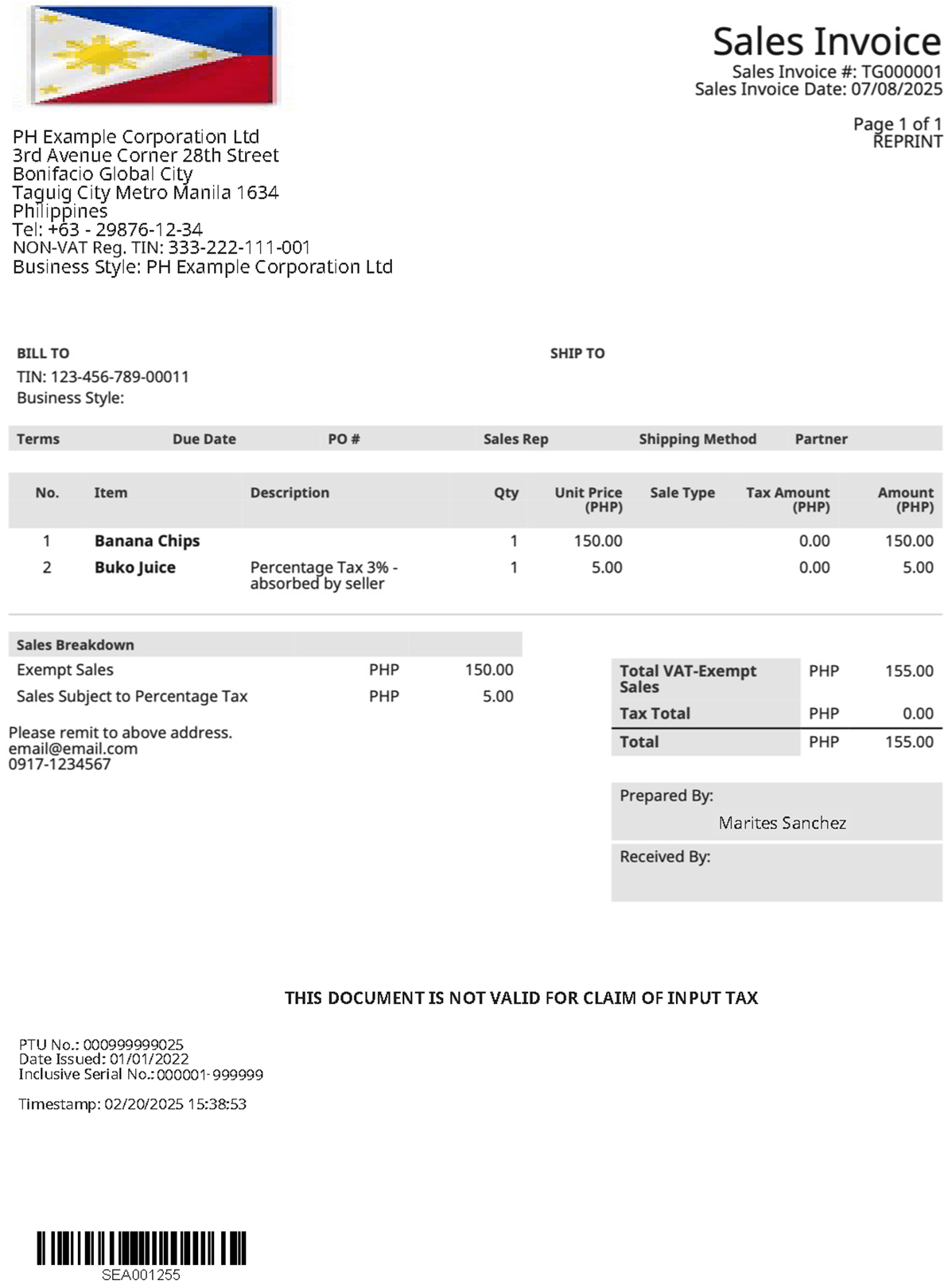
In this example:
-
The second line-item includes a description for the percentage tax.
Tip:To provide clear information about percentage-based tax items on your invoices, add an item description in one of the following ways:
-
On an invoice - When creating an invoice, enter the description in the line-item Description field.
-
On the item record - To set a default description, go to the item record, select the Sales/Pricing subtab, and enter the description in the Sales Description field. This description appears by default when the item is added to transactions.
-
-
The Transaction Total Summary shows a Tax Total of zero, meaning no tax amount is added to the invoice total.
-
The Sales Breakdown displays the amount for the second line item that is subject to percentage tax.
-
The Tax Code setup for this transaction is as follows:
-
Rate: 0%
-
Percentage Tax: Checked
-
These settings add no tax to the invoice total. However, the Sales Breakdown still shows the percentage tax amount for reporting.