Custom Number Formatting
can set custom number formats for pivot tables in the special tab. Define your own syntax, or choose from the Predefined Values.
The pivot table below shows numbers without no formatting in the first column. In the second column, the numbers use this custom format: [0000ff]'gain '00.00,;[ff0000](##,#00.00)' loss';[ff00ff]'nothing '0.00' zero'
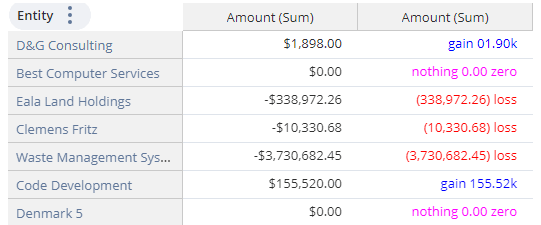
The available symbols for custom numbering syntax are:
|
Symbol |
Name |
Application |
|---|---|---|
|
# |
Number Sign |
Displays significant digits |
|
0 |
Zero |
Displays non-significant zeros |
|
' ' |
Double Quotation Marks |
Displays text inside quotation marks. You can place this text before or after numbers (positive, negative, or zero). |
|
+ |
Plus Sign |
Typically used for positive numbers |
|
( ) |
Paretheses |
Typically used for negative numbers |
|
- |
Minus Sign |
Typically used for negative numbers |
|
, |
Comma |
Thousands separator, or to scale a number by 1000 |
|
. |
Period |
Decimal separator |
|
; |
Semicolon |
Separates parts of the syntax. When you make custom number formats, you can use up to three sections for positive, negative, and zero values, in that order. |
|
[ ] |
Brackets |
A hexadecimal number (without #) in brackets sets the color of that format section. For example, [0000ff] is blue. |