Customizing Numeric Values
You can customize how numbers display in your pivot table with the Format window. To access it, click the Field Menu icon  next to a field in the Fields list or Layout panel and select Format... from the list.
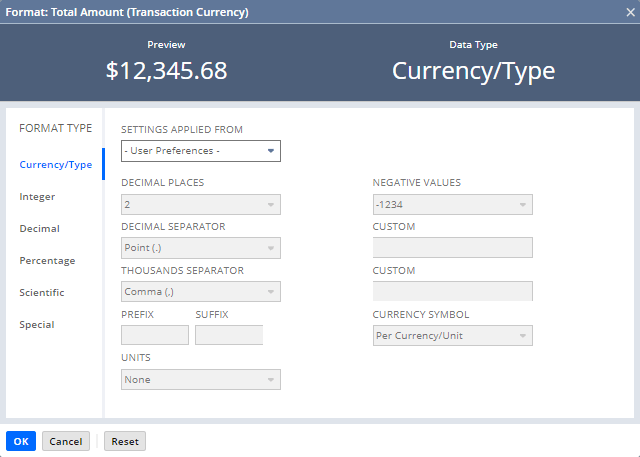
The following options are available. After you make a selection, the Preview field shows your changes. To apply them, click OK and refresh the table. To make your own format, click the Special tab and enter your syntax.
-
Settings Applied From: Lets you set numeric formatting based on a specific language. To set every setting manually, select Custom. To use the formatting from your NetSuite personal preferences, select User Preferences. For more information about personal preferences, see Setting Personal Preferences.
-
Decimal Places: The number of decimal places to show for each value.
-
Select Per Currency/Unit to use the currency or unit's decimal places.
-
Select Unbound for no limits on the number of decimal places.
-
-
Negative Values: The format for negative values.
-
Decimal Separator: The punctuation for the decimal place. Select Custom to set your own.
-
Thousands Separator: The punctuation that splits up thousands. Select Custom to set your own.
-
Prefix: Lets you add something before each value.
-
Suffix: Lets you add something after each value.
-
Currency Symbol: Lets you choose where the currency symbol shows up for dollar values.
-
Units: Lets you shorten values by thousands, millions, or billions.