Research and add suppliers to initiatives
Use natural language queries backed by AI agents to discover targeted suppliers for new initiatives by searching supplier profiles, past transactions, products and services categories, and approved supplier lists (ASL). This helps to uncover procurement activity that may signal the need for new supplier qualifications. You can search for suppliers to evaluate by using criteria such as qualification name, qualification outcome, status, inclusion in the ASL, business relationships, and business classification. You can then select one or more suppliers and add them directly to the initiative supplier list. You can also combine natural language queries with filters such as business classification.
For example, you can use search phrases such as:
- Minority-owned suppliers for laptops with expired qualifications - This query will look for suppliers who have past transactions such as purchase orders or agreements with laptop as an item or have laptop-related category in their profile. The suppliers must also belong to the Minority Owned business classification and have qualifications with Expired status.
- Suppliers for the area Cost Management with outcome as Qualified - This query will look for all the suppliers who have been evaluated for the Cost Management qualification area and have the Qualified outcome.
- Prospective suppliers with excellent outcome - This query will look for suppliers with business relationship as Prospective and evaluated with qualification outcome as Excellent.
- Approved suppliers for laptops - This query will look for suppliers who are added to ASL records with either item, purchasing category, or both and have past transactions or products and services categories for laptops .
The results help you review supplier information such as qualification and assessment counts, purchasing activity, business relationship, and confidence rating. You can review the data and add one or more suppliers to the initiative based on the qualification objective.
You can configure guided journeys to provide tailored instructions in the Research and add suppliers drawer.
You can access this drawer from the Initiatives page by selecting the row corresponding to the initiative to which you want to add suppliers and selecting the Edit button. Then, in the Suppliers section, select the Research and Add button.
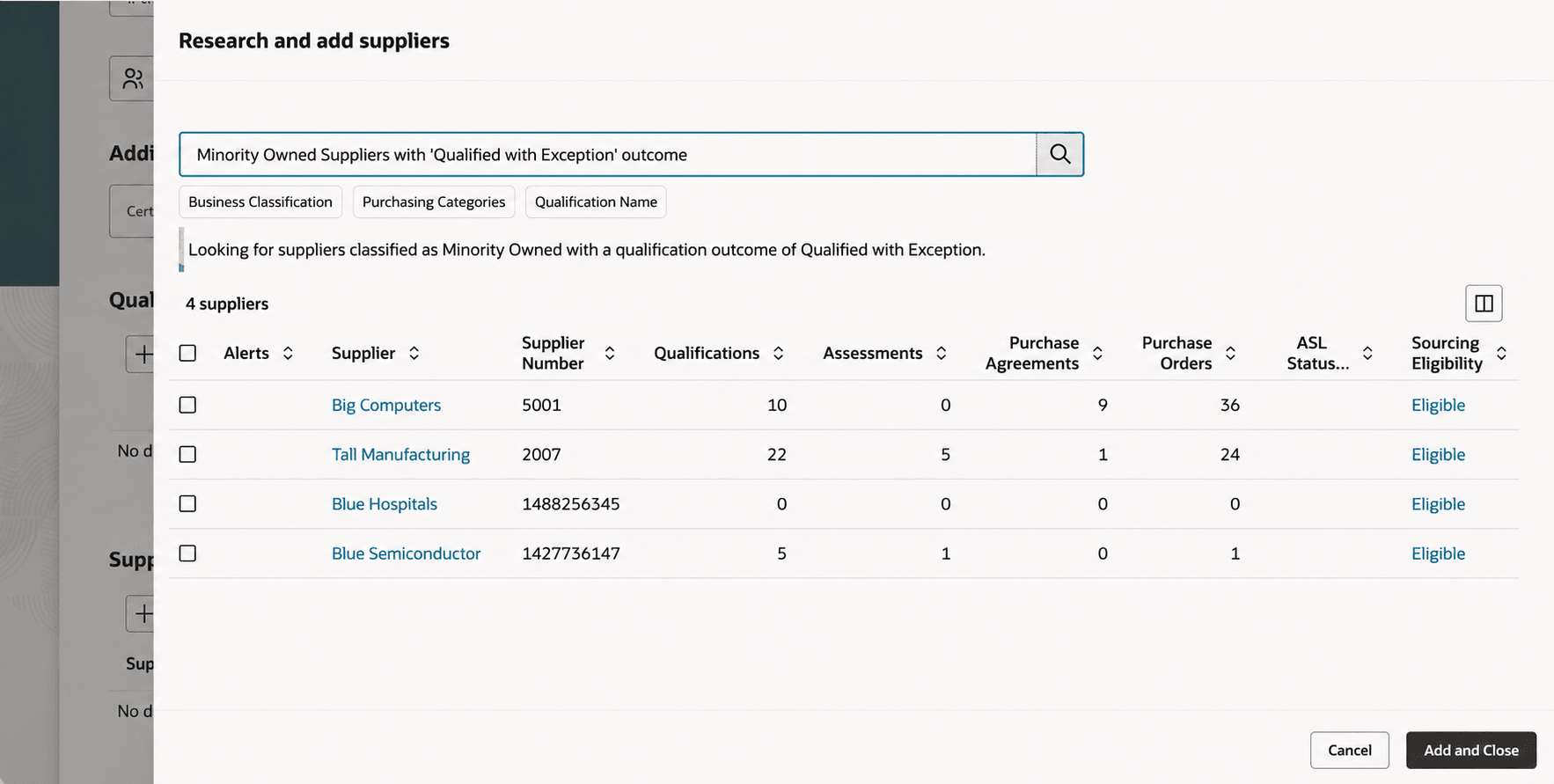
Research and add suppliers drawer
As an initiative owner you can find and add relevant suppliers more efficiently using natural language search based on procurement transaction activity and key supplier information in a single workflow.
Steps to enable and configure
To enable this feature, perform the setup requirements listed in AI Agent: Research Suppliers with AI.
You no longer need to enable the Redwood: Add Suppliers Suggested by Oracle AI feature to run the Prepare Smart Supplier Suggestions scheduled process.
Tips and considerations
- The ability to search for assessment-related attributes like assessment name, status, and outcome is planned for a future update.
- The search does not handle ambiguous terms and misspellings in the search query.
Key resources
- For information on Research suppliers page, see - AI Agent: Research Suppliers with AI, AI Agent: Research Suppliers Using Products and Services Categories
- For information about using Oracle Visual Builder Studio to extend your Redwood application pages, see Oracle Fusion Cloud HCM and SCM: Extending Redwood Applications for HCM and SCM Using Visual Builder Studio.
- Refer to Overview of Guided Journeys in the Oracle Fusion Cloud Human Resources: Implementing and Using Journeys guide, available on the Oracle Help Center.
Access requirements
If you are using custom job roles, then you need to validate that you have the previously delivered privileges listed.
| Privilege status | Privilege name and code |
|---|---|
| Previously delivered | View Supplier (POZ_VIEW_SUPPLIER_PRIV) |
| Previously delivered | Edit Supplier Qualification Initiative (POQ_EDIT_SUPPLIER_QUALIFICATION_INITIATIVE_PRIV) |
If you're using custom job roles, then you need to validate that you have this previously delivered duty role listed.
| Duty role status | Duty role name and code |
|---|---|
| Previously delivered | Research Suppliers Workflow
(ORA_PON_RESEARCH_SUPPLIERS_WORKFLOW_DUTY) |