Analytic Functions
Analytic functions compute an aggregate value based on a group of rows. They differ from aggregate functions in that they return multiple rows for each group. The group of rows is called a window and is defined by the analytic_clause. For each row, a sliding window of rows is defined. The window determines the range of rows used to perform the calculations for the current row. Window sizes can be based on either a physical number of rows or a logical interval such as time.
Analytic functions are the last set of operations performed in a query except for the final ORDER BY clause. All joins and all WHERE, GROUP BY, and HAVING clauses are completed before the analytic functions are processed. Therefore, analytic functions can appear only in the select list, QUALIFY clause, or the ORDER BY clause.
Analytic functions are commonly used to compute cumulative, moving, centered, and reporting aggregates.
analytic_function::=
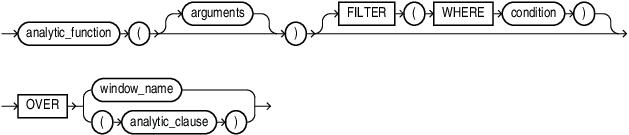
Description of the illustration analytic_function.gif
analytic_clause::=
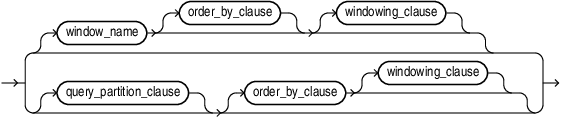
Description of the illustration analytic_clause.gif
query_partition_clause::=
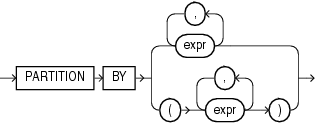
Description of the illustration query_partition_clause.gif
order_by_clause::=
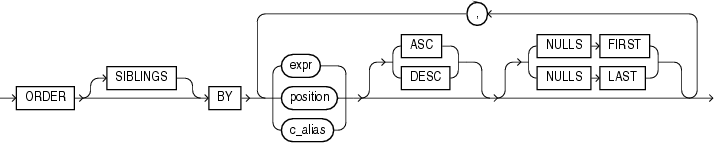
Description of the illustration order_by_clause.gif
windowing_clause::=
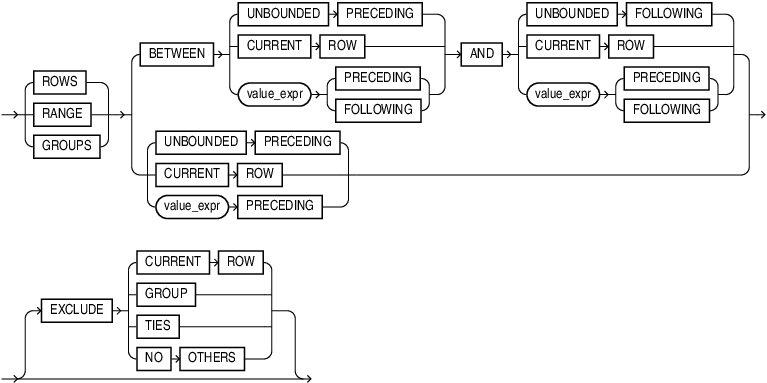
Description of the illustration windowing_clause.gif
qualify_clause::=

Description of the illustration qualify_clause.gif
analytic_function
Specify the name of an analytic function (see the listing of analytic functions following this discussion of semantics).
arguments
Analytic functions take 0 to 3 arguments. The arguments can be any numeric data type or any nonnumeric data type that can be implicitly converted to a numeric data type. Oracle determines the argument with the highest numeric precedence and implicitly converts the remaining arguments to that data type. The return type is also that data type, unless otherwise noted for an individual function.
See Also: Numeric Precedence for information on numeric precedence and Table 2-9 for more information on implicit conversion
analytic_clause
Use OVER analytic_clause to indicate that the function operates on a query result set. This clause is computed after the FROM, WHERE, GROUP BY, and HAVING clauses. You can specify analytic functions with this clause in the select list or ORDER BY clause. To filter the results of a query based on an analytic function, nest these functions within the parent query, and then filter the results of the nested subquery.
Notes on the analytic_clause:
The following notes apply to the analytic_clause:
-
You cannot nest analytic functions by specifying any analytic function in any part of the analytic_clause. However, you can specify an analytic function in a subquery and compute another analytic function over it.
-
You can specify
OVERanalytic_clause with user-defined analytic functions as well as built-in analytic functions. See CREATE FUNCTION. -
The
PARTITIONBYandORDERBYclauses in the analytic_clause are collation-sensitive.
See Also:
-
in Oracle AI Database Globalization Support Guide for the collation determination rules for the
OVER(PARTITIONBY...ORDERBY...)clause of an analytic function -
window_clause in the
SELECTstatement
query_partition_clause
Use the PARTITION BY clause to partition the query result set into groups based on one or more value_expr. If you omit this clause, then the function treats all rows of the query result set as a single group.
To use the query_partition_clause in an analytic function, use the upper branch of the syntax (without parentheses). To use this clause in a model query (in the model_column_clauses) or a partitioned outer join (in the outer_join_clause), use the lower branch of the syntax (with parentheses).
You can specify multiple analytic functions in the same query, each with the same or different PARTITION BY keys.
If the objects being queried have the parallel attribute, and if you specify an analytic function with the query_partition_clause, then the function computations are parallelized as well.
Valid values of value_expr are constants, columns, nonanalytic functions, function expressions, or expressions involving any of these.
order_by_clause
Use the order_by_clause to specify how data is ordered within a partition. For all analytic functions you can order the values in a partition on multiple keys, each defined by a value_expr and each qualified by an ordering sequence.
Within each function, you can specify multiple ordering expressions. Doing so is especially useful when using functions that rank values, because the second expression can resolve ties between identical values for the first expression.
Whenever the order_by_clause results in identical values for multiple rows, the function behaves as follows:
-
CUME_DIST,DENSE_RANK,NTILE,PERCENT_RANK, andRANKreturn the same result for each of the rows. -
ROW_NUMBERassigns each row a distinct value even if there is a tie based on the order_by_clause. The value is based on the order in which the row is processed, which may be nondeterministic if theORDERBYdoes not guarantee a total ordering. -
For all other analytic functions, the result depends on the window specification. If you specify a logical window with the
RANGEkeyword, then the function returns the same result for each of the rows. If you specify a physical window with theROWSkeyword, then the result is nondeterministic.
Restrictions on the ORDER BY Clause
The following restrictions apply to the ORDER BY clause:
-
When used in an analytic function, the order_by_clause must take an expression (expr). The
SIBLINGSkeyword is not valid (it is relevant only in hierarchical queries). Position (position) and column aliases (c_alias) are also invalid. Otherwise this order_by_clause is the same as that used to order the overall query or subquery. -
An analytic function that uses the
RANGEkeyword can use multiple sort keys in itsORDERBYclause if it specifies any of the following windows:-
RANGEBETWEENUNBOUNDEDPRECEDINGANDCURRENTROW. The short form of this isRANGEUNBOUNDEDPRECEDING. -
RANGEBETWEENCURRENTROWANDUNBOUNDEDFOLLOWING -
RANGEBETWEENCURRENTROWANDCURRENTROW -
RANGEBETWEENUNBOUNDEDPRECEDINGANDUNBOUNDEDFOLLOWING
Window boundaries other than these four can have only one sort key in the
ORDERBYclause of the analytic function. This restriction does not apply to window boundaries specified by theROWkeyword. -
ASC | DESC
Specify the ordering sequence (ascending or descending). ASC is the default.
NULLS FIRST | NULLS LAST
Specify whether returned rows containing nulls should appear first or last in the ordering sequence.
NULLS LAST is the default for ascending order, and NULLS FIRST is the default for descending order.
Analytic functions always operate on rows in the order specified in the order_by_clause of the function. However, the order_by_clause of the function does not guarantee the order of the result. Use the order_by_clause of the query to guarantee the final result ordering.
See Also: order_by_clause of SELECT for more information on this clause
windowing_clause
Some analytic functions allow the windowing_clause. In the listing of analytic functions at the end of this section, the functions that allow the windowing_clause are followed by an asterisk (*).
ROWS | RANGE | GROUPS
The keywords ROWS, RANGE, and GROUPS are options to define a window frame unit used for calculating the function result. The function is then applied to all the rows in the window. The window moves through the query result set or partition from top to bottom.
-
Use
ROWSto specify the window frame extent by counting rows forward or backward from the current row.ROWSallows any number of sort keys, of any ordered data types. -
Use
RANGEto specify the window frame extent as a logical offset.RANGEallows only one sort key, and its declared data type must allow addition and subtraction operations, for example they must be numeric, datetime, or interval data types. -
Use
GROUPSto specifiy the window frame extent with bothROWSandRANGEcharacteristics. LikeROWSaGROUPSwindow can have any number of sort keys, or any ordered types. LikeRANGE, aGROUPSwindow does not make cutoffs between adjacent rows with the same values in the sort keys.
You cannot specify this clause unless you have specified the order_by_clause. Some window boundaries defined by the RANGE clause let you specify only one expression in the order_by_clause. Refer to Restrictions on the ORDER BY Clause.
The value returned by an analytic function with a logical offset is always deterministic. However, the value returned by an analytic function with a physical offset may produce nondeterministic results unless the ordering expression results in a unique ordering. You may have to specify multiple columns in the order_by_clause to achieve this unique ordering.
BETWEEN … AND
Use the BETWEEN … AND clause to specify a start point and end point for the window. The first expression (before AND) defines the start point and the second expression (after AND) defines the end point.
If you omit BETWEEN and specify only one end point, then Oracle considers it the start point, and the end point defaults to the current row.
UNBOUNDED PRECEDING
Specify UNBOUNDED PRECEDING to indicate that the window starts at the first row of the partition. This is the start point specification and cannot be used as an end point specification.
UNBOUNDED FOLLOWING
Specify UNBOUNDED FOLLOWING to indicate that the window ends at the last row of the partition. This is the end point specification and cannot be used as a start point specification.
CURRENT ROW
As a start point, CURRENT ROW specifies that the window begins at the current row or value (depending on whether you have specified ROW, RANGE, or GROUPS respectively). In this case the end point cannot be value_expr PRECEDING.
As an end point, CURRENT ROW specifies that the window ends at the current row or value (depending on whether you have specified ROW, RANGE, or GROUPSrespectively). In this case the start point cannot be value_expr FOLLOWING.
value_exprPRECEDING orvalue_exprFOLLOWING
For RANGE, ROW, or GROUPS:
-
If value_expr
FOLLOWINGis the start point, then the end point must be value_exprFOLLOWING. -
If value_expr
PRECEDINGis the end point, then the start point must be value_exprPRECEDING.
If you are defining a logical window defined by an interval of time in numeric format, then you may need to use conversion functions.
See Also: NUMTOYMINTERVAL and NUMTODSINTERVAL for information on converting numeric times into intervals
If you specified ROWS:
-
value_expr is a physical offset. It must be a constant or expression and must evaluate to a positive numeric value.
-
If value_expr is part of the start point, then it must evaluate to a row before the end point.
If you specified GROUPS:
-
value_expr is a physical offset. It must be a constant or expression and must evaluate to a positive numeric value.
-
If value_expr is part of the start point, then it must evaluate to a row before the end point.
If you specified RANGE:
-
value_expr is a logical offset. It must be a constant or expression that evaluates to a positive numeric value or an interval literal. Refer to Literals for information on interval literals.
-
You can specify only one expression in the order_by_clause.
-
If value_expr evaluates to a numeric value, then the
ORDERBYexpr must be a numeric orDATEdata type. -
If value_expr evaluates to an interval value, then the
ORDERBYexpr must be aDATEdata type.
If you omit the windowing_clause entirely, then the default is RANGE BETWEEN UNBOUNDED PRECEDING AND CURRENT ROW.
EXCLUDE
You can remove rows, groups, and ties from the window frame with the EXCLUDE options:
-
If you specify
EXCLUDE CURRENT ROW, and the current row in in the window frame, then the current row is removed from the window frame. -
If you specify
EXCLUDE GROUP, then the current row and any peers of the current row are removed from the window frame. -
If you specify
EXCLUDE TIES, then the peers of the current row are removed from the window frame. The current row is retained. Note, that if the current row is previously removed from the window frame, it remains removed. -
If you specify
EXCLUDE NO OTHERS, then no additional rows are removed from the window frame. This is the default option.
qualify_clause
Use the QUALIFY clause to filter the results of an analytic function that appears in a SELECT list or in the predicate specified within the QUALIFY clause.
The relationship between the QUALIFY clause and analytic functions is analogous to the relationship between the HAVING clause and the GROUP BY clause.
-
The
QUALIFYclause must appear before theORDER BYandFETCH FIRSTclauses, but after theWINDOWclause of aSELECTstatement. -
All
WHERE,GROUB BY,HAVINGclauses and analytic functions are completed before theQUALIFYclause is processed. The general order of operations is as follows:FROM->WHERE->GROUP BY->HAVING->WINDOW->QUALIFY->DISTINCT->ORDER BY->FETCH FIRST.
Analytic functions are commonly used in data warehousing environments. In the list of analytic functions that follows, functions followed by an asterisk () allow the full syntax, including the *windowing_clause.
See Also: Oracle AI Database Data Warehousing Guide for more information on these functions and for scenarios illustrating their use