Integration Processes
This section provides detailed business process overviews and technical overviews of the following business processes in the integration:
Customer Data Synchronization Process
The customer data is synchronized in one direction from Oracle Utilities Customer Care and Billing to Oracle Utilities Network Management System to support the following functionality.
Refer to the Customer Data Synchronization Process section for message mapping information for this integration point.
Supported Functionality
This integration point supports the following functionalities:
• Sends data from Oracle Utilities Customer Care and Billing to Oracle Utilities Network Management System.
• Initial Sync (or Full Initial Load): It is the first load of data to create a Customer Data model in Oracle Utilities Network Management System.
• Incremental Sync: The changes since the last synchronization to the customer information in Oracle Utilities Customer Care and Billing are sent to Oracle Utilities Network Management System overwriting the last synchronized information.
• Only relevant and current electric customer data stored and maintained in Oracle Utilities Customer Care and Billing and needed to create the Oracle Utilities Network Management System customer model is synchronized. It involves getting data from the Person, Account, Premise, Service Point, Meter, and Item tables in Oracle Utilities Customer Care and Billing.
The following process diagram shows a graphical representation of the customer data synchronization process: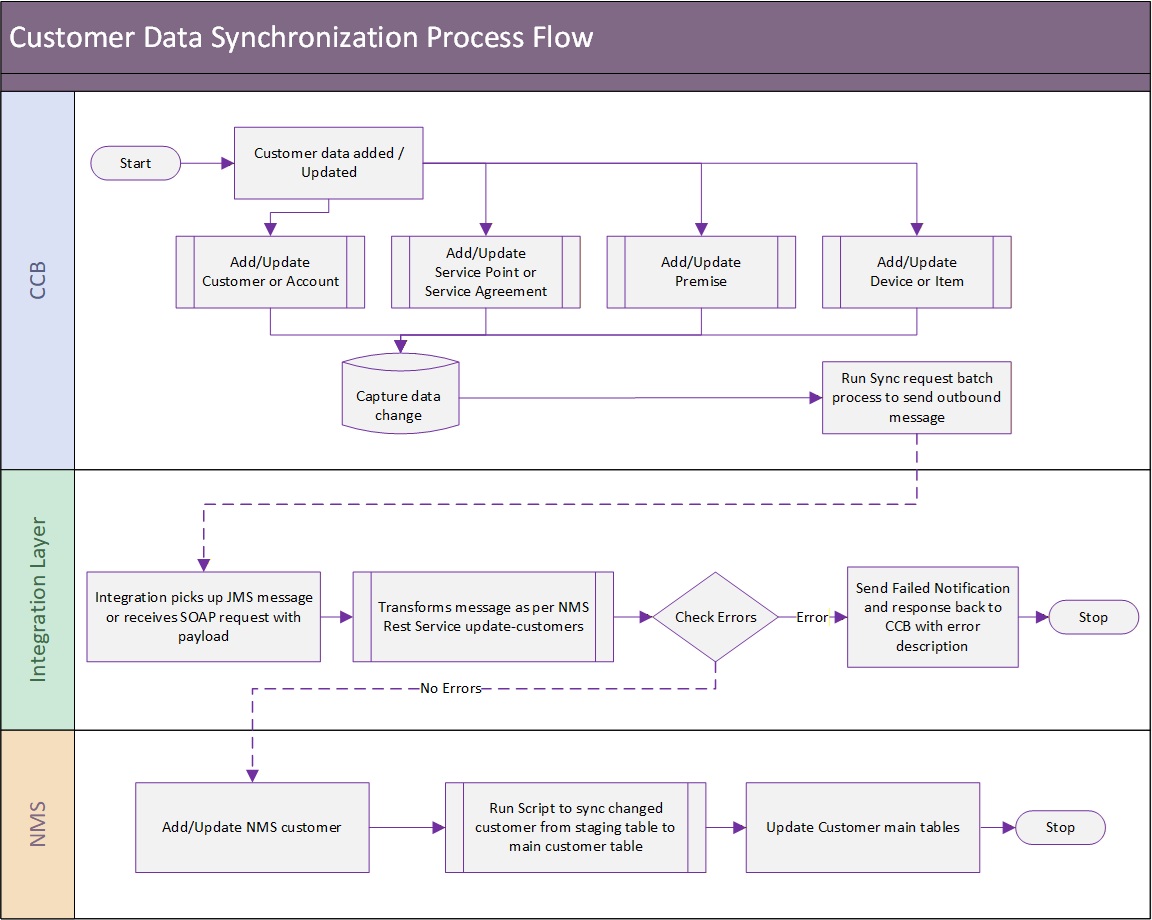
Creation and Update of Customer Data
Customer information is created and updated in Oracle Utilities Customer Care and Billing and this application is always the owner of customer data. Customer information must be kept up to date in Oracle Utilities Network Management System so that outage information can be properly synchronized with the appropriate customers and service points.
Initial Synchronization/ Incremental Updates
At the start of the implementation, the current customer data is synchronized from Oracle Utilities Customer Care and Billing to Oracle Utilities Network Management System by batch processing which is run on initial load from Oracle Utilities Customer Care and Billing. Oracle Utilities Customer Care and Billing then keeps the data in synchronization with Oracle Utilities Network Management System using periodic incremental updates.
Oracle Utilities Customer Care and Billing sends one message for every customer that needs to be synchronized in Oracle Utilities Network Management System. This message contains the entire customer related data load or updates for the customer relevant to Oracle Utilities Network Management System (person, account, premise, sp, meter/item information).
Only current customer information from Oracle Utilities Customer Care and Billing is synchronized when the following criteria is satisfied:
• Customer has an active or pending stopped service agreement (SA)
• SA has an effective SA/SP link
• SP linked to the SA is connected and in service
When Oracle Utilities Customer Care and Billing sends an update to Oracle Utilities Network Management System, the message may contain customer data with meter information or customer data with the item information.
Meter Information Updates
The messages containing the customer data with the meter information are processed and sent over to Oracle Utilities Network Management.
Item Information or Null Information Updates
Messages containing customer data with the item information or with no meter or item information trigger an error since item information updates and null updates are not supported. Clients can configure the integration to support these types of updates by setting the appropriate customization flag to “true.” For item information, the information must be manually mapped from Oracle Utilities Customer Care and Billing to Oracle Utilities Network Management.
Inactive Customer Data
When a customer becomes inactive in Oracle Utilities Customer Care and Billing, this information is sent so that Oracle Utilities Network Management System can mark the customer as inactive. This update only indicates that the customer is inactive, but does not provide details regarding whether the customer is inactive due to disconnection of service, for non-payment or if the customer has moved out.
Integration Process and Technical Details
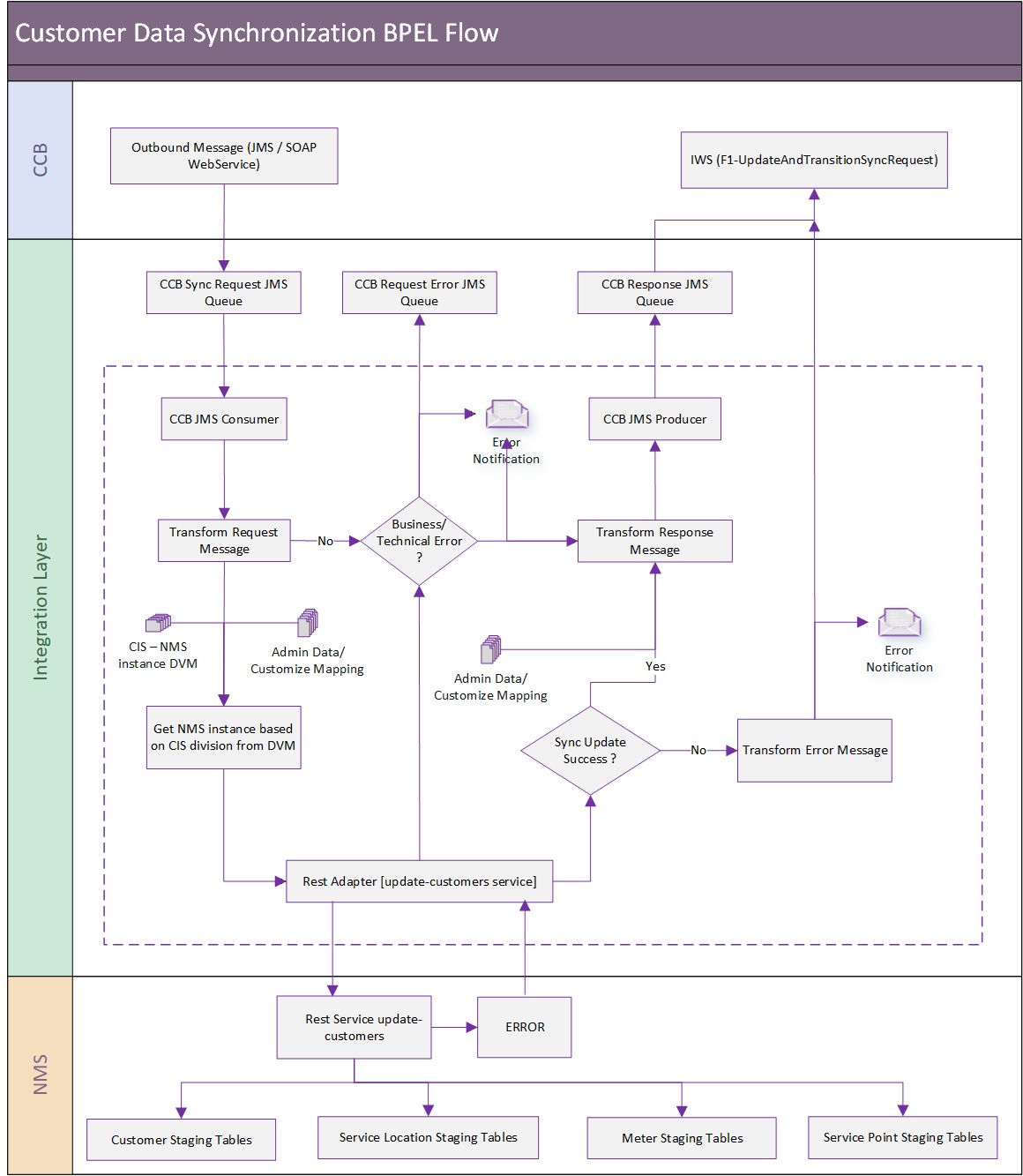
This integration point supports asynchronous data synchronization from Oracle Utilities Customer Care and Billing to Oracle Utilities Network Management System with the following processing:
• Oracle Utilities Customer Care and Billing sends the synchronization message to OUCCBNMSSyncReqJMSWriteSvc integration service. This integration service is exposed as web service.
• OUCCBNMSSyncReqJMSWriteSvc sends the synchronization message to Oracle Utilities Customer Care and Billing JMS Queue in the integration layer to consume and process.
• OUCCBOUNMSCustomerSyncEBF integration process consumes messages from the JMS Queue, transforms the message to the equivalent Oracle Utilities Network Management System field format, invokes the Customer Update REST API to insert/update the customer information in the Oracle Utilities Network Management System and sends the response or error messages to JMS Queues.
• WebLogic JMS queues are used as a queuing mechanism in the integration layer between Oracle Utilities Customer Care and Billing and BPEL processes. The following four JMS queues support this integration:
• Oracle Utilities Customer Care and Billing Request Queue: For Oracle Utilities Customer Care and Billing to add messages to this queue which are picked up by the integration for processing.
• Oracle Utilities Customer Care and Billing Response Queue: Business errors in the integration and success or failure of DB insert/update operations are written to this queue.
• Oracle Utilities Customer Care and Billing Request Error Queue: Technical errors encountered in the integration request process are written to this queue.
• Oracle Utilities Customer Care and Billing Response Error Queue: Technical errors encountered when Oracle Utilities Customer Care and Billing reads the messages from the Oracle Utilities Customer Care and Billing response queue are written to this queue.
• OUCCBOUNMSCustomerSyncEBF integration BPEL process with the following components processes the message. This BPEL process is not exposed as a web service.
• JMS Consumer reads messages from the Oracle Utilities Customer Care and Billing request queue.
• JMS Producer writes to the Oracle Utilities Customer Care and Billing response queue.
• Transformation converts the message from the source format to the target format. DVMs are used for the transformation.
• REST Adapter interacts with the Oracle Utilities Network Management System update-customers REST API to insert/update customer information in the Oracle Utilities Network Management System.
• Customization inserts placeholders for custom XSL and calls to pre- and post-transformation extension points for each transformation.
• OUCCBNMSSyncRespJMSReadSvc process consumes the message from JMS response queue and invokes the F1 UpdateAndTransitionSyncRequest IWS in Oracle Utilities Customer Care and Billing.
• In case of any errors, the error message returned by Oracle Utilities Network Management System is sent to Oracle Utilities Customer Care and Billing with the synchronization request ID associated with it.
Assumptions and Constraints
• Device information for each customer or service point must be setup in Oracle Utilities Customer Care and Billing first before the customer synchronization batch is run. Device ID used in Oracle Utilities Customer Care and Billing must be in the Oracle Utilities Network Management System Supply Nodes table. Oracle Utilities Customer Care and Billing stores the device information in the SP Geo Type and Oracle Utilities Network Management System stored it in Device ID.
• The Oracle Utilities Customer Care and Billing Customer Data synchronization is driven by SP and the data to be synchronized to Oracle Utilities Network Management System can be filtered by SP Type(s). The Oracle Utilities Network Management System Customer Data Sync BO Pre-processing algorithm filters the data to be synchronized by SP Type. Implementation teams can configure the SP Type(s) that need to be synchronized in the algorithm parameters and only those specified are synchronized over to Oracle Utilities Network Management System. If nothing is specified in the algorithm parameters, all SP Types are synchronized.
Note: For more details, refer to the “Data Synchronization” section in the Oracle Utilities Application Framework User Guide.
Successful Update
When the Oracle Utilities Network Management System tables are successfully updated, the integration layer sends a positive acknowledgment to the Oracle Utilities Customer Care and Billing response queue for Oracle Utilities Customer Care and Billing to process.
Business Process Errors
When a business error is encountered during NMS API invocation, the Update Customer API returns an error to the integration layer and a negative acknowledgment is sent to the Oracle Utilities Customer Care and Billing response queue. Oracle Utilities Customer Care and Billing fixes the error and resends the message.
Technical Errors
When a technical error is encountered the message is sent to the Oracle Utilities Customer Care and Billing JMS error queue and processing fails. The common technical errors would be if there are connectivity errors. As mentioned, the integration can be configured to send email notification of errors or to store them in an error table.
Integration Service
These values are cross referenced in the Service Configurations section.
Name | Description |
|---|---|
OUCCBNMSSyncReqJMSWriteSvc | CCB-NMS Customer Data Sync Wrapper Request BPEL Process. This BPEL process receives the incoming CCB soap messages and pushed it in the request queue for the OUCCBOUNMSCustomerDataSyncReqEBF to process. |
OUCCBOUNMSCustomerDataSyncReqEBF | CCB-NMS Customer Data Sync Request BPEL Process. This BPEL process reads messages from the CCB request queue and merges the customer data to the NMS Customer Related Staging tables after successful transformation. The BPEL process includes transformations, extensions and error notifications. |
OUCCBNMSSyncRespJMSReadSvc | CCB-NMS Customer Data Sync Wrapper Response BPEL Process. This BPEL process reads the NMS response that the OUCCBOUNMSCustomerDataSyncReqEBF composite published in the CCB response message. It will transform and sends the acknowledgement to CCB. |
Adapter Services
Name | Description |
OUCCBCustomerSyncReqJMSConsumer | CCB Customer Sync Request JMS Consumer. This is the JMS consumer service in BPEL responsible for listening to the CCB Request Queue. This is created as part of the BPEL process. |
OUCCBCustomerSyncResponseJMSProducer | CCB Customer Sync Response JMS Producer. This is the JMS producer service in BPEL responsible for adding a response message to the CCB Response Queue. This is created as part of the BPEL process. |
Services
Application | Service Name | Adapter | URL |
NMS | update-customers | REST API | https://<nms_host:nms_port>/nms-ws/nms-c2m/update-customers |
CCB | F1-UpdateAndTransitionSyncRequestService | SOAP IWS | https://<ccb_host:ccb_port>/ouaf/webservices/F1-UpdateAndTransitionSyncRequest?wsdl |
JMS Queues
Name | Description |
OUCCBCustomerDataSyncRequest | CCB Customer Data Sync Request Queue |
OUCCBCustomerDataSyncRequest Error | CCB Customer Data Sync Request Error Queue |
OUCCBCustomerDataSyncResponse | CCB Customer Data Sync Response Queue |
OUCCBCustomerDataSyncResponse Error | CCB Customer Data Sync Response Error Queue |
Trouble Call Entry Process
This process is a real time synchronous interface of the trouble calls created in Oracle Utilities Customer Care and Billing.
Oracle Utilities Network Management System is the central repository for trouble calls. However, trouble calls may originate in Oracle Utilities Customer Care and Billing and these trouble calls is sent to Oracle Utilities Network Management System.
Mapping
Trouble code mapping must be synchronized between the edge applications so that the trouble code sent from Oracle Utilities Customer Care and Billing is interpreted similarly when the trouble code is received by Oracle Utilities Network Management System. Please refer to the Data Mapping section for more details. Refer to the Trouble Call Process section for message mapping information for this integration point.
Supported Functionality
The integration point supports the following functionalities:
• Transmit to Oracle Utilities Network Management System trouble calls created, updated or canceled in Oracle Utilities Customer Care and Billing. The following types of calls are interfaced:
• Electric trouble calls for a particular customer (known premise/service point): This includes entering the meeting time for the job site appointments when there needs to be a planned outage to perform non-utility work at a location, such as tree removal near a power line or house painting.
• Fuzzy calls: When a fuzzy call is created, at least one of the following call identifiers must be provided:
• The caller's name
• The caller's phone number
• The caller's ID (911 reference ID provided by the caller (911)).
• Location must also be provided. A Location can be a:
• Street intersection (provide two street names)
• Street segment (provide a block number and a street name)
• City and State are optional
The following process diagram shows a graphical representation of the trouble call entry process: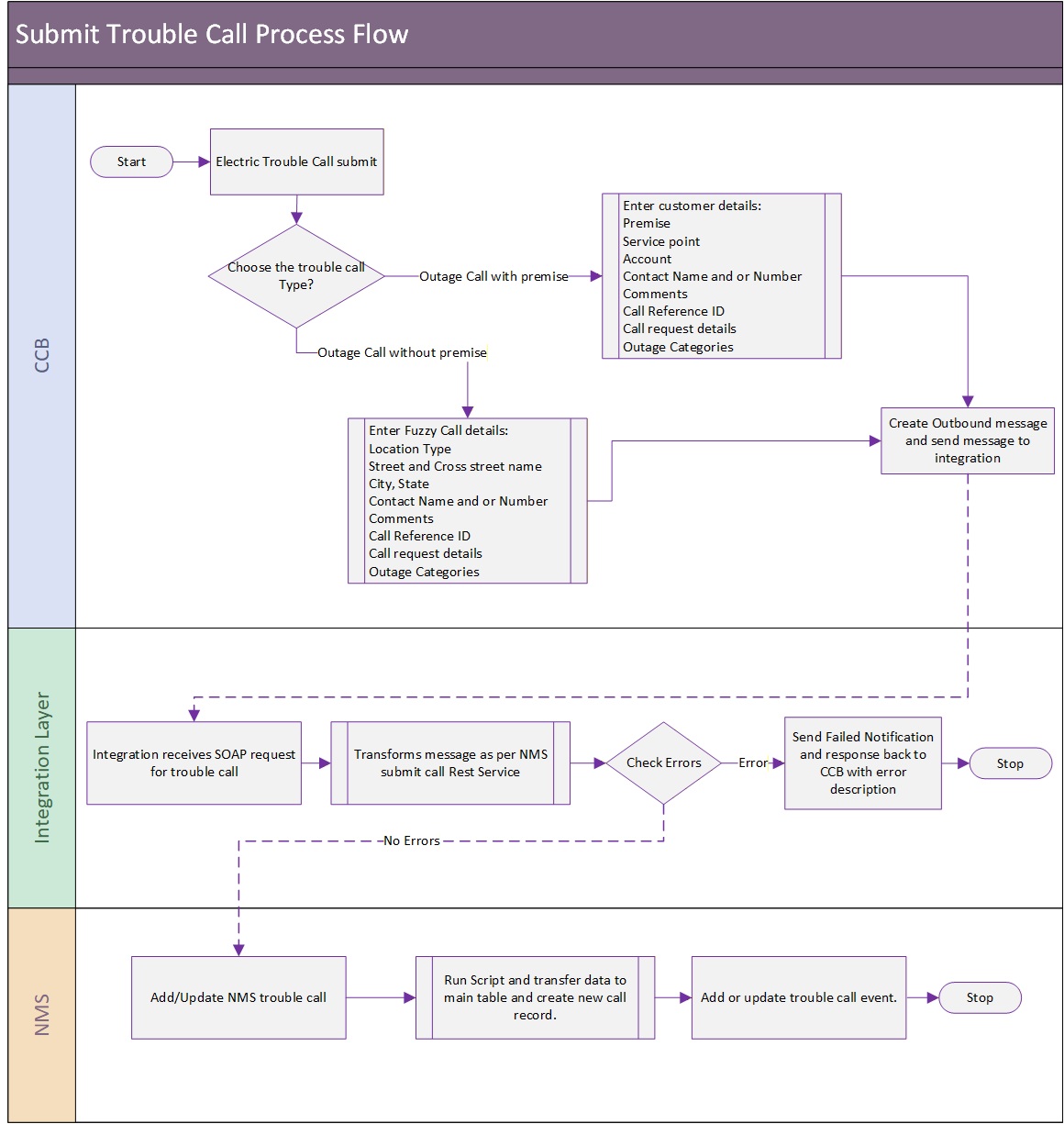
New Trouble Calls Created in Oracle Utilities Customer Care and Billing
When a trouble call is created in Oracle Utilities Customer Care and Billing, the contact name and contact phone passed to Oracle Utilities Network Management System are not always used as the customer name and customer phone stored in the incident record.
If the Generic IVR Adapter, which processes trouble calls received from Oracle Utilities Customer Care and Billing is run with the 'command line option '-docustquery' for customers that exist in the Oracle Utilities Network Management System Customer Model, the system uses the customer name and customer phone stored in the Oracle Utilities Network Management System customer model rather than the contact name and contact phone coming from Oracle Utilities Customer Care and Billing.
Make sure that when running the Generic IVR Adapter in Oracle Utilities Network Management System that the command-line option '-docustquery' is not used if you want to store the contact name and contact number from Oracle Utilities Customer Care and Billing.
For more information on configuring this option, refer to the Setting Up Oracle Utilities Network Management System section in Chapter 3.
Updates
The edge applications determine which fields can be updated and which fields are restricted. Depending on the needs of the customer, this decision is implementation specific since some customers are very sensitive about the ability to modify customer reported information so they require new calls to be entered for significant changes to a reported call while some only allow certain fields to be updated. No restrictions are applied as default.
Updating Phone Numbers
When Oracle Utilities Customer Care and Billing passes a contact phone to the integration layer, the integration layer removes all delimiters and characters, and only passes the numeric value to Oracle Utilities Network Management System.
Integration Process and Technical Details
This integration point supports trouble calls created or updated in Oracle Utilities Customer Care and Billing and sent to Oracle Utilities Network Management System with the following processing:.
When a trouble call is created in Oracle Utilities Customer Care and Billing as a Service Task, a synchronous XML message is sent to the BPEL Process. The BPEL process transforms the message to the equivalent Oracle Utilities Network Management System field format and invokes the Submit Call Stored Procedure to insert/update the trouble call information in the Oracle Utilities Network Management System Trouble Calls table. The BPEL process handles the following:
• Request Message transformation from the source (CCB) to the target (NMS) application format. DVMs are used for the transformation.
• Insert/Update of trouble calls in the Trouble Calls table using a DB Adapter to interact with the Oracle Utilities Network Management System database to invoke the Oracle Utilities Network Management System trouble calls stored procedure that inserts/updates the trouble call record to the Trouble Calls table.
• Error handling and optional error notification.
• Customization inserts placeholders for custom XSL and calls to pre- and post-transformation extension points for each transformation.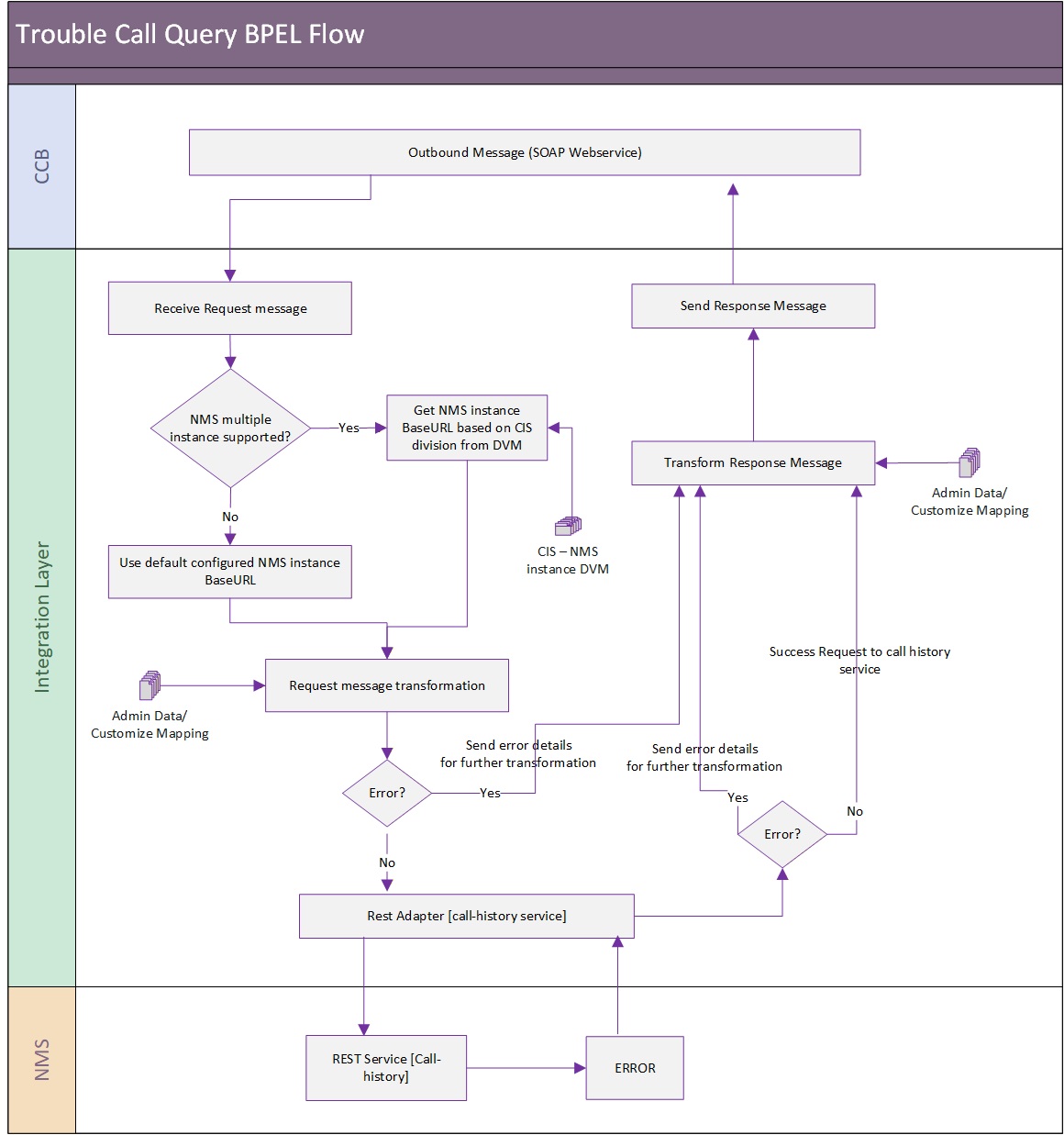
Successful Update
When the Oracle Utilities Network Management System tables are successfully updated, the integration layer sends a positive acknowledgment to the Oracle Utilities Customer Care and Billing response queue.
Errors
When a business or technical error is encountered, the integration layer synchronously responds with an error to Oracle Utilities Customer Care and Billing. As mentioned, the integration can be configured to send email notification of errors or to store them in an error table.
Integration Service
These values are cross referenced in the Service Configurations section.
Name | Description |
OUCCBOUNMSTroubleCallInterfaceEBF | CCB-NMS Trouble Call Interface BPEL Process. This is the main BPEL process that transforms the incoming CCB trouble call message to NMS format and inserts or updates the trouble call record in NMS. The BPEL process includes transformations, extensions and error notifications. |
Adapter Services
Name | Description |
OUNMSSubmitCallStoredProcedure | NMS DB Adapter - Insert Trouble Calls Stored Procedure. This is created as part of the BPEL process. |
Job History Query Process
This process is a real-time synchronous interface from Oracle Utilities Customer Care and Billing to retrieve job history information from Oracle Utilities Network Management System for a particular customer, location or call identifier and display the results back in Oracle Utilities Customer Care and Billing.
Refer to the Job History Query Process section for message mapping information for this integration point.
Supported Functionality
The job history query supports the following functionalities:
• Query and view job history details from Oracle Utilities Customer Care and Billing using any of the search criteria:
• Standard outage job history query for known customers: Search by IDs:
• Service Point ID
• Account ID
• Premise ID
• Nearby Outage Job History Query: Search by location:
• Query by Street Intersection: The possible inputs to the query are:
• Street Intersection (street name and cross street)
• City (optional)
• State (optional)
• Query by Street Segment: The possible inputs to the query are:
• Street segment (street name and block number)
• City (optional)
• State (optional)
• Fuzzy Call Identifier Query: This query can find the job details for a fuzzy call that was placed. This requires first looking up the fuzzy call from the Call History using any of the following criteria and finding the associated jobs.
• Caller's Name
• Caller's Phone Number
• Call Identifier Number (911 Call Identifier)
• External ID (Outage Call ID in Oracle Utilities Customer Care and Billing or IVR ID)
• Oracle Utilities Customer Care and Billing default display order of trouble calls with most recent at top.
• The amount of history to be retrieved is restricted by the number of days defined in the integration layer.
The following process diagram shows a graphical representation of the job history query process: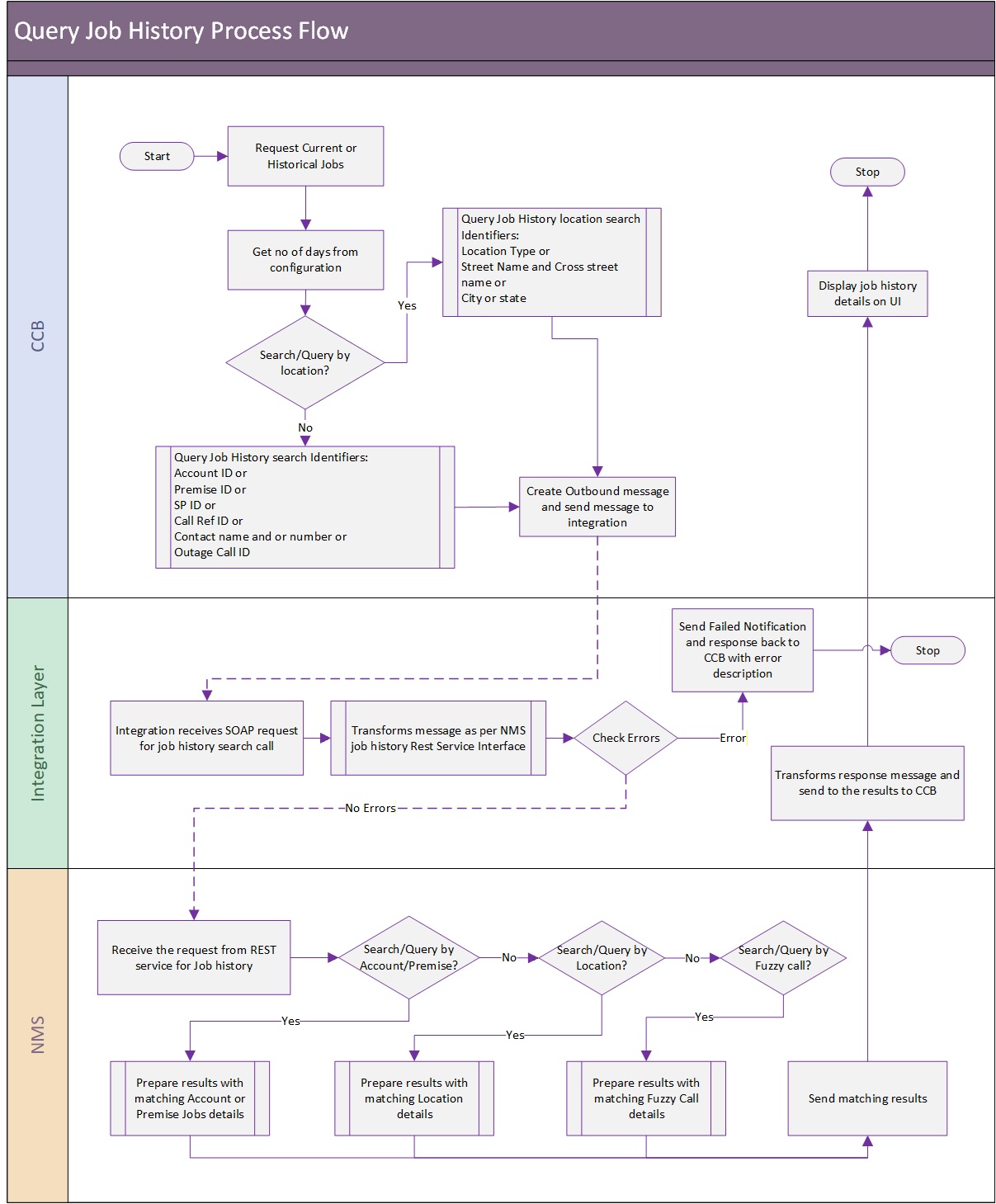
Integration Process and Technical Details
Oracle Utilities Customer Care and Billing sends the query information in the form of xml messages which are transformed by the integration and sent to Oracle Utilities Network Management System. Oracle Utilities Network Management System responds with the Job History results based on the input criteria that it received. The response is transformed by the integration layer and sent to Oracle Utilities Customer Care and Billing.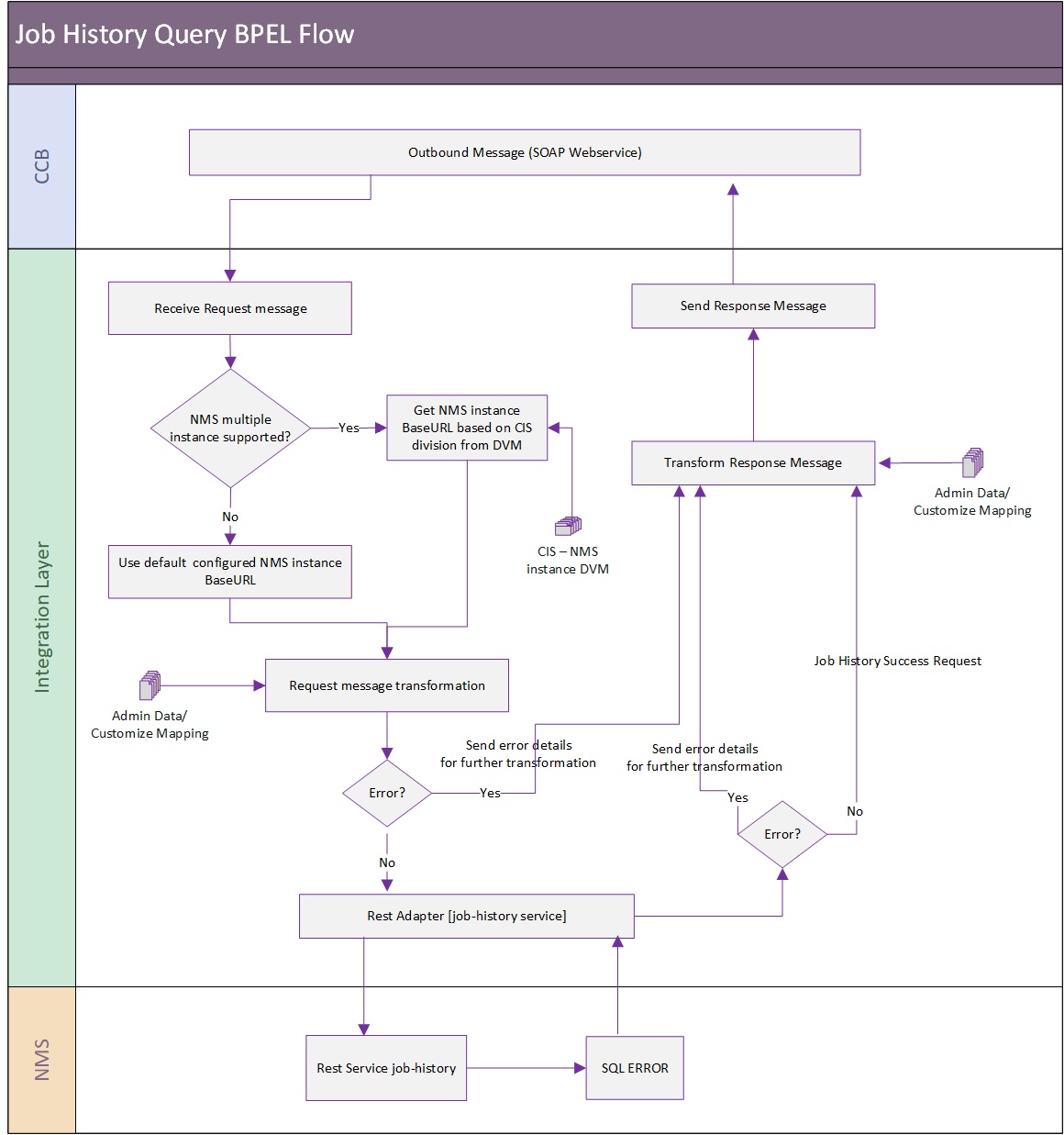
Assumptions and Constraints
• When searching Job History by contact phone, the integration layer removes all delimiters and characters from the contact phone that Oracle Utilities Customer Care and Billing and only passes the numeric value to Oracle Utilities Network Management System.
• To make the name search and street name search compatible, a wildcard character (%) must be added at the end of the value. Example. Smith%
Number of Days to Retrieve
The number of days of job history to retrieve from Oracle Utilities Network Management System is configurable form the integration layer. It is defined in the configuration properties file, service name = OUCCBOUNMSJobHistoryQuery and property name = NMS.NumberOfDaysOfHistory. This value is sent to Oracle Utilities Network Management System for use as the filter when the records are being returned to Oracle Utilities Customer Care and Billing.
Errors
If the integration layer or Oracle Utilities Network Management System returns a business error while processing the inbound message, an error message is returned in the response message to Oracle Utilities Customer Care and Billing. As mentioned, the integration can be configured to send email notification of errors or to store them in an error table.
Integration Service
These values are cross referenced in the Service Configurations section.
Name | Description |
OUCCBOUNMSJobHistoryQueryEBF | Query NMS for the Job History BPEL Process This synchronous BPEL process transforms the incoming CCB message into NMS format and the response from NMS back into CCB format. This BPEL process receives the CCB request messages and invoke NMS stored procedure using DB Adapter. The response from NMS is sent as response back to CCB after appropriate transformations. |
Adapter Services
Name | Description |
OUCCBOUNMSJobHistoryQueryAdapterService | Query NMS for the Job History Adapter Service This DB Adapter Service invokes the NMS stored procedure PK_CCB.JOB_HISTORY. |
Trouble Call History Query Process
This process is a real-time synchronous interface from Oracle Utilities Customer Care and Billing to retrieve trouble call history information from Oracle Utilities Network Management System for a particular customer, location or call identifier and display the results back in Oracle Utilities Customer Care and Billing.
Refer to the Trouble Call History Query Process section for message mapping information for this integration point.
Supported Functionality
• Query and view call history details from Oracle Utilities Customer Care and Billing using any of the search criteria:
• Standard Trouble Calls History Query for known customers: Search by IDs:
• Service Point ID
• Account ID
• Premise ID
• Nearby Outage Job History Query: Search by location:
• Query by Street Intersection: The possible inputs to the query are:
• Street Intersection (street name and cross street)
• City (optional)
• State (optional)
• Query by Street Segment: The possible inputs to the query are:
• Street segment (street name and block number)
• City (optional)
• State (optional)
• Fuzzy Call Identifier Query. This query can find the trouble call details for a fuzzy call (calls that are not associated with a customer or with a device in Oracle Utilities Network Management System). Search by call identifiers:
• Caller's Name
• Caller's Phone Number
• Call Identifier Number (911 Call Identifier)
• External ID (Outage Call ID in Oracle Utilities Customer Care and Billing or IVR ID)
• Oracle Utilities Customer Care and Billing default display order of trouble calls with most recent at top.
• The amount of history to be retrieved is restricted by the number of days defined in the integration layer.
The graphical representation of the trouble call history query process is shown below: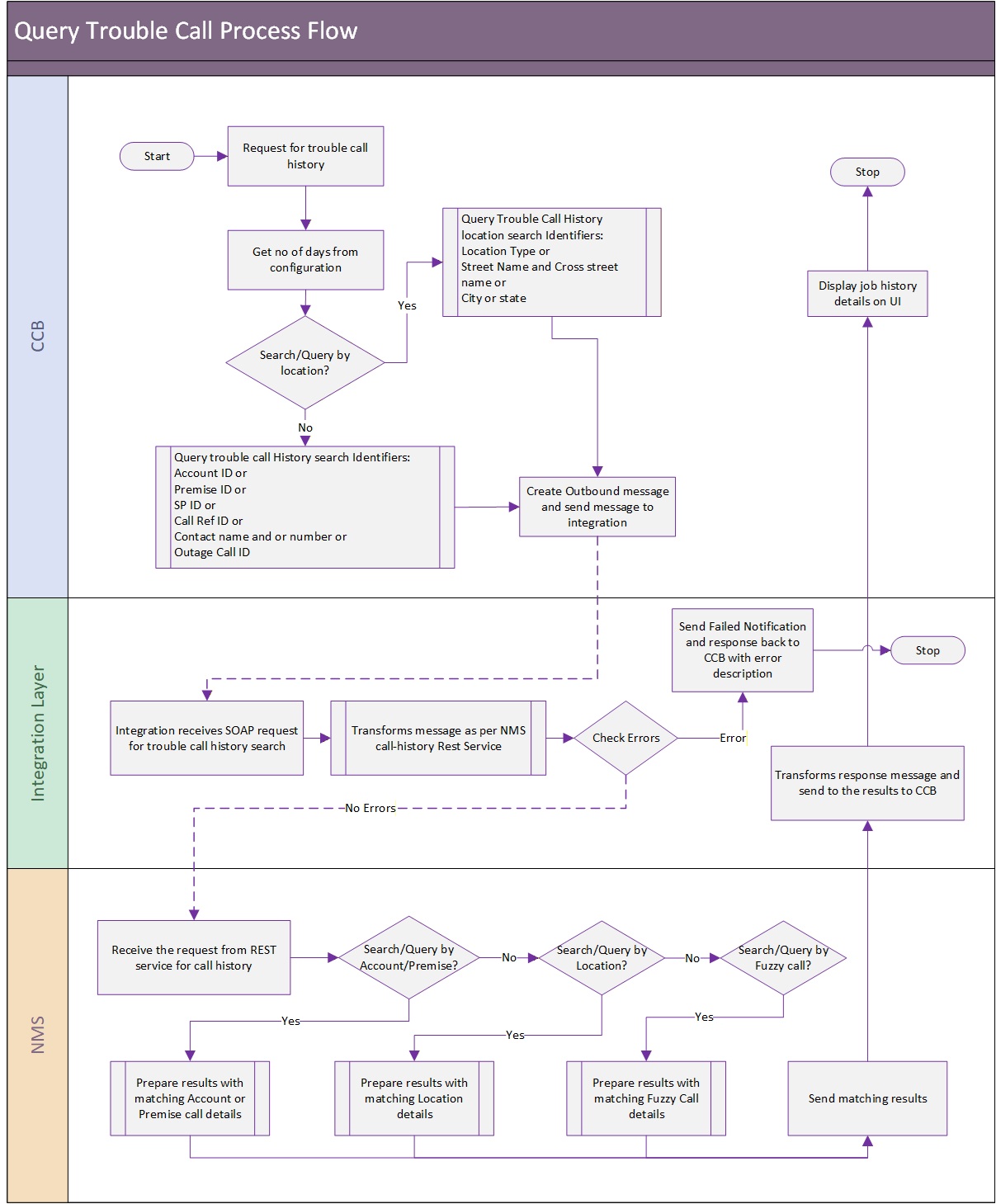
Integration Process and Technical Details
Oracle Utilities Customer Care and Billing sends the query information in the form of XML messages which are transformed by the integration layer and sent to Oracle Utilities Network Management System. Oracle Utilities Network Management System responds with the Trouble Calls History based on the input criteria that it received. The response is transformed by the integration layer and sent to Oracle Utilities Customer Care and Billing.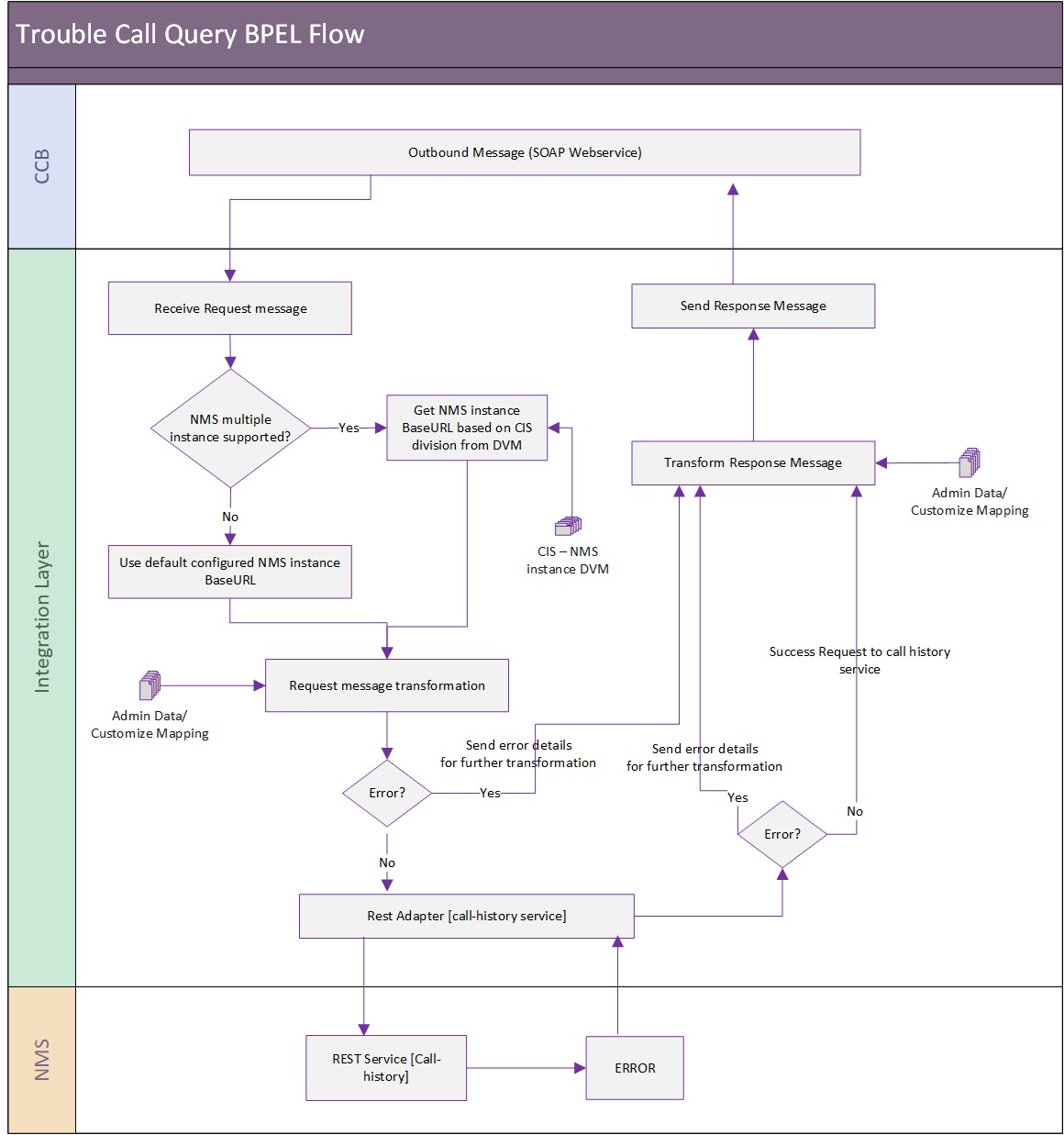
Assumptions and Constraints
• When searching Trouble Call History by contact phone, the integration layer removes all delimiters and characters from the contact phone that Oracle Utilities Customer Care and Billing passes to the integration and only passes the numeric value to Oracle Utilities Network Management System.
• To make the name search and street name search compatible, a wildcard character (%) must be added at the end of the value. Example. Smith%.
Number of Days to Retrieve
The number of days of trouble call history to retrieve from Oracle Utilities Network Management System is configurable form the integration layer. It is defined in the configuration properties file, service name = OUCCBOUNMSTroubleCallsQueryEBF and property name = NMS.NoOfDays. This value is sent to Oracle Utilities Network Management System for use as the filter when the records are being returned to Oracle Utilities Customer Care and Billing.
Errors
If the integration layer or Oracle Utilities Network Management System returns a business error while processing the inbound message, an error message is returned in the response message to Oracle Utilities Customer Care and Billing. As mentioned, the integration can be configured to send email notification of errors or to store them in an error table.
Integration Service
These values are cross referenced in the Service Configurations section.
Name | Description |
OUCCBOUNMSCallHistoryQueryEBF | Query NMS for the Trouble Calls History BPEL Process This is the synchronous BPEL process to transform the incoming CCB message to NMS format and transform the response from NMS back to CCB format. The process receives the CCB request messages and invoke NMS stored procedure using DB Adapter. The response from NMS is sent as response back to CCB after appropriate transformations. |
Adapter Services
Name | Description |
OUCCBOUNMSCallHistoryQueryAdapterService | Query NMS for the Trouble Calls History Adapter Service This DB Adapter Service invokes the NMS stored procedure PK_CCB.Call_History. |
Planned Outages Query Process
The planned outage data is primarily owned by Oracle Utilities Network Management System.
This process is a real-time synchronous interface from Oracle Utilities Customer Care and Billing to retrieve planned outages from Oracle Utilities Network Management System for a particular customer and display the results back in Oracle Utilities Customer Care and Billing.
Refer to the Planned Outages Query Process section for message mapping information for this integration point.
Supported Functionality
The planned outage query supports the following functionalities:
• Query and view planned outage jobs from Oracle Utilities Customer Care and Billing given a Service Point.
• Retrieve from Oracle Utilities Network Management System for display in Oracle Utilities Customer Care and Billing information for future, current and historical planned outages that affects or have affected that service point.
• Whether or not to retrieve all planned outages affecting the customer (past, present, and future), or only “active” ones (current and future, not past) is configurable.
• The amount of history is restricted by the number of days defined in the integration layer.
The following process diagram shows a graphical representation of the Planned Outages Query process:
Integration Process and Technical Details
Oracle Utilities Customer Care and Billing sends the query information in form of xml messages, which are transformed by the integration and sent to Oracle Utilities Network Management System.
Oracle Utilities Network Management System responds back with the Planned Outage Jobs based on the input criteria that it received. The response is transformed by the integration layer and sent to Oracle Utilities Customer Care and Billing.

Number of Days to Retrieve
The number of days of past planned outage to retrieve from Oracle Utilities Network Management System is also an input to the Oracle Utilities Network Management System stored procedure and this value is configurable from the integration layer. It is defined in the configuration properties file, service name = OUCCBOUNMSPlannedOutagesQueryEBF and property name = NMS.NoOfDays.
From Oracle Utilities Customer Care and Billing, if Include Past Planned Outages flag is true, the integration sends to Oracle Utilities Network Management System the defined number of days of past planned outage to retrieve from Oracle Utilities Network Management System obtained from the configuration file. If Include Past Planned Outages flag is false, a value of zero is passed to Oracle Utilities Network Management System and the integration only retrieves the current and future planned outages.
Errors
If the integration layer or Oracle Utilities Network Management System returns a business error while processing the inbound message, an error message is returned in the Response message to Oracle Utilities Customer Care and Billing. As mentioned, the integration can be configured to send email notification of errors or to store them in an error table.
Integration Service
These values are cross referenced in the Service Configurations section.
Name | Description |
OUCCBOUNMSPlannedOutagesQueryEBF | Query NMS for the Planned Outage Jobs BPEL Process. This is a synchronous BPEL process to transform the incoming CCB message to NMS format and transform the response from NMS back to CCB format. This BPEL process receives the CCB request messages and invoke NMS stored procedure using DB Adapter. The response from NMS is sent as response back to CCB after appropriate transformations. |
Adapter Services
Name | Description |
OUCCBOUNMSPlannedOutagesQueryAdapterService | Query NMS for Planned Outages Adapter Service. This is the DB Adapter Service to invoke NMS stored procedure PK_CCB.switching_history. |